Revision notes for Edexcel GCSE Computer Science Reading and writing CSV text files. Open the guide for explanations and worked examples. Written against the Edexcel GCSE Computer Science (1CP2) specification, so the content matches what's examinable rather than general Computer Science background.
Reading and writing CSV text files
What you'll learn
- What a comma separated value (CSV) text file stores.
- How records, fields, delimiters, and header rows work.
- How to read CSV files in Python 3 using the
csvmodule. - How to write new CSV files, append records, and avoid common mistakes.
Why programs use files
Variables only keep data while a program is running. If the program stops, the values in its variables are lost.
A file lets a program store data so it can be used later. For this topic, you are working with text files, which store ordinary characters such as letters, digits, commas, and line breaks.
Definition
Text file
A text file stores data as characters that humans can usually read in a text editor. A CSV file is a type of text file.
A CSV file normally has the file extension .csv. A file extension is the part after the dot in a filename, such as .txt or .csv.
What a CSV file is
Definition
CSV text file
A CSV (comma separated value) text file stores table-like data as plain text. Each record is usually one line, each field is one item of data, and a comma is used as the delimiter that separates fields.
For example, this CSV data stores three student records:
Name,Score,Grade
Asha,82,7
Ben,91,8
Chloe,76,6
The first line is often a header row, which is a row containing column names rather than normal data.
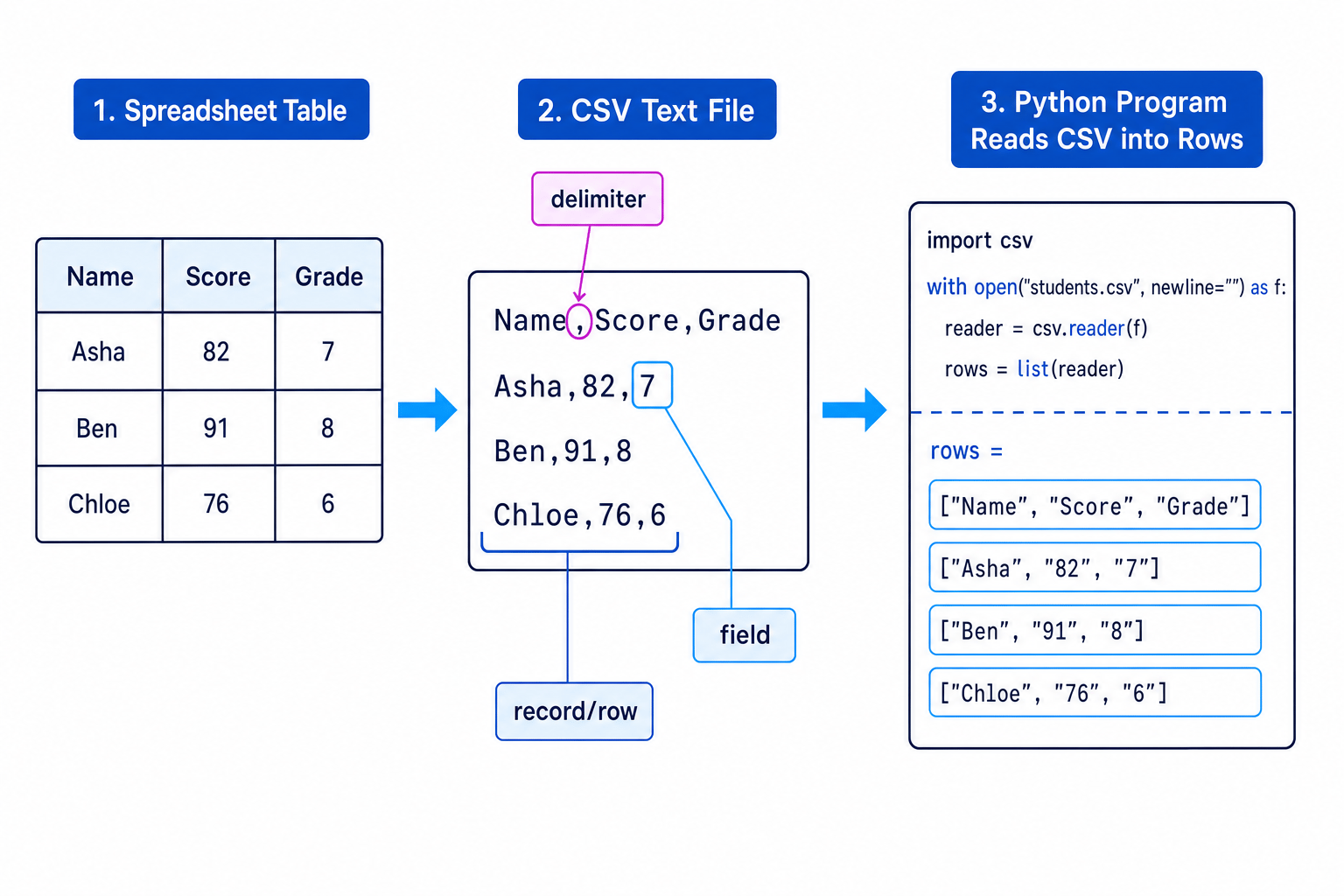
A CSV file can often be opened in spreadsheet software, but it is not the same as a full spreadsheet file. It does not store formatting, multiple sheets, formula styling, or colours — just text data separated into rows and fields.
Key Idea
CSV structure
Think of a CSV file as a table saved as plain text: lines make records, commas split fields, and the optional first line often names the columns.
Opening files safely in Python
In Python, a file path is the filename, and possibly folder names, used to locate a file. If you write "students.csv", Python usually looks for that file in the same working folder as the program.
To use a file, Python needs to open it in a mode. A mode tells Python what you want to do with the file.
| Mode | Meaning | Use when |
|---|---|---|
"r" | read | You want to read an existing file |
"w" | write | You want to create or replace a file |
"a" | append | You want to add new data to the end |
Use with open(...) as file: to open files. The with statement automatically closes the file when the indented block finishes.
with open("students.csv", mode="r", newline="") as file:
    # Work with the file here
    pass
The newline="" part lets Python’s CSV tools handle line breaks correctly.
Common Mistake
Opening in write mode too early
Opening a file with mode "w" overwrites the existing contents. If you need the old data, read it before opening the file in write mode.
Reading from a CSV file
Python has a built-in csv module. A module is reusable code that you import into your program.
import csv
To read a CSV file, create a CSV reader. The reader gives you one row at a time. Each row is a list, which is a sequence of values in square brackets.
import csv

with open("students.csv", mode="r", newline="") as file:
    reader = csv.reader(file)

    for row in reader:
        print(row)
For the earlier file, the first few rows printed would look like this:
['Name', 'Score', 'Grade']
['Asha', '82', '7']
['Ben', '91', '8']
Notice that the numbers are in quotes. CSV data is read as strings, which are text values. If you want to do calculations, convert them to integers using int().
A list item is accessed using its index, which is its position number. In Python, the first item is index 0.
So for this row:
row = ["Asha", "82", "7"]
row[0]is"Asha"row[1]is"82"row[2]is"7"
Example
Calculating an average from a CSV
Suppose students.csv contains a header row followed by names, scores, and grades. You want to calculate the average score.
-
Choose the correct field: the score is the second field in each data row, so its Python index is
1. -
Skip the header row because
"Score"is not a number and cannot be included in the calculation. -
Convert each score from a string to an integer before adding it to the running total, then divide by the number of scores.
import csv

total = 0
count = 0

with open("students.csv", mode="r", newline="") as file:
    reader = csv.reader(file)

    next(reader)  # Skip the header row

    for row in reader:
        score = int(row[1])
        total = total + score
        count = count + 1

average = total / count
print("Average score:", average)
Common Mistake
Forgetting type conversion
Values read from a CSV file are strings. Use int(row[index]) before doing integer calculations with numeric fields.
Writing to a CSV file
To write CSV data, use csv.writer(file). A writer takes Python lists and writes them as CSV records.
The most useful methods are:
writerow(...)— writes one record.writerows(...)— writes several records.
import csv

with open("results.csv", mode="w", newline="") as file:
    writer = csv.writer(file)
    writer.writerow(["Name", "Score", "Grade"])
    writer.writerow(["Asha", 82, 7])
This creates a file containing:
Name,Score,Grade
Asha,82,7
Tip
writerow vs writerows
Use writerow(["Asha", 82, 7]) for one record. Use writerows(rows) when rows is a list containing several row lists.
Example
Saving quiz results to a CSV
Suppose a program has collected quiz results and needs to save them to quiz_results.csv.
-
Structure the data as rows, keeping the fields in the same order for every record: name, score, then grade.
-
Open the file in write mode because the program is creating a fresh results file.
-
Use
writerows(...)because there are several rows to write, including the header row.
import csv

results = [
    ["Name", "Score", "Grade"],
    ["Asha", 82, 7],
    ["Ben", 91, 8],
    ["Chloe", 76, 6]
]

with open("quiz_results.csv", mode="w", newline="") as file:
    writer = csv.writer(file)
    writer.writerows(results)
Appending to an existing CSV file
To append means to add data to the end of an existing file without deleting what is already there.
Use mode "a" when adding a new record:
import csv

with open("quiz_results.csv", mode="a", newline="") as file:
    writer = csv.writer(file)
    writer.writerow(["Dylan", 68, 6])
Usually, you do not write the header row again when appending, because the file should already have one.
Updating a CSV file
CSV files are simple text files, so you normally cannot neatly “edit the middle” of a file in place.
A common pattern is:
- Read all the rows into a list.
- Change the data in the list.
- Rewrite the whole CSV file.
import csv

rows = []

with open("quiz_results.csv", mode="r", newline="") as file:
    reader = csv.reader(file)

    for row in reader:
        if row[0] == "Ben":
            row[1] = "95"
        rows.append(row)

with open("quiz_results.csv", mode="w", newline="") as file:
    writer = csv.writer(file)
    writer.writerows(rows)
This is why you must be careful with mode "w": it clears the file before writing the new contents.
Why not just use split(",")?
For very simple files, you might see code that reads a line and uses split(","). However, real CSV files can contain commas inside fields if the field is quoted.
For example:
Name,Comment
Asha,"Good effort, improved a lot"
The comma inside "Good effort, improved a lot" is part of the comment, not a delimiter.
Common Mistake
Quoted commas
Avoid writing your own CSV parser with split(",") unless the task is extremely simple. Python’s csv module correctly handles quoted fields and commas inside data.
A useful GCSE template
For reading:
import csv

with open("filename.csv", mode="r", newline="") as file:
    reader = csv.reader(file)

    for row in reader:
        # Use row[0], row[1], row[2], ...
        print(row)
For writing:
import csv

with open("filename.csv", mode="w", newline="") as file:
    writer = csv.writer(file)

    writer.writerow(["Heading1", "Heading2"])
    writer.writerow(["value1", "value2"])
Exam technique
In the exam
-
Decide whether the program needs to read, write, or append, then choose mode
"r","w", or"a". -
Use
import csv,with open(..., newline=""), and acsv.readerorcsv.writer. -
Check whether there is a header row, and convert numeric strings with
int()before calculations.
Self review
Check yourself
- What is the difference between a record and a field in a CSV file?
- Why might
next(reader)be used before afor row in reader:loop? - What is the danger of opening an existing CSV file using mode
"w"?
Input/output
Guide 2 of 4
You've reached the end
Test yourself on this topic, or move on to the next guide.
How was this guide?