Revision notes for Edexcel GCSE Computer Science Implementing validation. Open the guide for explanations and worked examples. Written against the Edexcel GCSE Computer Science (1CP2) specification, so the content matches what's examinable rather than general Computer Science background.
Implementing validation
What you'll learn
- Why programs use validation before accepting input.
- How to implement the four Edexcel validation checks: length, presence, range and pattern.
- How to use selection and iteration to keep asking until input is valid.
- How to write clear Python 3 validation code for GCSE Paper 2.
The prerequisites: input, conditions and loops
Before validation makes sense, you need three ideas.
Definition
Input
Input is data entered into a program, for example from a keyboard, file, sensor or another system.
In GCSE programs, input often comes from the user:
name = input("Enter your name: ")
The value returned by input() is a string, which means text data.
Definition
Condition
A condition is an expression that is either True or False, such as age < 18 or name == "".
Validation uses conditions to decide whether input is acceptable.
Definition
Iteration
Iteration means repetition. In Python, a while loop repeats code while a condition is true.
For validation, the usual pattern is:
- Ask for input.
- Test whether it is invalid.
- If it is invalid, show an error and ask again.
- Continue only when the input is valid.
What validation means
Definition
Validation
Validation is checking that input data is reasonable or acceptable before the program uses it.
Validation helps programs:
- avoid crashes caused by unexpected input
- avoid storing unsuitable data
- guide users to correct mistakes
- protect the quality of data being processed
For example, if a program asks for a month number, values from 1 to 12 are reasonable. A value of 27 should be rejected.
Key Idea
Validation checks reasonableness
Validation can check that data is sensible, but it cannot guarantee that the data is true.
A user could enter a date of birth in the correct format, but still lie about their age. The format may be valid, but the information may not be truthful.
Common Mistake
Valid does not always mean correct
Do not write that validation proves data is correct. It only checks whether data follows the rules the programmer has chosen.
Example
Choosing suitable validation checks
A school trip program asks for a pupil’s name, year group and emergency phone number.
- The pupil’s name should not be left blank, so a presence check is needed.
- The year group should be a number from 7 to 11, so a range check is needed.
- The emergency phone number should contain 11 digits. It should be treated as text, not a number, because UK phone numbers often start with 0. A length check can check there are 11 characters, and a pattern check can check they are all digits.
The validation loop pattern
Validation is usually implemented with a loop. The program keeps asking until the input passes the check.
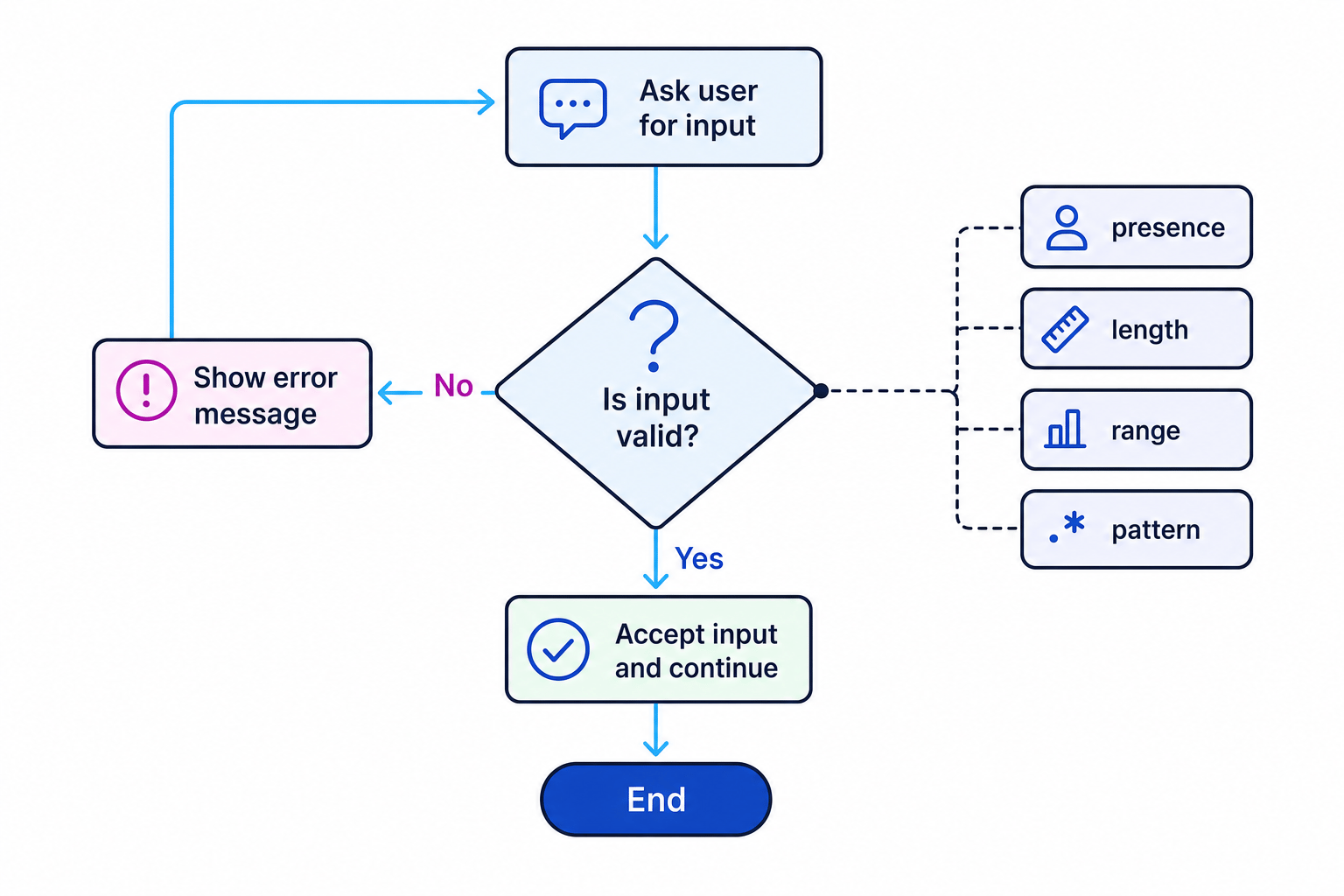
A simple validation loop in Python looks like this:
age = int(input("Enter your age: "))

while age < 11 or age > 18:
    print("Age must be between 11 and 18.")
    age = int(input("Enter your age: "))

print("Age accepted.")
The while condition describes the invalid input. While the input is outside the allowed range, the program repeats.
Example
Tracing a validation loop
The allowed age range is 11 to 18. The user enters 9, then 20, then 15.
- The first input is 9. The condition
age < 11 or age > 18is true because 9 is less than 11, so the error message is displayed. - The second input is 20. The condition is true again because 20 is greater than 18, so the loop repeats.
- The third input is 15. The condition is false because 15 is not less than 11 and not greater than 18, so the loop ends and the input is accepted.
Tip
Write the invalid condition
In a while validation loop, it is often easiest to write the condition for what is not allowed, because the loop repeats while the data is invalid.
Presence check
Definition
Presence check
A presence check makes sure that data has been entered and the input is not empty.
This is useful for required fields such as a name, username or email address.
name = input("Enter your name: ").strip()

while name == "":
    print("Name cannot be blank.")
    name = input("Enter your name: ").strip()

print("Hello", name)
The method .strip() removes extra spaces from the start and end of the string. This means an input containing only spaces will be treated as blank.
Example
Implementing a presence check
A program must not accept a blank username.
- The invalid case is an empty string, so the loop condition should test whether
username == "". - The input should be stripped before testing, because
" "should not count as a real username. - If the condition is true, the program displays an error and asks for the username again.
Common Mistake
Accepting spaces as input
If you do not use .strip(), a user could enter only spaces and the program might accept it as present data.
Length check
Definition
Length check
A length check makes sure that input has an allowed number of characters.
A length check can test:
- an exact length, such as a 6-character student ID
- a minimum length, such as a password of at least 8 characters
- a maximum length, such as a username of no more than 12 characters
Python uses len() to find the number of characters in a string.
password = input("Enter a password between 8 and 20 characters: ")

while len(password) < 8 or len(password) > 20:
    print("Password must be between 8 and 20 characters.")
    password = input("Enter a password between 8 and 20 characters: ")

print("Password accepted.")
Example
Checking a fixed-length code
A student ID must be exactly 6 characters long.
- The valid length is exactly 6, so any length not equal to 6 is invalid.
- The invalid condition is
len(student_id) != 6. - The program should repeat while that condition is true, because the ID should only be accepted once its length is exactly 6.
Length checks do not check whether the characters are the right type. For example, "ABCDEF" and "123456" both have length 6.
Range check
Definition
Range check
A range check makes sure that a value is between an allowed minimum and maximum.
Range checks are normally used for numbers, such as:
- age from 0 to 120
- menu choice from 1 to 4
- exam mark from 0 to 80
mark = int(input("Enter mark out of 80: "))

while mark < 0 or mark > 80:
    print("Mark must be from 0 to 80.")
    mark = int(input("Enter mark out of 80: "))

print("Mark accepted.")
The condition uses or because the mark is invalid if it is too low or too high.
Example
Setting range boundaries
A game asks for a difficulty level from 1 to 5.
- Values below 1 are invalid, so one part of the condition is
difficulty < 1. - Values above 5 are invalid, so the other part is
difficulty > 5. - The full loop condition is
difficulty < 1 or difficulty > 5, because either case means the input should be rejected.
Common Mistake
Boundary errors
Be careful with the end values. If the valid range is 1 to 5, then 1 and 5 should be accepted, not rejected.
Pattern check
Definition
Pattern check
A pattern check makes sure that input follows a required format.
Pattern checks are useful when the structure of the data matters, such as:
- a product code with one letter followed by three digits
- a postcode format
- a date written as
DD/MM/YYYY - an email address containing certain required characters
At GCSE, you do not need complicated regular expressions. You can use string operations such as len(), indexing, slicing, .isdigit() and .isalpha().
This example accepts a product code such as A123: one capital letter followed by three digits.
product_code = input("Enter product code, e.g. A123: ")

while not (
    len(product_code) == 4
    and product_code[0].isalpha()
    and product_code[0].isupper()
    and product_code[1:4].isdigit()
):
    print("Code must be one capital letter followed by three digits.")
    product_code = input("Enter product code, e.g. A123: ")

print("Product code accepted.")
Example
Testing a product-code pattern
The required pattern is one capital letter followed by three digits. Test the input B72X.
- The length is 4, so it passes the length part of the pattern.
- The first character
Bis a capital letter, so it passes the first-character test. - The last three characters are
72X. This fails.isdigit()becauseXis not a digit, so the whole pattern check fails and the input should be rejected.
Common Mistake
Check length before indexing
If you use product_code[0] on an empty string, the program will crash. Put the length check first when your pattern check uses character positions.
Combining validation checks
Real programs often combine more than one validation check. A username might need to be present, have a suitable length and follow a pattern.
valid_username = False

while not valid_username:
    username = input("Enter username: ").strip()

    if username == "":
        print("Username cannot be blank.")
    elif len(username) < 5 or len(username) > 12:
        print("Username must be 5 to 12 characters.")
    elif not username.isalnum():
        print("Username must contain letters and numbers only.")
    else:
        valid_username = True

print("Username accepted.")
Here, .isalnum() checks whether the string contains only letters and digits.
Example
Combining checks for a username
The username rules are: it must not be blank, it must be 5 to 12 characters long, and it must contain only letters and digits. The user enters sam!.
- The username is not blank, so it passes the presence check.
- Its length is 4, so it fails the length check before the pattern check is even needed.
- The program should display the length error and ask again, because all validation rules must be passed before the input is accepted.
Tip
Use clear error messages
A good validation message says what was wrong and how to fix it, such as Password must be between 8 and 20 characters, not just Invalid.
Validation and data types
Remember that input() returns a string. If you want to do a range check, you normally convert it using int().
However, this can cause a crash if the user types text when a number is expected:
age = int(input("Enter age: "))
If the user enters twelve, Python cannot convert it to an integer.
A safer GCSE-style approach is to check the pattern first, then convert:
age_text = input("Enter age: ")

while not age_text.isdigit():
    print("Age must be digits only.")
    age_text = input("Enter age: ")

age = int(age_text)

while age < 0 or age > 120:
    print("Age must be from 0 to 120.")
    age_text = input("Enter age: ")

    while not age_text.isdigit():
        print("Age must be digits only.")
        age_text = input("Enter age: ")

    age = int(age_text)

print("Age accepted.")
This uses a pattern check first to make sure the input contains digits, then a range check once it is safe to treat it as a number.
Common Mistake
Converting too soon
If you convert input to int before checking that it contains digits, invalid text input can crash the program instead of being handled by validation.
Exam technique
In the exam
- Name the correct validation check: presence, length, range or pattern.
- When writing code, make the loop repeat while the input is invalid, then ask for the input again inside the loop.
- For range checks, include both boundaries correctly; for pattern checks, explain the required format clearly.
Self review
Check yourself
- What is the difference between a length check and a pattern check?
- Why does validation not prove that input data is true?
- Write a Python validation loop that accepts only menu choices from 1 to 4.
Input/output
Guide 3 of 4
You've reached the end
Test yourself on this topic, or move on to the next guide.
How was this guide?