Revision notes for Edexcel GCSE Computer Science Read, write, analyse and refine programs. Open the guide for explanations and worked examples. Written against the Edexcel GCSE Computer Science (1CP2) specification, so the content matches what's examinable rather than general Computer Science background.
Read, write, analyse and refine programs
What you'll learn
- Why Python 3 is a high-level programming language: one written closer to human language than machine code.
- How to read programs by following variables, inputs, outputs and control structures.
- How to write small programs from a requirement using sequence, selection and iteration.
- How to analyse and refine programs using trace tables, testing and debugging.
The programming cycle
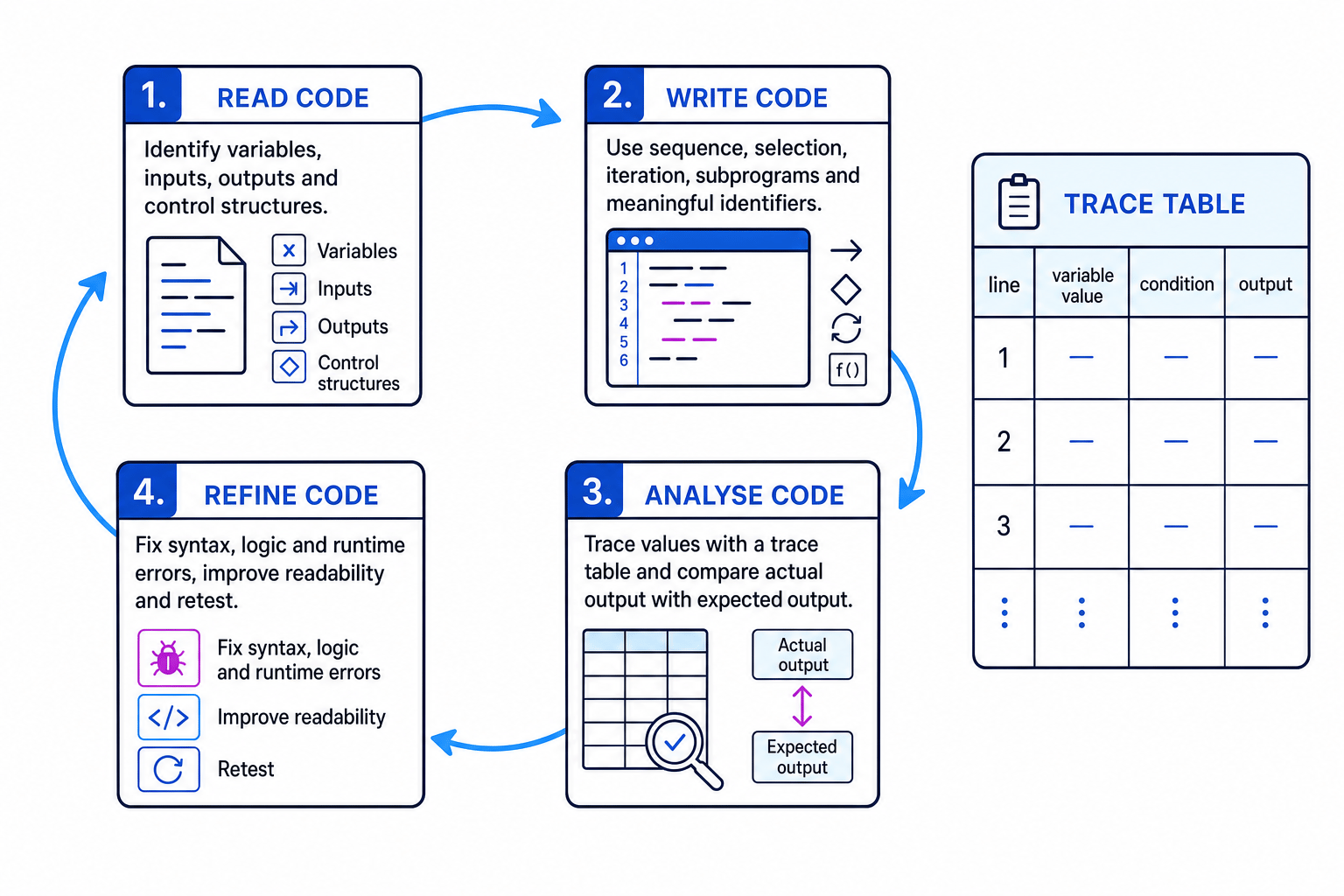
This topic is about being able to work with code, not just memorise definitions. In an exam or programming task, you may need to understand existing code, write new code, predict what code will do, spot errors, and improve it.
Key Idea
The main idea
Programming is a cycle: read the code, write or change the code, analyse what it does, then refine it until it meets the requirement.
High-level programming languages
Definition
High-level programming language
A high-level programming language is a programming language whose source code — the human-written instructions — is closer to English and maths than machine code, which is the binary instruction form a processor can execute directly.
Python 3 is the high-level programming language used for Paper 2. It hides lots of low-level details, so you can write code using words like if, while, for, print and meaningful variable names.
A program is a set of instructions that a computer can follow. Syntax means the grammar rules of the language. Semantics means what the instructions actually do when they run.
The building blocks you must recognise
Before you can read or write programs confidently, you need to recognise these core ideas.
Variables and assignment
A variable is a named storage location for a value. The name is called an identifier. For example:
score = 12
This stores the value 12 in the variable score.
Common Mistake
Assignment is not comparison
In Python, = means assign a value. To compare two values, use ==. For example, score = 10 changes score, but score == 10 checks whether score is equal to 10.
Inputs, outputs and data types
Input is data entered into a program, often using input(). Output is data displayed or returned by a program, often using print().
A data type is the kind of value being stored. Common Python data types include:
int: whole numbers, such as42float: decimal numbers, such as3.5str: text, such as"hello"bool: Boolean values, eitherTrueorFalse
Because input() gives a string, you often need to convert it:
age = int(input("Enter your age: "))
Operators
An operator performs an action on values.
| Type | Python examples | Meaning |
|---|---|---|
| Arithmetic | +, -, *, / | addition, subtraction, multiplication, division |
| Other arithmetic | %, //, ** | modulus, integer division, exponentiation |
| Relational | ==, !=, <, <=, >, >= | compare values |
| Logical | and, or, not | combine or reverse conditions |
In the specification, logical operators are written as AND, OR and NOT. In Python, they are written as and, or and not.
Control structures
A control structure controls the order in which instructions run.
- Sequence: instructions run one after another.
- Selection: the program chooses a path using
if,elifandelse. - Iteration: the program repeats code using a loop, such as
fororwhile.
A condition is an expression that evaluates to True or False.
Reading programs
To read a program, follow it in the order Python would run it. Keep track of variable values, conditions, loop repetitions and outputs.
A trace table is a table used to record the changing values of variables as each line of code runs.
Tip
Range sanity check
In Python, range(start, stop) includes the start value but stops before the stop value. So range(1, 4) gives 1, 2, 3.
Example
Tracing a loop and selection
For this code, suppose the user enters 8000, then 12000, then 10000.
total = 0

for day in range(1, 4):
    steps = int(input("Steps: "))
    if steps >= 10000:
        total = total + 1

print(total)
totalstarts at0. The loop usesrange(1, 4), so it runs fordayvalues1,2and3.- On the first loop,
stepsis8000. The conditionsteps >= 10000isFalse, sototalstays0. - On the second loop,
stepsis12000. The condition isTrue, sototalbecomes1. - On the third loop,
stepsis10000. The condition is alsoTruebecause>=includes equality, sototalbecomes2. - The
print(total)line is after the loop, so the final output is2.
Writing programs
When writing code, start from the problem requirement. An algorithm is an ordered set of steps that solves a problem. Decomposition means breaking a larger problem into smaller parts.
A useful structure is:
- What inputs are needed?
- What processing must happen?
- What output is required?
This is sometimes called IPO: input, process, output.
Example
Writing an average program
Requirement: ask for five marks, calculate the average, then print Pass if the average is at least 50, otherwise print Resit.
- The program needs repeated input, so a
forloop is suitable because the number of marks is fixed at five. - The program needs an accumulator variable, such as
total, to keep the running total of the marks. - After the loop, calculate
average = total / 5, then use selection to compare the average with50. - A suitable Python 3 program is:
total = 0

for counter in range(5):
    mark = int(input("Enter mark: "))
    total = total + mark

average = total / 5

if average >= 50:
    print("Pass")
else:
    print("Resit")
Tip
Use meaningful identifiers
Names like total, mark and average make the program easier to understand than names like x, y and z.
Analysing programs
To analyse a program, decide whether it behaves as required. You are not just checking whether the code runs — you are checking whether it gives the correct results.
Useful methods include:
- tracing the code line by line
- comparing actual output with expected output
- testing normal values, boundary values and unusual values
- checking whether each condition matches the requirement
A boundary value is a value at the edge of a decision, such as 50 in a pass mark of “at least 50”.
Example
Finding and fixing a boundary error
Requirement: a child aged 5 or under gets a free ticket. Everyone else pays £4.
Faulty code:
age = int(input("Age: "))

if age < 5:
    print("Free")
else:
    print("£4")
- The important boundary is age
5, because the requirement says “aged5or under”. - Substitute
age = 5into the conditionage < 5. This isFalse, so the program goes to theelsebranch. - The actual output is
£4, but the expected output isFree, so the condition is too strict. - Refine the condition to
age <= 5, so age5is included.
Refining programs
To refine a program means to improve it so that it better meets the requirement. Refining might involve fixing errors, improving readability, removing repeated code, or making the program more robust.
There are three common error types:
- A syntax error breaks the grammar rules of Python, such as missing a colon after
if. - A runtime error happens while the program is running, such as dividing by zero.
- A logic error means the program runs but gives the wrong result.
Debugging means finding and fixing errors.
Example
Refining an average program
Requirement: ask how many scores will be entered, then calculate the average. There must be at least one score.
Faulty code:
number_of_scores = int(input("How many scores? "))
total = 0

for counter in range(number_of_scores):
    score = int(input("Score: "))
    total = score

average = total / number_of_scores
print("Average:", average)
- Trace the update to
total. If the scores are10,20,30, the variable becomes10, then20, then30. It is being overwritten each time. - The requirement needs the sum of all scores, so the update should accumulate:
total = total + score. - Check the runtime risk. If
number_of_scoresis0, the lineaverage = total / number_of_scoreswill divide by zero. - Refine the program by adding validation and fixing the accumulator:
number_of_scores = int(input("How many scores? "))

while number_of_scores < 1:
    number_of_scores = int(input("Enter at least 1 score: "))

total = 0

for counter in range(number_of_scores):
    score = int(input("Score: "))
    total = total + score

average = total / number_of_scores
print("Average:", average)
Key Idea
Refine, then retest
After changing code, test it again. A fix is only successful if the refined program now matches the requirement.
Exam technique
In the exam
- For “read” or “analyse” questions, trace the code exactly as Python would run it; do not rely on a quick guess.
- For “write” questions, identify the inputs, processing and outputs before choosing variables, loops and conditions.
- For “refine” questions, state the specific error or weakness, change the code, then mentally retest it with suitable data.
Self review
Check yourself
- What is the difference between a syntax error, a runtime error and a logic error?
- Why does
range(1, 4)run three times, not four? - How could a trace table help you find a wrong output in a loop?
You've reached the end
Test yourself on this topic, or move on to the next guide.
How was this guide?