Revision notes for Edexcel GCSE Computer Science Converting algorithms into programs. Open the guide for explanations and worked examples. Written against the Edexcel GCSE Computer Science (1CP2) specification, so the content matches what's examinable rather than general Computer Science background.
Converting algorithms into programs
What you'll learn
- How to translate flowcharts and pseudocode into Python 3 programs.
- How to map algorithm ideas like sequence, selection and iteration into code.
- How to choose sensible variables, data types and indentation.
- How to test that your program still matches the original algorithm.
From algorithm to program
An algorithm is a step-by-step method for solving a problem. It can be written in different forms, such as a flowchart or pseudocode.
A program is an algorithm written in a programming language so that a computer can run it. In Paper 2, Edexcel assesses programming using Python 3.
Definition
Algorithm
An algorithm is a precise set of instructions that solves a problem or completes a task.
Definition
Program
A program is an algorithm implemented in a programming language, such as Python 3.
The key skill in this topic is not inventing a new solution. It is keeping the same logic while changing the representation from flowchart or pseudocode into working code.
Key Idea
Convert the logic, not the layout
When converting an algorithm into a program, preserve the original inputs, outputs, decisions, loops and order of steps.
The basic building blocks
Most GCSE algorithms are built from three control structures.
Sequence
Sequence means instructions happen one after another, in order.
For example:
name = input("Enter your name: ")
print("Hello", name)
The input happens first. The output happens second.
Selection
Selection means the program chooses between different paths depending on a condition. In Python, this usually uses if, elif and else.
A condition is an expression that is either True or False, such as score >= 50.
if score >= 50:
    print("Pass")
else:
    print("Resit")
Iteration
Iteration means repetition. A section of code runs more than once.
A count-controlled loop repeats a known number of times, often using for.
for count in range(5):
    print("Hello")
A condition-controlled loop repeats while a condition is true, often using while.
while password != "letmein":
    password = input("Try again: ")
Definition
Control structure
A control structure controls the order in which instructions run. The main ones are sequence, selection and iteration.
Mapping flowcharts and pseudocode to Python
Flowcharts use shapes and arrows. Pseudocode uses informal English-like instructions. Python uses exact syntax.
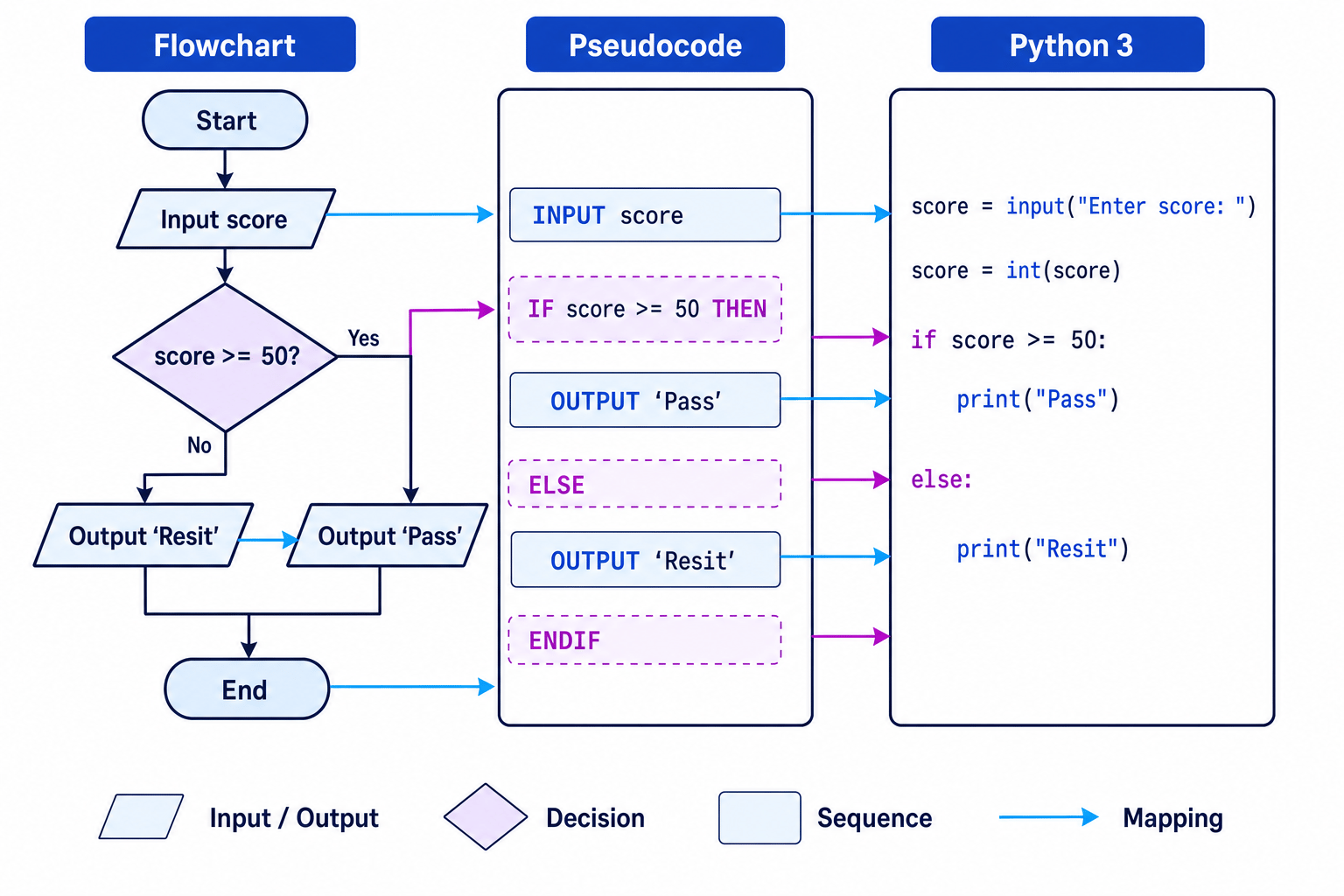
Here are some common conversions.
| Algorithm idea | Flowchart / pseudocode clue | Python 3 version |
|---|---|---|
| Input | INPUT age | age = input("Enter age: ") |
| Numeric input | Input used in maths or comparison | age = int(input("Enter age: ")) |
| Output | OUTPUT total | print(total) |
| Assignment | SET total TO 0 | total = 0 |
| Selection | IF condition THEN | if condition: |
| Alternative path | ELSE | else: |
| Count-controlled loop | FOR count FROM 1 TO 5 | for count in range(1, 6): |
| Condition-controlled loop | WHILE condition | while condition: |
Common Mistake
Forgetting input is text
In Python, input() always returns a string. If the input will be used as a number, convert it using int() or, where appropriate, float().
Converting a decision
Suppose the algorithm says:
- Input a score.
- If the score is at least 50, output
Pass. - Otherwise, output
Resit.
This becomes a Python selection.
Example
Converting a pass/resit algorithm
- The algorithm has one input,
score. Because it is compared with 50, it should be converted from text to an integer usingint(input(...)). - The decision “score is at least 50” becomes the Boolean condition
score >= 50. - The true branch becomes the indented block under
if score >= 50:. - The false branch becomes the indented block under
else:. - Test both routes: if the user enters 72, the program should output
Pass; if the user enters 41, it should outputResit.
The completed Python program is:
score = int(input("Enter score: "))

if score >= 50:
    print("Pass")
else:
    print("Resit")
Notice the indentation. In Python, indentation is part of the syntax. It shows which statements belong inside the if or else block.
Common Mistake
Losing the indentation
If a line should only run inside an if, else, for or while, it must be indented. Incorrect indentation can change the logic or cause a syntax error.
Converting assignment and calculations
An assignment stores a value in a variable. A variable is a named memory location that holds data while a program runs.
In pseudocode you might see:
SET total TO price * quantity
In Python this becomes:
total = price * quantity
The equals sign in Python means “store the value on the right in the variable on the left”. It does not mean exactly the same thing as equals in maths.
Definition
Variable
A variable is a named storage location used to hold a value that may change while a program runs.
Useful Python arithmetic operators include:
| Operation | Python operator | Example |
|---|---|---|
| Addition | + | total = a + b |
| Subtraction | - | difference = a - b |
| Multiplication | * | area = width * height |
| Division | / | mean = total / count |
| Integer division | // | groups = pupils // 4 |
| Modulus | % | remainder = pupils % 4 |
| Exponentiation | <strong> | square = number </strong> 2 |
Example
Converting a calculation
- The algorithm needs two numeric inputs,
priceandquantity, so both values must be converted usingint()orfloat(). - The calculation
price * quantityis an assignment because the result is stored intotal. - The output step becomes
print(total), because the algorithm wants to display the calculated value.
Python version:
price = float(input("Enter price: "))
quantity = int(input("Enter quantity: "))

total = price * quantity

print(total)
Converting count-controlled loops
A count-controlled loop repeats a fixed number of times.
Pseudocode often uses wording like:
SET total TO 0
FOR count FROM 1 TO 5
    INPUT mark
    SET total TO total + mark
ENDFOR
OUTPUT total
This algorithm inputs 5 marks and adds them together.
Example
Converting a count-controlled loop
totalis an accumulator because it keeps a running total, so it must be initialised to 0 before the loop starts.- The pseudocode counts from 1 to 5 inclusive. In Python,
range(1, 6)is needed because the stop value 6 is not included. - The input
markhappens inside the loop because a new mark is needed each repetition. - The update
total = total + markmust also be inside the loop so every mark is added. - The output happens after the loop because the final total should only be printed once all 5 marks have been entered.
Python version:
total = 0

for count in range(1, 6):
    mark = int(input("Enter mark: "))
    total = total + mark

print(total)
Tip
Range sanity check
For range(start, stop), Python includes start but stops before stop. So range(1, 6) gives 1, 2, 3, 4, 5.
Common Mistake
Off-by-one loop error
Using range(1, 5) would only repeat for 1, 2, 3 and 4. That is four repetitions, not five.
Converting condition-controlled loops
A condition-controlled loop repeats until something changes. In Python, this is usually a while loop.
Example algorithm:
INPUT password
WHILE password != "secret"
    OUTPUT "Incorrect"
    INPUT password
ENDWHILE
OUTPUT "Access granted"
Python version:
password = input("Enter password: ")

while password != "secret":
    print("Incorrect")
    password = input("Enter password: ")

print("Access granted")
The input appears before the loop and again inside the loop. This is because the condition needs a first value to test, and then the user needs another chance after an incorrect password.
Common Mistake
Avoid infinite loops
A while loop must contain code that can eventually make its condition false. Otherwise, the loop may never stop.
A careful conversion method
When you are given a flowchart or pseudocode algorithm, work through it in this order.
1. Identify inputs and outputs
Look for values that enter or leave the algorithm.
- Inputs usually become
input(...). - Outputs usually become
print(...). - Numeric inputs usually need
int(...)orfloat(...).
2. Identify variables
Choose meaningful variable names, such as total, score, largest or number_of_items.
Avoid names like x unless the algorithm already uses them or the value is genuinely temporary.
3. Identify control structures
Ask yourself:
- Are the steps simply in order? Use sequence.
- Is there a decision? Use
if,eliforelse. - Is there repetition? Use
fororwhile.
4. Translate one block at a time
Do not try to write the whole program at once. Convert each section, then check that the order still matches the original algorithm.
5. Test using sample data
A test value is an input chosen to check whether a program works correctly.
Use values that test different paths, such as:
- a normal value
- a boundary value, such as exactly 50 in a pass mark algorithm
- a value that should take the
elsepath
Key Idea
Testing proves the conversion
A converted program should produce the same outputs as the original algorithm for the same inputs.
Exam technique
In the exam
- Convert the algorithm structure first: sequence to ordered statements, decisions to
if/else, and loops tofororwhile. - Check Python details carefully: colons after
if,else,forandwhile; correct indentation; and numeric conversion afterinput(). - Test mentally with at least two inputs, especially values that go down different branches or sit on a boundary.
Self review
Check yourself
- What Python code would you use to convert a numeric input called
age? - Why does
range(1, 6)repeat five times, not six? - In a converted program, how can incorrect indentation change the meaning of an algorithm?
You've reached the end
Test yourself on this topic, or move on to the next guide.
How was this guide?