Revision notes for Edexcel GCSE Computer Science Primitive and structured data types. Open the guide for explanations and worked examples. Written against the Edexcel GCSE Computer Science (1CP2) specification, so the content matches what's examinable rather than general Computer Science background.
Primitive and structured data types
What you'll learn
- How to choose between integer, real, Boolean and char values.
- How strings, arrays and records group data together.
- How to use one-dimensional and two-dimensional structures in Python 3.
- How to avoid common exam mistakes when selecting data types.
The big idea: data has a type
A program stores data in variables. A variable is a named storage location whose value can change while the program runs.
Definition
Data type
A data type tells a program what kind of value a variable can store and what operations make sense for that value.
For example, it makes sense to add two integers, compare two Boolean values, or find the length of a string. It does not make sense to calculate the average of a name unless the name has first been converted into a suitable numerical value.
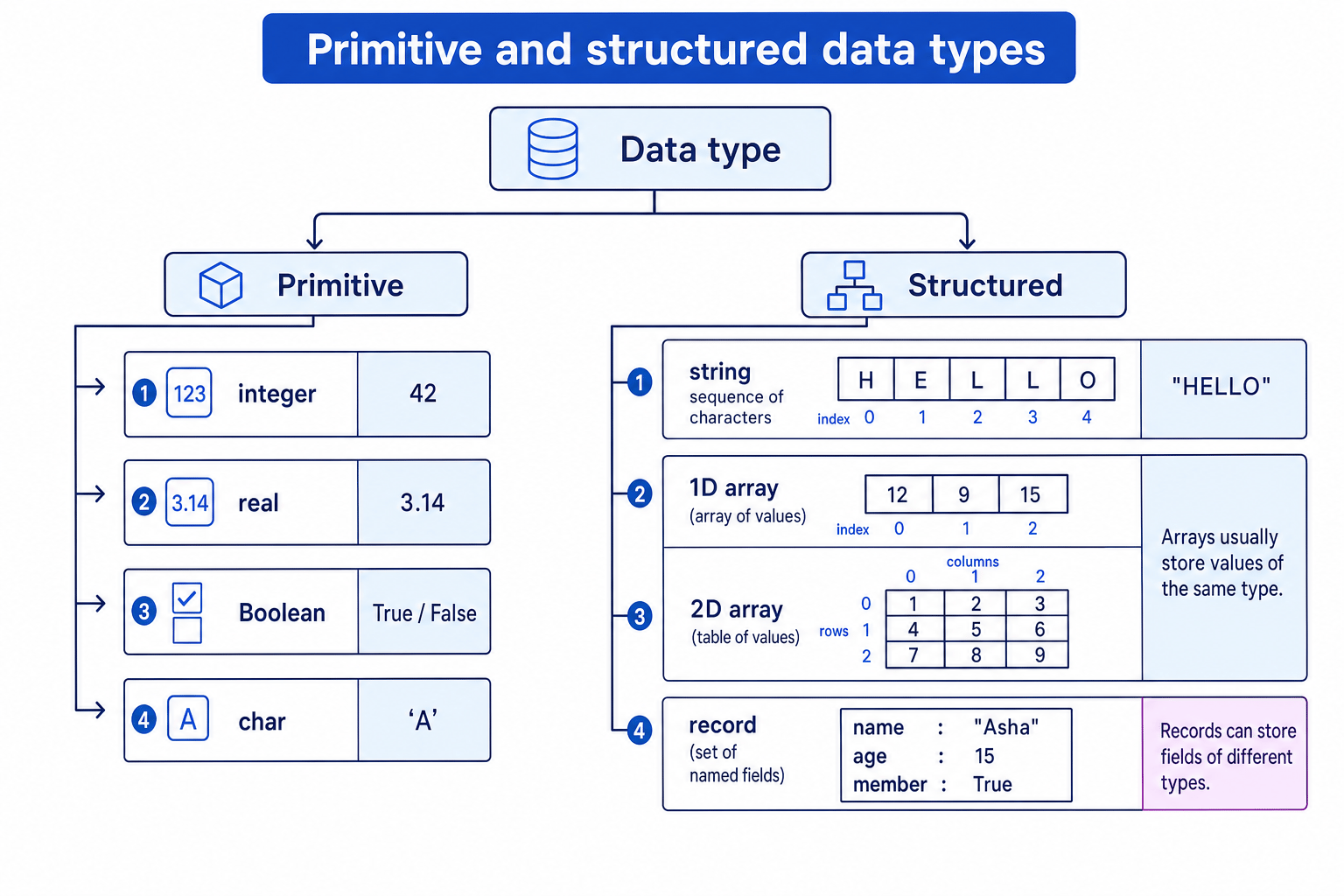
Data types in this topic split into two groups: primitive data types and structured data types.
Primitive data types
Definition
Primitive data type
A primitive data type stores one simple value, such as one whole number, one decimal number, one true-or-false value, or one character.
For Edexcel GCSE, the primitive data types you need are:
| Primitive type | Meaning | Python 3 example | Good use |
|---|---|---|---|
| integer | A whole number with no decimal point | score = 17 | Counts, positions, quantities |
| real | A number that can include a decimal part | price = 2.50 | Measurements, averages, prices |
| Boolean | A value that is either true or false | is_valid = True | Decisions and conditions |
| char | A single character | grade = "A" | One letter, one digit, one symbol |
In Python, there is no separate char type. A char is represented using a string of length 1, such as "A" or "?".
Tip
Boolean names
Boolean variable names often sound like yes/no questions: is_logged_in, has_finished, valid_password, game_over.
Choosing primitive types
You choose the type by thinking about what the value represents and what the program must do with it.
Example
Choosing suitable primitive types
A quiz program stores the number of questions answered, the average time per question, whether the player has passed, and the player’s grade letter.
-
The number of questions answered is a count, so it should be an integer. Counts should not have decimal parts.
-
The average time per question might be 4.5 seconds, so it should be a real value. In Python, this will usually be stored as a
float. -
Whether the player has passed has only two possible states, true or false, so it should be a Boolean.
-
The grade letter is one character, such as
"A", so it should be a char. In Python, this is a string of length 1. -
A suitable Python version is:
questions_answered = int(input("Questions answered: "))
average_time = float(input("Average time: "))
has_passed = average_time < 10
grade = "A"
Common Mistake
Forgetting input conversion
In Python, input() always returns a string. If you want arithmetic, convert it using int() or float() before calculating.
Structured data types
Definition
Structured data type
A structured data type groups several values together under one name.
Structured data types help you organise related data. Instead of creating lots of separate variables, you can store a sequence, a table, or a record.
For this topic, you need:
- string
- array
- record
Strings
A string is a sequence of characters, such as "HELLO", "Asha", or "AB12 3CD".
Although each individual character is like a char, the whole string is structured because it contains multiple characters in order.
In Python, you can access characters using an index. An index is a position number. Python indexing starts at 0.
word = "HELLO"

first_letter = word[0]   # "H"
second_letter = word[1]  # "E"
length = len(word)       # 5
Key Idea
Use strings for non-calculated numbers
A value such as a phone number or postcode should usually be stored as a string, not an integer, because you are not doing arithmetic with it and leading zeros may matter.
One-dimensional arrays
Definition
Array
An array is a data structure that stores multiple values under one name, with each value accessed by its position.
A one-dimensional array is like a single row of values. In Python 3, you usually represent an array using a list.
scores = [12, 9, 15, 14]
Each item has an index:
scores[0]is12scores[1]is9scores[2]is15scores[3]is14
In GCSE programming, an array usually stores values of the same data type. Python will allow mixed lists, but you should avoid them unless there is a very good reason.
Processing a one-dimensional array
Example
Processing a 1D array
A program stores four quiz scores and needs to calculate the average score.
-
The scores are repeated values of the same type, so a one-dimensional array is suitable:
scores = [12, 9, 15, 14] -
The program needs a running total, so create an integer variable and add each score to it:
total = 0 for score in scores: total = total + score -
The average is found by dividing the total by the number of scores.
len(scores)gives the number of items in the array:average = total / len(scores) print(average)
Common Mistake
Off-by-one indexing
The first item in a Python list is at index 0, not index 1. The last item in a list called scores is at index len(scores) - 1.
Two-dimensional arrays
A two-dimensional array stores data in rows and columns, like a table or grid. In Python, you can represent this using a list of lists.
seats = [
    ["A1", "A2", "A3"],
    ["B1", "B2", "B3"],
    ["C1", "C2", "C3"]
]
You access a value using two indexes:
selected_seat = seats[1][2]
The first index selects the row. The second index selects the column.
Accessing a two-dimensional array
Example
Accessing a 2D array
Using this array:
seats = [
    ["A1", "A2", "A3"],
    ["B1", "B2", "B3"],
    ["C1", "C2", "C3"]
]
What value is stored in seats[1][2]?
-
The first index is
1, so choose row 1. Because indexing starts at 0, this is the second row:["B1", "B2", "B3"]. -
The second index is
2, so choose column 2 within that row. This is the third item. -
The value at that row and column is
"B3".
Tip
Rows then columns
For GCSE Python 2D arrays, read grid[row][column] from left to right: first choose the row, then choose the item inside that row.
Records
Definition
Record
A record is a structured data type that stores related fields about one thing. Each field has a name and can have its own data type.
Records are useful when the data belongs together but is not all the same type.
For example, one student could have:
name: stringage: integertarget_grade: integerhas_paid: Boolean
In Python, a simple way to represent a record is using a dictionary:
student = {
    "name": "Mia",
    "age": 15,
    "target_grade": 6,
    "has_paid": False
}
You access fields by their names:
print(student["name"])
student["has_paid"] = True
Designing records
Example
Designing records for related data
A club program needs to store each member’s name, age and whether they have paid their fee.
-
These values all describe one member, so they should be grouped together rather than stored as unrelated variables.
-
The fields need different data types:
nameis a string,ageis an integer, andhas_paidis a Boolean. -
A suitable Python record is:
member = { "name": "Asha", "age": 15, "has_paid": True } -
If the club has several members, store several records in a one-dimensional array:
members = [
    {"name": "Asha", "age": 15, "has_paid": True},
    {"name": "Ben", "age": 14, "has_paid": False}
]
Key Idea
Array versus record
Use an array when you have many values of the same kind, such as many scores. Use a record when you have several named facts about one thing, such as one student or one member.
Choosing the right structure
When writing programs, think from the data’s purpose, not just from what it looks like.
Quick decision guide
- Use an integer for whole-number counts, positions and quantities.
- Use a real for measurements or averages that may include decimal values.
- Use a Boolean for true-or-false conditions.
- Use a char for one character.
- Use a string for text or sequences of characters.
- Use a 1D array for a list of similar values.
- Use a 2D array for a table or grid.
- Use a record for named fields about one item.
Common Mistake
Storing everything as strings
Strings are useful, but not every value should be a string. If the program needs arithmetic or numerical comparison, use an integer or real instead.
Exam technique
In the exam
-
Match the data type to the operation: arithmetic needs integer or real; yes/no decisions need Boolean; text handling needs string or char.
-
For arrays, state whether it is one-dimensional or two-dimensional, and use the correct indexing pattern:
array[index]orarray[row][column]. -
For records, name the fields clearly and choose a suitable data type for each field.
Self review
Check yourself
- Why is a phone number usually better stored as a string than as an integer?
- What is the difference between
scores[2]andgrid[2][1]? - How could you represent three students, each with a name, age and Boolean paid status, in Python?
You've reached the end
Test yourself on this topic, or move on to the next guide.
How was this guide?