Revision notes for Edexcel GCSE Computer Science Network vulnerabilities and protection methods. Open the guide for explanations and worked examples. Written against the Edexcel GCSE Computer Science (1CP2) specification, so the content matches what's examinable rather than general Computer Science background.
Network vulnerabilities and protection methods
What you'll learn
- Why network security matters for people, organisations and data.
- How vulnerabilities are found using penetration testing and ethical hacking.
- How access control, physical security and firewalls help protect a network.
- How to choose suitable protection methods for a given scenario.
Starting point: what are we protecting?
A network is a group of connected devices that can share data and resources, such as files, printers, internet access or software services.
In network security, an asset is anything valuable that needs protecting. This might be customer data, student records, login details, computers, servers, or the network connection itself.
Definition
Network security
Network security means using rules, software, hardware and procedures to protect a network from unauthorised access, damage, theft or disruption.
A network can be attacked from outside the organisation, such as over the internet, or from inside, such as by a user misusing their account.
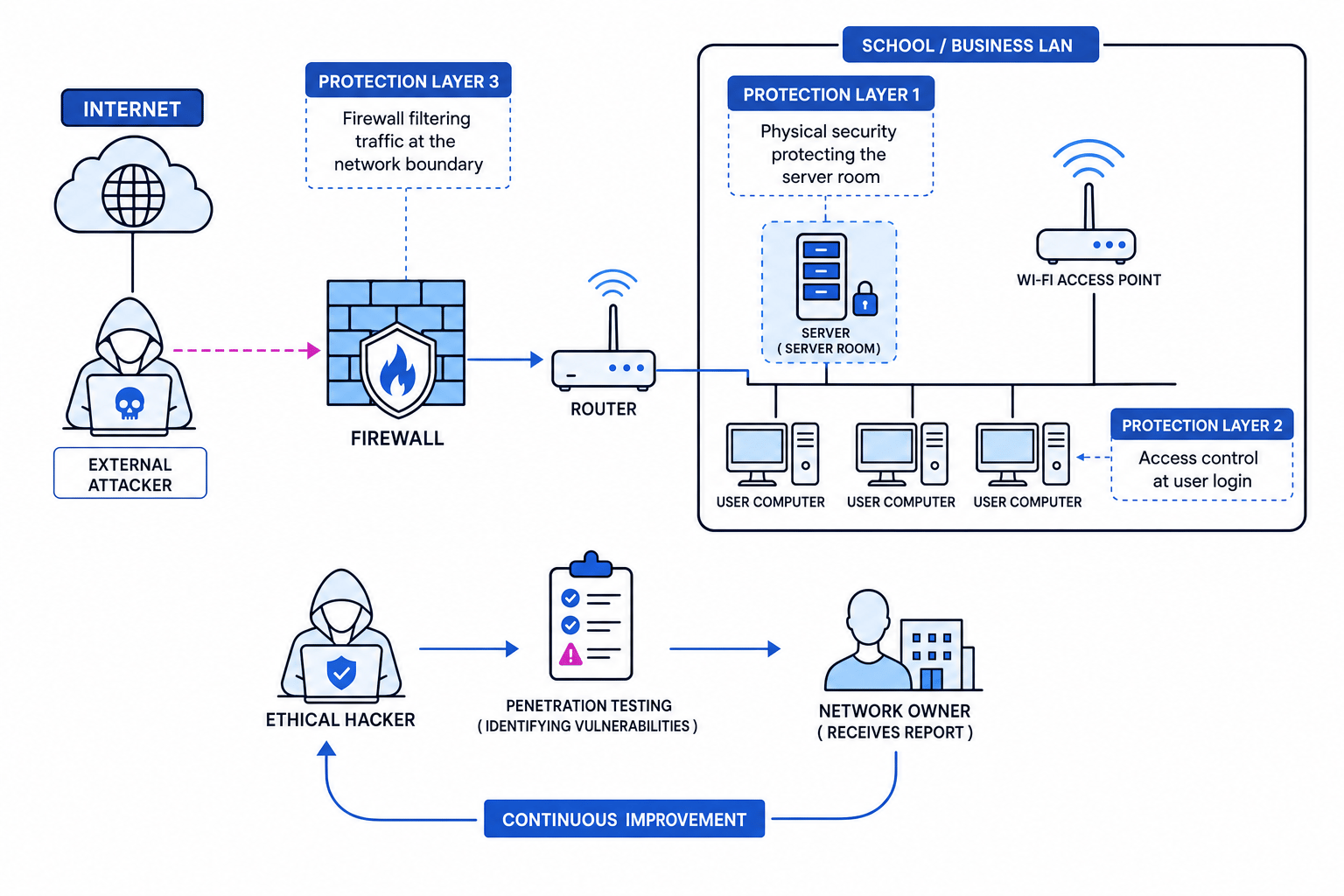
Why network security is important
Network security matters because most organisations depend on networks to store, process and share data. If a network is not secure, attackers may be able to steal data, change data, delete data, or stop services from working.
Three useful ideas are:
- Confidentiality: only authorised people can access data.
- Integrity: data is accurate and has not been changed without permission.
- Availability: systems and data are available when needed.
For example, a hospital needs patient records to stay confidential, accurate, and available to doctors. A school needs student accounts and shared files to be protected from unauthorised access or deletion.
Key Idea
The purpose of network security
Network security is not just about “stopping hackers”. It protects data, users, devices and services so the organisation can keep working safely.
Consequences of poor network security
If a network is insecure, an organisation may suffer:
- Data theft, such as stolen customer details.
- Loss of service, where users cannot access email, files or websites.
- Financial loss, such as paying to recover systems or losing sales.
- Reputational damage, meaning people lose trust in the organisation.
- Legal consequences, especially if personal data is not protected properly.
Example
Explaining why security matters
A small online shop stores customer names, addresses and order history on a server.
- The customer database is an asset because it contains valuable personal data.
- If an attacker gains access, confidentiality is broken because unauthorised people can read the data.
- If the attacker changes delivery addresses, integrity is broken because the data is no longer accurate.
- If the attacker crashes the server, availability is broken because customers cannot place orders.
Vulnerabilities, threats and attacks
A vulnerability is a weakness in a system that could be used to cause harm. A threat is something that could exploit that weakness. An attack is an attempt to exploit a vulnerability.
Definition
Vulnerability
A vulnerability is a weakness in a network, device, software setup, user behaviour or security procedure that could be exploited by an attacker.
Examples of network vulnerabilities include:
- Weak passwords, such as
password123. - Default administrator passwords left unchanged.
- Out-of-date software with known security flaws.
- Unlocked server rooms.
- Users having more permissions than they need.
- Firewall rules that allow unnecessary traffic.
- Unsecured wireless access points.
Common Mistake
Threat vs vulnerability
Do not use threat and vulnerability as if they mean the same thing. A vulnerability is the weakness; a threat is the possible danger that could use it.
How vulnerabilities are identified
Organisations should not wait for a real attacker to find weaknesses. Instead, they can test their own network in a controlled and authorised way.
Two important methods in this spec are:
- Penetration testing
- Ethical hacking
Penetration testing
Definition
Penetration testing
Penetration testing is an authorised attempt to find and exploit vulnerabilities in a computer system or network, so the organisation can fix them before a real attacker uses them.
A penetration test is sometimes shortened to pen test. It is planned in advance and usually ends with a report explaining:
- What was tested.
- Which vulnerabilities were found.
- How serious each vulnerability is.
- What could happen if it was exploited.
- How to reduce or remove the risk.
A penetration tester might check whether:
- User passwords are too weak.
- Software is out of date.
- Ports are open when they should be closed.
- A firewall allows risky traffic.
- Staff accounts have too many privileges.
- A Wi-Fi network is poorly protected.
Key Idea
Why penetration testing is useful
Penetration testing helps an organisation find weaknesses safely, before criminals find them for real.
Example
Prioritising penetration test findings
A penetration test report finds three issues: an unlocked server room, a weak guest Wi-Fi password, and one old unused account that still exists.
- The unlocked server room is serious because someone could physically access servers, steal equipment, or connect directly to the network.
- The weak guest Wi-Fi password is also serious because an unauthorised person nearby could join the network and attempt further attacks.
- The old unused account is a risk because it might still be used to log in, especially if the password is weak or shared.
- A sensible response is to fix the highest-impact issues quickly: lock the server room, change and strengthen the Wi-Fi password, then disable the unused account.
Ethical hacking
Definition
Ethical hacking
Ethical hacking is hacking carried out legally, with permission, to identify security weaknesses and report them to the organisation.
An ethical hacker uses some of the same skills and tools as a malicious hacker, but the purpose is different. They are working to improve security, not to steal data or cause damage.
Ethical hacking must be:
- Authorised: the organisation gives permission.
- Controlled: the tester follows agreed rules and limits.
- Reported: findings are shared so they can be fixed.
- Legal: the tester does not attack systems they are not allowed to test.
Common Mistake
Permission matters
Testing a network without permission is not ethical hacking. Even if the intention is “just to check”, unauthorised access can be illegal.
Penetration testing vs ethical hacking
These terms are closely linked, but you can separate them like this:
- Penetration testing is the planned testing process.
- Ethical hacking is the legal and authorised use of hacking skills to find weaknesses.
Tip
Easy distinction
In an exam answer, connect both terms to permission and finding vulnerabilities before criminals do.
Protecting networks
Once vulnerabilities have been identified, the organisation should reduce the risk. The spec names three protection methods you need to understand:
- Access control
- Physical security
- Firewalls
Access control
Definition
Access control
Access control means limiting who can access a system, network or data, and what they are allowed to do once they are inside.
Access control usually starts with authentication, which checks a user’s identity. A common example is a username and password.
It also includes authorisation, which decides what an authenticated user is allowed to access. For example, a student account might access lesson files but not staff payroll records.
Access control methods include:
- Unique usernames for each user.
- Strong passwords.
- Different permission levels for different users.
- Disabling accounts that are no longer needed.
- Locking accounts after several failed login attempts.
- Giving users only the access they need.
Key Idea
Least privilege
A good access control rule is least privilege: users should only have the permissions needed to do their job, and no more.
Example
Choosing access permissions
A school network has students, teachers and network managers.
- Students need access to their own work area and shared lesson resources, so they should not have permission to change system settings.
- Teachers need access to class resources and assessment folders, but they should not have full control over every network device.
- Network managers need higher permissions because they maintain accounts, devices and security settings.
- This setup reduces risk because a compromised student account cannot be used to control the whole network.
Physical security
Definition
Physical security
Physical security means protecting the physical equipment and locations that make up a network, such as servers, switches, cables and wireless access points.
A network is not secure if attackers can simply touch, remove or damage its hardware. Physical security is important because direct access to equipment can bypass some software protections.
Examples include:
- Locked server rooms.
- Door entry systems or key cards.
- Security guards or reception checks.
- CCTV monitoring.
- Locking devices to desks.
- Keeping network cabinets closed.
- Protecting cables from being unplugged or tampered with.
Physical security also helps protect availability. If someone steals a server, unplugs a switch, or damages a router, users may lose access to network services.
Common Mistake
Forgetting the physical side
Network security is not only software. A locked server room can be just as important as a strong password.
Firewalls
Definition
Firewall
A firewall is hardware or software that monitors and controls network traffic entering or leaving a network, using a set of rules.
Network traffic means the data moving across a network. A firewall checks this traffic and decides whether to allow or block it.
Firewall rules may be based on things such as:
- The source or destination address.
- The type of traffic.
- The port being used.
- Whether the traffic is incoming or outgoing.
- Whether the connection appears suspicious.
A firewall can help by:
- Blocking unauthorised access from outside the network.
- Preventing some harmful traffic from entering.
- Stopping users from accessing blocked services.
- Reducing the attack surface by closing unnecessary routes into the network.
Analogy
Firewall as a security checkpoint
A firewall is like a security checkpoint at the entrance to a building. It does not make the building perfectly secure, but it checks who or what is allowed through.
Common Mistake
Thinking a firewall solves everything
A firewall is important, but it cannot fix weak passwords, unlocked server rooms or users giving away login details. Network security needs several layers.
Example
Applying firewall rules
A business wants staff to browse the web, but it does not want unknown users on the internet connecting directly to its internal file server.
- Web browsing by staff is outgoing traffic, so the firewall can allow normal web requests from inside the network to the internet.
- A connection attempt from an unknown external computer to the internal file server is incoming traffic, so the firewall should block it unless there is a specific approved reason.
- This protects the file server by reducing unauthorised access from outside the network while still allowing staff to use the internet.
Layered protection
The strongest answers usually explain that organisations should use multiple methods together. This is called a layered approach: if one protection fails, another may still reduce the damage.
For example:
- A firewall may block unwanted traffic from the internet.
- Access control may stop a normal user account from changing administrator settings.
- Physical security may prevent someone from directly accessing the server.
- Penetration testing may identify weaknesses in all of these areas.
Key Idea
Security works in layers
No single method gives perfect protection. Good network security combines testing, access control, physical security and firewalls.
Exam technique
In the exam
- If asked why network security is important, link your answer to protecting data, preventing unauthorised access, maintaining service availability, and avoiding damage to the organisation.
- If asked about penetration testing or ethical hacking, always mention that it is authorised and used to find vulnerabilities so they can be fixed.
- If asked to recommend protection methods, match the method to the problem: use access control for users and permissions, physical security for equipment, and firewalls for filtering network traffic.
Self review
Check yourself
- What is the difference between a threat and a vulnerability?
- Why must ethical hacking be authorised?
- Which protection method would help stop an unauthorised person entering a server room?
You've reached the end
Test yourself on this topic, or move on to the next guide.
How was this guide?