Revision notes for Edexcel GCSE Computer Science Network and email protocols. Open the guide for explanations and worked examples. Written against the Edexcel GCSE Computer Science (1CP2) specification, so the content matches what's examinable rather than general Computer Science background.
Network and email protocols
What you'll learn
- Why networks need protocols so devices can communicate reliably.
- The roles of common network protocols: Ethernet, Wi-Fi, TCP/IP, HTTP, HTTPS and FTP.
- How email uses SMTP, POP3 and IMAP for sending and receiving messages.
- How to choose the right protocol for a short GCSE scenario.
Why protocols are needed
A network is a group of connected devices that can share data and resources. For example, your laptop might connect to a router, a printer and the internet.
For this to work, devices need agreed rules. A phone, a laptop, a server and a router may all be made by different companies, but they still need to understand each other.
Definition
Protocol
A protocol is a set of rules that controls how data is transmitted and received between devices on a network.
Protocols are needed because they define things like:
- how data is split into smaller chunks
- how devices are addressed
- how errors are handled
- how a web page, file or email should be requested and delivered
- how devices connect using wires or wireless signals
Key Idea
Why protocols matter
Protocols allow different hardware and software to communicate using the same agreed rules. Without protocols, networks would not be reliable or compatible.
Packets: sending data in smaller pieces
When data is sent across a network, it is often split into packets. A packet is a small section of data with extra information attached, such as where it is going.
Definition
Packet
A packet is a small unit of data sent across a network, usually containing part of the message plus addressing and control information.
Splitting data into packets makes networks more efficient. Packets can travel by different routes, and if one packet is lost, only that packet may need to be resent rather than the whole file.
The TCP/IP model
TCP/IP is the main set of protocols used for communication across the internet and many other networks.
Definition
TCP/IP
TCP/IP stands for Transmission Control Protocol / Internet Protocol. It is a suite of protocols that controls how data is packet-switched, addressed, transmitted, routed and received.
GCSE explanations often group protocols into layers. Each layer has a different job. When you send data, it moves down the layers; when you receive data, it moves back up.
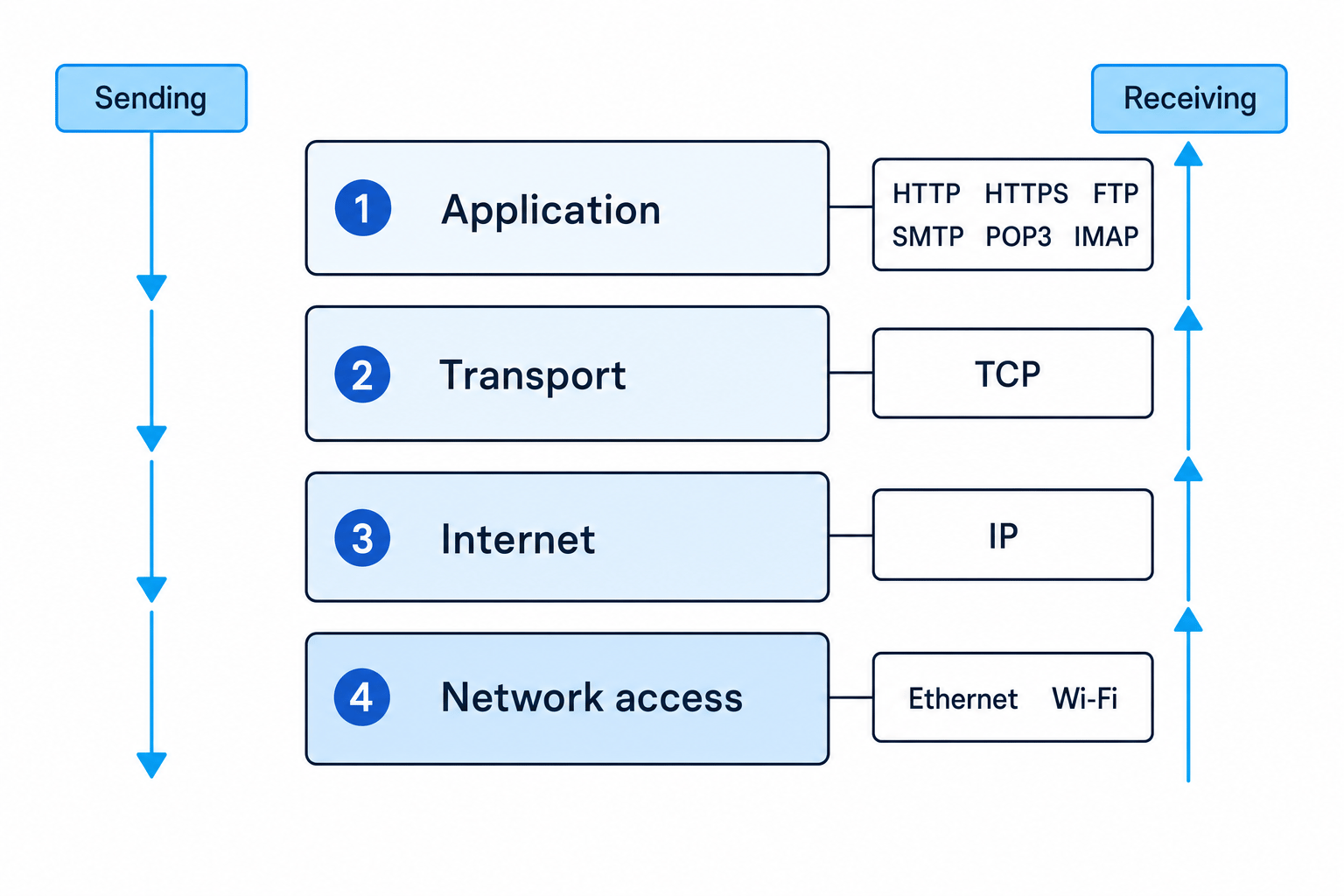
The four layers in simple terms
| TCP/IP layer | Main job | Example protocols |
|---|---|---|
| Application | Provides services the user or application needs | HTTP, HTTPS, FTP, SMTP, POP3, IMAP |
| Transport | Breaks data into packets and supports reliable delivery | TCP |
| Internet | Handles addressing and routing across networks | IP |
| Network access | Deals with the physical or wireless connection to the local network | Ethernet, Wi-Fi |
You do not need to know every technical detail of each layer for this point. You do need to understand that different protocols have different roles and work together.
Common Mistake
Thinking TCP/IP is only one rule
TCP/IP is often written like one thing, but it refers to a suite of protocols. TCP and IP have different roles: TCP supports reliable delivery, while IP deals with addressing and routing packets.
Ethernet and Wi-Fi
Ethernet
Ethernet is a protocol used for wired networks. It controls how data is transmitted over cables, usually within a Local Area Network (LAN) such as a school, office or home network.
Definition
Ethernet
Ethernet is a network access protocol used for wired connections, defining how devices send data over network cables.
Ethernet is commonly used where a stable and fast connection is useful, such as desktop PCs, servers and games consoles.
Wi-Fi
Wi-Fi is a protocol used for wireless networking. It allows devices to connect to a network using radio waves rather than cables.
Definition
Wi-Fi
Wi-Fi is a network access protocol that allows devices to connect wirelessly to a network using radio signals.
Wi-Fi is useful for mobile devices, laptops and places where cables would be inconvenient. However, it can be affected by distance, walls, interference and the number of connected devices.
HTTP and HTTPS
When you use a web browser, you are usually using HTTP or HTTPS.
Definition
HTTP
HTTP stands for Hypertext Transfer Protocol. It is used by web browsers and web servers to request and transfer web pages and related files.
For example, when you open a website, your browser sends a request to a web server. The server responds with the web page data.
Definition
HTTPS
HTTPS stands for Hypertext Transfer Protocol Secure. It is the secure version of HTTP and uses encryption to protect data sent between the browser and web server.
Encryption means scrambling data so that it cannot be understood if intercepted without the correct key.
HTTPS is important when sensitive information is being sent, such as passwords, payment details or personal data.
Common Mistake
Saying HTTPS is just faster HTTP
HTTPS is not mainly about speed. Its key role is security: it encrypts data and helps protect communication between the client and web server.
FTP
FTP is used to transfer files between computers on a network.
Definition
FTP
FTP stands for File Transfer Protocol. It is used to upload and download files between a client and a server.
For example, a website developer might use FTP to upload image files and HTML files to a web server. FTP is about file transfer, not viewing web pages in a browser.
Choosing a network protocol
Once you know each protocol’s role, many GCSE questions become matching a scenario to the correct protocol.
Example
Choosing suitable network protocols
A student is asked which protocol is most suitable in each situation: loading a secure banking website, uploading files to a web server, connecting a desktop PC to a router using a cable, and connecting a tablet wirelessly.
- For the secure banking website, the key requirement is that web data is protected. The suitable protocol is HTTPS, because it transfers web pages securely using encryption.
- For uploading files to a web server, the task is file transfer rather than web browsing. The suitable protocol is FTP.
- For connecting a desktop PC by cable, the connection is wired on a local network. The suitable protocol is Ethernet.
- For connecting a tablet without a cable, the connection is wireless. The suitable protocol is Wi-Fi.
Tip
Spot the task first
Ask yourself: is the scenario about a wired/wireless connection, a web page, a secure web page, a file transfer, or email? That usually points you to the protocol.
Email protocols
Email is not handled by just one protocol. Sending and receiving email are different jobs, so they use different protocols.
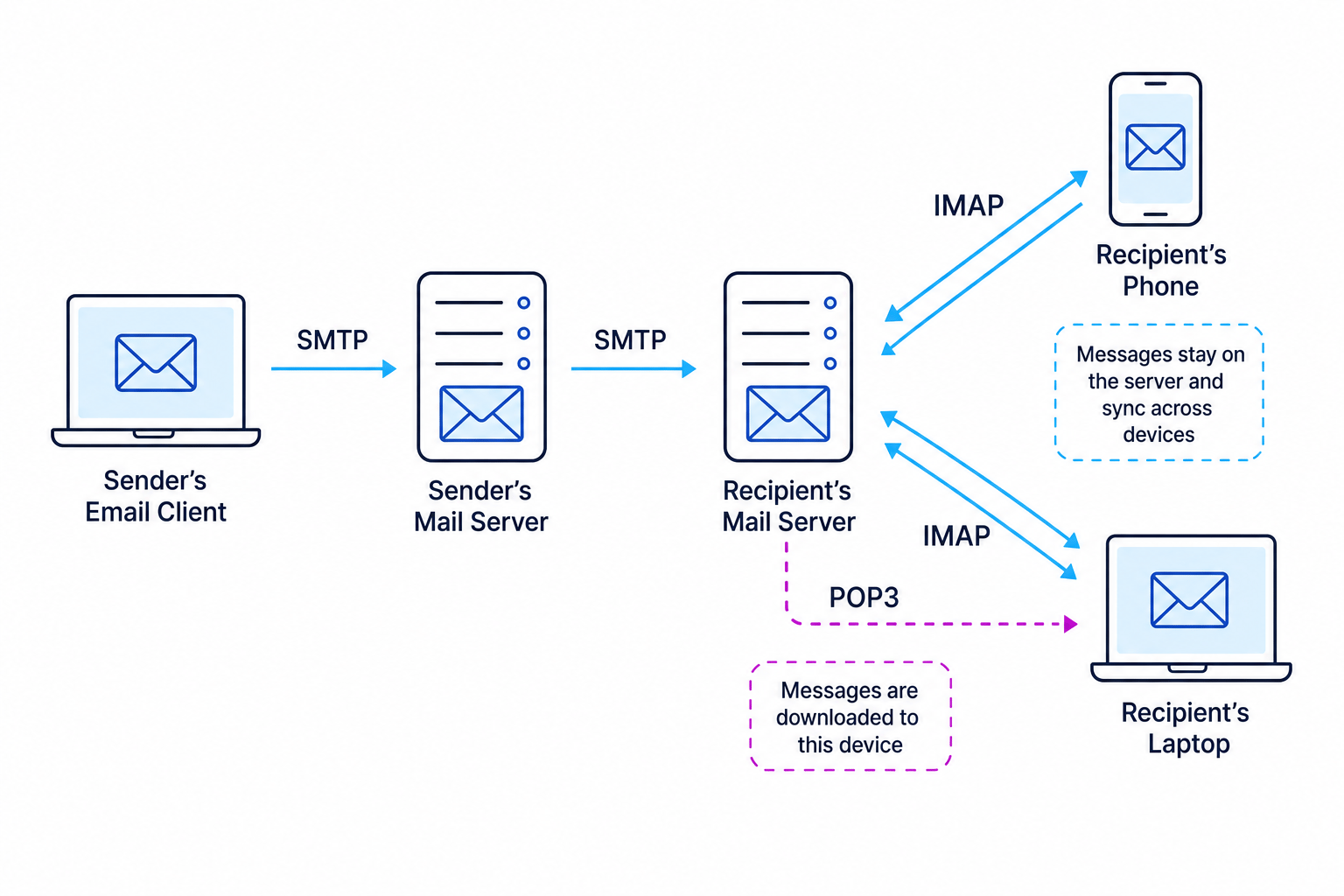
SMTP: sending email
Definition
SMTP
SMTP stands for Simple Mail Transfer Protocol. It is used to send email from an email client to a mail server, and between mail servers.
An email client is the software or app used to write and read email, such as a mail app or webmail interface. A mail server is a computer that stores and forwards email messages.
SMTP is used when:
- you send an email from your device
- your email provider sends the message to the recipient’s email provider
SMTP is mainly for sending, not for managing your inbox.
POP3: downloading email
Definition
POP3
POP3 stands for Post Office Protocol version 3. It is used to retrieve email from a mail server by downloading messages to a client device.
With POP3, messages are typically downloaded to one device. Depending on settings, they may then be removed from the server. This can be useful if you mainly read email on one computer, but it is less convenient if you use several devices.
IMAP: syncing email
Definition
IMAP
IMAP stands for Internet Message Access Protocol. It is used to access and manage email while messages remain stored on the mail server.
IMAP is useful when you read email on multiple devices. Your phone, laptop and tablet can all show the same inbox because the messages stay on the server and changes are synchronised.
For example, if you read or delete an email on your phone, that change can appear on your laptop too.
Key Idea
SMTP sends, POP3 and IMAP receive
Use SMTP for sending email. Use POP3 or IMAP for receiving email. IMAP is better for keeping multiple devices synchronised because messages stay on the server.
POP3 versus IMAP
| Feature | POP3 | IMAP |
|---|---|---|
| Main role | Downloads email to a client device | Accesses email stored on the server |
| Best for | One main device | Multiple devices |
| Message storage | Often stored locally after download | Stored centrally on the mail server |
| Synchronisation | Limited | Stronger synchronisation across devices |
Example
Choosing email protocols for a user
A user wants to send email from a laptop, then read and manage the same inbox on a phone and tablet. Choose suitable protocols.
- Sending the email needs a protocol that transfers messages from the client to a mail server and onwards between mail servers. That role belongs to SMTP.
- Reading the same inbox on several devices means the messages should stay on the server rather than being tied to one device. That points to IMAP rather than POP3.
- The best answer is: use SMTP to send the email and IMAP to receive and synchronise email across the phone and tablet.
Common Mistake
Using SMTP to receive email
SMTP is for sending email. If a question asks how email is retrieved or accessed from a mailbox, choose POP3 or IMAP, not SMTP.
Quick protocol summary
| Protocol | Full name | Main role |
|---|---|---|
| Ethernet | Ethernet | Wired network communication |
| Wi-Fi | Wireless Fidelity is commonly said, but Wi-Fi is the accepted name | Wireless network communication |
| TCP/IP | Transmission Control Protocol / Internet Protocol | Packet delivery, addressing and routing across networks |
| HTTP | Hypertext Transfer Protocol | Transfers web pages and web resources |
| HTTPS | Hypertext Transfer Protocol Secure | Securely transfers web pages using encryption |
| FTP | File Transfer Protocol | Uploads and downloads files between computers |
| SMTP | Simple Mail Transfer Protocol | Sends email |
| POP3 | Post Office Protocol version 3 | Downloads email from a mail server |
| IMAP | Internet Message Access Protocol | Accesses and synchronises email stored on a mail server |
Common Mistake
Be careful with full names
For GCSE, the role of the protocol is usually more important than expanding the abbreviation. Still, learn the common full names because they may help you remember what each one does.
Exam technique
In the exam
- Identify the job in the scenario first: web browsing, secure web browsing, file transfer, wired access, wireless access, sending email, or receiving email.
- Name the correct protocol and give its role, not just the abbreviation. For example: “HTTPS, because it securely transfers web pages using encryption.”
- For email questions, separate the journey into sending and receiving: SMTP sends; POP3 downloads; IMAP keeps mail on the server and synchronises devices.
Self review
Check yourself
- Why are protocols needed when devices on a network communicate?
- Which protocol would you choose for a secure website, and why?
- What is the difference between POP3 and IMAP when reading email on multiple devices?
Networks
Guide 6 of 8
You've reached the end
Test yourself on this topic, or move on to the next guide.
How was this guide?