Revision notes for Edexcel GCSE Computer Science Need for and methods of compression. Open the guide for explanations and worked examples. Written against the Edexcel GCSE Computer Science (1CP2) specification, so the content matches what's examinable rather than general Computer Science background.
Need for and methods of compression
What you'll learn
- Why computer systems compress data before storing or sending it.
- The difference between lossless and lossy compression.
- How repeated patterns can be stored more efficiently.
- How to choose a suitable compression method for a situation.
Start point: what is being made smaller?
Digital data is stored using bits. A bit is a single binary digit: 0 or 1. A byte is 8 bits, and file sizes are often measured in bytes, kibibytes and mebibytes. In this course, use binary storage units: 1 KiB is 1024 B, and 1 MiB is 1024 KiB.
A file size is the amount of storage space needed to store a file.
Definition
Data compression
Data compression is the process of reducing the number of bits needed to store or transmit data.
A compressed file often needs to be decompressed before it is used. Decompression means converting compressed data back into a usable form. Some software does this automatically, such as an image viewer opening a compressed image file.
Key Idea
Compression reduces bits
Compression is useful because fewer bits means less storage space and usually less time needed to send the data across a network.
Why compression is needed
Compression is not just about “making files neat”. It solves real problems:
- Storage space: more files can fit on the same storage device.
- Transfer time: smaller files can be uploaded, downloaded or emailed faster.
- Bandwidth: network bandwidth means how much data a connection can carry per second. Compression reduces the amount of bandwidth needed.
- Streaming: audio and video can be sent smoothly if the data rate is low enough.
- Backups and cloud storage: less data means quicker backups and lower storage requirements.
For transfers, the relationship is:
transfer time=file sizetransfer rate\text{transfer time} = \frac{\text{file size}}{\text{transfer rate}}transfer time=transfer ratefile sizeSo, if the transfer rate stays the same, reducing the file size reduces the transfer time.
A compression ratio compares the original file size with the compressed file size. A ratio of 4:1 means the original file was four times the size of the compressed file.
Example
Working out storage saved
-
A sound file is 64 MiB before compression and 16 MiB after compression. Subtract the compressed size from the original size: 64−16=4864 - 16 = 4864−16=48, so 48 MiB is saved.
-
Work out the compression ratio: 6416=4\frac{64}{16} = 41664=4, so the ratio is 4:1.
-
Work out the fraction of the original file size that was saved: 4864=34\frac{48}{64} = \frac{3}{4}6448=43, so the file size was reduced by 75%.
-
Compare how many files fit in 256 MiB of storage: 256÷64=4256 \div 64 = 4256÷64=4 uncompressed files, but 256÷16=16256 \div 16 = 16256÷16=16 compressed files.
Two broad methods: lossless and lossy
The GCSE specification groups compression methods into two main types:
- Lossless compression
- Lossy compression
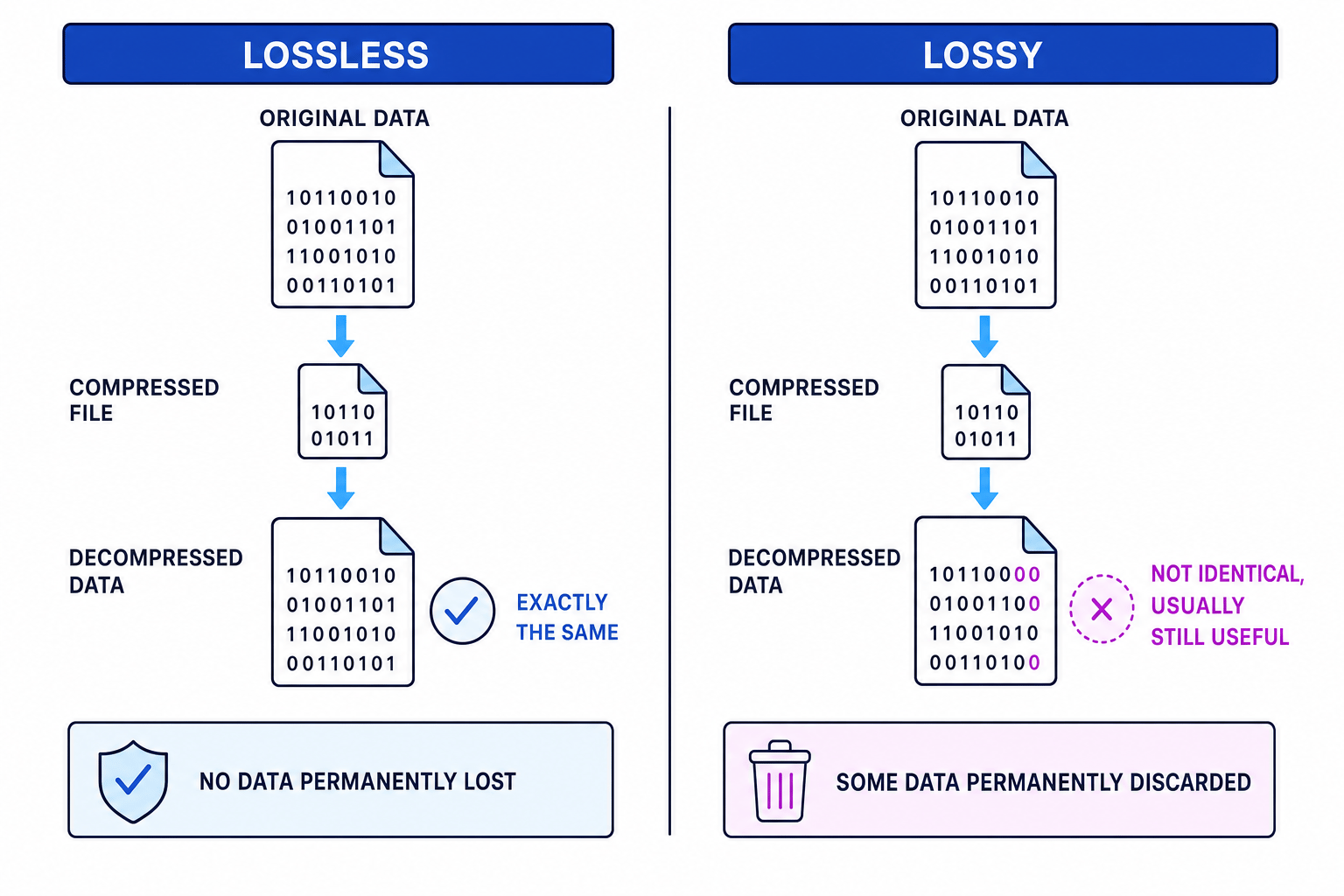
The key question is: can the exact original data be reconstructed after decompression?
Lossless compression
Definition
Lossless compression
Lossless compression reduces file size while allowing the original data to be reconstructed exactly. No data is permanently lost.
Lossless compression is needed when every bit or character matters. It is suitable for:
- text documents
- source code, such as Python programs
- spreadsheets and databases
- executable programs
- legal, financial or scientific records
- images where exact detail must be preserved
Examples of lossless formats include ZIP archives and PNG images.
How lossless compression works
Lossless compression looks for redundancy. Redundancy means repeated or predictable data that can be described more efficiently.
For example, instead of storing the same value again and again, a file could store the value once with a count of how many times it repeats. The compressed file must still contain enough information to rebuild the original exactly.
Simple lossless idea: run-length encoding
A run is a sequence of the same value repeated next to itself. Run-length encoding is a simple lossless method that stores each run as a count plus the value.
Example
Compressing repeated values
-
Start with the data
MMMMMMMMPPPPQQR. Identify the runs: 8 Ms, 4 Ps, 2 Qs and 1 R. -
Replace each run with its count and value:
8M4P2Q1R. -
Compare the number of symbols: the original has 15 characters, while the encoded version has 8 symbols. If each symbol takes a similar amount of storage, this is smaller.
-
Decompress by expanding each count:
8Mbecomes eight Ms,4Pbecomes four Ps,2Qbecomes two Qs and1Rbecomes one R. The original data is restored exactly.
Common Mistake
Assuming lossless always shrinks data
Lossless compression does not guarantee a smaller file. For example, ABCDEF could become 1A1B1C1D1E1F, which is longer. Data with little repetition may not compress well.
Lossy compression
Definition
Lossy compression
Lossy compression reduces file size by permanently removing some data. The decompressed version is not identical to the original, but it is usually close enough for its purpose.
Lossy compression is suitable when an approximate version is acceptable, especially for:
- photographs
- music
- speech recordings
- video
It is not suitable when exact data is required. A lossy-compressed program, spreadsheet or database could become corrupted or incorrect because even a tiny change may matter.
How lossy compression works
Lossy compression removes detail that is judged to be less important or less noticeable to humans. For example:
- An image may store fewer subtle colour changes.
- An image may reduce its resolution, meaning it stores fewer pixels.
- Audio may remove sounds outside the range most people can hear clearly.
- Video may reduce detail between similar frames.
A compression artefact is an unwanted distortion caused by compression, such as blocky areas in an image or muffled sound in audio.
Example
Reducing image resolution
-
Calculate the original number of pixels in an image that is 800 pixels by 600 pixels: 800×600=480 000800 \times 600 = 480\,000800×600=480000 pixels.
-
Calculate the number of pixels after reducing it to 400 pixels by 300 pixels: 400×300=120 000400 \times 300 = 120\,000400×300=120000 pixels.
-
Compare the two amounts: 120 000÷480 000=14120\,000 \div 480\,000 = \frac{1}{4}120000÷480000=41, so the smaller image has one quarter as many pixel values to store before any other compression is applied.
-
Decide the trade-off: the file can be much smaller, but fine detail is permanently lost because the original pixel grid cannot be fully reconstructed.
Tip
Quality trade-off
More aggressive lossy compression usually gives a smaller file, but quality decreases. In an exam, link lossy compression to both benefits and costs: smaller file size, but some data is permanently discarded.
Common Mistake
Saving lossy data as lossless
If data has already been removed by lossy compression, saving the result later in a lossless format cannot bring the missing original detail back.
Choosing the right method
The best method depends on whether the original data must be recovered exactly.
| Situation | Better choice | Reason |
|---|---|---|
| Python source code | Lossless | Every character must be restored exactly. |
| Database backup | Lossless | Changed values could make the data wrong. |
| Website photograph | Lossy | Small visual changes are usually acceptable, and faster loading matters. |
| Music streaming | Lossy | Some sound detail can be removed while keeping acceptable quality. |
| Logo with sharp text | Often lossless | Blurring or artefacts may be very noticeable. |
Example
Selecting compression for different files
-
A school database of student results must keep every value exactly the same, so lossless compression is the safer choice.
-
A photograph for the school website does not normally need every original camera detail, so lossy compression can reduce download time while keeping the image acceptable.
-
A Python program must not have characters changed or removed, because that could stop it running correctly, so it should use lossless compression.
Exam technique
In the exam
-
If the data must be reconstructed exactly, choose lossless and explain that no data is permanently lost.
-
If the data is image, sound or video and small quality loss is acceptable, choose lossy and mention the trade-off between file size and quality.
-
When asked why compression is needed, link it to storage space, transfer time, bandwidth or streaming.
-
For calculations, keep units clear: use bytes, KiB and MiB correctly, and show the comparison between original and compressed file sizes.
Self review
Check yourself
- Why would lossy compression be unsuitable for a Python program file?
- What kind of data is run-length encoding most likely to compress well?
- A 20 MiB file is compressed to 5 MiB. What is the compression ratio, and how much storage is saved?
You've reached the end
Test yourself on this topic, or move on to the next guide.
How was this guide?