Revision notes for Edexcel GCSE Computer Science Accepting and responding to user input. Open the guide for explanations and worked examples. Written against the Edexcel GCSE Computer Science (1CP2) specification, so the content matches what's examinable rather than general Computer Science background.
Accepting and responding to user input
What you'll learn
- How Python 3 programs accept user input using
input(). - Why input is stored as text first, and when you need to convert it.
- How to respond differently using
if,elifandelse. - How to make programs more robust by checking input before using it.
The basic idea: input, process, output
A program often follows an input → process → output pattern.
- Input: data goes into the program.
- Process: the program uses instructions to do something with that data.
- Output: the program shows or returns a result.
Definition
User input
User input is data entered by the person using the program, usually by typing at the keyboard or choosing an option.
For this topic, you need to be able to write programs that accept user input and respond appropriately. “Appropriately” means the program should use the input sensibly: store it, convert it if needed, check it if needed, and produce a suitable output.
Key Idea
The core pattern
Most interactive programs do this: ask for input, store it in a variable, process it, then output a response.
Reading input in Python
In Python 3, the built-in function input() pauses the program and waits for the user to type something.
Definition
Function
A function is a named block of code that performs a particular task. Python’s input() function gets text from the user.
A prompt is the message shown to the user to tell them what to enter.
name = input("What is your name? ")
print(f"Hello, {name}!")
Here, the user’s answer is stored in the variable name.
Definition
Variable
A variable is a named storage location in memory that holds a value while a program is running.
Example
Making a personalised greeting
- The program needs one piece of input: the user’s name, so a meaningful variable name is
name. - The prompt should make the expected input clear:
input("What is your name? "). - The response should use the stored input, so an f-string can insert the value of
nameinto the output.
name = input("What is your name? ")
print(f"Hello, {name}!")
Tip
Prompt clearly
A good prompt tells the user exactly what to type, for example Enter your age: is better than just Age.
Input is text first
A very important Python rule is that input() always returns a string.
Definition
String
A string is a sequence of characters, such as "Maya", "17" or "Y".
Even if the user types 17, Python receives it as the string "17", not the integer 17. If you want to do arithmetic or numerical comparisons, you usually need to convert it.
Definition
Type conversion
Type conversion, also called casting, means changing data from one data type to another, such as from a string to an integer.
Common conversions include:
| Purpose | Python example |
|---|---|
| Convert to integer | age = int(age_text) |
| Convert to real number | height = float(height_text) |
| Convert to string | message = str(score) |
age_text = input("Enter your age: ")
age = int(age_text)
The variable age_text stores the original string. The variable age stores the converted integer.
Example
Calculating with typed-in numbers
- The user types the number of tickets, but
input()stores it as text, so the program first receives something like"3". - The program converts the text to an integer using
int()so it can be used in multiplication. - The program calculates the total price and outputs a response using the result.
tickets_text = input("How many tickets do you want? ")
tickets = int(tickets_text)

total_price = tickets * 5

print(f"That will cost £{total_price}.")
Common Mistake
Forgetting to convert numeric input
If you write tickets = input("How many tickets? "), then tickets is a string. You cannot reliably use it as a number until you convert it with int() or float().
Responding with selection
Programs often need to respond differently depending on what the user enters. This uses selection.
Definition
Selection
Selection is when a program chooses which block of code to run based on a condition. In Python, selection is written using if, elif and else.
A condition is an expression that is either true or false, such as age >= 13.
This flow shows the common pattern: input is accepted, converted if necessary, then used in a decision.
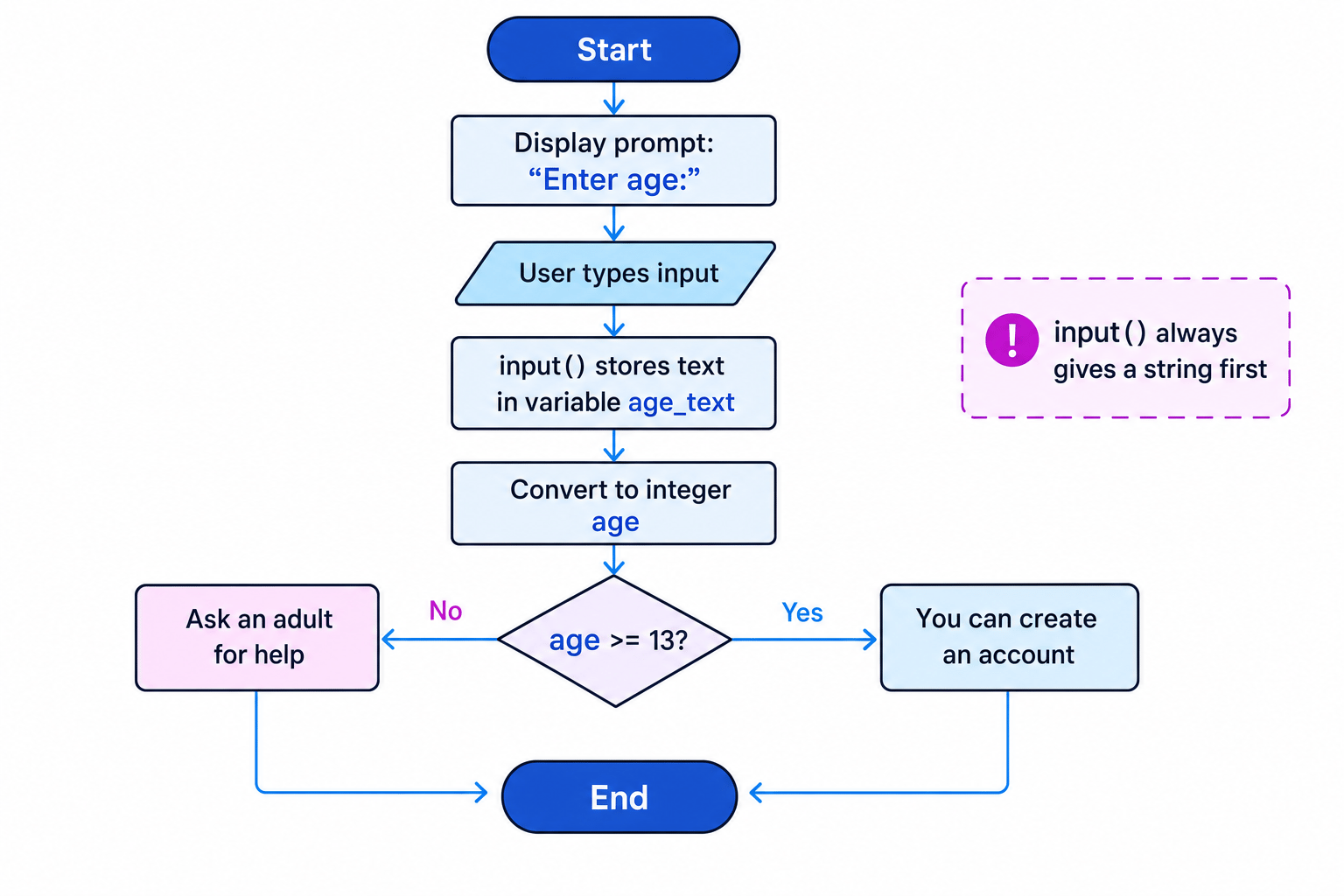
In Python:
age = int(input("Enter your age: "))

if age >= 13:
    print("You can create an account.")
else:
    print("Ask an adult for help.")
Example
Choosing a message from an age
- The input must be treated as a number because the program compares it with 13, so
int()is needed. - The condition
age >= 13separates the two possible cases: age 13 or above, and age below 13. - The
ifbranch handles the true case, while theelsebranch handles every remaining case.
age = int(input("Enter your age: "))

if age >= 13:
    print("You can create an account.")
else:
    print("Ask an adult for help.")
Using more than two possible responses
Sometimes two branches are not enough. Python uses elif, meaning “else if”, to test another condition.
mark = int(input("Enter the test mark: "))

if mark >= 80:
    print("Excellent")
elif mark >= 50:
    print("Pass")
else:
    print("Try again next time")
The order matters. Python checks from top to bottom and stops when it finds the first true condition.
Example
Tracing multiple responses
Suppose the user enters 72.
- The program converts
"72"into the integer 72, so numerical comparisons can be made. - It tests
mark >= 80; 72 is not at least 80, so that branch is skipped. - It tests
mark >= 50; 72 is at least 50, so the program outputsPassand does not run theelse.
Common Mistake
Putting conditions in the wrong order
If you test mark >= 50 before mark >= 80, then a mark of 85 would match the first condition and never reach the “Excellent” branch.
Responding to menu choices
Not all input has to be numeric. Many programs ask the user to choose from a menu.
choice = input("Choose A to add or S to subtract: ")

if choice == "A":
    print("You chose addition.")
elif choice == "S":
    print("You chose subtraction.")
else:
    print("That was not a valid choice.")
For string comparisons, exact characters matter. "A" and "a" are different strings.
Tip
Make case easier to handle
You can convert input to upper case with .upper(), so "a" and "A" can be treated the same way.
choice = input("Choose A to add or S to subtract: ").upper()
Checking input before using it
A program should often check whether input is acceptable before processing it. This is called validation.
Definition
Validation
Validation checks whether data is sensible or allowed. It does not prove the data is true; it only checks whether it follows the rules set by the program.
Examples of validation include:
- Presence check: making sure something has been entered.
- Length check: making sure input is the correct length.
- Range check: making sure a number is between allowed limits.
- Pattern check: making sure input follows a required format.
A program can respond to invalid input by showing an error message, asking again, or stopping safely.
Definition
Iteration
Iteration means repeating a set of instructions. In Python, a while loop can repeat until the input is valid.
Example
Repeating until a valid menu choice
- The valid inputs are only
"S"and"P", so any other value should be rejected. - The loop condition must stay true while the choice is not
"S"and not"P". - Once the loop ends, the program can safely respond to the valid choice.
choice = input("Choose S for sandwich or P for pasta: ").upper()

while choice != "S" and choice != "P":
    print("Please enter S or P.")
    choice = input("Choose S for sandwich or P for pasta: ").upper()

if choice == "S":
    print("You chose sandwich.")
else:
    print("You chose pasta.")
Common Mistake
Conversion can fail
If the user types hello and your program tries int("hello"), Python will produce an error. In GCSE questions, you may sometimes be told to assume sensible input, but if validation is required you should handle invalid input.
Good responses are specific
A program is responding appropriately when its output matches the input and the purpose of the program.
Weak response:
print("Error")
Better response:
print("Please enter a number from 1 to 10.")
A useful response tells the user what happened and, if needed, what to do next.
Key Idea
Appropriate response
A good interactive program does not just accept input. It uses selection, iteration and clear output to respond in a way that helps the user complete the task.
Mini checklist for writing input code
When you write a program that accepts input, ask yourself:
- What data does the user need to enter?
- What data type should it become: string, integer, real number or Boolean-style choice?
- Does it need validation?
- Which output should be shown for each possible case?
- Are the variable names meaningful?
Exam technique
In the exam
- Identify whether the input should stay as a string or be converted using
int()orfloat()before processing. - Use
if,elifandelsewhen the program must respond differently to different inputs. - If the question asks for validation, repeat the input using a loop and give a clear message when the input is invalid.
Self review
Check yourself
- Why does
input()needint()before you can do arithmetic with a typed-in whole number? - What is the difference between validation and proving that data is correct?
- How could a program respond differently to the inputs
"Y"and"N"?
Input/output
Guide 1 of 4
You've reached the end
Test yourself on this topic, or move on to the next guide.
How was this guide?