Revision notes for Edexcel GCSE Computer Science Malware threats and cyberattack methods. Open the guide for explanations and worked examples. Written against the Edexcel GCSE Computer Science (1CP2) specification, so the content matches what's examinable rather than general Computer Science background.
Malware threats and cyberattack methods
What you'll learn
- What malware is and why it is a threat to digital systems.
- How to tell apart viruses, worms, Trojans, ransomware and key loggers.
- How attackers exploit technical vulnerabilities such as unpatched software and out-of-date anti-malware.
- How social engineering tricks people into helping an attack succeed.
The big picture: threats, vulnerabilities and attacks
A digital system is any computer-based system that stores, processes or transmits data. This could be a laptop, smartphone, server, school network, website, or cloud service.
A cyberattack is an attempt to gain unauthorised access to a digital system, damage it, disrupt it, or steal data from it. Attackers often combine two things:
- a technical weakness, such as software that has not been updated
- a human weakness, such as persuading someone to click a malicious link
Definition
Threat and vulnerability
A threat is a possible danger to a digital system. A vulnerability is a weakness that could be exploited by a threat. For example, ransomware is a threat; an old, unpatched operating system could be a vulnerability it exploits.
A useful way to think about cybersecurity is the CIA triad:
- Confidentiality means data is kept private from unauthorised users.
- Integrity means data stays accurate and is not changed without permission.
- Availability means systems and data are accessible when authorised users need them.
Malware and cyberattacks usually harm at least one of these.
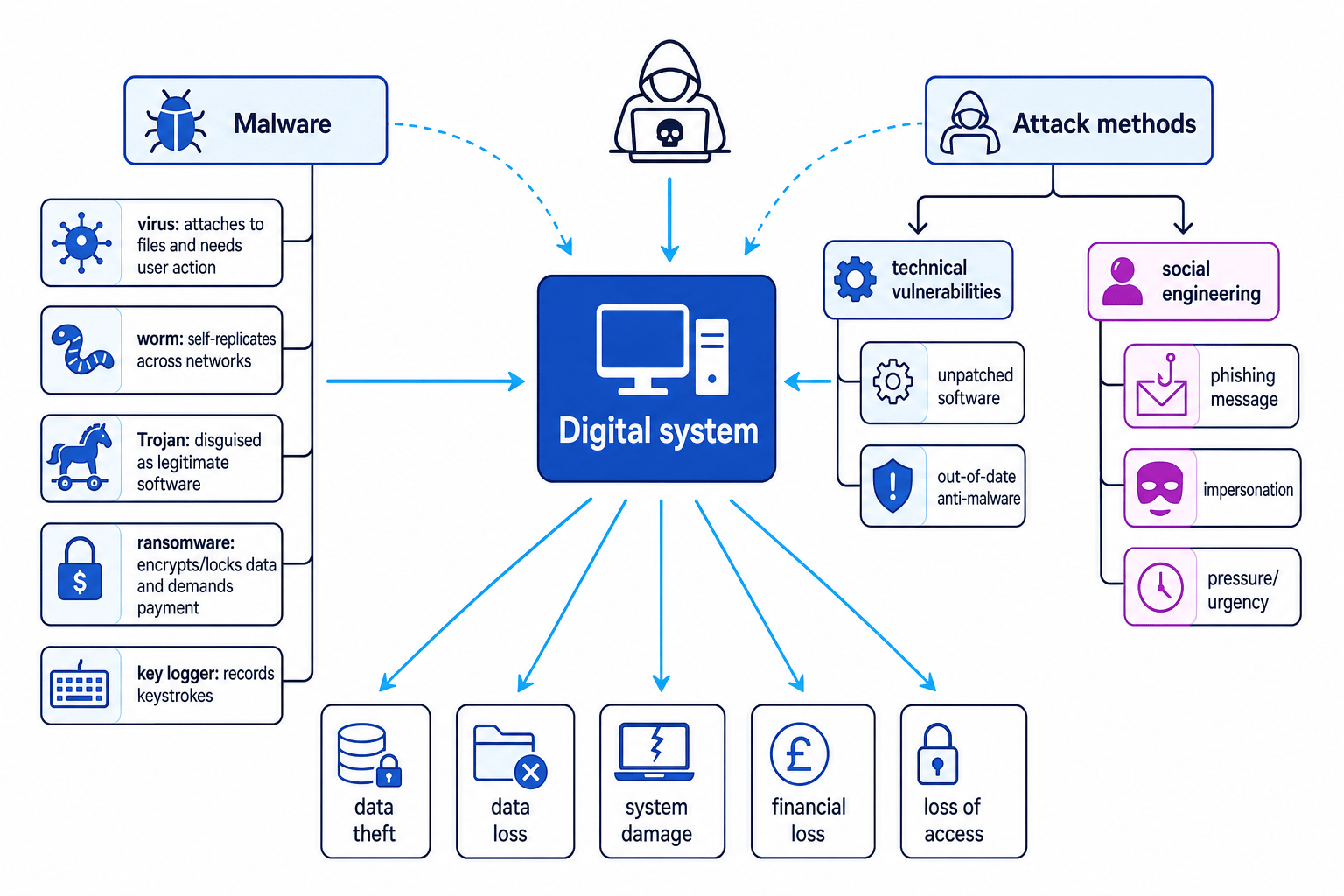
The diagram below shows how malware, technical vulnerabilities and social engineering can all lead to damage.
Key Idea
Attacks often combine methods
Many real cyberattacks are not just “a virus”. An attacker might use social engineering to trick a user, then exploit unpatched software, then install malware to steal data or lock files.
Malware
Malware is short for malicious software. It is software designed to harm, disrupt, spy on, or gain unauthorised access to a digital system.
Definition
Malware
Malware is software created with harmful intent, such as stealing data, damaging files, taking control of a device, or preventing access to a system.
Malware can affect:
- confidentiality, by stealing usernames, passwords or personal data
- integrity, by changing or corrupting files
- availability, by slowing systems down, crashing them, or locking users out
Viruses
A virus is malware that attaches itself to another file or program. It usually spreads when the infected file is opened, copied, shared, or run.
A virus normally needs some user action to spread, such as opening an infected attachment or running an infected program. Once active, it may copy itself into other files, delete data, corrupt files, or cause system problems.
Definition
Virus
A virus is malware that attaches itself to a host file or program and spreads when that file or program is run or shared.
Worms
A worm is malware that can copy itself and spread across networks without needing to attach to a host file. Worms often exploit weaknesses in networked systems.
Because a worm can spread automatically, it can infect many machines quickly. It may slow down a network by creating lots of traffic, install other malware, or damage data.
Definition
Worm
A worm is self-replicating malware that spreads across networks, often without the user needing to open an infected file.
Common Mistake
Virus versus worm
Do not use virus and worm as if they mean the same thing. A virus attaches to another file or program; a worm is standalone malware that can spread itself across a network.
Trojans
A Trojan, or Trojan horse, is malware disguised as legitimate or useful software. The user thinks they are installing something safe, such as a game, update, or free tool, but the program contains harmful code.
A Trojan may create a backdoor, which is a hidden way for an attacker to access the system later. It may also install other malware, steal data, or change security settings.
Definition
Trojan
A Trojan is malware that pretends to be legitimate software so that a user is tricked into installing or running it.
Ransomware
Ransomware is malware that prevents access to files or a device and demands payment to restore access. It often encrypts files, meaning it scrambles them so they cannot be read without a decryption key.
The main impact of ransomware is on availability, because users cannot access their own files or systems. It can also lead to data loss and financial loss.
Definition
Ransomware
Ransomware is malware that locks a device or encrypts files, then demands payment from the victim to regain access.
Common Mistake
Paying is not a guaranteed fix
Even if a victim pays a ransom, the attacker may not restore the files. Backups and prevention are much safer than relying on criminals to keep a promise.
Key loggers
A key logger records the keys typed on a keyboard. It can capture passwords, usernames, payment details, messages, and other private information.
A key logger mainly threatens confidentiality, because it secretly collects data and may send it to an attacker.
Definition
Key logger
A key logger is malware that records keystrokes made by a user, often to steal login details or other sensitive information.
Example
Classifying a malware incident
A user downloads a fake “free video editor”. After installing it, their files become unreadable and a message demands payment. The same device later shows signs that passwords have been stolen.
- The fake video editor suggests a Trojan, because the malware was disguised as useful, legitimate software.
- The unreadable files and payment demand match ransomware, because the user’s access to their data has been blocked until a ransom is paid.
- The stolen passwords suggest a key logger or other spyware-like behaviour, because private information has been captured without permission.
- The best answer depends on what the question asks: if it asks about the delivery method, choose Trojan; if it asks about the file-locking effect, choose ransomware.
Technical vulnerabilities
A technical vulnerability is a weakness in hardware, software, or system configuration that could be exploited by an attacker.
In this spec point, you need to understand two important examples:
- unpatched software
- out-of-date anti-malware
Unpatched software
A patch is an update released to fix a problem in software. Some patches fix security vulnerabilities.
If software is unpatched, it has not had the latest fixes installed. Attackers may already know about the weakness and may use malware or other techniques to exploit it.
Definition
Unpatched software
Unpatched software is software that has not been updated with the latest fixes, leaving known faults or security weaknesses in place.
Examples include:
- an old operating system missing security updates
- a web browser with known security flaws
- a server application that has not been updated
- a plugin or app that is no longer supported
Out-of-date anti-malware
Anti-malware is security software designed to detect, block, quarantine, or remove malware.
To detect known malware, anti-malware often uses signatures, which are recognisable patterns in malicious code. It may also use behaviour-based detection, where suspicious actions are flagged.
If anti-malware is out of date, it may not recognise newer threats. This makes it easier for malware to enter or remain on the system.
Definition
Out-of-date anti-malware
Out-of-date anti-malware is security software that has not received recent updates, so it may fail to detect newer malware or newly discovered threats.
Tip
Think patch versus anti-malware update
A software patch fixes a weakness in the program itself. An anti-malware update improves the security tool’s ability to recognise and stop threats.
Example
Analysing a technical vulnerability
A school computer is running an old web browser. The browser has a known security flaw, and the anti-malware software has not been updated for months. A malicious website installs malware on the computer.
- The old browser is unpatched software, because it still contains a known weakness that should have been fixed by an update.
- The malicious website exploits that weakness to install malware, so the vulnerability helped the attack succeed.
- The out-of-date anti-malware increases the risk further, because it may not recognise or block the newer malware.
- The final threat is the malware itself; the vulnerabilities are the unpatched browser and out-of-date anti-malware.
Social engineering
Social engineering is when an attacker manipulates people into doing something that helps the attack. Instead of only attacking the technology, the attacker attacks the user’s decision-making.
Definition
Social engineering
Social engineering is the use of deception or manipulation to trick people into revealing information, giving access, or carrying out unsafe actions.
Common social engineering methods include:
- phishing, where a fake email, text or website tries to trick users into giving information or clicking a link
- impersonation, where the attacker pretends to be someone trusted, such as IT support, a bank, or a manager
- urgency or pressure, where the attacker tries to make the victim act quickly without checking
- curiosity, such as tempting the user with a fake prize, attachment, or download
Social engineering can lead to malware infections. For example, a phishing email might persuade a user to open an attachment containing a virus, install a Trojan, or visit a website that exploits unpatched software.
Key Idea
People can be part of the attack surface
A system can have strong technical security but still be attacked if a user is tricked into revealing credentials, installing malware, or ignoring security warnings.
Example
Tracing a social engineering attack
An employee receives an email claiming to be from IT support. It says their account will be locked unless they click a link and install an “urgent security update”. The program is actually a Trojan that installs a key logger.
- The fake IT support email is social engineering, because it uses impersonation and urgency to influence the employee’s behaviour.
- The “urgent security update” is a Trojan, because it is malware disguised as legitimate software.
- The installed key logger threatens confidentiality, because it records private information such as usernames and passwords.
- The attacker can use the stolen credentials to attempt further unauthorised access to systems or data.
Putting it together
For GCSE questions, try to separate the threat, the vulnerability, and the method.
- The threat might be ransomware, a worm, or a key logger.
- The vulnerability might be unpatched software or out-of-date anti-malware.
- The method might be exploiting the technical weakness or using social engineering.
Common Mistake
Naming only the malware
If a question asks how the attack happened, do not stop at naming the malware. Explain the route: for example, a phishing email tricked the user into installing a Trojan, which then installed ransomware.
Reducing the risk
Although this spec point focuses on threats and attack methods, it helps to know the matching defensive ideas:
- install software updates and security patches promptly
- keep anti-malware updated
- avoid opening unexpected attachments or links
- check the sender and website address carefully
- use strong passwords and multi-factor authentication where available
- make regular backups so ransomware is less damaging
- train users to recognise social engineering
These do not remove all risk, but they reduce the chance that an attack will succeed and reduce the damage if it does.
Exam technique
In the exam
- Identify whether the question is asking for a type of malware, a technical vulnerability, or a social engineering method.
- Use the behaviour in the scenario to justify your answer: self-spreading suggests a worm, disguised software suggests a Trojan, payment demand after locked files suggests ransomware.
- For “explain” questions, link cause and effect: the attacker exploits the vulnerability, malware runs, then confidentiality, integrity or availability is harmed.
Self review
Check yourself
- What is the difference between a virus and a worm?
- Why does out-of-date anti-malware make a system more vulnerable?
- How could social engineering lead to ransomware being installed?
You've reached the end
Test yourself on this topic, or move on to the next guide.
How was this guide?