Revision notes for Edexcel GCSE Computer Science Protecting digital systems and data. Open the guide for explanations and worked examples. Written against the Edexcel GCSE Computer Science (1CP2) specification, so the content matches what's examinable rather than general Computer Science background.
Tip
Backup Best Practices
To be truly secure, a backup should be:
- Stored off-site: If a physical disaster like a fire burns down the office, physical backups kept on-site will be destroyed alongside the original hardware. Cloud storage is an excellent way to achieve off-site storage.
- Tested regularly: A backup is useless if it is corrupt or can't be restored. Organisations run recovery drills to test their backups.
Let's look at how to calculate storage requirements for backup strategies.
Example
Calculating backup storage requirements
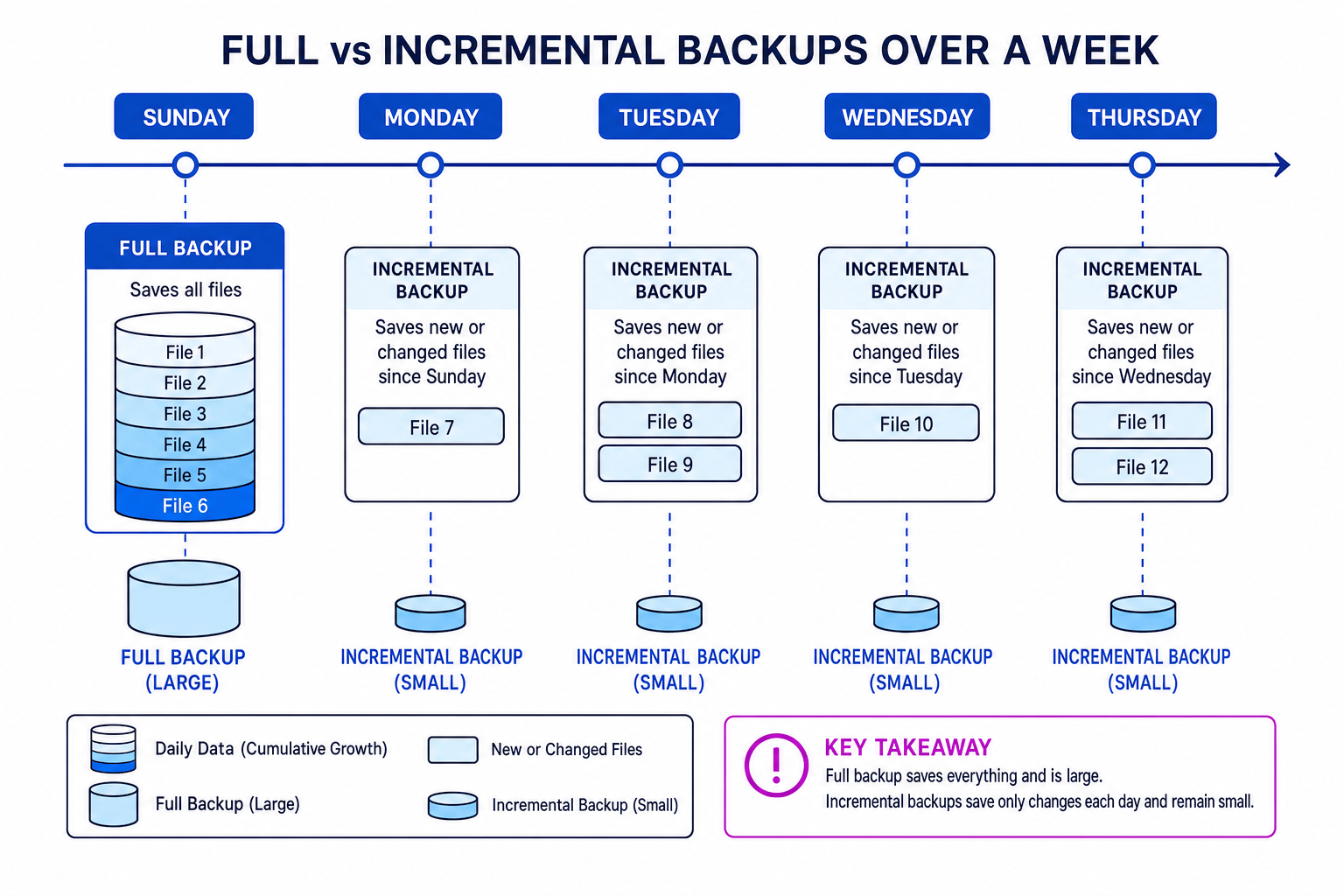
An engineering office has a master directory containing 16 GiB of files. On Monday, Tuesday, Wednesday, and Thursday, users modify or create exactly 512 MiB of data each day. The IT department needs to calculate the difference in storage required over these 5 days (Sunday to Thursday) for two backup plans:
- Plan A: Perform a full backup every day.
- Plan B: Perform a full backup on Sunday, followed by daily incremental backups.
Let's calculate the total backup storage needed for both plans and determine the total storage savings in GiB.
- Convert all units to a common base: Recall that Edexcel uses binary prefix factors where 1 GiB=1024 MiB1\text{ GiB} = 1024\text{ MiB}1 GiB=1024 MiB. Convert the daily incremental change from MiB to GiB:
- Calculate the total storage for Plan A (Daily Full Backups): A full backup copies all files (16 GiB) every day. Over 5 days (Sunday, Monday, Tuesday, Wednesday, Thursday):
-
Calculate the total storage for Plan B (Sunday Full + Incremental):
- Sunday (Full Backup): 16 GiB
- Monday (Incremental): 0.5 GiB
- Tuesday (Incremental): 0.5 GiB
- Wednesday (Incremental): 0.5 GiB
- Thursday (Incremental): 0.5 GiB
Add these together to find the sum:
- Calculate the storage space saved by choosing Plan B: Subtract Plan B's total from Plan A's total:
Summarising the 4 Protection Methods
To wrap up this sub-topic, let's look at how these four techniques complement one another to build a secure environment:
| Method | Main Threat Addressed | How It Protects | Human or Technical? |
|---|---|---|---|
| Anti-Malware | Viruses, Spyware, Ransomware | Scans files using signatures and heuristics to detect and isolate malicious code. | Technical |
| Encryption | Unauthorised interception of data | Scrambles plaintext into ciphertext using algorithms and keys to ensure data is unreadable. | Technical |
| Acceptable Use Policy | Insider threats, careless user errors | Establishes rules and expectations for computer use, minimizing security lapses. | Administrative (Human) |
| Backup & Recovery | Hardware failure, data deletion, malware disasters | Ensures physical copies of files exist off-site so they can be restored when lost. | Technical & Process |
Exam technique
In the exam
- Always read the context: If a question asks you to select a security measure for a scenario, don't just write "anti-malware". If the issue is staff downloading dodgy games, suggest an Acceptable Use Policy. If the concern is physical hardware theft, suggest Encryption or Backups.
- Be precise with encryption terms: Avoid using vague terms like "scrambled messages" or "hiding code". Use plaintext, ciphertext, key, and algorithm.
- Remember off-site for backups: If you write about backup strategies, you must state that the backup must be stored off-site (or in the cloud) to protect against physical risks like fires.
Self review
Check yourself
- Explain the key difference between static signature scanning and heuristic analysis in anti-malware software.
- A sender wants to transmit a confidential file securely using asymmetric encryption. Whose public key should they use to encrypt the file, and whose private key will decrypt it?
- Why is it complex and time-consuming to recover data from a sequence of incremental backups compared to a full backup?
You've reached the end
Test yourself on this topic, or move on to the next guide.
How was this guide?