Revision notes for Edexcel GCSE Computer Science Intellectual property protection methods. Open the guide for explanations and worked examples. Written against the Edexcel GCSE Computer Science (1CP2) specification, so the content matches what's examinable rather than general Computer Science background.
Intellectual property protection methods
What you'll learn
- What intellectual property means in Computer Science.
- How copyright, patents, trademarks and licencing protect computer systems and software.
- How to choose the correct protection method in a scenario.
- Common exam traps, such as confusing copyright with licences.
Why intellectual property matters in computing
Software is valuable because people spend time, skill and money creating it. Unlike a physical object, a program can be copied perfectly and shared very quickly, so creators need legal ways to control how their work is used.
Definition
Intellectual property
Intellectual property, often shortened to IP, means creations of the mind that can be legally owned, such as software code, designs, names, logos, written documentation and technical inventions.
A protection method is a legal way of controlling who may copy, use, sell, modify or distribute that intellectual property.
The four named methods for this topic are copyright, patents, trademarks and licencing. They often protect different parts of the same computing product.
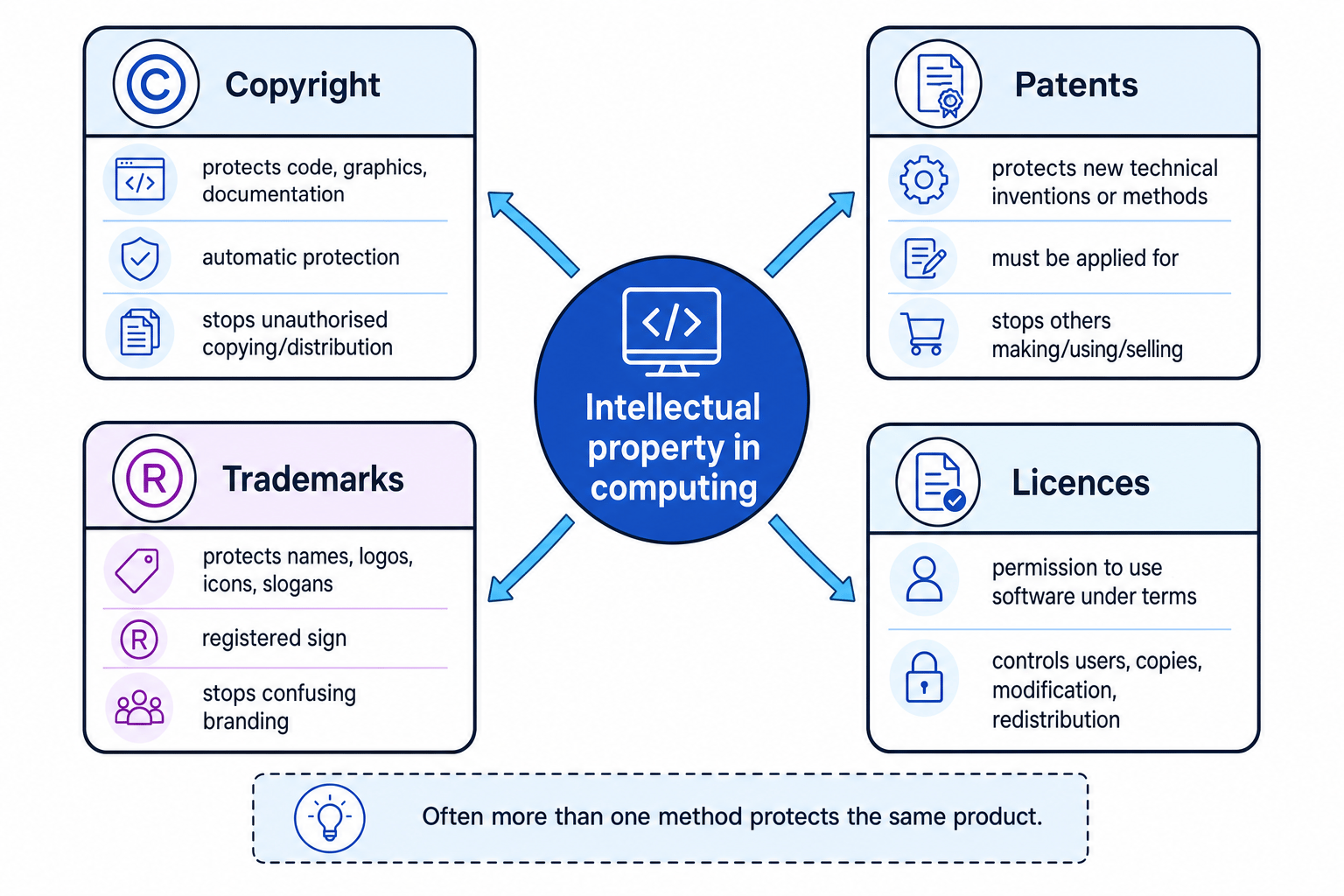
Key Idea
Different methods protect different things
The exam usually gives you a scenario. First identify what is being protected: the code or documents, a technical invention, the brand identity, or the permission to use the software.
Copyright: protecting the created work
Definition
Copyright
Copyright is automatic legal protection for original creative work, including software source code, object code, graphics, written manuals and other documentation.
Source code is the human-readable program text written by a programmer. Object code is the translated machine-code form that the computer can execute.
Copyright does not normally need to be applied for. It exists as soon as the work is created, as long as the work is original.
For software, copyright helps the owner control actions such as:
- copying the program
- selling or distributing copies
- adapting the code into another product
- uploading the code or documentation without permission
Copyright protects the expression of an idea, not every possible idea behind it. Two programmers can both make a revision app, but one cannot simply copy the other programmer’s code, graphics or help pages.
Common Mistake
Free to view is not free to copy
If code, images or documentation are available online, they may still be protected by copyright. “I found it on the internet” is not permission to copy or redistribute it.
Patents: protecting technical inventions
Definition
Patent
A patent is a legal right granted for a new technical invention, giving the owner control over who can make, use or sell that invention for a limited time.
Unlike copyright, a patent is not automatic. The inventor must apply for it, and the invention must usually be new, non-obvious and practical.
In computing, patents may be relevant to things such as:
- a new hardware design
- a new technical method used inside a computer system
- a novel way a device processes data to achieve a technical result
A patent is stronger than copyright in one important way: it can protect the underlying technical invention, not just the exact wording of the code. However, patents are more difficult and expensive to obtain.
Common Mistake
Not every software idea can be patented
A general app idea, ordinary business method or basic algorithm is not automatically patentable. At GCSE, remember the key distinction: patents are for new technical inventions, not for logos, names or ordinary copied code.
Trademarks: protecting brand identity
Definition
Trademark
A trademark is a sign used to identify a product or organisation, such as a name, logo, icon, slogan or symbol.
In computing, trademarks can protect things like:
- the name of an operating system
- an app logo
- a company name
- a product icon
- a slogan used in advertising
The purpose is to stop other people using branding that could confuse customers. For example, a fake app using a very similar name and icon to a well-known banking app could mislead users into trusting it.
A trademark does not protect the program code or the way the software works. It protects the identity associated with the product.
Tip
Think brand, not build
If the scenario is about a name, logo, icon or slogan, the answer is likely to be trademark. If it is about how the system works, trademark is probably not the best choice.
Licencing: giving permission with conditions
Definition
Software licence
A software licence is a legal agreement that gives a user permission to use software under specific conditions set by the owner.
Licencing is different from copyright. Copyright gives the owner legal control over the work. A licence is how the owner grants permission to someone else.
A licence can control conditions such as:
- how many users may use the software
- how many devices it may be installed on
- whether the software may be copied
- whether the source code may be viewed or modified
- whether modified versions may be redistributed, meaning passed on to other people
- how long the user may use the software
You may see different types of licences. Proprietary software is software where the owner keeps tight control, often keeping the source code private. Open-source software is software where the source code is made available, but it still comes with licence rules.
Common Mistake
Open source still has rules
Open-source software is not the same as “no copyright”. The owner uses copyright and a licence to say what users are allowed to do, such as modifying the code or redistributing copies under certain conditions.
Example
Checking a software licence
A licence says: “One named user may install the software on up to two personal devices. The software must not be shared with anyone else.” Sam installs it on a desktop and a laptop, then sends the installer to a friend.
- Compare the number of users: the licence allows one named user, and Sam is still the only user for the desktop and laptop installations.
- Compare the number of devices: the licence allows up to two personal devices, and Sam has used exactly two, so that part is allowed.
- Check redistribution: sending the installer to a friend shares the software with another person, which the licence specifically forbids.
- Conclude that Sam’s own installations are within the device limit, but sharing the installer breaks the licence terms.
How the methods work together
A single software product can be protected by several methods at once. They are not alternatives where you must choose only one.
For example, a game might have:
- copyright for its code, artwork, music and manual
- a trademark for its title and logo
- a licence agreement controlling installation and online play
- possibly a patent if it includes a genuinely new technical invention
Example
Protecting a new revision app
A company creates a revision app with original code, a distinctive owl logo, a new technical handwriting-recognition method and a subscription agreement for schools.
- Match the original code, graphics and written help pages to copyright, because they are created works that can be copied.
- Match the new handwriting-recognition method to a patent only if it is a genuinely new technical invention and the company applies for protection.
- Match the owl logo and app name to a trademark, because they identify the product and help users recognise the brand.
- Match the subscription agreement to licencing, because it sets the conditions for how schools are allowed to use the software.
Quick decision guide
Use these clues when reading a scenario:
- Copied code, images or documentation: copyright.
- New technical invention or method: patent.
- Name, logo, icon or slogan: trademark.
- Rules about installation, users, copying, modification or redistribution: licence.
Exam technique
In the exam
- Identify the exact thing being protected before naming the method.
- Use the correct method: copyright for created work, patent for a technical invention, trademark for brand identity, licence for permission and conditions.
- Add a consequence: for example, “prevents unauthorised copying”, “prevents others making or selling the invention”, or “sets limits on how many users may install it”.
- Avoid giving technical-security answers such as passwords or encryption unless the question specifically asks for technical controls.
Self review
Check yourself
- Why might the same game be protected by copyright, a trademark and a licence?
- A developer posts source code online with no price. What might other people still not be allowed to do?
- What details in a scenario suggest a patent rather than copyright?
You've reached the end
Test yourself on this topic, or move on to the next guide.
How was this guide?