Revision notes for Edexcel GCSE Computer Science Implementing authentication. Open the guide for explanations and worked examples. Written against the Edexcel GCSE Computer Science (1CP2) specification, so the content matches what's examinable rather than general Computer Science background.
Implementing authentication
What you'll learn
- Why programs need authentication before giving access to data or features.
- How an ID and password can be checked using a lookup.
- How to design the logic for a simple login system.
- How to write Python 3 code that implements authentication.
Why authentication is needed
Many computer systems should not let just anyone use them. For example, a school network account, online banking app, or email account should only be accessible to the correct user.
Definition
Authentication
Authentication is the process of checking that a user is who they claim to be before allowing access to a system.
Authentication helps to:
- protect private data
- stop unauthorised users changing or deleting information
- make sure actions can be linked to the correct user account
- restrict access to systems, files, or services
A very common way to authenticate a user is to ask for two pieces of information:
- an ID, often called a username
- a password, which should be known only by that user
Definition
Credentials
Credentials are the details a user gives to prove their identity, such as an ID and password.
Common Mistake
Authentication is not authorisation
Authentication checks who the user is. Authorisation decides what that authenticated user is allowed to do. Logging in is authentication; deciding whether the user can delete files is authorisation.
The basic idea: ID and password
A login system usually stores a list of valid user IDs and their matching passwords. When someone tries to log in, the program compares the entered details with the stored details.
Definition
User ID
A user ID is a value that identifies a particular user account. It is often a username, such as alice, bob123, or sarah.smith.
Definition
Password
A password is a secret string of characters used to help prove that the person entering the ID is the real account holder.
A simple stored user table might look like this:
| ID | Password |
|---|---|
| alice | A1b2C3d4 |
| bob | B5c6D7e8 |
| carol | C9d0E1f2 |
In this example, the ID bob belongs with the password B5c6D7e8.
Key Idea
The ID chooses the row
The program must first find the matching ID, then compare the entered password with the password stored for that same ID.
Example
Checking a login attempt
Suppose the stored user table contains:
| ID | Password |
|---|---|
| alice | A1b2C3d4 |
| bob | B5c6D7e8 |
| carol | C9d0E1f2 |
A user enters ID bob and password B5c6D7e8.
- Find the row where the stored ID is
bob. - The password stored on that row is
B5c6D7e8. - Compare the entered password with the stored password for
bob. - They are exactly the same, so the program should allow access.
Lookup
To authenticate a user, the program needs to search stored data and find the entry for the entered ID.
Definition
Lookup
A lookup is the process of finding a stored value using another value as the key. In authentication, the entered ID is used to find the stored password for that ID.
For GCSE programming, a dictionary in Python is a good way to represent this.
Definition
Dictionary
A dictionary is a Python data structure that stores key-value pairs. Each key is used to look up its matching value.
For authentication:
- the key can be the user ID
- the value can be the stored password
Example:
users = {
    "alice": "A1b2C3d4",
    "bob": "B5c6D7e8",
    "carol": "C9d0E1f2"
}
Here, "bob" is a key. The value stored with it is "B5c6D7e8".
Tip
Think key then value
In a login dictionary, read "bob": "B5c6D7e8" as: “if the ID is bob, the correct password is B5c6D7e8”.
The authentication algorithm
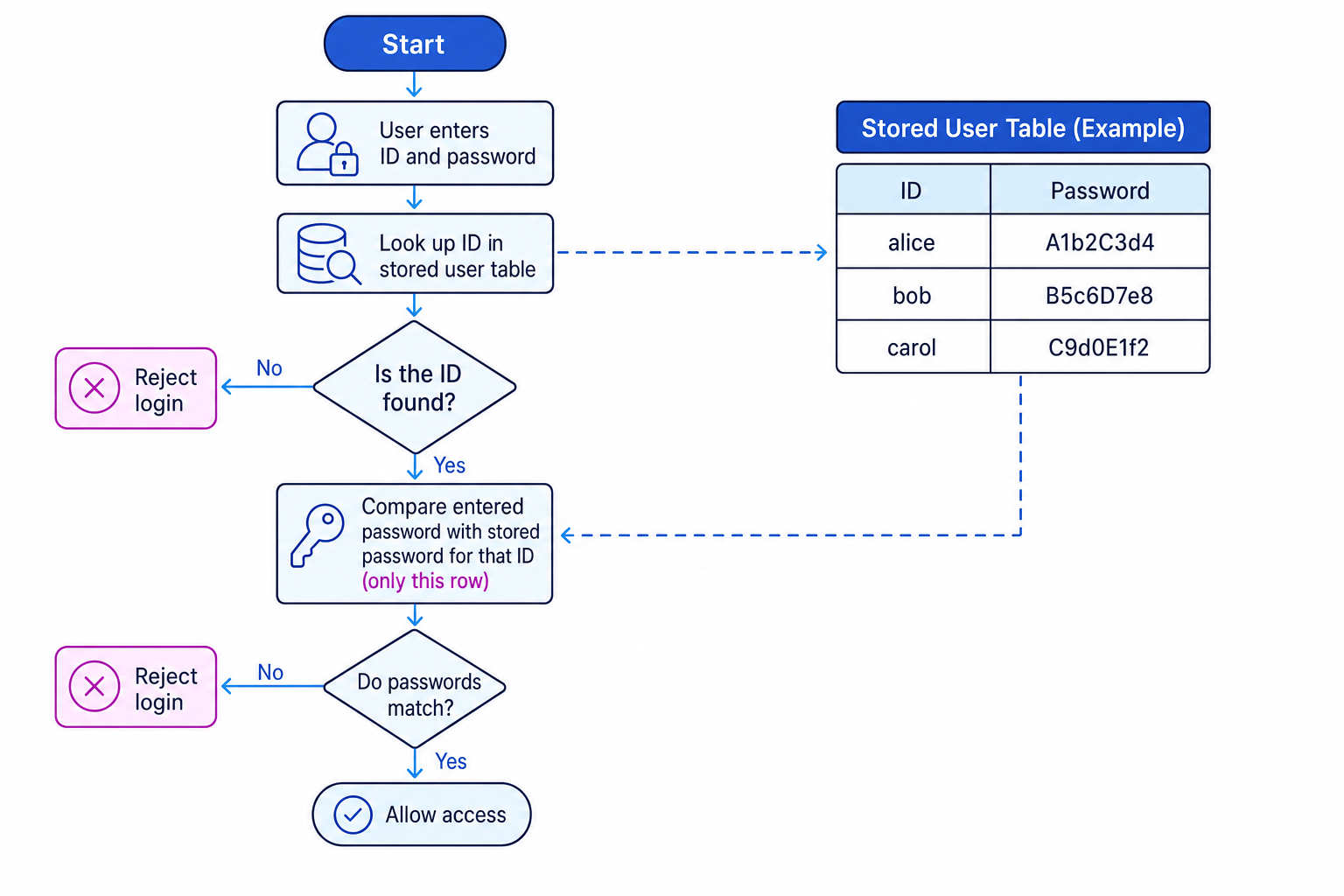
A simple authentication algorithm follows this logic:
- Ask the user to enter their ID.
- Ask the user to enter their password.
- Look up the ID in the stored user table.
- If the ID is not found, reject the login.
- If the ID is found, compare the entered password with the stored password for that ID.
- If they match, allow access.
- If they do not match, reject the login.
This flowchart shows the key decision points in an ID-and-password authentication system.
Common Mistake
Checking any matching password
Do not just check whether the entered password appears anywhere in the table. The password must match the password stored for the entered ID.
Example
Rejecting a mismatched password
A user enters ID alice and password B5c6D7e8.
- Look up the ID
alicein the stored user table. - The stored password for
aliceisA1b2C3d4. - Compare the entered password
B5c6D7e8withA1b2C3d4. - They are different, so the program should reject the login.
Writing the program in Python
Here is a simple Python 3 program that implements authentication using an ID and password lookup.
users = {
    "alice": "A1b2C3d4",
    "bob": "B5c6D7e8",
    "carol": "C9d0E1f2"
}

user_id = input("Enter ID: ")
password = input("Enter password: ")

if user_id in users:
    if password == users[user_id]:
        print("Access granted")
    else:
        print("Access denied")
else:
    print("Access denied")
The line:
if user_id in users:
checks whether the entered ID exists as a key in the dictionary.
The line:
password == users[user_id]
compares the entered password with the password stored for that particular ID.
Definition
Boolean expression
A Boolean expression is an expression that evaluates to either True or False. For example, password == users[user_id] is True if the passwords match and False otherwise.
Example
Tracing the Python login code
The dictionary contains "bob": "B5c6D7e8". The user enters ID bob and password wrongpass.
- Check whether
bobis in the dictionaryusers. It is, so the program enters the firstifblock. - Look up
users["bob"], which gives the stored passwordB5c6D7e8. - Compare
wrongpasswithB5c6D7e8. They are not equal. - The comparison is
False, so the program printsAccess denied.
Using a function
In a larger program, authentication is often written as a function. A function is a named block of code that can be reused.
def authenticate(user_id, password, users):
    if user_id in users:
        return password == users[user_id]
    else:
        return False

users = {
    "alice": "A1b2C3d4",
    "bob": "B5c6D7e8",
    "carol": "C9d0E1f2"
}

entered_id = input("Enter ID: ")
entered_password = input("Enter password: ")

if authenticate(entered_id, entered_password, users):
    print("Access granted")
else:
    print("Access denied")
This version separates the login decision from the input and output. That makes the program easier to test and reuse.
Key Idea
Authentication returns a decision
A useful authentication function should return a clear result, usually True for valid credentials and False for invalid credentials.
Exact matching matters
Passwords are usually checked using exact string comparison.
That means:
- uppercase and lowercase letters are different
- spaces count as characters
- every character must be in the same order
For example, these are all different strings:
Password1password1Password1
The last one has a space at the end.
Common Mistake
Changing the password before comparison
Do not convert passwords to uppercase or lowercase before checking them unless the question specifically tells you to. Passwords are normally case-sensitive.
Handling missing IDs safely
A program should not try to look up a password for an ID that does not exist.
This would be unsafe in Python:
if password == users[user_id]:
    print("Access granted")
If user_id is not in the dictionary, the program can crash because there is no stored value to retrieve.
That is why the safer version checks the ID first:
if user_id in users:
    if password == users[user_id]:
        print("Access granted")
Common Mistake
GCSE examples versus real systems
For GCSE programming, it is fine to use a small dictionary of sample passwords to show the authentication logic. Real systems should not store plain text passwords; they use more secure techniques such as password hashing, but you do not need to implement that here.
Input validation is not the same as authentication
You may also see checks on the input before authentication, such as making sure the ID and password are not blank.
For example:
if entered_id == "" or entered_password == "":
    print("ID and password must both be entered")
else:
    if authenticate(entered_id, entered_password, users):
        print("Access granted")
    else:
        print("Access denied")
This is useful, but it is not enough on its own.
Definition
Validation
Validation checks whether input is sensible or follows a rule, such as “must not be blank”. It does not prove that the user is genuine.
A password being present only means the user typed something. Authentication checks whether it is the correct password for that ID.
Exam technique
In the exam
- If asked to describe authentication, say that it checks a user’s identity before allowing access.
- If asked to write a program, make sure you look up the ID first, then compare the password with the stored password for that ID.
- Use clear output such as
Access grantedandAccess denied, and handle both invalid IDs and wrong passwords.
Self review
Check yourself
- Why must the program check the ID before comparing the password?
- In a Python dictionary used for login, what should be the key and what should be the value?
- What is wrong with accepting a password just because it appears somewhere in the stored table?
Input/output
Guide 4 of 4
You've reached the end
Test yourself on this topic, or move on to the next guide.
How was this guide?