Revision notes for Edexcel GCSE Computer Science Using arithmetic operators. Open the guide for explanations and worked examples. Written against the Edexcel GCSE Computer Science (1CP2) specification, so the content matches what's examinable rather than general Computer Science background.
Using arithmetic operators
What you'll learn
- How to use Python arithmetic operators:
+,-,*,/,%,//and**. - The difference between division, integer division and modulus.
- How Python decides the order of calculations in an expression.
- How to write short program statements that calculate and store numeric results.
Arithmetic in programs
A program often needs to calculate values: scores, totals, averages, positions, costs, distances, file sizes, and more. In Python 3, you write these calculations using arithmetic operators.
Definition
Arithmetic operators and expressions
An arithmetic operator is a symbol that tells the computer to perform a calculation. An operand is a value or variable that the operator works on. An arithmetic expression is a piece of code that combines operands and operators to produce a numeric result.
For example, in score + 10, the operator is +, and the operands are score and 10.
A variable is a named storage location in a program. You can store the result of a calculation in a variable using assignment, written with = in Python.
For example: total = price * quantity
This means: calculate price * quantity, then store the result in total.
The arithmetic operators you need
| Operation | Python operator | Example | Result | Meaning |
|---|---|---|---|---|
| Addition | + | 7 + 2 | 9 | Adds values |
| Subtraction | - | 7 - 2 | 5 | Takes one value away from another |
| Multiplication | * | 7 * 2 | 14 | Multiplies values |
| Division | / | 7 / 2 | 3.5 | Gives a real-number answer |
| Integer division | // | 7 // 2 | 3 | Gives the whole-number quotient |
| Modulus | % | 7 % 2 | 1 | Gives the remainder |
| Exponentiation | <strong> | 2 </strong> 3 | 8 | Raises a number to a power |
Common Mistake
Writing maths symbols instead of Python symbols
Python does not understand 2x, 2^3, or a written divide sign. Write 2 * x, 2 ** 3, and 7 / 2 instead.
Assignment: storing a calculated result
In Python, assignment uses =. The expression on the right is evaluated first, then the answer is stored in the variable on the left.
For example:
score = 12score = score + 5
The second line may look strange at first, because score appears on both sides. In programming, this means “take the old value of score, add 5, then store the new value back into score”.
Example
Updating a score
-
Start with the current value:
scorestores12. -
Evaluate the right-hand side of
score = score + 5: this becomes12 + 5, which gives17. -
Store the result back into the variable, so
scorenow stores17instead of12.
Key Idea
Assignment is not a maths equation
In Python, score = score + 5 is valid because = means “store this value”, not “these two sides are already equal”.
Multiplication, division and real answers
Multiplication uses *. Division uses /.
In Python 3, / gives a float, which is Python’s name for a number that may have a decimal part. So 8 / 2 gives 4.0, not just 4.
That matters when the rest of your program expects a whole number.
Common Mistake
Expecting division to give an integer
7 / 2 gives 3.5. If you want the whole-number part of the answer, use integer division: 7 // 2 gives 3.
Integer division and modulus
Integer division and modulus are a pair. They are useful when you are splitting something into equal groups.
Definition
Integer division and modulus
Integer division using // gives the whole-number quotient. Modulus using % gives the remainder after division.
For positive whole numbers, they fit this pattern: dividend equals divisor times quotient plus remainder.
For example, 29 // 6 gives 4, because 6 fits into 29 four complete times. Then 29 % 6 gives 5, because 5 is left over.
Example
Finding full groups and remainders
-
Suppose 29 students are put into groups of 6. Use integer division to find the number of full groups:
29 // 6gives4. -
Use modulus to find how many students are left over:
29 % 6gives5. -
Check the result using the relationship 29=6×4+529 = 6 \times 4 + 529=6×4+5, so there are 4 full groups and 5 students left over.
Tip
When modulus is useful
Modulus is useful for “left over” questions. For example, number % 2 gives 0 when a whole number divides exactly by 2, so it can help detect even numbers.
Common Mistake
Dividing by zero
You cannot use /, // or % with zero as the divisor. For example, 10 / 0 causes a Python error because division by zero is undefined.
Exponentiation: powers
Exponentiation means raising a number to a power. In Python, use **.
Examples:
2 ** 3means 2 cubed, giving8.5 ** 2means 5 squared, giving25.10 ** 3gives1000.
This is useful in Computer Science. For example, 8 bits can represent 2 ** 8 different unsigned values, which is 256 values.
Operator precedence: the order of calculation
Operator precedence means the order Python uses when an expression contains more than one operator.
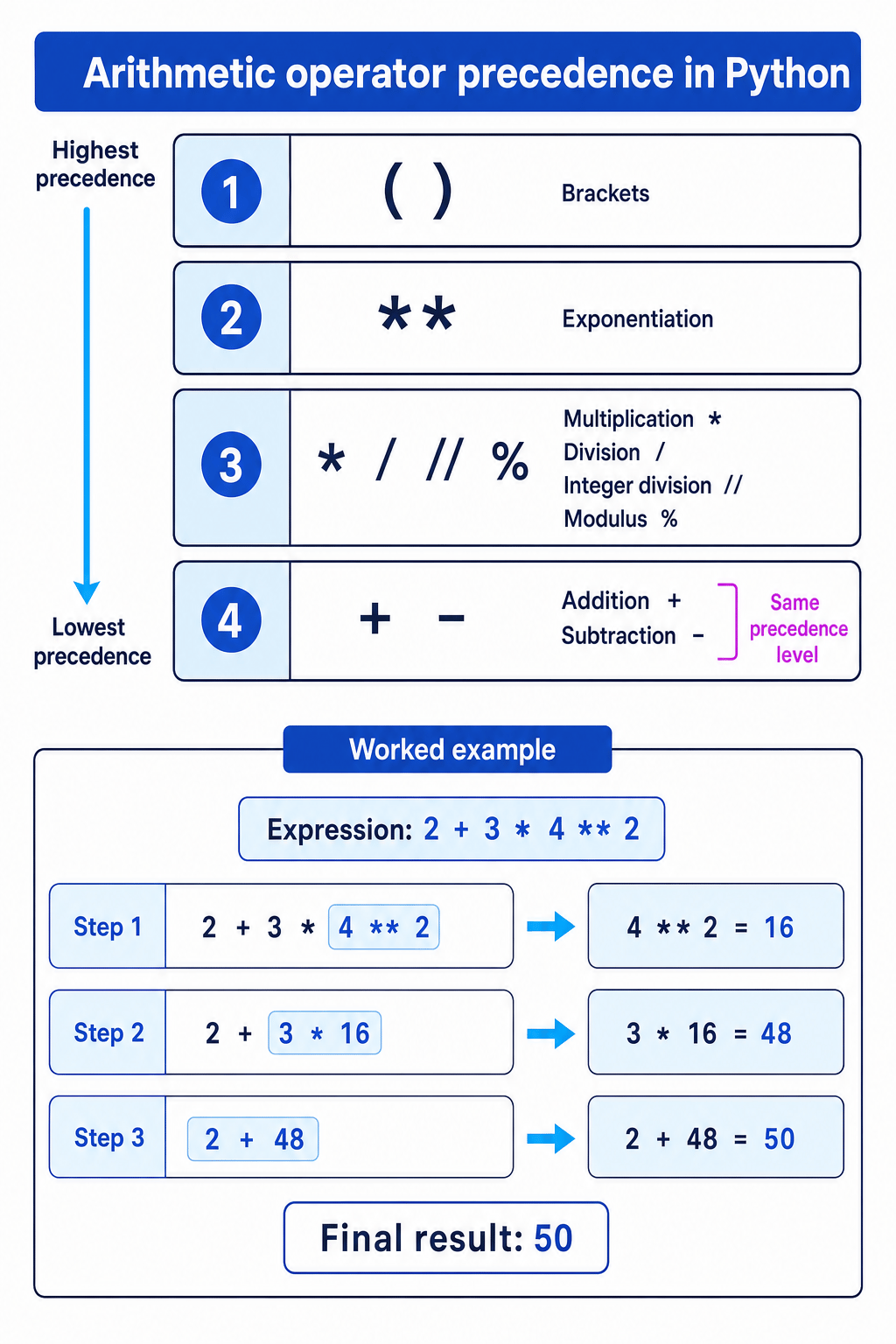
Python does not simply calculate from left to right every time. Some operators are done before others. Brackets are done first, then exponentiation, then multiplication/division-related operators, then addition and subtraction.
Example
Evaluating a mixed expression
-
In
2 + 3 * 4 <strong> 2, exponentiation has the highest precedence after brackets, so calculate4 </strong> 2first. The expression becomes2 + 3 * 16. -
Multiplication is done before addition, so calculate
3 * 16. The expression becomes2 + 48. -
Finally, calculate the addition. The result is
50.
Operators on the same precedence level are usually evaluated from left to right. For GCSE programming, the safest habit is to use brackets whenever the intended order might not be obvious.
Using brackets to control the result
Brackets force Python to calculate part of an expression first. This can completely change the answer.
For example:
10 + 6 // 4gives11, because6 // 4is calculated first and gives1.(10 + 6) // 4gives4, because the bracketed addition is calculated first.
Key Idea
Brackets make your intention clear
Even when Python would calculate the expression correctly without brackets, adding brackets can make your program easier to read and reduce mistakes.
Writing arithmetic with user input
If a program asks the user to type a value using input(), Python receives it as a string, which means text. To do arithmetic, convert it to a number first.
Use:
int(...)for whole numbers, such asage = int(input("Age: "))float(...)for numbers that may contain decimals, such asprice = float(input("Price: "))
Then you can calculate with the value:
quantity = int(input("Quantity: "))price = float(input("Price of one item: "))total = quantity * price
Common Mistake
Forgetting to convert input
If you write quantity = input("Quantity: "), the value is text. Convert it with int() before using arithmetic, otherwise your calculation may fail or behave unexpectedly.
Choosing the right operator
A good way to choose the correct operator is to translate the problem into what you want the computer to calculate.
| If the problem says... | You probably need... | Example |
|---|---|---|
| “total”, “more”, “increase by” | + | score = score + bonus |
| “difference”, “decrease by”, “left after taking away” | - | lives = lives - 1 |
| “each”, “per item”, “repeated groups” | * | cost = price * quantity |
| “share equally with possible decimals” | / | average = total / count |
| “number of full groups” | // | boxes = items // items_per_box |
| “left over” or “remainder” | % | left_over = items % items_per_box |
| “squared”, “cubed”, “power of” | <strong> | area = side </strong> 2 |
Exam technique
In the exam
-
Decide whether the question needs a real-number division answer using
/, or a whole-number quotient and remainder using//and%. -
When an expression has several operators, apply precedence carefully: brackets, powers, multiplication/division/integer division/modulus, then addition/subtraction.
-
Use Python syntax exactly:
*for multiplication,**for powers, and meaningful variable names for calculated values.
Self review
Check yourself
- What is the difference between
17 / 5,17 // 5and17 % 5? - Why does
2 + 3 * 4not give the same result as(2 + 3) * 4? - What conversion might you need if a number has been entered using
input()?
Operators
Guide 1 of 3
You've reached the end
Test yourself on this topic, or move on to the next guide.
How was this guide?