Revision notes for Edexcel GCSE Computer Science Hexadecimal notation and conversion. Open the guide for explanations and worked examples. Written against the Edexcel GCSE Computer Science (1CP2) specification, so the content matches what's examinable rather than general Computer Science background.
Hexadecimal notation and conversion
What you'll learn
- What hexadecimal means and why it is useful in Computer Science.
- How bits, nibbles and bytes connect to hexadecimal.
- How to convert binary to hexadecimal and hexadecimal to binary.
- How to avoid common mistakes with grouping and leading zeros.
Before hexadecimal: the binary recap
Computers store and process data using binary, which is a base 2 number system. That means it only uses two digit symbols: 0 and 1.
A denary number system is base 10, which is the everyday system humans usually use. It uses the digit symbols 0 to 9.
Definition
Bit, nibble and byte
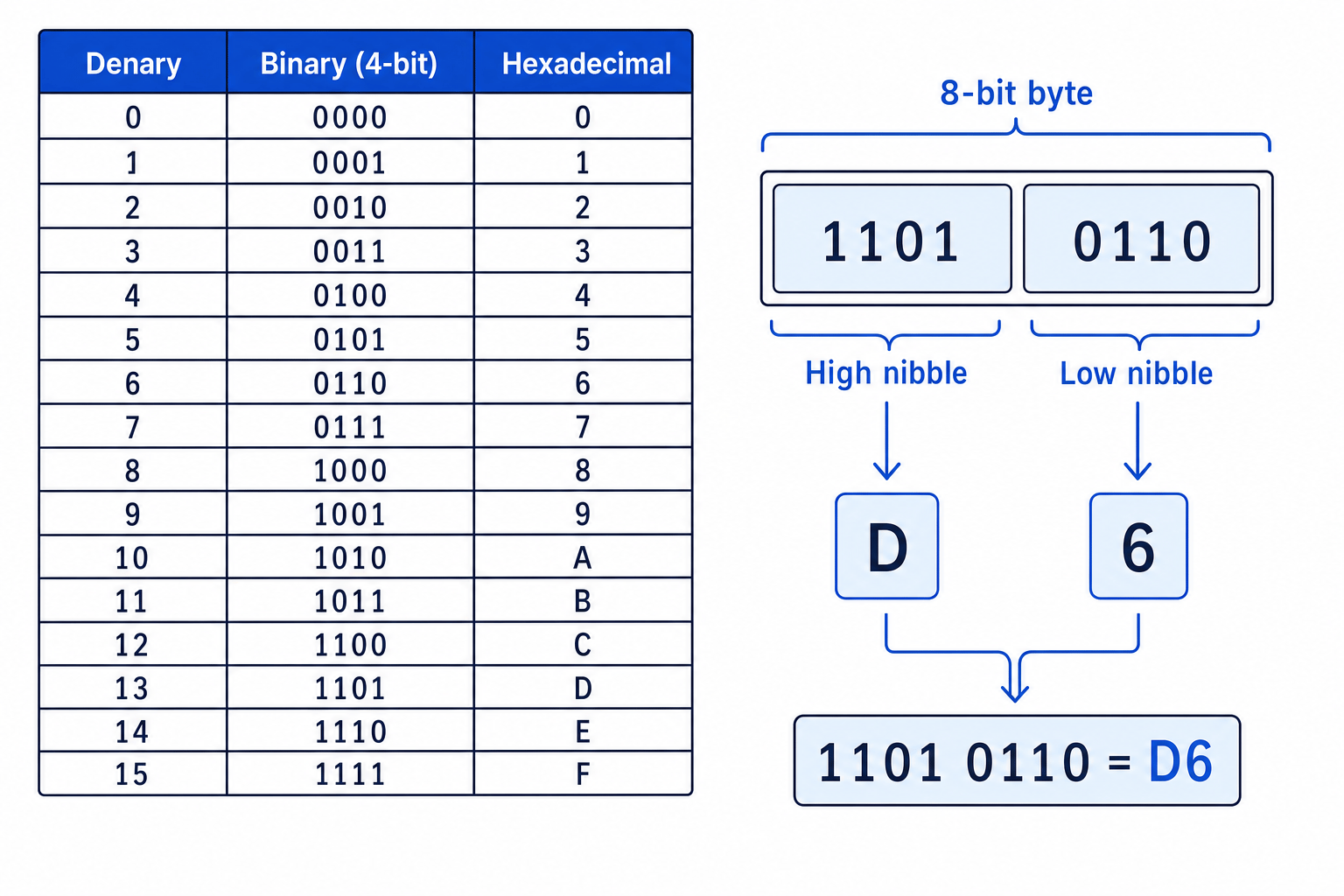
A bit is one binary digit, either 0 or 1. A nibble is a group of 4 bits. A byte is a group of 8 bits, which is the same as 2 nibbles.
For this GCSE specification, you often work with 8-bit binary values. An 8-bit unsigned number can represent values from 0 to 255.
What hexadecimal means
Hexadecimal, often shortened to hex, is a base 16 number system.
Because it is base 16, it needs 16 different digit symbols. It uses:
- 0, 1, 2, 3, 4, 5, 6, 7, 8, 9
- A, B, C, D, E, F
The letters are used for the values after 9:
| Hex digit | Denary value | Binary nibble |
|---|---|---|
| A | 10 | 1010 |
| B | 11 | 1011 |
| C | 12 | 1100 |
| D | 13 | 1101 |
| E | 14 | 1110 |
| F | 15 | 1111 |
The key link is that 4 bits have exactly 16 possible patterns, because 24=162^4 = 1624=16. So one hexadecimal digit matches one binary nibble perfectly.
Key Idea
The nibble rule
One hexadecimal digit represents exactly one 4-bit binary nibble. Therefore, one 8-bit byte can be written as exactly two hexadecimal digits.
Example
Finding the hex digit for a nibble
Convert the binary nibble 1010 into hexadecimal.
- Use the nibble place values 8, 4, 2, 1.
- Add the place values where the bit is 1: 8+2=108+2=108+2=10.
- Denary 10 is represented by A in hexadecimal, so 1010 becomes A.
Why hexadecimal notation is used
Binary is what computers actually store and process, but long binary numbers are hard for humans to read, copy and check.
Hexadecimal is used because it is a shorter, clearer way to write binary patterns. It is especially useful when showing things like memory addresses, machine-code values, colour values and error codes.
For example, the binary byte 1111 1111 can be written as FF in hexadecimal. That is much shorter, but it represents the same bit pattern.
Example
Comparing binary and hexadecimal length
Convert 1111 1111 into hexadecimal and compare the length.
- Split the byte into two nibbles: 1111 and 1111.
- Convert each nibble: 1111 is F, and the second 1111 is also F.
- Join the two hex digits to get FF, so 8 binary digits have been written as 2 hexadecimal digits.
Common Mistake
Thinking hex is stored instead of binary
Hexadecimal is a human-friendly notation for binary patterns. The computer hardware still stores data using bits: 0s and 1s.
Converting binary to hexadecimal
To convert from binary to hexadecimal, you convert each nibble separately.
Method
- Start from the right-hand side of the binary number.
- Split the bits into groups of 4.
- If the leftmost group has fewer than 4 bits, add leading zeros to complete the nibble.
- Convert each nibble into its hexadecimal digit.
- Join the hexadecimal digits together.
For most 8-bit GCSE questions, the binary value will already split neatly into two nibbles, such as 1011 0110.
Example
Converting binary to hexadecimal
Convert 1011 0110 into hexadecimal.
- Split the byte into nibbles: 1011 and 0110.
- Convert 1011 using the place values 8, 4, 2, 1: 8+0+2+1=118+0+2+1=118+0+2+1=11, which is B in hexadecimal.
- Convert 0110: 0+4+2+0=60+4+2+0=60+4+2+0=6, which is 6 in hexadecimal.
- Join the two hex digits: 1011 0110 is B6.
Tip
Group from the right
If the binary number is not already spaced into nibbles, group from the right. The rightmost bits are the least significant bits, so grouping from the left can give the wrong answer.
Padding with leading zeros
Sometimes a binary number may not contain a multiple of 4 bits. To convert it to hex, add zeros on the left until the leftmost group has 4 bits.
For example, 101101 becomes 0010 1101 before converting to hex.
Common Mistake
Adding zeros on the wrong side
Adding zeros to the right changes the value of the binary number. For conversion, only add leading zeros on the left.
Converting hexadecimal to binary
To convert from hexadecimal to binary, replace each hex digit with its 4-bit binary nibble.
This is usually easier than binary to hex because you do not need to group anything first: each hex digit becomes exactly 4 bits.
Method
- Take one hexadecimal digit at a time.
- Convert it into its 4-bit binary nibble.
- Keep leading zeros inside each nibble.
- Join the nibbles together.
Example
Converting hexadecimal to binary
Convert 4C into 8-bit binary.
- Convert 4 into a 4-bit nibble: 0100.
- Convert C into its nibble: 1100.
- Join the nibbles together: 4C becomes 0100 1100.
Common Mistake
Dropping leading zeros in a nibble
The hex digit 4 converts to 0100, not just 100, when you are writing full nibbles. Two hex digits should become 8 bits.
Hex represents a bit pattern
A hexadecimal value shows the same pattern as binary, just in a shorter form.
For example, FF represents the binary byte 1111 1111. If the question treats it as an unsigned 8-bit number, that pattern means 255. If the question treats it as an 8-bit two’s-complement number, the same pattern represents -1.
Common Mistake
Context gives the meaning
Hexadecimal tells you the bit pattern, but not whether it should be interpreted as unsigned or signed. Read the question carefully.
Quick checks for your conversions
Use these checks to catch errors:
- A single hex digit should always become 4 binary bits.
- Two hex digits should become 8 binary bits.
- Binary should be grouped in nibbles, for example 1100 0011.
- Hex digits can only be 0 to 9 or A to F.
- Do not convert the whole binary number through denary unless you are using it as a check; nibble conversion is faster and safer.
Exam technique
In the exam
- For binary to hex, split the binary from the right into nibbles before converting.
- For hex to binary, replace every hex digit with exactly 4 bits, including leading zeros such as 0100.
- Use uppercase A to F and space binary answers into nibbles to reduce copying mistakes.
Self review
Check yourself
- Why does one hexadecimal digit match exactly one nibble?
- Convert 0110 1111 into hexadecimal.
- Convert 3A into 8-bit binary.
You've reached the end
Test yourself on this topic, or move on to the next guide.
How was this guide?