Revision notes for Edexcel GCSE Computer Science Encoding characters with 7-bit ASCII. Open the guide for explanations and worked examples. Written against the Edexcel GCSE Computer Science (1CP2) specification, so the content matches what's examinable rather than general Computer Science background.
Encoding characters with 7-bit ASCII
What you'll learn
- What a character is: a letter, digit, symbol, space, or non-printing instruction.
- How ASCII is a standard way to give characters binary codes.
- Why 7 bits — binary digits, each 0 or 1 — give 128 possible codes.
- How to encode and decode simple text using 7-bit ASCII.
Computers only store binary
A computer’s memory stores data using bits. A bit is a single binary digit: either 0 or 1.
Text is not stored as the shape of a letter. Instead, each character is represented by a number, and that number is stored in binary.
Definition
Binary and denary
Binary is base-2, using only 0 and 1. Denary is base-10, the number system humans usually use, with digits 0 to 9.
So when you type the character A, the computer needs an agreed code for A, then stores that code as bits.
Characters and character sets
A character is one item of text. This includes:
- letters, such as
Aorz - digits, such as
0or9 - punctuation, such as
!or? - spaces
- non-printing instructions, such as “move to a new line”
A character set is an agreed list of characters, with a unique code assigned to each one.
Definition
Character set
A character set is a defined collection of characters that a computer can represent, where each character has its own unique numeric code.
Key Idea
Text is stored as codes
To store text, the computer stores the code for each character, not the character’s visual appearance.
What ASCII means
ASCII stands for American Standard Code for Information Interchange. It is a character set used to represent common English letters, digits, punctuation, spaces, and control characters.
In 7-bit ASCII, each character code is stored using exactly 7 bits.
Definition
7-bit ASCII
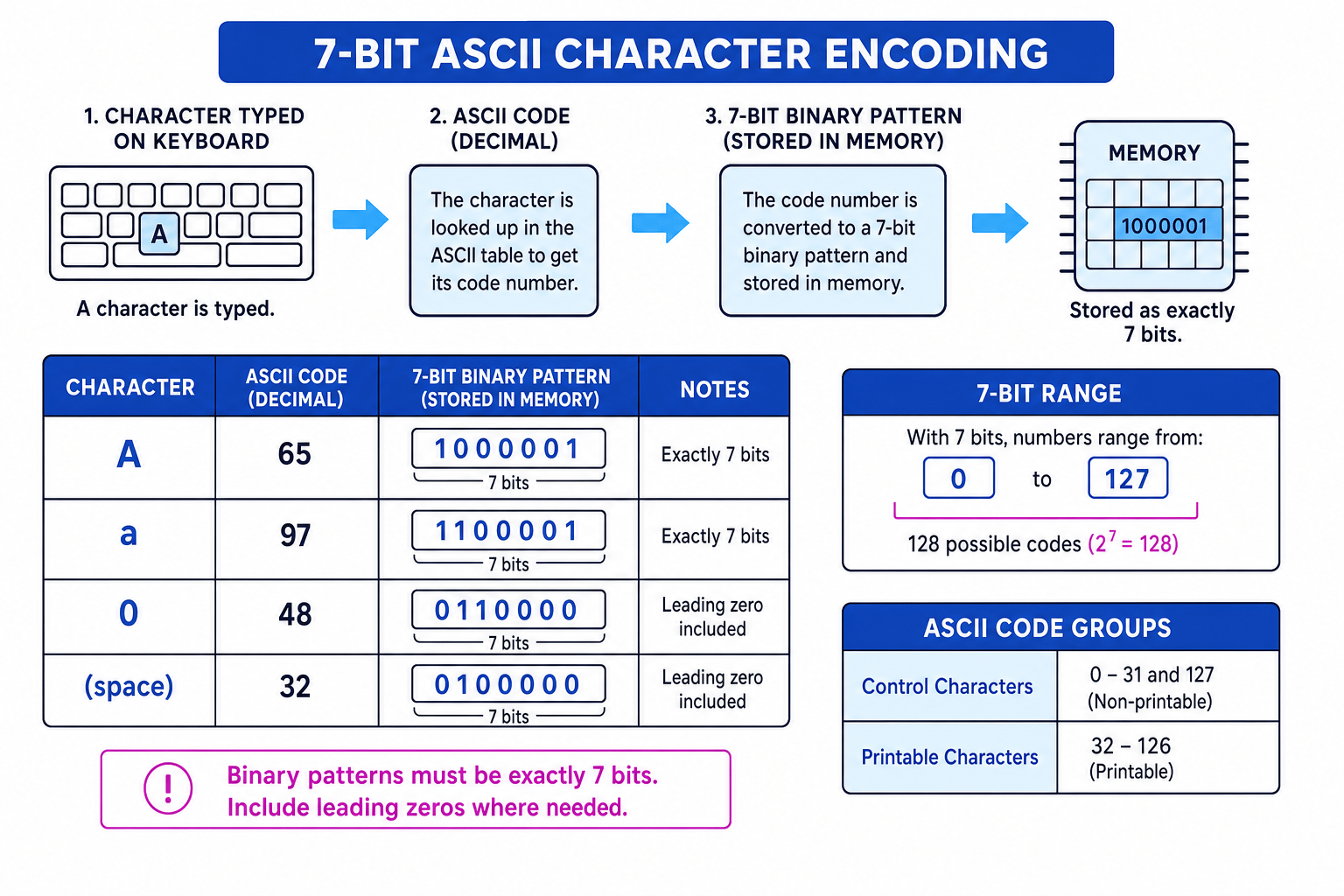
7-bit ASCII is a character encoding system where each character is assigned a code from 0 to 127, stored as a 7-bit binary pattern.
Here is the big picture: a typed character is looked up in the ASCII table, changed into a 7-bit binary pattern, and stored in memory.
Printable and control characters
ASCII codes include two broad types of character:
- Printable characters: visible characters such as letters, digits, punctuation, and the space character.
- Control characters: non-printing instructions, such as tab or new line.
ASCII codes 32 to 126 are printable. Codes 0 to 31 and 127 are control characters.
Tip
Space counts as a character
The space character has its own ASCII code: 32. If you are counting the characters in a string, spaces count too.
Why 7 bits gives 128 codes
Each bit has 2 possible values: 0 or 1.
With more bits, the number of possible patterns doubles each time. For n bits, the number of possible patterns is:
For 7-bit ASCII:
27=1282^7 = 12827=128That means there are 128 different ASCII codes. Because counting starts at 0, the codes go from 0 to 127.
Example
Finding the number of ASCII codes
- Each bit has 2 possible states: 0 or 1.
- For 7 independent bits, multiply the choices: 27=1282^7 = 12827=128 possible patterns.
- Since the first code is 0, the final code is 128−1=127128 - 1 = 127128−1=127, so the range is 0 to 127.
Common Mistake
Saying the largest code is 128
There are 128 possible codes, but they are numbered 0 to 127. The largest 7-bit ASCII code is 127, not 128.
Converting an ASCII code into 7-bit binary
To encode a character using ASCII, you usually follow this process:
- Find the character in the ASCII table.
- Read its denary ASCII code.
- Convert that denary code into 7-bit binary.
- Store the 7-bit pattern.
The 7-bit place values are:
| Place value | 64 | 32 | 16 | 8 | 4 | 2 | 1 |
|---|
For example, the denary number 67 is made from 64 + 2 + 1, so its 7-bit binary pattern is 1000011.
Example
Encoding a character
Encode the character C using 7-bit ASCII. The ASCII table gives C as denary 67.
- Choose the 7-bit place values needed to make 67: 64, 2, and 1.
- Put 1 under those place values and 0 under the others: 64 is used, 32 is not, 16 is not, 8 is not, 4 is not, 2 is used, 1 is used.
- Read the bits from left to right to get
1000011, soCis stored as1000011.
Common Mistake
Dropping leading zeros
A 7-bit ASCII pattern must have exactly 7 bits. For example, the ASCII code for ! is 33, which is 0100001, not just 100001.
Decoding 7-bit ASCII back into text
Decoding means reversing the process:
- Split the binary data into 7-bit groups.
- Convert each 7-bit group into a denary number.
- Look up each denary number in the ASCII table.
- Write the matching character.
Definition
Decoding
Decoding means converting stored binary data back into meaningful information, such as text.
Example
Decoding a 7-bit ASCII code
Decode the ASCII binary pattern 1100001.
- Match the bits to the 7-bit place values: 64, 32, 16, 8, 4, 2, 1.
- Add the place values where the bit is 1: 64 + 32 + 1 = 97.
- Look up denary 97 in the ASCII table: it represents the character
a.
Encoding strings
A string is a sequence of characters. In 7-bit ASCII, each character in the string is encoded separately using 7 bits.
Definition
String
A string is text made from a sequence of characters, such as Hello, A7, or Hi!.
For example, the string Hi! has three characters: H, i, and !. Each one gets its own 7-bit ASCII code.
Example
Encoding a short string
Encode the string Hi! using 7-bit ASCII. The ASCII table gives H as 72, i as 105, and ! as 33.
- Convert
Hfrom denary 72 into 7-bit binary: 72 = 64 + 8, soHis1001000. - Convert
ifrom denary 105 into 7-bit binary: 105 = 64 + 32 + 8 + 1, soiis1101001. - Convert
!from denary 33 into 7-bit binary: 33 = 32 + 1, so!is0100001. - Put the character codes in order:
1001000 1101001 0100001. - Calculate the storage needed for 3 characters in 7-bit ASCII: 3×7=213 \times 7 = 213×7=21 bits.
Key Idea
Order matters
A string is stored as the ASCII codes for each character in order. Changing the order of the codes changes the text.
Important ASCII details
Uppercase and lowercase are different
ASCII treats uppercase and lowercase letters as different characters.
For example:
Ahas ASCII code 65ahas ASCII code 97
So A and a are not stored using the same binary pattern.
Digit characters are not the same as number values
The character 5 is a piece of text. It is not the same thing as the numeric value 5.
In ASCII, the digit character 5 has code 53, so it is stored as 0110101 in 7-bit ASCII.
Common Mistake
Confusing text digits with numbers
If a question says the character 5, use the ASCII code for the digit character. Do not treat it as the number 5.
ASCII is limited
7-bit ASCII only has 128 possible codes. That is enough for basic English letters, digits, punctuation, spaces, and control characters, but not enough for every language, emoji, or modern symbol.
Common Mistake
Real systems may use other encodings
Modern computers often use encodings such as Unicode, and text may be stored in 8-bit bytes. For this GCSE topic, if the question says 7-bit ASCII, treat each character as exactly 7 bits unless told otherwise.
Exam technique
In the exam
- If asked how many characters 7-bit ASCII can represent, calculate 27=1282^7 = 12827=128 and remember the code range is 0 to 127.
- If converting a character, use the ASCII table first, then convert the denary code into exactly 7 bits.
- If encoding a string, count every character separately, including spaces and punctuation, then multiply by 7 bits per character.
Self review
Check yourself
- Why does 7-bit ASCII have 128 possible codes but a maximum code of 127?
- What is the difference between the character
7and the number 7? - How many bits are needed to store the string
CS!using 7-bit ASCII?
You've reached the end
Test yourself on this topic, or move on to the next guide.
How was this guide?