Revision notes for Edexcel GCSE Computer Science Structural components of programs. Open the guide for explanations and worked examples. Written against the Edexcel GCSE Computer Science (1CP2) specification, so the content matches what's examinable rather than general Computer Science background.
Structural components of programs
What you'll learn
- What the main structural components of a program are.
- How to recognise constants, variables, assignments, selection, loops and subprograms in Python code.
- The difference between repetition and iteration.
- How input, output, parameters and data structures help programs solve problems.
The big picture: programs are built from components
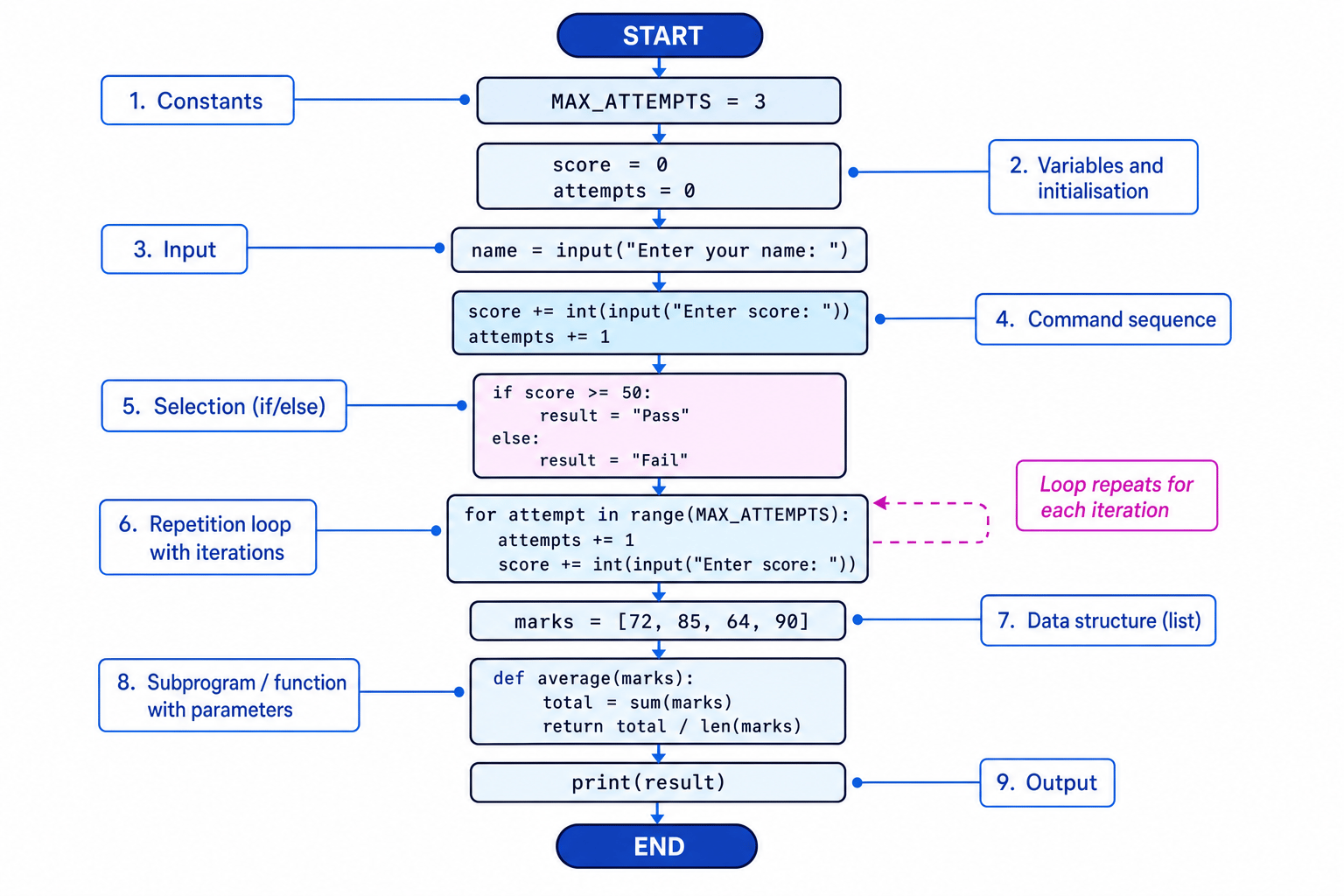
A program is not just a long list of random instructions. It is made from structural components: recognisable building blocks that each have a job.
Definition
Structural component
A structural component is a part of a program with a particular role, such as storing data, choosing between paths, repeating instructions, or splitting code into subprograms.
In GCSE Computer Science, you need to understand what each component does and be able to identify it in a program.
Key Idea
Main idea
A program stores data, processes it using commands, controls the order of execution, and communicates using input and output.
Constants and variables
Variables
A variable is a named storage location in memory. Its value can change while the program runs.
For example:
score = 0
score = score + 10
The variable is called score. It starts at 0, then changes to 10.
Definition
Variable
A variable stores a value that can be read and changed during program execution.
Constants
A constant is a named value that should not change while the program runs.
In Python, constants are not enforced by the language, but programmers usually write their names in capital letters:
PASS_MARK = 50
MAX_ATTEMPTS = 3
Definition
Constant
A constant stores a value that is intended to stay the same throughout the program.
Constants make programs easier to read and maintain. If the pass mark changes, you only need to update PASS_MARK once.
Initialisation and assignment statements
An assignment statement gives a value to a variable or updates the value stored in it.
lives = 3
lives = lives - 1
The first line gives lives the value 3. The second line changes it by subtracting 1.
Definition
Initialisation
Initialisation is the first assignment of a value to a variable, usually before the variable is used.
Definition
Assignment statement
An assignment statement stores a value in a variable using the assignment operator =.
Common Mistake
Assignment does not mean equals
In Python, score = score + 1 does not mean “score is equal to score plus 1” in a maths sense. It means “calculate the current score plus 1, then store the result back in score.”
Example
Updating a variable
total = 10
total = total + 5
total = total * 2
print(total)
- The first assignment initialises
totalto 10. - The second assignment uses the current value, 10, adds 5, and stores 15 back in
total. - The third assignment uses the current value, 15, multiplies it by 2, and stores 30 back in
total. - The output statement displays
30.
Command sequences
A command sequence is a set of instructions carried out in order.
name = input("Enter your name: ")
message = "Hello " + name
print(message)
Python normally runs commands from top to bottom. The order matters: you cannot print message before it has been created.
Definition
Command sequence
A command sequence is a group of statements executed one after another in the order they appear, unless a control structure changes the flow.
Selection
Selection lets a program choose between different paths. It usually uses an if, elif or else statement.
A condition is a test that evaluates to either True or False.
mark = int(input("Enter mark: "))

if mark >= 50:
    result = "Pass"
else:
    result = "Fail"

print(result)
If the condition mark >= 50 is true, the program stores "Pass". Otherwise, it stores "Fail".
Definition
Selection
Selection is a control structure that chooses which block of code to run based on a condition.
Tip
Spotting selection
Look for keywords such as if, elif and else. They show that the program is making a decision.
Repetition and iteration
Repetition means running a block of code more than once. This is usually done using a loop.
In Python, common loops are for loops and while loops:
for count in range(3):
    print("Hello")
This repeats the print command 3 times.
An iteration is one pass through a loop. If a loop runs 3 times, it has 3 iterations.
Definition
Repetition
Repetition is a control structure that repeats a block of code while a condition is met or for a set number of times.
Definition
Iteration
An iteration is one complete execution of the repeated block inside a loop.
Common Mistake
Repetition vs iteration
The loop is the repetition structure. One journey through the loop body is an iteration.
Example
Tracing loop iterations
total = 0

for mark in [4, 7, 3]:
    total = total + mark

print(total)
- Before the loop starts,
totalis initialised to 0. - On the first iteration,
markis 4, sototalbecomes 4. - On the second iteration,
markis 7, sototalbecomes 11. - On the third iteration,
markis 3, sototalbecomes 14. - After the loop finishes, the program outputs
14.
Data structures
A data structure stores multiple related values together.
At GCSE, you will often see a Python list used as a data structure:
marks = [72, 85, 64, 90]
Instead of creating separate variables such as mark1, mark2, mark3 and mark4, the program stores all the marks in one list called marks.
Definition
Data structure
A data structure is a way of organising and storing data so it can be used efficiently by a program.
Data structures are useful when a program needs to process a collection of values, such as names, scores, temperatures or items in a shopping basket.
Subprograms
A subprogram is a named section of code that performs a specific task. In Python, this is usually written as a function using def.
def calculate_average(total, number_of_marks):
    average = total / number_of_marks
    return average
Subprograms help make programs easier to read, test and reuse.
Definition
Subprogram
A subprogram is a named block of code designed to carry out a particular task.
A subprogram can receive values through parameters.
Definition
Parameter
A parameter is a named value that a subprogram expects to receive when it is called.
When the subprogram is actually used, the values passed into it are often called arguments.
def add_bonus(score, bonus):
    return score + bonus

final_score = add_bonus(70, 5)
print(final_score)
Here, score and bonus are parameters. The values 70 and 5 are passed into the subprogram when it is called.
Example
Following parameters through a subprogram
- The call
add_bonus(70, 5)sends 70 into the parameterscoreand 5 into the parameterbonus. - Inside the subprogram, the expression
score + bonususes those received values, so it calculates 70 plus 5. - The subprogram returns 75, which is assigned to
final_score. - The output statement displays
75.
Input and output
Input is data that enters a program. It might come from the keyboard, a file, a sensor or another system.
In Python, keyboard input usually uses input():
name = input("Enter your name: ")
Output is data sent out by a program. It might be shown on a screen, written to a file, or sent to another device.
In Python, screen output usually uses print():
print("Welcome", name)
Definition
Input and output
Input is data received by a program. Output is data produced or sent by a program.
Common Mistake
Input is text unless converted
In Python, input() returns a string. If the user types a number and you want to do arithmetic with it, convert it, for example using int(input("Enter age: ")).
Identifying components in a program
Look at this program:
PASS_MARK = 50

def grade(mark, pass_mark):
    if mark >= pass_mark:
        return "Pass"
    else:
        return "Fail"

marks = []
name = input("Enter name: ")

for count in range(3):
    mark = int(input("Enter mark: "))
    marks.append(mark)

result = grade(marks[0], PASS_MARK)
print(name, result)
Example
Identifying structural components
PASS_MARK = 50is a constant because it is intended to stay the same throughout the program.marks = [],name = input(...),mark = int(input(...))andresult = grade(...)are assignment statements because they store values in variables.marks = []also initialises the listmarks, so it creates an empty data structure ready to store multiple marks.def grade(mark, pass_mark):defines a subprogram. The namesmarkandpass_markare parameters.- The
ifandelsestatements are selection because they choose between returning"Pass"and"Fail". for count in range(3):is repetition because it repeats the indented block 3 times. Each pass through the block is one iteration.input(...)receives data from the user, andprint(name, result)outputs data to the screen.
Exam technique
In the exam
- When asked to identify a component, quote or refer to the exact line of code and name the component, such as “
if mark >= pass_mark:is selection.” - For loops, state both what repeats and how many times or under what condition it repeats.
- For subprograms, identify the subprogram name and its parameters, not just the keyword
def.
Self review
Check yourself
- What is the difference between initialisation and assignment?
- In a loop that runs 5 times, how many iterations are there?
- How can you tell that a line of Python code is receiving input from the user?
You've reached the end
Test yourself on this topic, or move on to the next guide.
How was this guide?