Revision notes for Edexcel GCSE Computer Science Binary multiples and file size calculations. Open the guide for explanations and worked examples. Written against the Edexcel GCSE Computer Science (1CP2) specification, so the content matches what's examinable rather than general Computer Science background.
Binary multiples and file size calculations
What you'll learn
- The storage units Edexcel expects: bit, nibble, byte, KiB, MiB, GiB and TiB.
- Why GCSE Computer Science uses binary multiples based on 1024, not decimal thousands.
- How to convert between storage units accurately.
- How to construct expressions for file size and total data capacity.
Starting point: data is stored as bits
Computers store data using binary, a number system that uses only two digits: 0 and 1. Each 0 or 1 is a bit.
Definition
Bit
A bit is a single binary digit: either 0 or 1. It is the smallest unit of data storage.
Bits are grouped into larger units so that file sizes are easier to describe. It would be awkward to say a small image is 2,457,600 bits every time, so we often convert into bytes, KiB or MiB.
The storage units you need
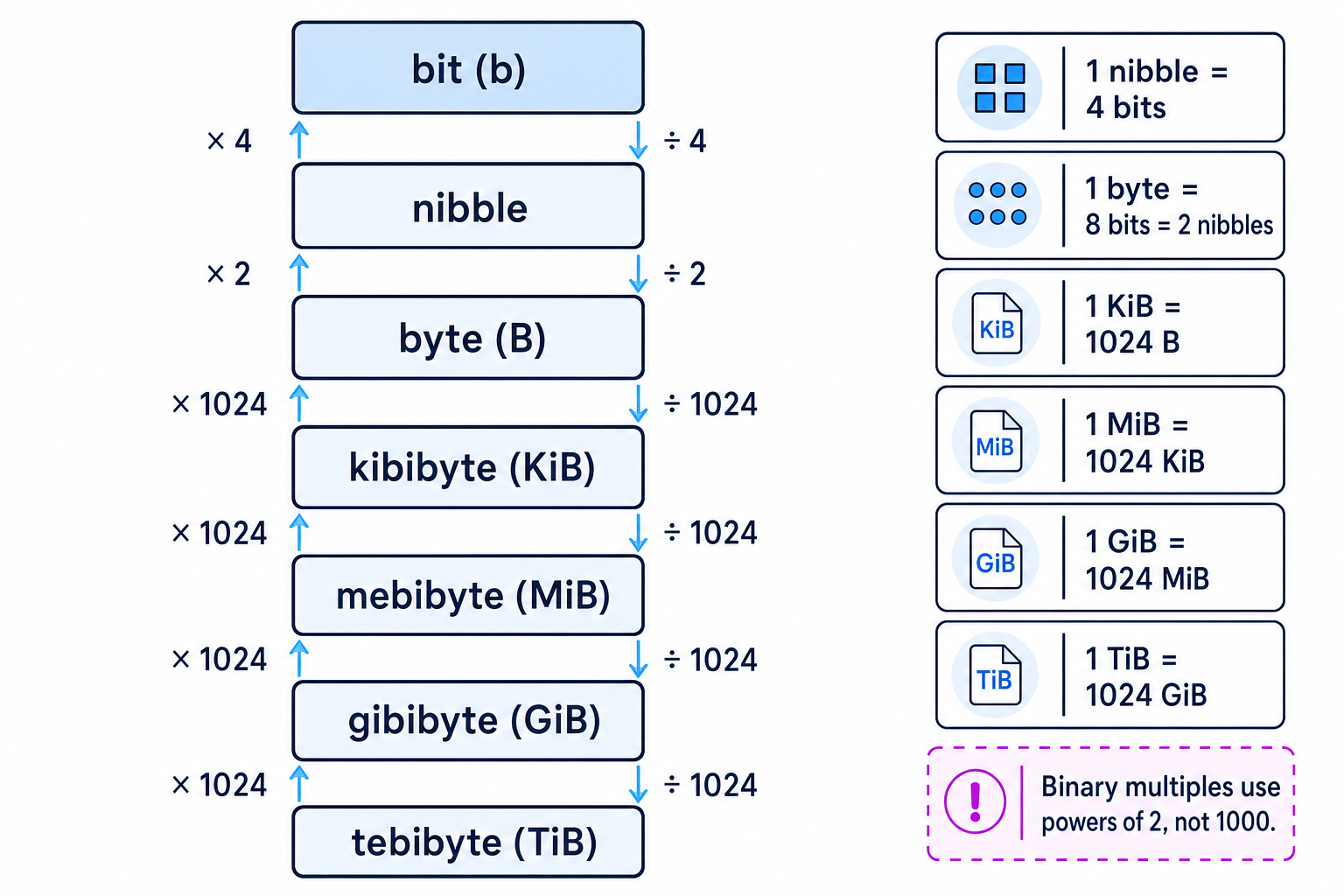
A nibble is 4 bits. A byte is 8 bits, or 2 nibbles.
After bytes, Edexcel uses binary multiples:
| Unit | Symbol | Meaning |
|---|---|---|
| bit | b | one binary digit |
| nibble | — | 4 bits |
| byte | B | 8 bits |
| kibibyte | KiB | 1024 bytes |
| mebibyte | MiB | 1024 KiB |
| gibibyte | GiB | 1024 MiB |
| tebibyte | TiB | 1024 GiB |
Definition
Binary multiple
A binary multiple is a storage unit based on powers of 2. In this topic, each larger unit from KiB upwards is 1024 times the previous unit because 1024 is 2 to the power of 10.
This ladder shows the direction of the conversions.
Key Idea
The unit ladder
Move towards smaller units by multiplying. Move towards larger units by dividing. From byte upwards, the factor is 1024 each time.
Common Mistake
Using 1000 instead of 1024
For this Edexcel GCSE topic, use KiB, MiB, GiB and TiB, not decimal kB/MB/GB/TB. So 1 KiB is 1024 bytes, not 1000 bytes.
Bits and bytes: the capital letter matters
The symbol b usually means bit. The symbol B means byte.
That tiny difference changes the size by a factor of 8.
- 64 b means 64 bits.
- 64 B means 64 bytes, which is 512 bits.
Tip
Sanity check
If a file size is in bits, divide by 8 to get bytes. If it is in bytes, multiply by 8 to get bits.
Example
Converting bits to bytes
A small data item is 2048 bits. Convert this to bytes.
-
Use the relationship 1 byte = 8 bits, so the number of bytes is found by dividing the number of bits by 8.
-
Substitute the value:
bytes=2048÷8\text{bytes} = 2048 \div 8bytes=2048÷8 -
Calculate the result:
bytes=256\text{bytes} = 256bytes=256So 2048 bits is 256 B.
Converting between KiB, MiB, GiB and TiB
From bytes upwards, each step uses 1024.
So:
- bytes to KiB: divide by 1024
- KiB to MiB: divide by 1024
- MiB to GiB: divide by 1024
- GiB to TiB: divide by 1024
Going the other way, multiply by 1024 each step.
Example
Converting MiB to bytes and bits
Convert 3 MiB into bytes and then into bits.
-
Convert MiB to KiB by multiplying by 1024:
3×1024=3072 KiB3 \times 1024 = 3072 \text{ KiB}3×1024=3072 KiB -
Convert KiB to bytes by multiplying by 1024 again:
3072×1024=3,145,728 B3072 \times 1024 = 3,145,728 \text{ B}3072×1024=3,145,728 B -
Convert bytes to bits by multiplying by 8:
3,145,728×8=25,165,824 bits3,145,728 \times 8 = 25,165,824 \text{ bits}3,145,728×8=25,165,824 bitsSo 3 MiB is 3,145,728 B, or 25,165,824 bits.
File size: build the expression first
A file size is the amount of storage needed to store a file.
The main GCSE skill is not just “doing sums”; it is choosing the correct expression from the information given.
Key Idea
General file size pattern
A file size calculation usually follows this pattern: number of items multiplied by bits needed for each item. Then convert the answer into the unit requested.
For example:
- For text, the items are characters. A character is one symbol such as
A,7,?or a space. - For a bitmap image, the items are pixels. A pixel is one tiny coloured square in the image. The colour depth is the number of bits used for each pixel.
- For sound, the items are samples. A sample is one measurement of the sound wave. The sample rate tells you how many samples are recorded per second, and the bit depth tells you how many bits are used per sample.
You may not need all of these formulae in one question, but the same structure appears again and again.
Common expressions
For text:
file size in bits=number of characters×bits per character\text{file size in bits} = \text{number of characters} \times \text{bits per character}file size in bits=number of characters×bits per characterFor a bitmap image:
file size in bits=width×height×colour depth\text{file size in bits} = \text{width} \times \text{height} \times \text{colour depth}file size in bits=width×height×colour depthFor sound:
file size in bits=sample rate×duration×bit depth\text{file size in bits} = \text{sample rate} \times \text{duration} \times \text{bit depth}file size in bits=sample rate×duration×bit depthIf the question gives multiple channels, such as stereo sound, include that too:
file size in bits=sample rate×duration×bit depth×channels\text{file size in bits} = \text{sample rate} \times \text{duration} \times \text{bit depth} \times \text{channels}file size in bits=sample rate×duration×bit depth×channelsCommon Mistake
Only include what the question gives you
GCSE file size questions usually ignore extra storage such as file headers or metadata unless the question explicitly tells you to include it.
Example
Calculating a bitmap image file size
An uncompressed bitmap image is 640 pixels wide and 480 pixels high. Each pixel uses 8 bits. Calculate the file size in KiB.
-
Construct the expression in bits using width, height and colour depth:
file size=640×480×8\text{file size} = 640 \times 480 \times 8file size=640×480×8 -
Calculate the number of bits:
640×480×8=2,457,600 bits640 \times 480 \times 8 = 2,457,600 \text{ bits}640×480×8=2,457,600 bits -
Convert bits to bytes by dividing by 8:
2,457,600÷8=307,200 B2,457,600 \div 8 = 307,200 \text{ B}2,457,600÷8=307,200 B -
Convert bytes to KiB by dividing by 1024:
307,200÷1024=300 KiB307,200 \div 1024 = 300 \text{ KiB}307,200÷1024=300 KiBThe file size is 300 KiB.
Data capacity requirements
A data capacity requirement is the total amount of storage needed for a system, device or collection of files.
This often means calculating the size of one file, then multiplying by the number of files.
Definition
Data capacity
Data capacity is the amount of data that can be stored, or the amount of storage required for a particular set of data.
For example, if one image is 2 MiB and a phone must store 500 images, the storage required is 1000 MiB. You may then convert that into GiB if needed.
Example
Calculating total storage for many files
A security camera stores 96 images each hour. Each image is 750 KiB. Calculate the storage needed for 24 hours in MiB.
-
Find the number of images stored in 24 hours:
96×24=2304 images96 \times 24 = 2304 \text{ images}96×24=2304 images -
Multiply by the size of one image to get the total in KiB:
2304×750=1,728,000 KiB2304 \times 750 = 1,728,000 \text{ KiB}2304×750=1,728,000 KiB -
Convert KiB to MiB by dividing by 1024:
1,728,000÷1024=1687.5 MiB1,728,000 \div 1024 = 1687.5 \text{ MiB}1,728,000÷1024=1687.5 MiBThe storage required is 1687.5 MiB.
How many files will fit?
Sometimes the question gives a storage device capacity and asks how many files can be stored.
In that case:
number of files=total capacity÷size of one file\text{number of files} = \text{total capacity} \div \text{size of one file}number of files=total capacity÷size of one fileIf the result is not a whole number, round down, because you cannot store part of a file and count it as a complete stored file.
Example
Finding how many files fit on a device
A memory card has 2 GiB available. Each audio file is 4 MiB. How many complete audio files can be stored?
-
Convert the total capacity into the same unit as the file size. Since 1 GiB = 1024 MiB:
2×1024=2048 MiB2 \times 1024 = 2048 \text{ MiB}2×1024=2048 MiB -
Divide the total capacity by the size of one file:
2048÷4=5122048 \div 4 = 5122048÷4=512 -
Interpret the result as a number of complete files. Since the answer is already a whole number, the card can store 512 audio files.
Common Mistake
Mixing units in one calculation
Do not divide GiB by MiB, or bits by bytes, without converting first. Put both values into the same unit before comparing or dividing.
Exam technique
In the exam
- Write the expression before calculating, so the examiner can see which quantities you are using.
- Convert units carefully: bits to bytes uses 8, but KiB to MiB and MiB to GiB use 1024.
- If asked how many whole files fit, convert to the same unit, divide, then round down if necessary.
Self review
Check yourself
- Why is 1 KiB equal to 1024 bytes rather than 1000 bytes?
- What is the difference between b and B in storage units?
- A file is 8192 bits. How many bytes is it, and how many KiB is it?
You've reached the end
Test yourself on this topic, or move on to the next guide.
How was this guide?