Revision notes for Edexcel GCSE Computer Science Tracing algorithm output with trace tables. Open the guide for explanations and worked examples. Written against the Edexcel GCSE Computer Science (1CP2) specification, so the content matches what's examinable rather than general Computer Science background.
Tracing algorithm output with trace tables
What you'll learn
- How to follow an algorithm using a given set of data.
- How variables change when assignment statements run.
- How to build and use a trace table.
- How to find the output or the value of a variable at a particular point.
Why tracing matters
In GCSE Computer Science, you are often given an algorithm and asked:
- What is the output?
- What value does a variable hold after a certain line?
- How many times does a loop run?
- Which branch of a selection statement is followed?
A trace table helps you answer these questions accurately by recording the values of variables as the algorithm runs.
Definition
Algorithm
An algorithm is a clear, step-by-step method for solving a problem. In an exam, it might be shown as a flowchart, informal pseudocode, or Python 3 code.
Key prerequisites
Variables
A variable is a named storage location for a value. The value can change while the algorithm runs.
Examples of variable names:
totalcountscorelargest
Definition
Assignment
Assignment means storing a value in a variable. In algorithms, Edexcel often uses the left arrow, such as total ← 0, meaning “put 0 into total”.
The right-hand side is worked out first, then the result is stored in the variable on the left.
For example:
total ← total + 5
means:
- take the current value of
total - add 5
- store the new result back in
total
Common Mistake
Treating assignment like algebra
total ← total + 5 is not an equation to solve. It is an update instruction. The old value of total is used to calculate the new value.
Example
Updating a variable
Suppose this algorithm runs:
| Line | Instruction |
|---|---|
| 1 | score ← 4 |
| 2 | score ← score + 3 |
| 3 | score ← score * 2 |
| 4 | OUTPUT score |
- Line 1 stores 4 in
score, so the current value is 4. - Line 2 uses the current value:
score + 3means 4 + 3, soscorebecomes 7. - Line 3 uses the updated value:
score * 2means 7 * 2, soscorebecomes 14. - Line 4 outputs the current value of
score, so the output is 14.
Inputs and given data
A question may give you a set of data. This means the values that are entered into the algorithm when it asks for input.
For example, if the algorithm says:
| Line | Instruction |
|---|---|
| 1 | INPUT firstNumber |
| 2 | INPUT secondNumber |
and the question says the data is:
8, 12
then:
firstNumbergets 8secondNumbergets 12
The input values are usually used in the order given.
Tip
Use the data in order
If an algorithm has several INPUT instructions, match them to the given data one by one. Do not skip values or reuse a value unless the algorithm specifically says to.
Sequence, selection and iteration
Algorithms normally use three basic control structures.
Sequence
Sequence means instructions run in order, one after another.
Example:
| Line | Instruction |
|---|---|
| 1 | x ← 2 |
| 2 | x ← x + 1 |
| 3 | OUTPUT x |
Line 1 runs, then line 2, then line 3.
Selection
Selection means the algorithm chooses between different paths using a condition.
A condition is a test that is either TRUE or FALSE, such as:
age >= 18score < 50password = "cat123"
Definition
Selection
Selection is when an algorithm uses a condition to decide which instruction or group of instructions to run, often using IF, THEN, ELSE and END IF.
Example
Following an IF statement
Given this algorithm and input data 11:
| Line | Instruction |
|---|---|
| 1 | INPUT age |
| 2 | IF age >= 13 THEN |
| 3 | category ← "teen" |
| 4 | ELSE |
| 5 | category ← "child" |
| 6 | END IF |
| 7 | OUTPUT category |
- Line 1 stores the input value 11 in
age. - Line 2 tests
age >= 13. Since 11 is not greater than or equal to 13, the condition isFALSE. - Because the condition is
FALSE, line 3 is skipped and theELSEpath is followed. - Line 5 stores
"child"incategory, so line 7 outputschild.
Iteration
Iteration means repetition. An algorithm repeats instructions using a loop.
Common loop types include:
FORloops, which repeat a set number of times.WHILEloops, which repeat while a condition isTRUE.
Definition
Iteration
Iteration is when an algorithm repeats one or more instructions. Each repeat of the loop is called an iteration.
Common Mistake
Stopping a WHILE loop too late
In a WHILE loop, check the condition before each repeat. As soon as the condition is FALSE, the loop body does not run again.
What a trace table is
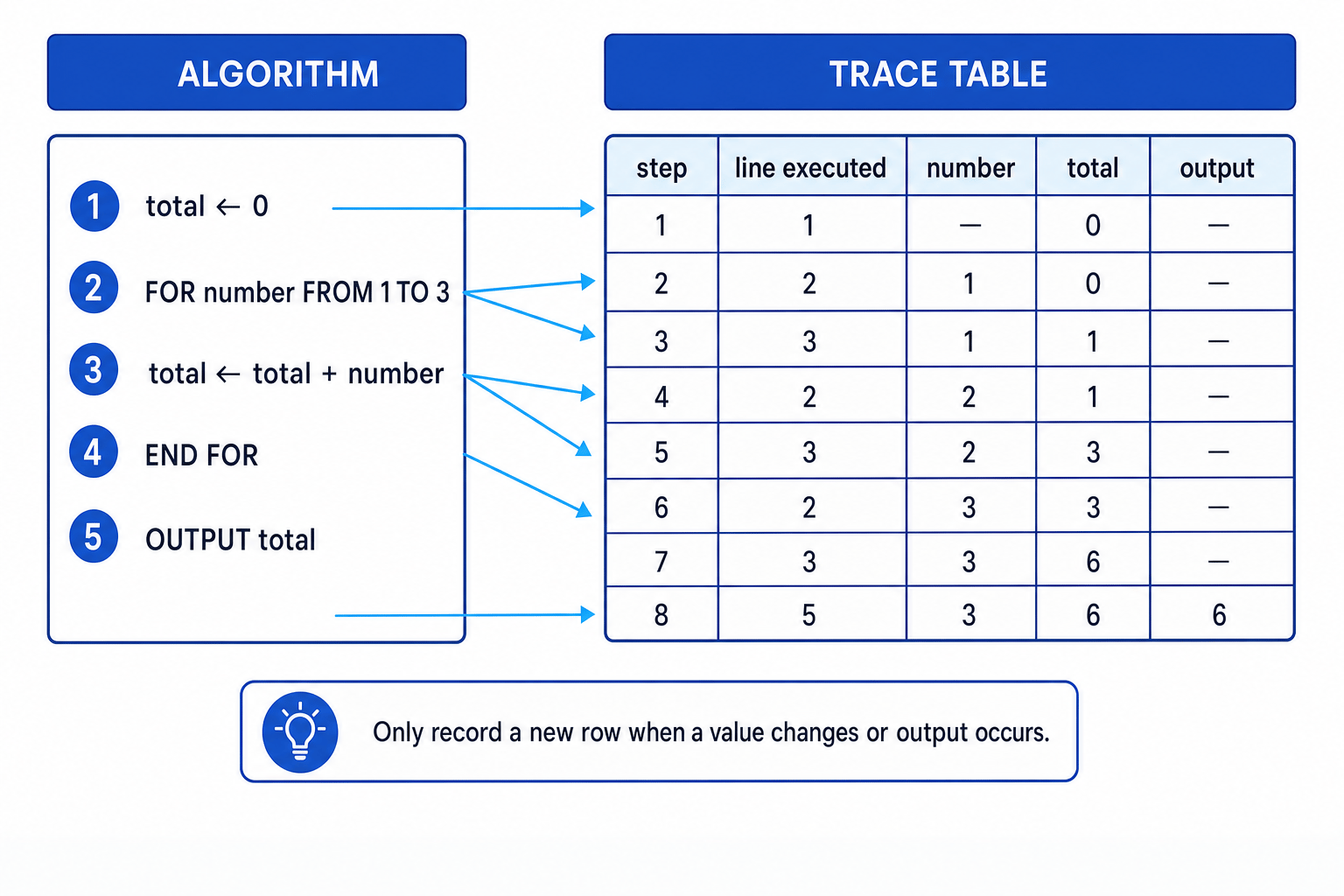
A trace table is a table used to record the changing values of variables as an algorithm runs.
It usually includes columns for:
- the line number or step
- each important variable
- any condition being tested
- any output produced
Definition
Trace table
A trace table records the values of variables at different points while an algorithm is executed, so you can work out the final output or a variable’s value at a chosen point.
The diagram shows the main idea: follow the algorithm in order and record changes as they happen.
Key Idea
Trace tables show state
The state of an algorithm means the current values of its variables. A trace table lets you track the state as each instruction changes it.
How to build a trace table
Step 1: Add useful columns
You usually need a column for each variable.
For example, if the algorithm uses:
counttotalnumber
then your trace table should probably include those three variables.
You may also add:
lineto show which line has just runconditionto show whether a loop orIFtest isTRUEorFALSEoutputto record anything displayed byOUTPUT
Step 2: Work through the algorithm in order
Start at line 1 and follow the instructions exactly.
Each time a variable changes, record the new value.
If a condition is tested, record whether it is TRUE or FALSE if that helps you follow the path.
Step 3: Be careful with loops
For a loop:
- Check whether the loop should run.
- Trace all instructions inside the loop.
- Update any loop counter or variable.
- Return to the loop condition.
- Stop only when the loop condition is no longer satisfied.
Tip
Trace one line at a time
Cover the lines below the one you are tracing, or use your finger to follow the current line. This reduces the chance of jumping ahead and using a future value too early.
Worked trace table with a loop
Consider this algorithm:
| Line | Instruction |
|---|---|
| 1 | total ← 0 |
| 2 | count ← 1 |
| 3 | WHILE count <= 4 |
| 4 | total ← total + count |
| 5 | count ← count + 1 |
| 6 | END WHILE |
| 7 | OUTPUT total |
The question might ask:
- What value does
totalhold when line 7 is reached? - What is the output?
Example
Tracing a WHILE loop
- Lines 1 and 2 initialise the variables:
totalbecomes 0 andcountbecomes 1. - At line 3,
count <= 4is tested. Sincecountis 1, the condition isTRUE, so the loop body runs. - Line 4 adds the current
counttototal: 0 + 1 givestotal = 1. - Line 5 increases
countby 1, socountbecomes 2. - The algorithm returns to line 3 and repeats while
countis 2, 3 and 4, adding each value tototal. - When
countbecomes 5, the testcount <= 4isFALSE, so the loop stops and line 7 outputs the finaltotal.
A completed trace table could look like this:
| Line | count | total | Condition count <= 4 | Output |
|---|---|---|---|---|
| 1 | 0 | |||
| 2 | 1 | 0 | ||
| 3 | 1 | 0 | TRUE | |
| 4 | 1 | 1 | ||
| 5 | 2 | 1 | ||
| 3 | 2 | 1 | TRUE | |
| 4 | 2 | 3 | ||
| 5 | 3 | 3 | ||
| 3 | 3 | 3 | TRUE | |
| 4 | 3 | 6 | ||
| 5 | 4 | 6 | ||
| 3 | 4 | 6 | TRUE | |
| 4 | 4 | 10 | ||
| 5 | 5 | 10 | ||
| 3 | 5 | 10 | FALSE | |
| 7 | 5 | 10 | 10 |
So when line 7 is reached:
totalholds 10- the output is 10
Finding a variable at a given point
Sometimes the question does not ask for the final output. It may ask something like:
What value does
counthold after line 5 has executed for the third time?
This is exactly what trace tables are for. You trace carefully until the required point, then read the value from the correct column.
Key Idea
Point in the algorithm matters
A variable can have different values before and after the same line runs. Always check whether the question asks for the value before, after, or when reaching a line.
For the loop above:
- before line 5 runs for the first time,
countis 1 - after line 5 runs for the first time,
countis 2 - after line 5 runs for the third time,
countis 4
Common Mistake
No output if OUTPUT is not reached
An algorithm only produces output when an OUTPUT instruction is actually executed. If a loop never ends, or a branch skips the OUTPUT, there may be no output from that part of the algorithm.
Recording output correctly
Output is not always the same as the final value of every variable.
An algorithm may calculate several variables but only output one of them.
For example:
| Line | Instruction |
|---|---|
| 1 | a ← 5 |
| 2 | b ← 9 |
| 3 | a ← a + b |
| 4 | OUTPUT b |
At the end:
ais 14bis 9- the output is 9
The output is 9 because line 4 outputs b, not a.
Common Mistake
Outputting the wrong variable
Do not assume the algorithm outputs the most recently changed variable. Always check the exact variable named in the OUTPUT instruction.
A compact method for exams
When you are short on time, you do not always need a beautiful table. You need an accurate one.
A quick trace table might include only the variables that change and the output.
For example:
| Step | i | total | Output |
|---|---|---|---|
| start | 0 | ||
| 1 | 1 | 1 | |
| 2 | 2 | 3 | |
| 3 | 3 | 6 | |
| end | 3 | 6 | 6 |
This is fine if it clearly shows the values you need.
Exam technique
In the exam
- Write down the given input data first, then use the values in order as each
INPUTinstruction is reached. - Trace one instruction at a time, updating variables only when an assignment statement actually runs.
- For
IFandWHILE, evaluate the condition using the current variable values, then follow only the correct path. - When asked for output, copy exactly what the
OUTPUTinstruction would display, not just the final value of a random variable.
Self review
Check yourself
- In
total ← total + number, which value oftotalis used first: the old value or the new value? - Why is it useful to include a condition column when tracing a
WHILEloop? - How could the final output be different from the final value of a variable?
You've reached the end
Test yourself on this topic, or move on to the next guide.
How was this guide?