Revision notes for AQA GCSE Computer Science Structured query language (SQL). Open the guide for explanations and worked examples. Written against the AQA GCSE Computer Science (8525) specification, so the content matches what's examinable rather than general Computer Science background.
Structured query language (SQL)
What you'll learn
- How SQL retrieves data from relational database tables using
SELECT,FROM,WHEREandORDER BY. - How to read and write simple one-table and two-table queries.
- How to add records with
INSERT INTO. - How to edit and delete records safely using
UPDATEandDELETE.
Before SQL: the database ideas you need
A relational database stores data in tables. Each table is about one type of thing, such as students, books, customers or orders.
Definition
Table, record and field
A table is a grid of data. A record is one row in the table, usually about one item or person. A field is one column in the table, storing one type of data such as FirstName or BookTitle.
Here are two small example tables we will use.
Student
| StudentID | FirstName | LastName | TutorGroup |
|---|---|---|---|
| 101 | Aisha | Khan | 10A |
| 102 | Ben | Hughes | 10B |
| 103 | Chloe | Smith | 10A |
Loan
| LoanID | StudentID | BookTitle | LoanDate | Returned |
|---|---|---|---|---|
| 501 | 101 | Python Basics | 2025-01-14 | No |
| 502 | 103 | Databases | 2025-01-15 | Yes |
| 503 | 101 | Networks | 2025-01-20 | No |
Definition
Primary key and foreign key
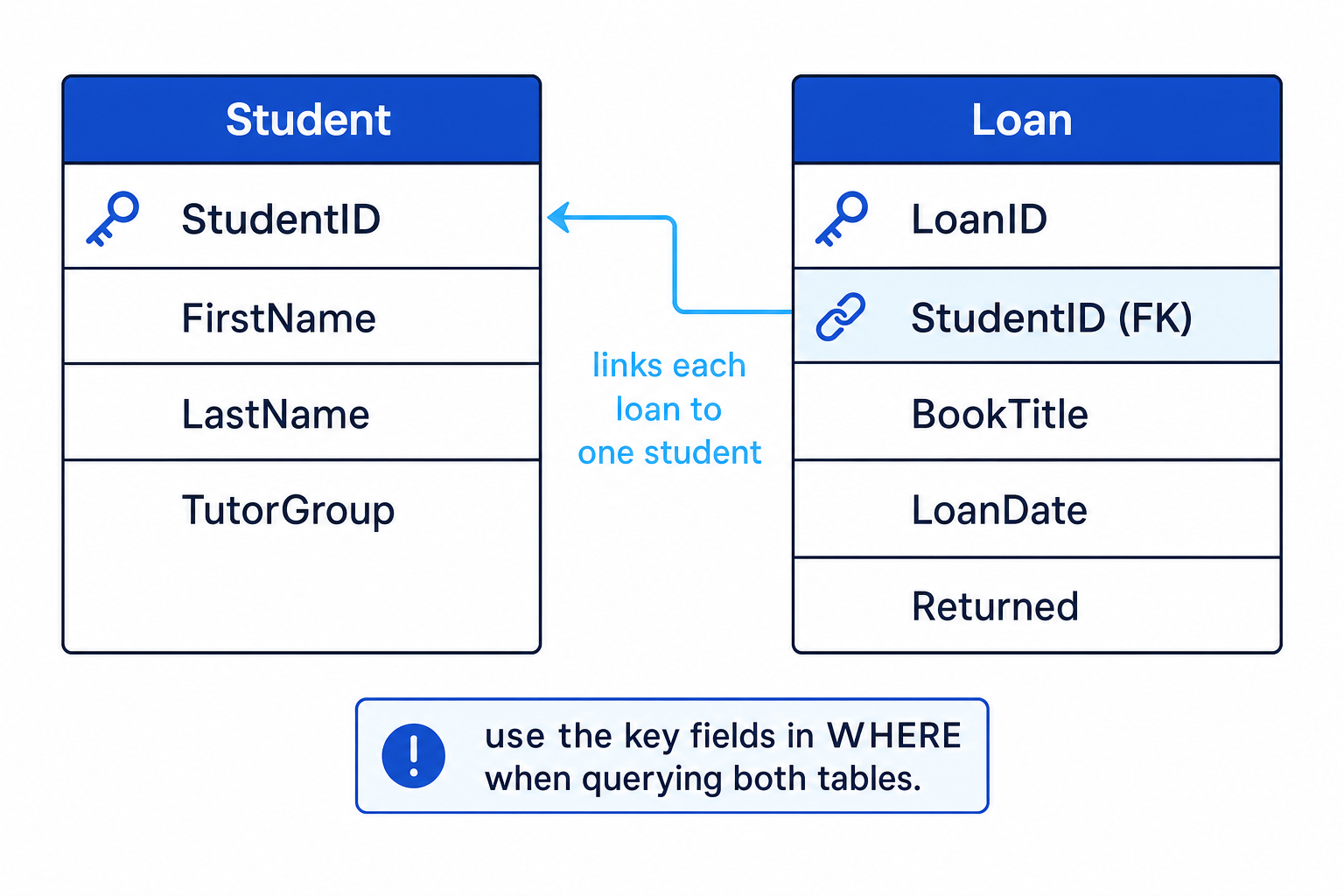
A primary key is a field that uniquely identifies each record in a table, such as StudentID. A foreign key is a field in one table that refers to the primary key in another table, such as Loan.StudentID linking to Student.StudentID.
The diagram shows how Loan.StudentID links each loan to the correct student record.
What SQL is
SQL stands for Structured Query Language. It is a language used to work with data in relational databases.
Definition
Query
A query is an instruction sent to a database to get data back or to change stored data. In GCSE SQL, you mainly write queries to retrieve, insert, update or delete records.
SQL keywords such as SELECT, FROM and WHERE are usually written in capitals. This makes the query easier to read, although SQL keywords are not normally case-sensitive.
Retrieving data with SELECT and FROM
The simplest useful SQL query says:
- which fields you want to see
- which table they come from
The pattern is:
SELECT field1, field2
FROM table_name;
SELECT chooses the fields, and FROM chooses the table.
For example:
SELECT FirstName, LastName
FROM Student;
This would return only the FirstName and LastName fields from every record in the Student table.
Key Idea
Rows versus columns
SELECT chooses columns. WHERE chooses rows. This is one of the most important SQL ideas to remember.
You may also see SELECT *, where * means “all fields”. However, if a question asks for specific fields, name only those fields.
Filtering records with WHERE
A condition is a test that is either true or false for a record. The WHERE clause filters the table so that only records matching the condition are returned.
The pattern is:
SELECT field1, field2
FROM table_name
WHERE condition;
For example:
SELECT FirstName, LastName
FROM Student
WHERE TutorGroup = '10A';
This returns students whose TutorGroup is 10A.
Text values such as '10A', 'No' and 'Aisha' are written in quotes. Number values such as 101 are usually not written in quotes.
Common comparison operators include:
| Operator | Meaning |
|---|---|
= | equal to |
< | less than |
> | greater than |
<= | less than or equal to |
>= | greater than or equal to |
<> | not equal to |
Common Mistake
Using Python equality
In SQL, equality is written with one equals sign: =. Do not write == in a SQL WHERE condition.
Example
Predicting selected records
For this query:
SELECT BookTitle
FROM Loan
WHERE Returned = 'No';
- Start with the table named in
FROM, so look at all records in theLoantable. - Apply the
WHEREcondition. Records 501 and 503 haveReturned = 'No', so keep those. Record 502 hasReturned = 'Yes', so reject it. - Apply
SELECT BookTitle. Only theBookTitlefield is displayed, so the output isPython BasicsandNetworks.
Sorting results with ORDER BY
ORDER BY sorts the records that are returned.
The pattern is:
SELECT field1, field2
FROM table_name
WHERE condition
ORDER BY field ASC;
ASC means ascending order:
- smallest to largest for numbers
- A to Z for text
- earliest to latest for dates
DESC means descending order:
- largest to smallest for numbers
- Z to A for text
- latest to earliest for dates
You can leave out WHERE if you do not need to filter records.
Example
Writing a sorted query
Task: show the first and last names of students in tutor group 10A, sorted by last name from A to Z.
- Choose the fields needed for the output:
FirstNameandLastName. - Choose the table that contains those fields:
Student. - Add the filter condition for the required tutor group:
TutorGroup = '10A'. - Sort by the field named in the task. A to Z means ascending, so use
ORDER BY LastName ASC.
Final query:
SELECT FirstName, LastName
FROM Student
WHERE TutorGroup = '10A'
ORDER BY LastName ASC;
Tip
Mental order for reading queries
Although the SQL is written as SELECT, FROM, WHERE, ORDER BY, it is often easier to understand it as: choose the table, filter the rows, choose the fields, then sort the output.
Retrieving data from two tables
Sometimes the data you need is split across two related tables. At GCSE, exam questions will not require data to be extracted from more than two tables in one query.
To use two tables, put both table names in FROM, then use WHERE to link the primary key and foreign key.
For the library example:
SELECT Student.FirstName, Student.LastName, Loan.BookTitle
FROM Student, Loan
WHERE Student.StudentID = Loan.StudentID;
The dot notation Student.FirstName means “the FirstName field from the Student table”. This is especially useful when two tables have a field with the same name, such as StudentID.
Example
Linking two tables
Task: list the first name, last name and book title for all loans that have not been returned.
- Identify the fields needed in the output.
FirstNameandLastNameare inStudent;BookTitleis inLoan. - Include both required tables in
FROM:Student, Loan. - Link the tables using the matching key fields:
Student.StudentID = Loan.StudentID. - Add the extra filter for unreturned books:
Loan.Returned = 'No'. Because both conditions must be true, join them withAND.
Final query:
SELECT Student.FirstName, Student.LastName, Loan.BookTitle
FROM Student, Loan
WHERE Student.StudentID = Loan.StudentID
AND Loan.Returned = 'No';
Common Mistake
Forgetting to link the tables
If you list two tables in FROM but do not link their key fields in WHERE, the database can match unrelated records together. Always include the primary-key-to-foreign-key condition.
Adding records with INSERT INTO
INSERT INTO adds a new record to a table.
The pattern is:
INSERT INTO table_name (column1, column2, ...)
VALUES (value1, value2, ...);
The column list and value list must match in order. The first value goes into the first column, the second value goes into the second column, and so on.
Example
Adding a new student
Task: add a student with StudentID 104, first name Dylan, last name Patel, and tutor group 10C.
- Choose the table that will receive the new record:
Student. - List the fields you are giving values for:
StudentID,FirstName,LastName,TutorGroup. - Put the values in the same order as the field names. The number 104 is not quoted; text values are quoted.
Final query:
INSERT INTO Student (StudentID, FirstName, LastName, TutorGroup)
VALUES (104, 'Dylan', 'Patel', '10C');
Common Mistake
Mismatched insert order
In an INSERT INTO query, do not swap the order of the values. If FirstName is listed before LastName, the first text value must be the first name.
Editing records with UPDATE
UPDATE changes data in existing records.
The pattern is:
UPDATE table_name
SET column1 = value1, column2 = value2
WHERE condition;
The SET part says what to change. The WHERE part says which record or records should be changed.
Example
Marking one loan as returned
Task: change loan 503 so that it is marked as returned.
- Choose the table containing the record to edit:
Loan. - Choose the field to change and its new value:
Returned = 'Yes'. - Use a condition that identifies the correct record.
LoanID = 503is suitable becauseLoanIDis unique.
Final query:
UPDATE Loan
SET Returned = 'Yes'
WHERE LoanID = 503;
Common Mistake
UPDATE without WHERE
If you omit the WHERE clause from an UPDATE, every record in the table may be changed. In exam answers, include a clear WHERE condition unless the question genuinely asks for all records to be changed.
Deleting records with DELETE
DELETE removes records from a table.
The pattern is:
DELETE FROM table_name
WHERE condition;
For example:
DELETE FROM Loan
WHERE LoanID = 502;
This deletes the loan record with LoanID 502.
Common Mistake
DELETE without WHERE
DELETE FROM Loan; would delete every record in the Loan table. For GCSE questions, you almost always need a WHERE condition to delete only the intended record.
SQL command summary
| Command | Main job | Example use |
|---|---|---|
SELECT | Choose fields to output | show names |
FROM | Choose table or tables | from Student |
WHERE | Filter records using a condition | only TutorGroup = '10A' |
ORDER BY ... ASC | Sort ascending | A to Z |
ORDER BY ... DESC | Sort descending | Z to A |
INSERT INTO | Add a new record | add a new student |
UPDATE | Change existing records | mark a loan returned |
DELETE FROM | Remove records | delete one loan |
Exam technique
In the exam
- Read the task carefully and separate the required output fields, table or tables, filter condition, and sort order.
- For two-table queries, include both table names in
FROMand link the matching key fields inWHERE. - For
UPDATEandDELETE, check that yourWHEREcondition selects only the intended record or records.
Self review
Check yourself
- What is the difference between
SELECTandWHERE? - How would you sort results from newest to oldest using
ORDER BY? - Why is it dangerous to write
UPDATEorDELETEwithout aWHEREclause?

Recap questions
Test yourself with 5 quick questions on this guide. Answer them all correctly to complete it.
Relational databases and structured query language (SQL)
Guide 2 of 2
You've reached the end
Test yourself on this topic, or move on to the next guide.
How was this guide?