Revision notes for AQA GCSE Computer Science String handling operations in a programming language. Open the guide for explanations and worked examples. Written against the AQA GCSE Computer Science (8525) specification, so the content matches what's examinable rather than general Computer Science background.
String handling operations in a programming language
What you'll learn
- How programs treat text as strings made from individual characters.
- How to use length, position and substring operations.
- How to join text using concatenation.
- How to convert between strings, numbers and character codes.
Strings and characters
Definition
String and character
A string is a sequence of characters stored as one item of data, such as "AQA" or "8525". A character is one single symbol, such as "A", "7", "!" or a space.
A string can contain letters, digits, punctuation and spaces. The important point is that "123" is not the same as 123. "123" is text; 123 is a number that can be used directly in calculations.
Key Idea
Text still has a data type
A digit inside a string is just a character until you convert it. For example, "5" + "2" as string concatenation gives "52", not 7.
Positions and indexes
To work with part of a string, a program needs to know where characters are.
Definition
Position or index
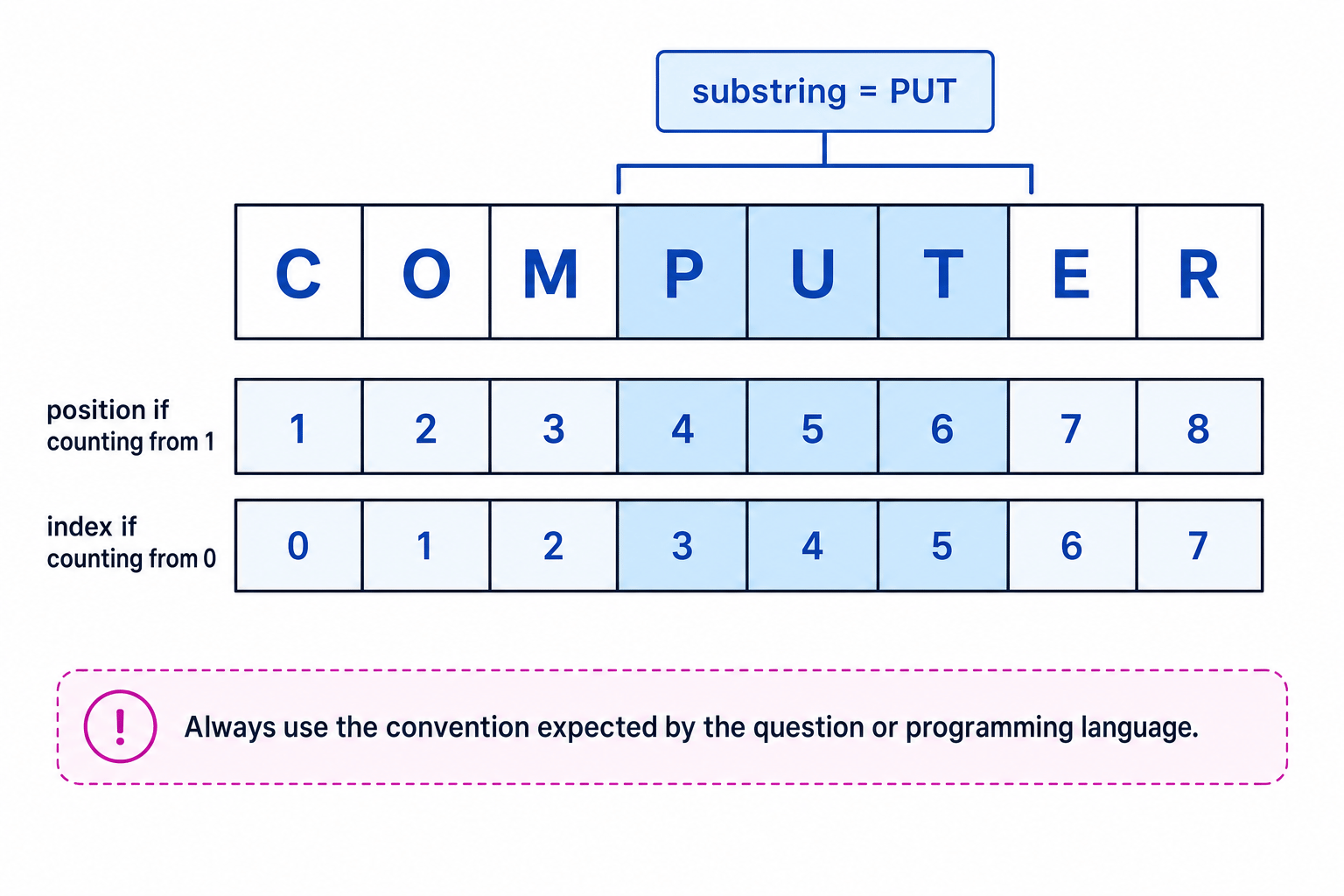
A position or index tells you where a character is in a string. A zero-indexed language counts the first character as index 0. A one-indexed description counts the first character as position 1.
Different languages and exam questions may use different conventions. Python 3 is zero-indexed, so in "COMPUTER" the character "C" has index 0 and "O" has index 1. If a question says it is counting from 1, then "C" is position 1.
Common Mistake
Mixing up indexing systems
Do not switch between zero-based and one-based counting halfway through a question. Use the convention given by the question or by the programming language.
Length
Definition
Length
The length of a string is the number of characters it contains.
Every character counts, including spaces, digits and punctuation. For example, "Hi!" has length 3, and "Hi there" has length 8 because the space counts as one character.
In Python 3, the length operation is written as len(text).
Example
Finding the last character
Suppose word = "DATA" and you are using Python-style zero-based indexing.
- Count the characters in
"DATA": there are 4 characters, so the length is 4. - In a zero-indexed string, the final index is one less than the length: 4−1=34 - 1 = 34−1=3.
- Look at index 3 in
"DATA": the final character is"A".
Tip
Quick check for last position
If counting from 1, the last position is the length. If counting from 0, the last index is one less than the length.
Position
Definition
Position operation
A position operation searches for one string inside another string and returns where it is found.
For example, you might search for "cat" inside "concatenate". Many languages return the first place where the search text appears. Python 3 uses text.find(searchText), which returns a zero-based index.
If the search text is not found, different languages behave differently. Some return -1, some return 0, and some cause an error. In a GCSE question, the behaviour should be clear from the language or from the question.
Example
Locating a substring
Find the first position of "NA" in "BANANA" if the question is counting positions from 1.
- Check each possible starting position: position 1 gives
"BA", which is not"NA". - Position 2 gives
"AN", which is still not"NA". - Position 3 gives
"NA", so the first position of"NA"is 3.
Common Mistake
Ignoring case
String searches are usually case-sensitive. "a" and "A" are different characters, so "cat" would not match "Cat" unless the program converts the case first.
Substring
Definition
Substring
A substring is a smaller string taken from inside a larger string.
A substring operation normally needs to know:
- the original string
- where to start
- how many characters to take, or where to stop
The exact syntax depends on the language. Python 3 uses slicing such as text[3:6], which means “start at index 3 and stop before index 6”.
Some pseudocode-style questions describe the operation as substring(text, start, length). In that form, length means the number of characters to take, not the final position.
Example
Extracting part of a string
Suppose code = "AQA-8525". A question uses substring(code, 5, 4), counting positions from 1 and taking 4 characters.
- Number the positions:
"A"is 1,"Q"is 2,"A"is 3,"-"is 4 and"8"is 5. - Start at position 5 and take 4 characters. The final position is 5+4−1=85 + 4 - 1 = 85+4−1=8.
- Positions 5 to 8 are
"8","5","2"and"5", so the substring is"8525".
Common Mistake
Confusing length with end position
In substring(text, start, length), the third value is how many characters to take. It is not the final position unless the question explicitly says so.
Concatenation
Definition
Concatenation
Concatenation means joining strings together end-to-end to make a longer string.
In many languages, including Python 3 and C#, the + operator can concatenate strings. For example, "Code" + "Club" gives "CodeClub".
Concatenation does not automatically add spaces. If you want a space, you must concatenate a string containing a space: " ".
Example
Building a full name
Suppose firstName = "Ada" and lastName = "Lovelace".
- Decide the required output: the full name should be
"Ada Lovelace", with a space between the two names. - Join the first name to a space:
"Ada" + " "gives"Ada ". - Join the surname:
"Ada " + "Lovelace"gives"Ada Lovelace".
Common Mistake
Concatenating numbers without converting
Some languages will not let you concatenate a string and a number directly. Convert the number to a string first if it is part of a message.
Character codes
Definition
Character code
A character code is the number used to represent a character in a character set.
A character set gives each character a number. For example, in common ASCII/Unicode values, "A" has code 65. GCSE questions may give you the code values you need.
You need to understand both directions:
| Operation | Meaning | Python 3 example |
|---|---|---|
| Character to character code | Convert a character into its number code | ord("A") gives 65 |
| Character code to character | Convert a number code into its character | chr(65) gives "A" |
Example
Using character codes
Assume the question tells you that "D" has character code 68 and that capital letters are stored in consecutive order. Find the next capital letter.
- Convert the character to its code:
"D"becomes 68. - Add 1 to move to the next character code: 68+1=6968 + 1 = 6968+1=69.
- Convert code 69 back to a character: the result is
"E".
Common Mistake
Letter shifting has edge cases
Moving from "D" to "E" is straightforward, but moving forward from "Z" may need special wrap-around logic back to "A" if the question asks for it.
String conversion operations
Definition
Type conversion
Type conversion means changing data from one data type to another, such as from a string to an integer.
AQA expects you to understand these string conversion operations:
| Conversion | Why it is useful | Python 3 example |
|---|---|---|
| String to integer | Use whole-number text in calculations | int("27") gives 27 |
| String to real | Use decimal-number text in calculations | float("3.5") gives 3.5 |
| Integer to string | Put a whole number into a message | str(27) gives "27" |
| Real to string | Put a decimal number into a message | str(3.5) gives "3.5" |
An integer is a whole number. A real is a number that may contain a fractional part, such as 3.5. Python calls real numbers float.
Example
Converting input before calculation
A program has two input strings: ticketsText = "3" and priceText = "4.50". It needs to calculate the total price.
- Convert
"3"from string to integer, giving 3 tickets. - Convert
"4.50"from string to real, giving a price of 4.5. - Multiply the numbers: 3×4.5=13.53 \times 4.5 = 13.53×4.5=13.5.
- Convert 13.5 to a string before joining it to a message such as
"Total: £".
Common Mistake
Invalid conversions
A string can only be converted to a number if it is in a suitable format. "42" can become an integer, but "forty two" cannot. "3.5" is suitable for a real, but not for an integer in many languages.
Choosing the right operation
| If you need to... | Use... |
|---|---|
| Count characters | length |
| Find where text appears | position |
| Take part of a string | substring |
| Join strings together | concatenation |
| Get the number code for a character | character to character code |
| Get the character for a number code | character code to character |
| Calculate using text input | string to integer or string to real |
| Display a number inside a message | integer to string or real to string |
Exam technique
In the exam
- Check whether positions are counted from 0 or from 1 before using position or substring.
- Remember that spaces and punctuation count as characters when finding length.
- Convert string inputs to numbers before calculations, and convert numbers to strings before concatenating them into messages.
Self review
Check yourself
- What is the difference between the string
"45"and the integer 45? - If a string has length 6, what is the final index in a zero-indexed language?
- Which conversion would you use before adding the input string
"12.5"to another number?

Recap questions
Test yourself with 5 quick questions on this guide. Answer them all correctly to complete it.
You've reached the end
Test yourself on this topic, or move on to the next guide.
How was this guide?