Revision notes for AQA GCSE Computer Science Random number generation in a programming language. Open the guide for explanations and worked examples. Written against the AQA GCSE Computer Science (8525) specification, so the content matches what's examinable rather than general Computer Science background.
Random number generation in a programming language
What you'll learn
- What random number generation means in a program.
- How to generate a random integer within a chosen range.
- How to use random values with variables, selection, loops, and lists.
- How to avoid common range and off-by-one mistakes.
Why programs use random numbers
Most programs follow exact instructions, so they normally behave predictably. Sometimes, though, you want a program to make an unpredictable choice: rolling a die in a game, choosing a quiz question, generating a secret number, or simulating an event.
Definition
Random number generation
Random number generation is the process of making a program produce a value that cannot be predicted in advance by the user, within limits chosen by the programmer.
At GCSE, you are expected to use random number generation in programs. You are not expected to explain how the computer creates pseudo-random numbers.
Definition
Pseudo-random number
A pseudo-random number is produced by a computer algorithm but appears random to the user. For this topic, treat it as random and focus on using the provided random function correctly.
Prerequisites: variables, assignment, and integers
A random number is usually stored in a variable so the program can use it later.
Definition
Variable and assignment
A variable is a named memory location that stores a value. Assignment means putting a value into a variable; in AQA-style pseudo-code this is shown with the arrow ←.
For example:
score ← 0
name ← USERINPUT
Most GCSE random-number tasks use integers, which are whole numbers such as 0, 1, 2, 3, and so on.
Generating a random integer in a range
A range is the set of possible values a random number can have. The lower bound is the smallest possible value, and the upper bound is the largest possible value.
In these notes, we will use AQA-style pseudo-code like this:
randomNumber ← RANDOM_INT(lower, upper)
This means: generate a random integer from lower to upper.
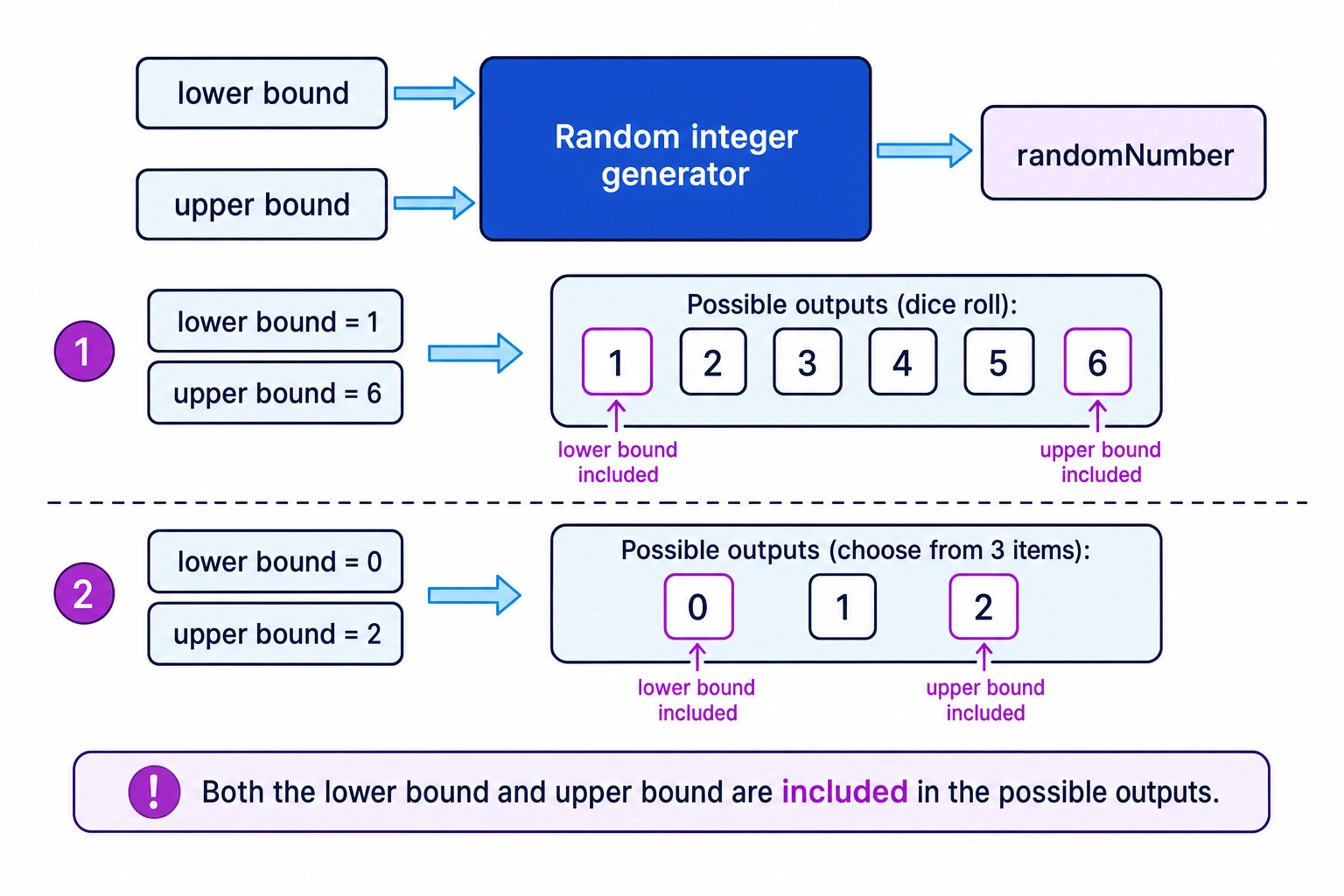
The diagram shows how the lower and upper bounds control the possible outputs.
Key Idea
Bounds are included
For RANDOM_INT(1, 6), the possible outputs are 1, 2, 3, 4, 5, and 6. Both the lower bound and the upper bound are included.
Example: counting possible outputs
Example
Counting possible random values
If a program uses RANDOM_INT(3, 8), how many different values could be generated?
- Identify the lower and upper bounds: the lower bound is 3 and the upper bound is 8.
- Use the inclusive-range count: count=upper−lower+1count = upper - lower + 1count=upper−lower+1, so count=8−3+1=6count = 8 - 3 + 1 = 6count=8−3+1=6.
- List the values to check the reasoning: 3, 4, 5, 6, 7, and 8. There are 6 possible outputs.
Storing and using a random value
A random number is most useful when you store it and then use it in a calculation or decision.
For example, this creates a secret number guessing game:
secretNumber ← RANDOM_INT(1, 10)
guess ← USERINPUT

IF guess = secretNumber THEN
    OUTPUT "Correct"
ELSE
    OUTPUT "Not correct"
ENDIF
Definition
Selection
Selection means choosing which instructions to run depending on a condition, usually using IF, ELSE, and ENDIF.
Example: creating a dice game turn
Example
Creating a random dice game turn
You want a program to roll two dice and output whether the player has rolled a double.
- Each die has possible values from 1 to 6, so each roll should use
RANDOM_INT(1, 6). - Generate two separate random values, because the dice are separate rolls:
dieOne ← RANDOM_INT(1, 6)anddieTwo ← RANDOM_INT(1, 6). - Compare the stored values using selection: if
dieOne = dieTwo, the player has rolled a double. - If the values are not equal, add them to calculate the total score.
The pseudo-code could be:
dieOne ← RANDOM_INT(1, 6)
dieTwo ← RANDOM_INT(1, 6)

IF dieOne = dieTwo THEN
    OUTPUT "Double"
ELSE
    total ← dieOne + dieTwo
    OUTPUT total
ENDIF
Common Mistake
Expecting no repeats
Random does not mean “different every time”. A random generator can return the same value twice, just like a real die can roll 4 and then 4 again.
Using random numbers to choose between outcomes
You can map each possible random value to an outcome. For a fair coin toss, there are two possible outcomes, so you only need two possible random values.
coin ← RANDOM_INT(1, 2)

IF coin = 1 THEN
    OUTPUT "Heads"
ELSE
    OUTPUT "Tails"
ENDIF
Example: choosing a fair outcome
Example
Creating a fair coin toss
- Count the number of outcomes: a coin toss has 2 outcomes, heads and tails.
- Choose a random range with exactly 2 values:
RANDOM_INT(1, 2)gives either 1 or 2. - Assign one outcome to each value: 1 means heads, and 2 means tails. This keeps the outcomes equally likely.
Choosing a random item from a list
A random number is often used as an index into a list or array.
Definition
Index
An index is the position number used to access an item in a list or array. In many programming languages, including Python, the first item is at index 0.
If a list has 5 items and uses indexes starting at 0, the valid indexes are 0, 1, 2, 3, and 4. So the random index should be from 0 to 4.
index ← RANDOM_INT(0, 4)
OUTPUT questions[index]
Example: choosing a random question
Example
Choosing a random list item
A quiz program has 5 questions stored in a 0-indexed list. Work out the random range needed to choose one question.
- The first valid index is 0 because the list is 0-indexed.
- There are 5 questions, so the final valid index is one less than 5: lastIndex=5−1=4lastIndex = 5 - 1 = 4lastIndex=5−1=4.
- Generate the random index using
RANDOM_INT(0, 4), then use that index to access the list item.
Common Mistake
Off-by-one list choice
An off-by-one error happens when a range is one value too high or too low. For 5 items indexed 0 to 4, RANDOM_INT(1, 5) would miss index 0 and could try invalid index 5.
Using random numbers inside loops
Iteration means repeating instructions. Sometimes you want a new random value each time a loop runs.
For example, this keeps rolling a die until a 6 appears:
attempts ← 0

REPEAT
    roll ← RANDOM_INT(1, 6)
    attempts ← attempts + 1
UNTIL roll = 6

OUTPUT attempts
Example: stopping when a random value appears
Example
Rolling until a six
- Use
REPEAT…UNTILbecause the die must be rolled at least once before the condition can be tested. - Put
roll ← RANDOM_INT(1, 6)inside the loop so a new value is generated on every attempt. - Increase
attemptsinside the loop so the program counts every roll that actually happened. - Stop when the latest random value satisfies the condition
roll = 6.
Tip
Random value inside the loop
If you generate the random number before the loop, the value may never change during the loop. Put the random-number line inside the loop when each repetition needs a fresh value.
Python 3 version
In Python 3, you need to import the random module before using randint.
import random

dice_roll = random.randint(1, 6)
print(dice_roll)
For a guessing game:
import random

secret_number = random.randint(1, 10)
guess = int(input("Enter a number: "))

if guess == secret_number:
    print("Correct")
else:
    print("Not correct")
Common Mistake
Language syntax can differ
In these notes, RANDOM_INT(1, 6) and Python random.randint(1, 6) include both 1 and 6. Some languages or functions use an exclusive upper bound, meaning the upper value is not included, so always follow the syntax used in the question or programming language.
Testing programs that use randomness
Random programs are harder to test because you cannot predict the exact output every time. Instead, test whether the output is always sensible.
Tip
Testing random code
- Check that generated values are always within the intended range.
- Test boundary values by temporarily replacing the random value with fixed values such as 1 and 6.
- Run the program several times to check that different branches can be reached.
Key Idea
What the exam wants
For this topic, focus on choosing correct random ranges, storing random values in variables, and using them sensibly in selection, loops, or list access. You do not need to describe how pseudo-random numbers are generated.
Exam technique
In the exam
- Check whether the bounds are inclusive, then make sure all valid values can appear and no invalid values can appear.
- Store the random value in a variable before comparing it, adding it, or using it as an index.
- For lists, match the random range to the valid indexes, often 0 to
length - 1in 0-indexed languages. - Do not waste time explaining the internal pseudo-random algorithm; the GCSE skill is using random generation correctly.
Self review
Check yourself
- What possible values can
RANDOM_INT(4, 9)generate? - Write pseudo-code to roll a die repeatedly until a 6 is rolled.
- Why is
RANDOM_INT(1, 5)wrong for choosing from a 0-indexed list of 5 items?

Recap questions
Test yourself with 5 quick questions on this guide. Answer them all correctly to complete it.
Programming
Guide 9 of 11
You've reached the end
Test yourself on this topic, or move on to the next guide.
How was this guide?