Revision notes for AQA GCSE Computer Science Malicious code (malware). Open the guide for explanations and worked examples. Written against the AQA GCSE Computer Science (8525) specification, so the content matches what's examinable rather than general Computer Science background.
Malicious code (malware)
What you'll learn
- What malware means and why it is an umbrella term.
- How to describe a computer virus, trojan, and spyware.
- How malware can affect people, data, and computer systems.
- How to protect against malware using layered defences.
Before we start: software and threats
Software means the programs and instructions that run on a computer system. This includes applications, operating systems, utilities, scripts, and sometimes files that contain executable instructions.
A cyber security threat is something that could damage, steal from, disrupt, or gain unauthorised access to a computer system or its data. Malware is one of the main technical threats you need to know for AQA GCSE Computer Science.
Malware usually needs to be installed, opened, or run in some way. Sometimes this happens because a user is tricked; sometimes it happens because the system has a weakness.
What is malware?
Definition
Malware
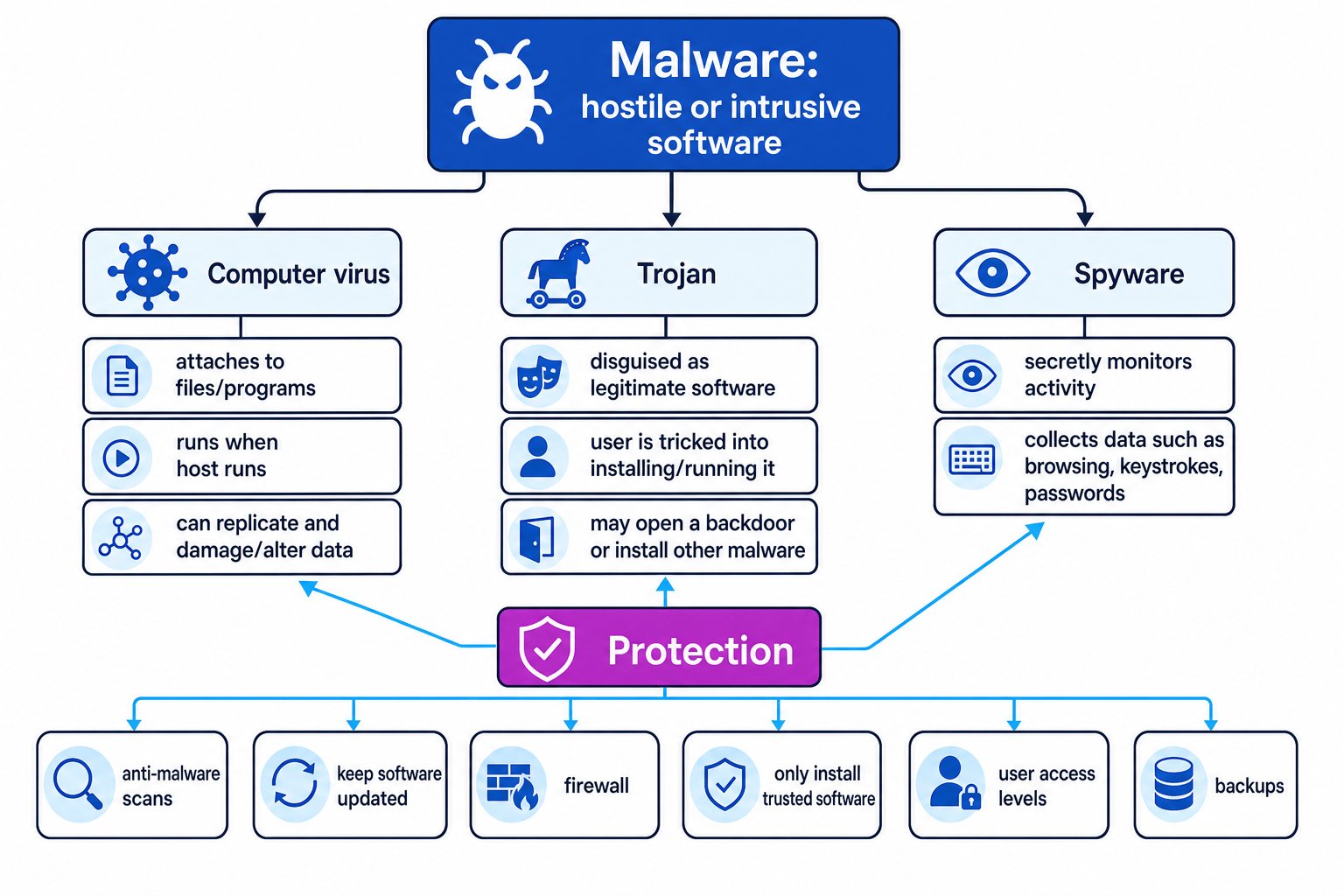
Malware is hostile or intrusive software designed to harm, disrupt, monitor, or gain unauthorised access to a computer system or its data.
The word malware comes from malicious software. It is an umbrella term, meaning it covers many different types of harmful software rather than just one specific thing.
The diagram below shows the three forms you need for this topic: computer viruses, trojans, and spyware.
Key Idea
Malware is a category
A virus is malware, a trojan is malware, and spyware is malware — but not all malware is a virus.
What malware can do
Malware can affect a system in different ways. It might:
- delete, corrupt, or change files
- slow down the computer
- crash programs or the operating system
- steal personal data, such as usernames and passwords
- secretly monitor what the user does
- allow an attacker to control the system remotely
- install more malware
The exact effect depends on the type of malware and what it was designed to do.
Common Mistake
Calling every malware attack a virus
In everyday speech, people often say “my computer has a virus” for any malware infection. In GCSE answers, be more precise: a virus is only one specific form of malware.
Computer virus
Definition
Computer virus
A computer virus is malware that attaches itself to a file or program and can replicate when that infected file or program is run.
A virus usually needs a host. The host is the file or program that the virus attaches to. When the user opens or runs the infected host, the virus code may run too.
A virus can then copy itself to other files or programs. It may spread through infected downloads, email attachments, shared drives, or removable storage devices.
What a virus might do
A virus may:
- corrupt or delete files
- change data
- make the system unstable
- slow the system down
- spread to other files or systems
The key idea is that a virus is associated with infection and replication.
Tip
Virus clue
If the scenario says the malware attaches to files or copies itself when a program is run, think computer virus.
Trojan
Definition
Trojan
A trojan is malware disguised as legitimate or useful software, so the user is tricked into installing or running it.
A trojan relies heavily on deception. It might pretend to be a free game, a software update, a video player, or a useful utility. Once run, it performs hidden harmful actions.
Unlike a virus, a trojan does not have to attach itself to other files or replicate. The main feature is that it is disguised as something trustworthy.
Backdoors
A trojan may create a backdoor.
Definition
Backdoor
A backdoor is a hidden way of bypassing normal security checks so an attacker can access a system later.
For example, a trojan might appear to be a free app, but secretly allow an attacker to connect to the computer remotely.
Analogy
Trojan horse idea
The name comes from the Trojan horse story: something appears harmless or useful on the outside, but it contains a hidden threat inside.
Spyware
Definition
Spyware
Spyware is malware that secretly monitors a user’s activity and collects information without their informed permission.
Spyware is about spying. It may collect:
- browsing history
- usernames and passwords
- email addresses
- personal details
- screenshots
- keystrokes
A keylogger is a type of spyware that records the keys a user presses. This can be used to steal passwords or card details.
Spyware may arrive as part of another malware infection. For example, a trojan might install spyware after the user runs a fake program.
Comparing virus, trojan, and spyware
| Form of malware | Main idea | Key clue in a question |
|---|---|---|
| Computer virus | Attaches to files or programs and replicates when run | “infected files”, “copies itself”, “spreads when opened” |
| Trojan | Disguised as legitimate software | “user thought it was a useful app”, “fake update”, “free download” |
| Spyware | Secretly monitors activity and collects data | “records keystrokes”, “steals passwords”, “tracks browsing” |
Example
Classifying malware from a scenario
A user downloads a free “PC speed booster” from an unknown website. It seems to work, but it secretly records passwords and sends them to an attacker.
- The program was presented as a useful tool, so the user was tricked into installing it. That points to a trojan.
- The hidden action is recording passwords and sending them away. That behaviour is spyware.
- A strong answer could say: “The malware was delivered as a trojan because it was disguised as useful software, and it then behaved like spyware by collecting passwords.”
Protecting against malware
Malware protection is strongest when you use several methods together. This is called a layered defence: if one protection fails, another may still reduce the damage.
Anti-malware software
Anti-malware software is software that detects, blocks, quarantines, or removes malware.
To quarantine a file means to isolate it so it cannot run or spread while the user or system decides what to do with it.
Anti-malware software can:
- scan files for known malware
- monitor programs for suspicious behaviour
- block infected downloads
- remove or quarantine threats
It should be kept up to date so it can recognise newer threats.
Software updates and patches
A vulnerability is a weakness in software that could be exploited by an attacker. A patch is an update that fixes a known vulnerability.
Keeping the operating system, browser, and applications updated reduces the chance that malware can use old security weaknesses.
Firewalls
A firewall is hardware or software that monitors network traffic and blocks traffic according to security rules.
A firewall can help block unauthorised connections. For example, it may stop a trojan’s backdoor from accepting incoming connections or stop suspicious outgoing traffic.
User access levels
User access levels control what a user is allowed to do on a system. For example, an administrator account can usually install software and change system settings, while a standard user account has fewer permissions.
Using standard accounts for everyday work limits the damage malware can do. If malware runs under a restricted account, it may not be able to install system-wide changes.
Sensible user behaviour
Users can reduce risk by:
- only installing software from trusted sources
- avoiding suspicious email attachments and links
- checking that updates come from the official provider
- not using unknown USB drives
- being cautious with pop-ups that claim the computer is infected
Backups
A backup is a copy of data kept so it can be restored if the original is lost, damaged, or corrupted.
Backups do not usually stop malware from infecting a system, but they help recovery if files are deleted or damaged.
Common Mistake
Thinking backups prevent infection
Backups are mainly a recovery method, not a prevention method. They help you restore clean copies of data after malware damage.
Example
Choosing suitable malware defences
A small business has staff who download email attachments and store customer records on shared computers. The owner wants to reduce the risk of malware damage.
- The likely infection route includes unsafe attachments and downloads, so staff should be trained to avoid suspicious files and only use trusted sources.
- The computers should run updated anti-malware software, because this can scan attachments, block known malware, and quarantine infected files.
- Software updates should be applied, because patches fix vulnerabilities that malware might exploit.
- Staff should use standard user accounts, because this limits what malware can change if it runs.
- Regular backups should be kept separately, because customer records can be restored if malware corrupts or deletes them.
Writing good GCSE answers
When asked to describe malware, do more than name it. Explain what it does and how it affects the system or user.
For example, “spyware steals data” is okay, but “spyware secretly monitors the user’s activity and may collect passwords or browsing history without permission” is much stronger.
Tip
Use the clue words
In scenario questions, focus on the behaviour: replicates suggests virus, disguised as useful software suggests trojan, and secretly monitors or collects data suggests spyware.
Exam technique
In the exam
- Define malware as hostile or intrusive software, then name the specific type if the question asks for one.
- Match your answer to the scenario: virus = attaches/replicates, trojan = disguised, spyware = monitors/collects data.
- For protection questions, give the defence and explain how it helps, such as “anti-malware scans and quarantines infected files.”
Self review
Check yourself
- What makes a computer virus different from other malware?
- Why might a trojan be installed by the user without them realising it is harmful?
- Give two ways a school could protect its computers against malware.
You've reached the end
Test yourself on this topic, or move on to the next guide.
How was this guide?