Revision notes for AQA GCSE Computer Science Number bases. Open the guide for explanations and worked examples. Written against the AQA GCSE Computer Science (8525) specification, so the content matches what's examinable rather than general Computer Science background.
Number bases
What you'll learn
- What decimal, binary and hexadecimal number bases are.
- Why computers use binary to represent data and instructions.
- How the same bit pattern can represent different types of data.
- Why hexadecimal is often used as a shorter, human-friendly way to write binary.
Starting point: symbols and place value
A digit is a single symbol used to write a number. For example, in the number 2537, the digits are 2, 5, 3 and 7.
A number base tells you two things:
- which digit symbols are allowed
- how the place values grow as you move left
Definition
Number base
A number base is the number of different digit symbols available in a number system. In base bbb, the place values from right to left are b0,b1,b2,…b^0, b^1, b^2, \ldotsb0,b1,b2,…, where bbb is the base.
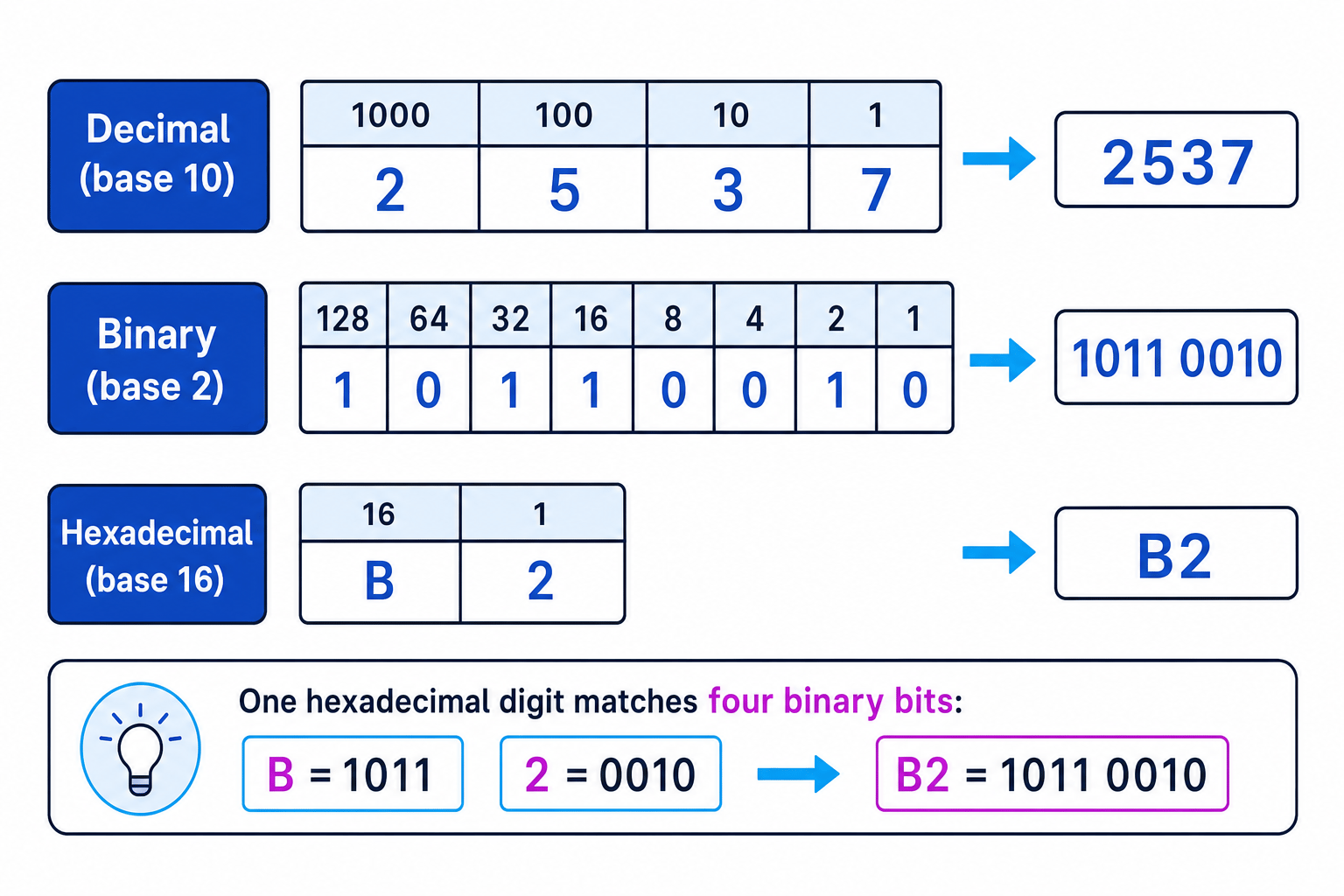
The most important rule is simple: moving one column left multiplies the place value by the base. This diagram compares the place values in decimal, binary and hexadecimal.
Key Idea
Place value
The same written digits can mean different values in different bases. For example, “10” means one group of the base and no units: ten in decimal, two in binary, and sixteen in hexadecimal.
Decimal: base 10
Decimal is the number system you use most often in everyday life.
Definition
Decimal
Decimal is base 10. It uses ten digit symbols: 0, 1, 2, 3, 4, 5, 6, 7, 8 and 9.
In decimal, the place values are ones, tens, hundreds, thousands, and so on. Each column is 10 times larger than the column to its right.
For example, 2537 means:
2×1000+5×100+3×10+7×1=25372 \times 1000 + 5 \times 100 + 3 \times 10 + 7 \times 1 = 25372×1000+5×100+3×10+7×1=2537
You already do this naturally, but it is useful because binary and hexadecimal follow the same place-value idea with different bases.
Binary: base 2
Computers use binary because computer hardware is built from electronic circuits that can reliably represent two states, such as off/on or low voltage/high voltage. These two states are represented using 0 and 1.
Definition
Binary
Binary is base 2. It uses only two digit symbols: 0 and 1.
Definition
Bit
A bit, short for binary digit, is a single 0 or 1. A bit pattern is a sequence of bits, such as 1011 0010.
In an 8-bit binary number, the place values are:
128, 64, 32, 16, 8, 4, 2, 1
The rightmost bit is the ones column. Moving left doubles the place value each time.
Example
Interpreting binary place value
- Put the bits in 1011 0010 under the 8-bit place values: 128, 64, 32, 16, 8, 4, 2 and 1.
- Select the columns that contain a 1: 128, 32, 16 and 2.
- Add those place values: 128+32+16+2=178128 + 32 + 16 + 2 = 178128+32+16+2=178. So, if this bit pattern is being used as a positive integer, 1011 0010 represents decimal 178.
Common Mistake
Reading binary like decimal
Do not read 1011 0010 as “one million and something”. Binary digits use binary place values, not decimal place values.
Computers use binary for data and instructions
A computer represents all data as bit patterns. This includes:
- integers, such as 65 or 178
- text, such as letters and punctuation
- images, such as pixel colours
- sound, such as sampled audio values
Computers also represent instructions in binary. An instruction is a command for the processor, such as loading data, adding values or storing a result.
Key Idea
Bits need context
A bit pattern does not have one fixed meaning on its own. The program, file format, character set or processor tells the computer how to interpret the bits.
Example
Interpreting one bit pattern in different contexts
- If 0100 0001 is interpreted as a positive integer, the 64 and 1 columns contain 1s, so its value is 64+1=6564 + 1 = 6564+1=65.
- If the same pattern is interpreted as text using a character set such as ASCII, decimal 65 commonly represents the letter A.
- If it is part of image data, those bits might represent part of a pixel’s colour value.
- If it is part of sound data, those bits might represent a sampled sound value at one moment in time.
Hexadecimal: base 16
Binary is perfect for computers, but long binary numbers are difficult for humans to read and copy accurately. Hexadecimal gives a shorter way to write bit patterns.
Definition
Hexadecimal
Hexadecimal, often shortened to hex, is base 16. It uses the digit symbols 0 to 9, then A, B, C, D, E and F for the values 10 to 15.
The extra hexadecimal digits are:
| Decimal value | Hex digit |
|---|---|
| 10 | A |
| 11 | B |
| 12 | C |
| 13 | D |
| 14 | E |
| 15 | F |
Hexadecimal place values go up in powers of 16: ones, sixteens, two-hundred-and-fifty-sixes, and so on.
Definition
Nibble
A nibble is a group of 4 bits. One hexadecimal digit can represent exactly one nibble.
This exact match happens because 16=2416 = 2^416=24. Four bits can make 16 different patterns, from 0000 to 1111, so one hex digit can stand for one group of 4 bits.
Example
Writing 8 bits as hexadecimal
- Split the binary pattern 1011 0010 into two nibbles: 1011 and 0010.
- Interpret 1011 as a 4-bit value: 8+2+1=118 + 2 + 1 = 118+2+1=11, which is hex B.
- Interpret 0010 as a 4-bit value: it has value 2, which is hex 2.
- Write the two hex digits together: 1011 0010 can be written as B2.
Tip
Quick sanity check
An 8-bit binary pattern should become exactly 2 hexadecimal digits, because each hex digit represents 4 bits.
Why hexadecimal is often used in computer science
Hexadecimal is not used because computers “prefer” it. Computers still store and process binary. Hex is used because it is easier for humans to work with.
Hexadecimal is useful because:
- it is much shorter than binary
- it is easier to read, copy and debug than long strings of 0s and 1s
- it maps neatly to binary because each hex digit represents 4 bits
- it is often used to display things like memory addresses, machine code, colour values and network identifiers
For example, the binary value 1111 1111 can be written as FF in hexadecimal. Both represent the same bit pattern, but FF is much shorter and easier to recognise.
Common Mistake
Hex is not what the computer stores
A computer still stores bits. Hexadecimal is mainly a human-friendly way to display the same binary patterns more compactly.
Exam technique
In the exam
- If asked to define the bases, state the allowed symbols: decimal uses 0 to 9, binary uses 0 and 1, and hexadecimal uses 0 to 9 plus A to F.
- If asked why computers use binary, link your answer to two-state electronic circuits and reliable storage/processing of 0s and 1s.
- If asked why hexadecimal is used, say it is shorter for humans than binary and maps exactly to groups of 4 bits.
- If asked about bit patterns, mention context: the same bits can represent an integer, text, image data, sound data or an instruction.
Self review
Check yourself
- Why does the bit pattern 0100 0001 not have one fixed meaning on its own?
- What digit symbols are used in hexadecimal after 9?
- Why is FF easier for humans to work with than 1111 1111?

Recap questions
Test yourself with 5 quick questions on this guide. Answer them all correctly to complete it.
Fundamentals of data representation
Guide 1 of 8
You've reached the end
Test yourself on this topic, or move on to the next guide.
How was this guide?