Revision notes for AQA GCSE Computer Science Representing sound. Open the guide for explanations and worked examples. Written against the AQA GCSE Computer Science (8525) specification, so the content matches what's examinable rather than general Computer Science background.
Representing sound
What you'll learn
- Why sound starts as an analogue signal but computers store it digitally.
- How sampling turns a sound wave into a sequence of numbers.
- What sampling rate and sample resolution mean.
- How to calculate the size of a sound file in bits, bytes and kB.
Sound starts as analogue
Sound is caused by vibrations. If you could draw a sound, you would usually show it as a smooth wave changing over time.
A computer, however, stores and processes data using binary, which means using only the digits 0 and 1. So before sound can be stored, edited, transmitted or processed by a computer, it must be converted into a digital form.
Definition
Analogue and digital
An analogue signal changes continuously, so its value can vary smoothly over time. A digital signal uses separate, discrete values that can be stored as binary data.
Key Idea
The big idea
To represent sound digitally, a computer records lots of measurements from the analogue sound wave and stores those measurements as binary numbers.
Sampling: measuring the wave
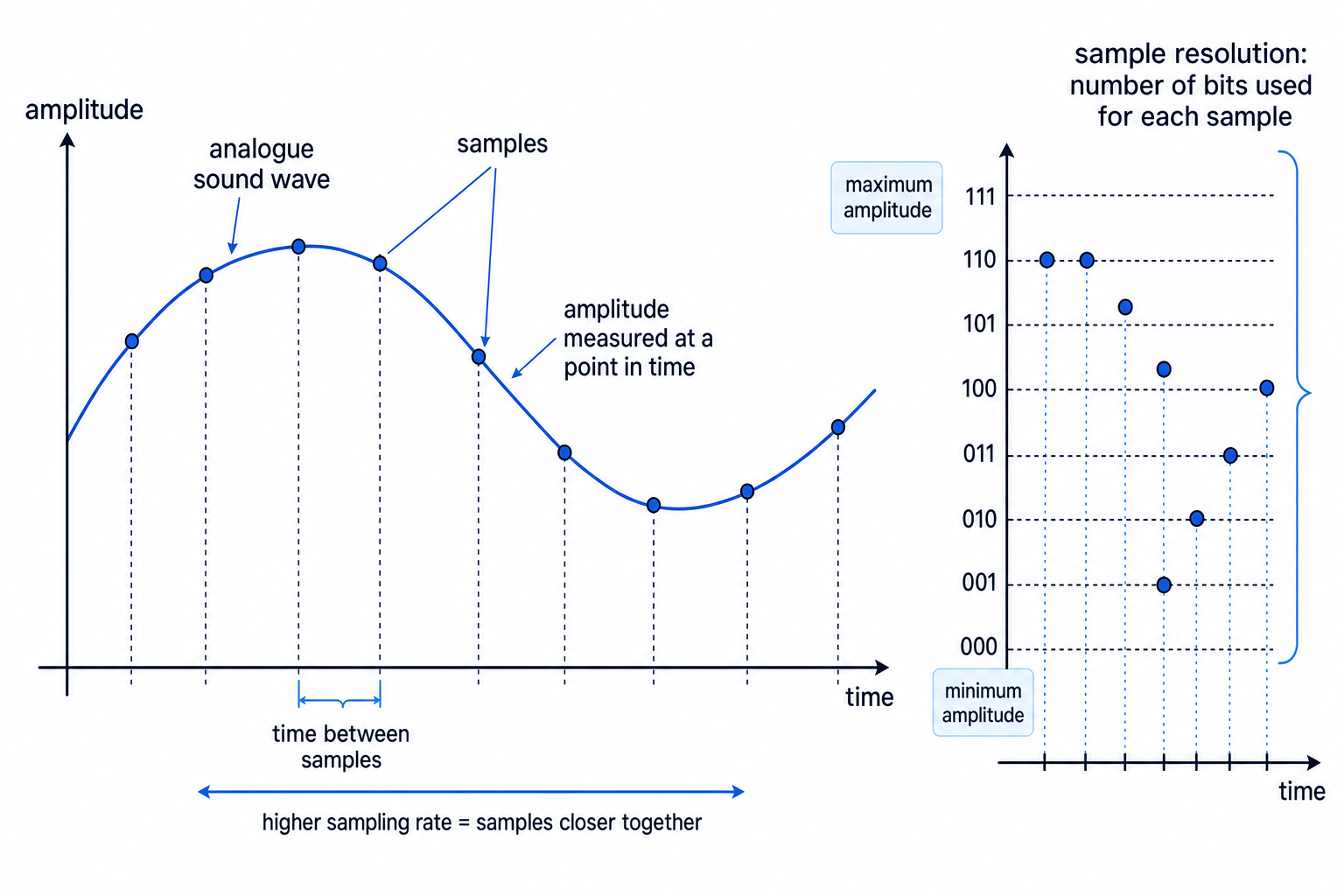
A computer cannot store every possible point on a smooth analogue wave. Instead, it takes measurements at regular points in time. This process is called sampling.
The height of the sound wave at a particular moment is called its amplitude. In simple terms, amplitude is linked to how strong or loud the sound is at that instant.
Definition
Sample and amplitude
A sample is a measure of the amplitude of a sound wave at a point in time.
When sound is digitised:
- The analogue wave is measured at regular time intervals.
- Each measurement gives one sample.
- Each sample is stored as a binary number.
Sampling rate
The sampling rate controls how often samples are taken.
Definition
Sampling rate
The sampling rate is the number of samples taken in one second. It is usually measured in hertz (Hz), where 1 Hz means 1 sample per second.
A higher sampling rate means samples are taken more frequently, so the digital version follows the shape of the original sound wave more closely. It also means more samples are stored, so the file size increases.
A lower sampling rate takes fewer samples, so it uses less storage, but it may miss detail in the original sound.
Example
Finding the number of samples
A sound clip is 3 seconds long and is sampled at 8000 Hz. How many samples are taken?
- Interpret 8000 Hz as 8000 samples every second.
- Multiply the samples per second by the duration: 8000×3=240008000 \times 3 = 240008000×3=24000.
- So the clip contains 24,000 samples.
Sample resolution
The sample resolution controls how much data is used to store each sample.
Definition
Sample resolution
Sample resolution is the number of bits used to store each sample.
A bit (b) is one binary digit, either 0 or 1. If more bits are used for each sample, there are more possible binary values available for the amplitude.
For example, with 8 bits per sample, a sample can have 256 possible values, from 0000 0000 to 1111 1111. This means the amplitude can be represented more accurately than if only a few bits were used.
Higher sample resolution usually gives a more accurate digital representation of the original sound, but it increases the file size because each sample uses more bits.
Example
Comparing sample resolutions
Compare 4-bit sample resolution with 8-bit sample resolution.
- Use the idea that n bits can represent 2n2^n2n different values.
- For 4 bits, the number of possible amplitude values is 24=162^4 = 1624=16.
- For 8 bits, the number of possible amplitude values is 28=2562^8 = 25628=256.
- The 8-bit version can store many more amplitude levels, but each sample uses twice as many bits as the 4-bit version.
Common Mistake
Mixing up rate and resolution
Sampling rate means how often samples are taken and is measured in Hz. Sample resolution means how many bits are used for each sample.
Quality and file size
Two settings mainly affect the digital representation of sound:
- Increasing the sampling rate means more samples are taken per second.
- Increasing the sample resolution means more bits are used for each sample.
Both can improve how closely the digital sound represents the original analogue sound. Both also increase the amount of data stored.
Key Idea
Quality and storage trade-off
Higher sampling rate or higher sample resolution usually improves the accuracy of the digital sound, but it also increases the file size.
Calculating sound file size
For GCSE, use this formula:
file size (bits)=rate×res×secs\text{file size (bits)} = \text{rate} \times \text{res} \times \text{secs}file size (bits)=rate×res×secswhere:
- rate is the sampling rate in Hz
- res is the sample resolution in bits
- secs is the length of the sound in seconds
This gives the file size in bits first.
A byte (B) is 8 bits, so to convert bits to bytes, divide by 8.
For decimal data-size prefixes:
- 1 kB = 1000 B
- 1 MB = 1000 kB = 1,000,000 B
Example
Calculating sound file size
A 10-second sound clip is sampled at 8000 Hz with a sample resolution of 8 bits. Calculate the file size in kB.
- Substitute into the formula: 8000×8×10=6400008000 \times 8 \times 10 = 6400008000×8×10=640000 bits.
- Convert bits to bytes by dividing by 8: 640000÷8=80000640000 \div 8 = 80000640000÷8=80000 B.
- Convert bytes to kB by dividing by 1000: 80000÷1000=8080000 \div 1000 = 8080000÷1000=80 kB.
- The sound file size is 80 kB.
Common Mistake
Forgetting the bits-to-bytes conversion
The formula gives an answer in bits, not bytes. If the question asks for bytes, kB or MB, you must divide by 8 before converting to larger units.
If the duration is not in seconds
The formula uses seconds. If the question gives minutes, convert them first.
For example, 2 minutes is 120 seconds, because each minute has 60 seconds.
Tip
Sanity check
If you double the sampling rate, double the sample resolution, or double the length of the recording, the file size also doubles.
Exam technique
In the exam
- Identify the three values: sampling rate, sample resolution and time in seconds.
- Use file size (bits)=rate×res×secs\text{file size (bits)} = \text{rate} \times \text{res} \times \text{secs}file size (bits)=rate×res×secs before doing any unit conversion.
- Convert bits to bytes by dividing by 8, then use 1000 B = 1 kB if needed.
- For description questions, link the setting to its effect: more samples or more bits per sample means a more accurate representation, but a larger file.
Self review
Check yourself
- What does one sample measure in a sound wave?
- What is the difference between sampling rate and sample resolution?
- A 5-second clip is sampled at 4000 Hz with 8-bit resolution. What calculation would give its size in bits?

Recap questions
Test yourself with 5 quick questions on this guide. Answer them all correctly to complete it.
Fundamentals of data representation
Guide 7 of 8
You've reached the end
Test yourself on this topic, or move on to the next guide.
How was this guide?