Revision notes for AQA GCSE Computer Science Data compression. Open the guide for explanations and worked examples. Written against the AQA GCSE Computer Science (8525) specification, so the content matches what's examinable rather than general Computer Science background.
Data compression
What you'll learn
- What data compression is and why it is useful.
- The difference between lossless and lossy compression.
- How Huffman coding uses a tree to create shorter codes for common symbols.
- How run length encoding (RLE) stores repeated data using frequency/data pairs.
Before compression: data has a size
A computer stores data using bits. A bit is a single binary digit: 0 or 1. A byte (B) is 8 bits. File sizes are often measured in kB, MB, GB and TB, using decimal prefixes in this course: 1 kB = 1000 B.
For text, one common character set is ASCII.
Definition
ASCII storage
ASCII is a character set that represents characters such as letters, digits and punctuation using binary codes. For GCSE calculations, standard ASCII uses 7 bits per character.
So uncompressed ASCII text can be calculated with:
ASCII bits=number of characters×7\text{ASCII bits} = \text{number of characters} \times 7ASCII bits=number of characters×7Example
Calculating ASCII storage
Suppose the text is ABACADABA.
- Count the characters:
ABACADABAhas 9 characters. - Use the ASCII formula: 9×7=639 \times 7 = 639×7=63 bits.
- So the uncompressed ASCII version needs 63 bits.
What data compression is
Definition
Data compression
Data compression is the process of reducing the number of bits needed to store or transmit data. Decompression is the process of turning compressed data back into a usable form.
Compression is common because smaller files:
- take up less storage space
- transfer faster over networks
- use less network capacity
- may fit storage or upload limits more easily
Example
Estimating transfer time
A file is compressed from 30 MB to 12 MB. It is sent over a connection that transfers 3 MB per second.
- Calculate the original transfer time: 30÷3=1030 \div 3 = 1030÷3=10 seconds.
- Calculate the compressed transfer time: 12÷3=412 \div 3 = 412÷3=4 seconds.
- Compare them: compression saves 6 seconds of transfer time, and also saves 18 MB of storage.
Lossless and lossy compression
There are different ways to compress data.
Definition
Lossless and lossy compression
Lossless compression allows the original data to be reconstructed exactly. Lossy compression permanently removes some data, so the decompressed version is not identical to the original.
For this topic, the two methods you need to understand in detail are Huffman coding and run length encoding (RLE). Both are lossless methods.
Key Idea
Exact data matters
Text files, programs and many data files usually need lossless compression, because even one changed bit could alter the meaning or stop the file working correctly.
Huffman coding
Huffman coding compresses data by giving shorter binary codes to symbols that appear more often, and longer binary codes to symbols that appear less often.
A symbol is one item of data being encoded, such as a character in a text file. The frequency of a symbol is how many times it appears.
Definition
Huffman coding
Huffman coding is a lossless compression method that uses the frequency of symbols to create variable-length binary codes, with the most frequent symbols usually given the shortest codes.
Unlike ASCII, where each character has a fixed number of bits, Huffman codes can have different lengths.
A Huffman code must be prefix-free. This means no code is the beginning of another code. For example, if one symbol had the code 0, no other symbol could have a code starting with 0. This lets the computer decode the bit stream without needing separators between codes.
Building a Huffman tree
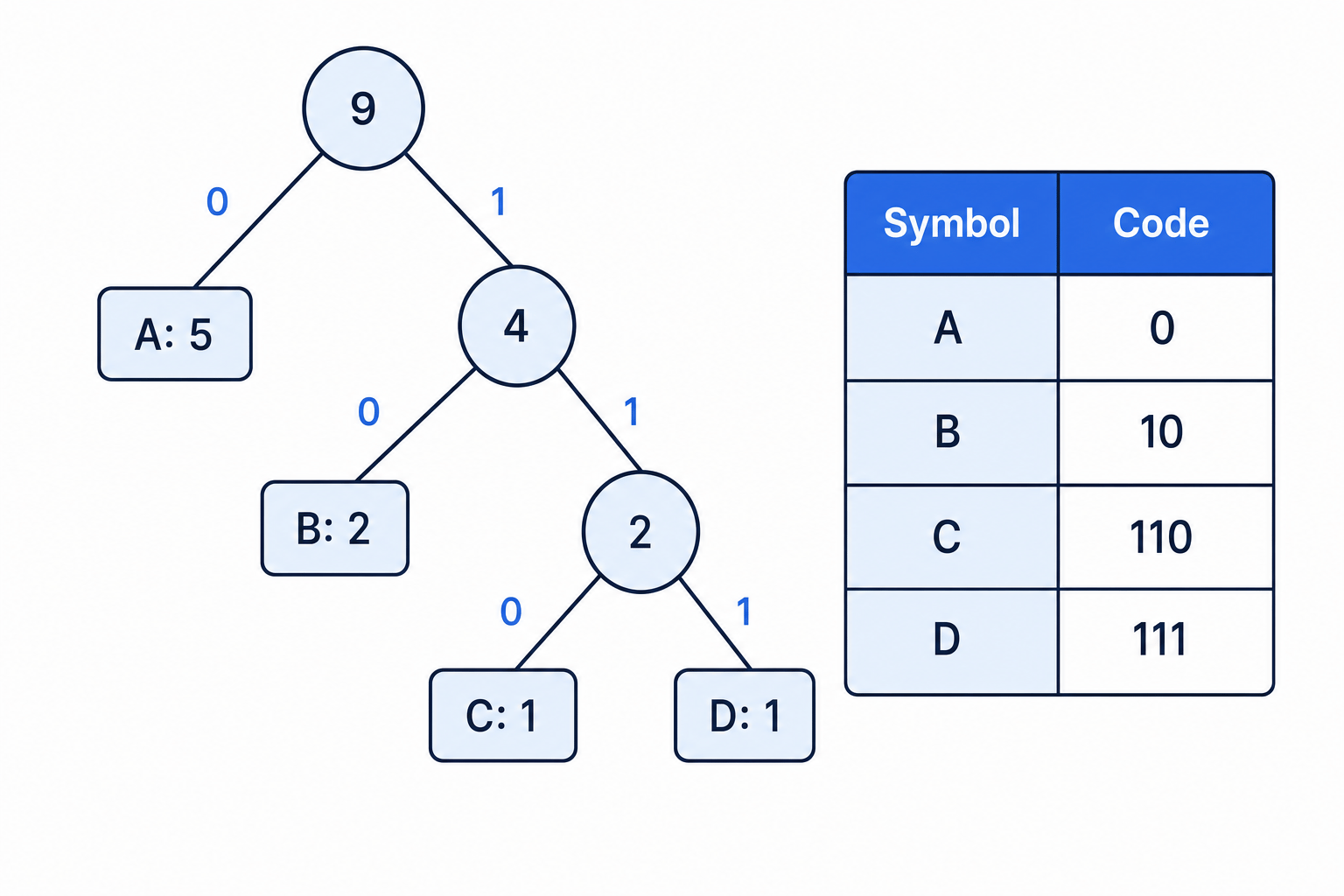
A Huffman tree is a binary tree used to represent the codes. A binary tree is a structure where each node can split into two branches. In a Huffman tree, each symbol is stored at a leaf node, and the path from the root to the symbol gives its code.
To build a Huffman tree:
- Count the frequency of each symbol.
- Make each symbol a leaf node.
- Repeatedly combine the two lowest-frequency nodes.
- Label branches with 0 and 1.
- Read each code by following the path from the root to the symbol.
Here is a Huffman tree for symbols A, B, C and D.
Example
Building a Huffman tree
Use these frequencies: A = 5, B = 2, C = 1, D = 1.
- Start with the lowest frequencies: C = 1 and D = 1.
- Combine them into one node with total frequency 2.
- Now compare the remaining lowest nodes: B = 2 and the new C/D node = 2. Combine them into a node with total frequency 4.
- Combine that node with A = 5 to make the root with total frequency 9.
- Follow the branch labels from root to leaf to get the codes: A =
0, B =10, C =110, D =111.
Common Mistake
Expecting only one possible tree
If two frequencies are equal, there may be more than one valid Huffman tree. The exact codes might differ, but the tree should still give shorter codes to more frequent symbols overall.
Calculating bits using Huffman coding
To calculate the number of bits used by Huffman coding, multiply each symbol’s frequency by the length of its code, then add the results.
Example
Counting Huffman bits
Use the message ABACADABA, with the Huffman codes from the tree above.
- Count the frequencies in the message: A appears 5 times, B appears 2 times, C appears 1 time, and D appears 1 time.
- Find each code length: A =
0is 1 bit, B =10is 2 bits, C =110is 3 bits, and D =111is 3 bits. - Multiply frequency by code length: A uses 5×1=55 \times 1 = 55×1=5 bits, B uses 2×2=42 \times 2 = 42×2=4 bits, C uses 1×3=31 \times 3 = 31×3=3 bits, and D uses 1×3=31 \times 3 = 31×3=3 bits.
- Add the compressed bits: 5+4+3+3=155 + 4 + 3 + 3 = 155+4+3+3=15 bits.
- Compare with uncompressed ASCII: 9×7=639 \times 7 = 639×7=63 bits.
- Calculate the saving: 63−15=4863 - 15 = 4863−15=48 bits saved.
Common Mistake
Code table overhead
In real compression, the receiver must know the Huffman tree or code table. In GCSE questions, if the tree is provided and you are asked for the bits needed for the encoded data, do not add extra bits unless the question explicitly tells you to.
Tip
Huffman sanity check
The most frequent symbol should usually have one of the shortest codes. If a rare symbol has a very short code and a common symbol has a long code, check the tree carefully.
Run length encoding (RLE)
Run length encoding is another lossless compression method. It works well when data contains long sequences of the same value.
A run is a sequence of the same value repeated next to itself. For example, in 00000111, the 00000 is a run of five 0s, and the 111 is a run of three 1s.
Definition
Run length encoding
Run length encoding (RLE) stores consecutive repeated values as frequency/data pairs. The frequency says how many times the value appears, and the data says what the value is.
This is especially useful for simple bitmaps with large areas of the same colour.
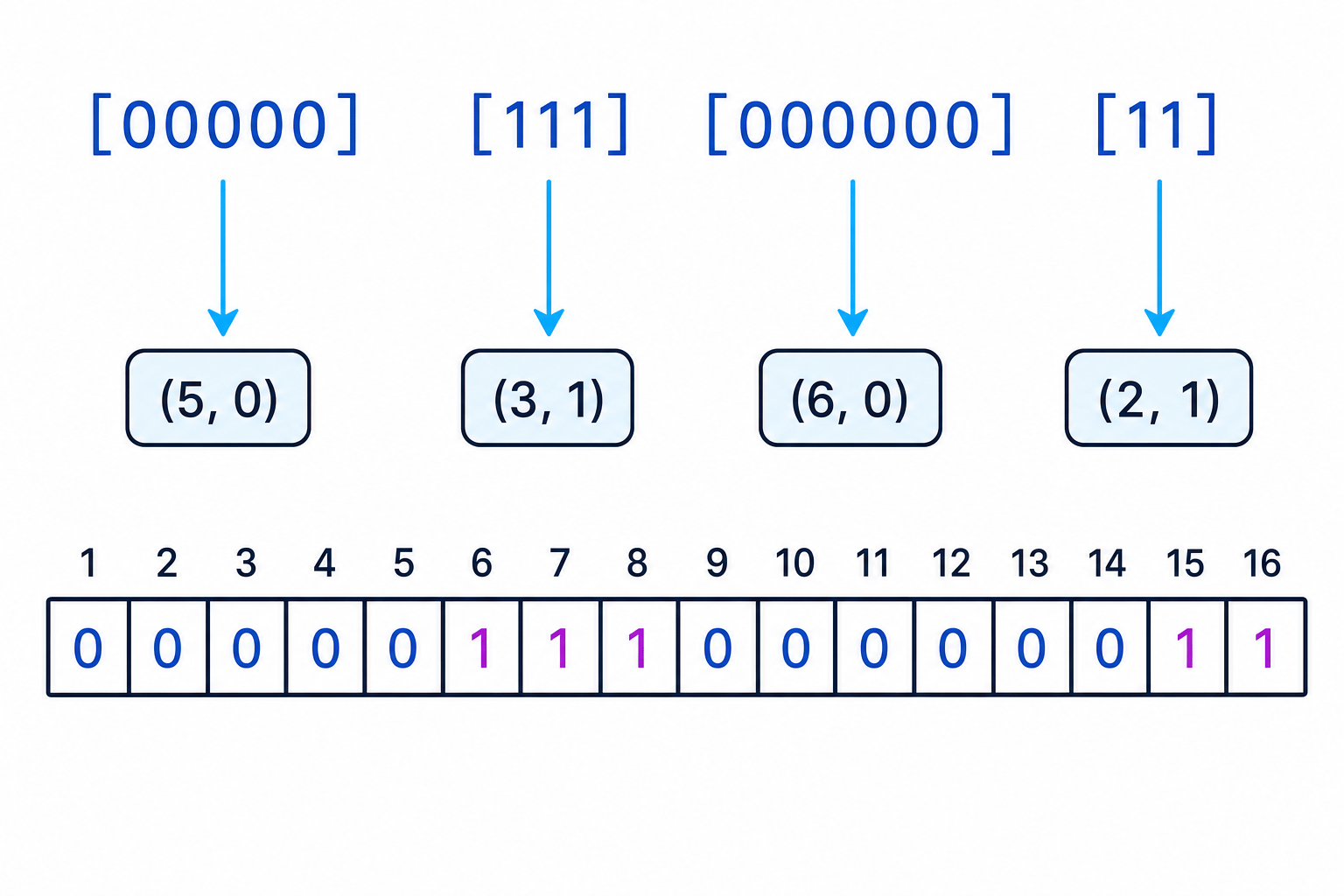
Example
Encoding a bitmap row with RLE
Encode the bitmap row 0000011100000011.
- Scan from left to right and split the row when the value changes:
00000 | 111 | 000000 | 11. - Count each run: there are five 0s, three 1s, six 0s, and two 1s.
- Write each run as a frequency/data pair:
(5, 0),(3, 1),(6, 0),(2, 1). - In the compact GCSE notation, this can be written as:
5 0 3 1 6 0 2 1.
Common Mistake
Putting data before frequency
RLE pairs are usually written as frequency first, then data. For example, 5 0 means “five 0s”, not “zero 5s”.
When RLE works well
RLE is effective when there are long repeated runs. It is not effective when the data changes value frequently.
Example
Predicting whether RLE will help
Compare 00000000 with 01010101.
00000000is one long run, so it can be represented as(8, 0).01010101changes every bit, so it becomes(1, 0),(1, 1),(1, 0),(1, 1), and so on.- The first row is likely to compress well. The second row may become larger because it creates many pairs.
Common Mistake
Continuing runs across bitmap rows
If a bitmap is shown as separate rows, encode each row separately unless the question says otherwise. Do not join the end of one row to the start of the next row.
Huffman coding vs RLE
| Method | Main idea | Best for | Common GCSE task |
|---|---|---|---|
| Huffman coding | Frequent symbols get shorter binary codes | Data where some symbols appear much more often than others | Interpret a tree and calculate compressed bits |
| RLE | Repeated adjacent values become frequency/data pairs | Bitmap rows or data with long repeated runs | Write the RLE pairs for a row |
Key Idea
Choose the method by the pattern
Huffman coding looks for frequent symbols across the data. RLE looks for repeated neighbouring values.
Exam technique
In the exam
- For Huffman trees, start at the root and follow the branch labels exactly to read each code.
- For uncompressed ASCII, use 7 bits per character unless the question states otherwise.
- For Huffman bit counts, multiply each frequency by its code length, then add the totals.
- For RLE, scan left to right, write frequency before data, and restart for each bitmap row if rows are shown separately.
Self review
Check yourself
- Why can Huffman coding use fewer bits than fixed-length ASCII for some text?
- How do you find a character’s code from a Huffman tree?
- Convert
0011111000into RLE frequency/data pairs.

Recap questions
Test yourself with 5 quick questions on this guide. Answer them all correctly to complete it.
Fundamentals of data representation
Guide 8 of 8
You've reached the end
Test yourself on this topic, or move on to the next guide.
How was this guide?