Revision notes for AQA GCSE Computer Science Relational operations in a programming language. Open the guide for explanations and worked examples. Written against the AQA GCSE Computer Science (8525) specification, so the content matches what's examinable rather than general Computer Science background.
Relational operations in a programming language
What you'll learn
- What a relational operation is and why it always gives
TRUEorFALSE. - How to use
=,≠,<,>,<=and>=in algorithms. - How comparison symbols differ between AQA pseudocode and real programming languages.
- How to avoid common mistakes with assignment, equality and boundary values.
The basic idea: comparing two values
Programs often need to ask questions such as:
- Is the password correct?
- Is the score at least 50?
- Has the player run out of lives?
- Is the temperature below 0?
These are all comparisons. A comparison checks how one value relates to another value.
Definition
Relational operation
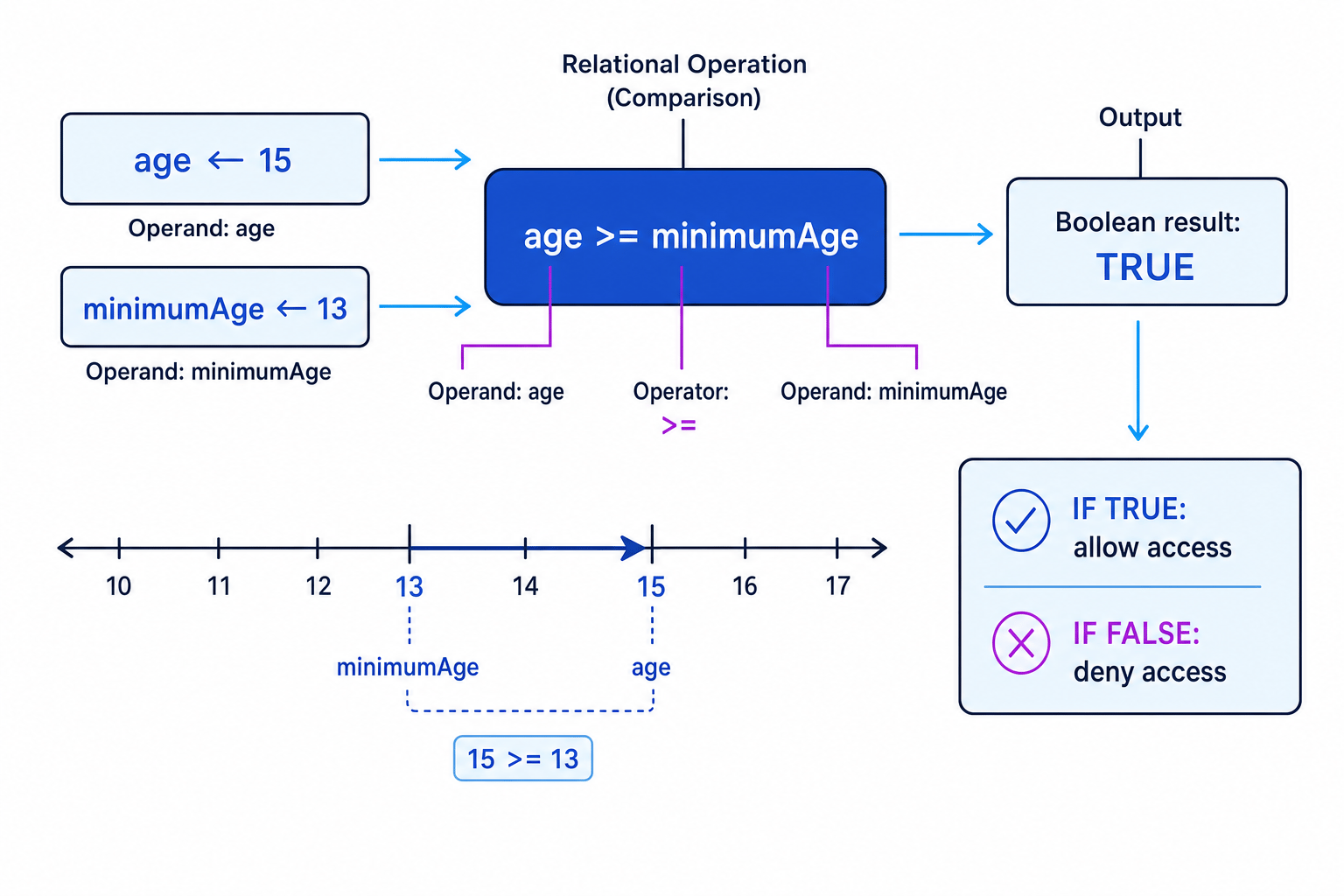
A relational operation compares two values and produces a Boolean result: either TRUE or FALSE.
The two values being compared are called operands. The symbol that does the comparing is called a relational operator.
For example, in age >= 13:
ageis an operand>=is the relational operator13is another operand- the result is either
TRUEorFALSE
Key Idea
The main takeaway
A relational operation does not usually give a number or a word as its result. It answers a yes/no question, so the result is always TRUE or FALSE.
Example
Evaluating comparisons
Suppose these variables have already been assigned:
score ← 72
passMark ← 50
lives ← 0
Work out the result of each comparison.
-
For
score >= passMark, compare 72 with 50. Since 72 is greater than 50, the comparison isTRUE. -
For
score = passMark, compare whether 72 is exactly the same as 50. They are different values, so the comparison isFALSE. -
For
lives <= 0, compare 0 with 0. The operator<=means “less than or equal to”, and 0 is equal to 0, so the comparison isTRUE.
The six relational operators
You need to be familiar with these six comparisons.
| Meaning | Common AQA pseudocode symbol | Common programming language symbol |
|---|---|---|
| Equal to | = | == in Python/C# |
| Not equal to | ≠ | != in Python/C#, <> in VB.NET |
| Less than | < | < |
| Greater than | > | > |
| Less than or equal to | <= or ≤ | <= |
| Greater than or equal to | >= or ≥ | >= |
Different languages use different symbols, especially for equal to and not equal to. In AQA pseudocode, assignment uses the left arrow ←, so = can be used for comparison. In Python and C#, = is assignment, so == is used for equality.
Common Mistake
Assignment and equality are not the same
score ← 50 stores 50 in score.
score = 50 checks whether score is equal to 50.
In Python, the equality check would be written as score == 50.
Equal to
Equal to checks whether two values are exactly the same.
For example:
IF password = "computer" THEN
    OUTPUT "Access granted"
ENDIF
This condition is only TRUE if the value stored in password is exactly "computer".
Equality is often used with:
- passwords or usernames
- menu choices
- checking if a total has reached a target
- checking if a variable has a particular value
Tip
Read equality as a question
Read password = "computer" as: “Is password equal to "computer"?”
That helps you remember it is a test, not an instruction to store a value.
Not equal to
Not equal to checks whether two values are different.
For example:
WHILE guess ≠ secretNumber
    INPUT guess
ENDWHILE
The loop continues while guess is different from secretNumber.
This is useful when you want something to continue until the correct value appears.
Example
Tracing not equal to in a loop
Suppose secretNumber ← 7, and the user enters guesses 3, then 9, then 7.
-
After the first guess, compare
3 ≠ 7. The values are different, so the condition isTRUEand the loop continues. -
After the second guess, compare
9 ≠ 7. The values are still different, so the condition isTRUEand the loop continues again. -
After the third guess, compare
7 ≠ 7. The values are not different, so the condition isFALSEand the loop stops.
Less than and greater than
Less than means the value on the left is smaller than the value on the right.
temperature < 0
This is TRUE when temperature is below 0.
Greater than means the value on the left is larger than the value on the right.
score > highScore
This is TRUE when score is bigger than highScore.
Order matters. 5 < 10 is TRUE, but 10 < 5 is FALSE.
Example
Choosing the correct direction
A program should output "Too high" if the user’s guess is greater than the answer.
-
Identify the two values being compared:
guessandanswer. -
Decide which value must be bigger for the message to appear. The guess must be bigger than the answer.
-
Put the larger-side variable on the left of the
>operator:guess > answer.
So the condition should be:
IF guess > answer THEN
    OUTPUT "Too high"
ENDIF
Less than or equal to, greater than or equal to
The operators <= and >= include the boundary value.
A boundary value is the exact cut-off point where the result changes.
For example, if a pass mark is 50:
score > 50means 51 or more is a passscore >= 50means 50 or more is a pass
Those are not the same.
Key Idea
Inclusive comparisons
<= means “less than or equal to”.
>= means “greater than or equal to”.
The “or equal to” part means the boundary value is included.
Example
Checking a pass mark boundary
A test is passed if the student scores 50 or more. Decide whether to use > or >=.
-
The boundary value is 50 because that is the exact cut-off score.
-
The phrase “50 or more” means a score of exactly 50 should pass.
-
Use
>=because it includes equality:score >= 50.
The condition should be:
IF score >= 50 THEN
    OUTPUT "Pass"
ELSE
    OUTPUT "Fail"
ENDIF
Common Mistake
Using the wrong boundary operator
If the rule says “at least”, “no more than”, “minimum”, or “maximum”, you probably need <= or >=, not just < or >.
Using relational operations in algorithms
Relational operations are most often used as conditions.
Definition
Condition
A condition is an expression that is evaluated as TRUE or FALSE, usually to control selection or iteration.
You will commonly see conditions in:
IFstatements, where the program chooses between different pathsWHILEloops, where the program repeats while a condition isTRUEREPEAT...UNTILloops, where the program repeats until a condition becomesTRUE
Example using selection:
IF age >= 18 THEN
    OUTPUT "Adult ticket"
ELSE
    OUTPUT "Child ticket"
ENDIF
Example using iteration:
WHILE lives > 0
    OUTPUT "Keep playing"
    lives ← lives - 1
ENDWHILE
Example
Interpreting an algorithm condition
Consider this pseudocode:
points ← 12
target ← 15

IF points < target THEN
    OUTPUT "Keep going"
ELSE
    OUTPUT "Target reached"
ENDIF
-
Evaluate the condition
points < targetby substituting the current values:12 < 15. -
Since 12 is smaller than 15, the condition is
TRUE. -
Follow the
THENbranch, so the output is"Keep going".
Comparing text values
You can use equality and inequality with strings, such as checking a password or menu option.
For example:
IF choice = "A" THEN
    OUTPUT "Add record"
ENDIF
In many languages, string comparisons are case-sensitive, meaning "A" and "a" are treated as different values.
Common Mistake
Watch the data type
A number stored as text is not always treated the same as a number stored as an integer or real value. For example, in Python, user input is read as a string unless it is converted.
Exam technique
In the exam
-
Read the comparison as a full question: “Is the left value greater than or equal to the right value?”
-
Check boundary words carefully: “at least” usually means
>=; “no more than” usually means<=. -
Do not mix up assignment and comparison:
←stores a value, while relational operators test values.
Self review
Check yourself
- What Boolean result does
7 <= 7produce, and why? - Which operator would you use for “the password is not equal to
"admin"”? - A cinema charges adult prices for ages 16 and above. What condition should test for an adult ticket?

Recap questions
Test yourself with 5 quick questions on this guide. Answer them all correctly to complete it.
You've reached the end
Test yourself on this topic, or move on to the next guide.
How was this guide?