Revision notes for AQA GCSE Computer Science Boolean operations in a programming language. Open the guide for explanations and worked examples. Written against the AQA GCSE Computer Science (8525) specification, so the content matches what's examinable rather than general Computer Science background.
Boolean operations in a programming language
What you'll learn
- What a Boolean value and Boolean expression are.
- How to use the Boolean operators NOT, AND and OR.
- How Boolean operations control selection and iteration structures.
- How to trace combined conditions without getting caught by common mistakes.
The starting point: True or False
In programming, many decisions come down to a question with only two possible answers: True or False.
A variable is a named storage location in a program, such as score or loggedIn. A variable can store a Boolean value, or it can store a number/string that is tested in a condition.
Definition
Boolean value
A Boolean value is one of two values: True or False.
A comparison checks two values and produces a Boolean result. For example, score >= 50 is True if score is at least 50, and False otherwise.
Definition
Boolean expression
A Boolean expression is any expression that evaluates to True or False, such as lives > 0, loggedIn, or score >= 50 AND timeLeft > 0.
Example
Evaluating a Boolean expression
Suppose lives ← 3 and score ← 42. Evaluate lives > 0 AND score >= 50.
- Substitute the current values into each comparison:
3 > 0and42 >= 50. - Evaluate each comparison:
3 > 0is True, while42 >= 50is False. - Apply the Boolean operator:
True AND Falseevaluates to False, so the whole expression is False.
Boolean operators
A Boolean operator takes one or more Boolean values and produces another Boolean value.
The three operators you need for this programming topic are:
- NOT
- AND
- OR
In AQA-style pseudocode, they are usually written in capitals. In Python 3, the same ideas are written as not, and and or.
Definition
Boolean operator
A Boolean operator combines or changes Boolean values to produce a final True or False result.
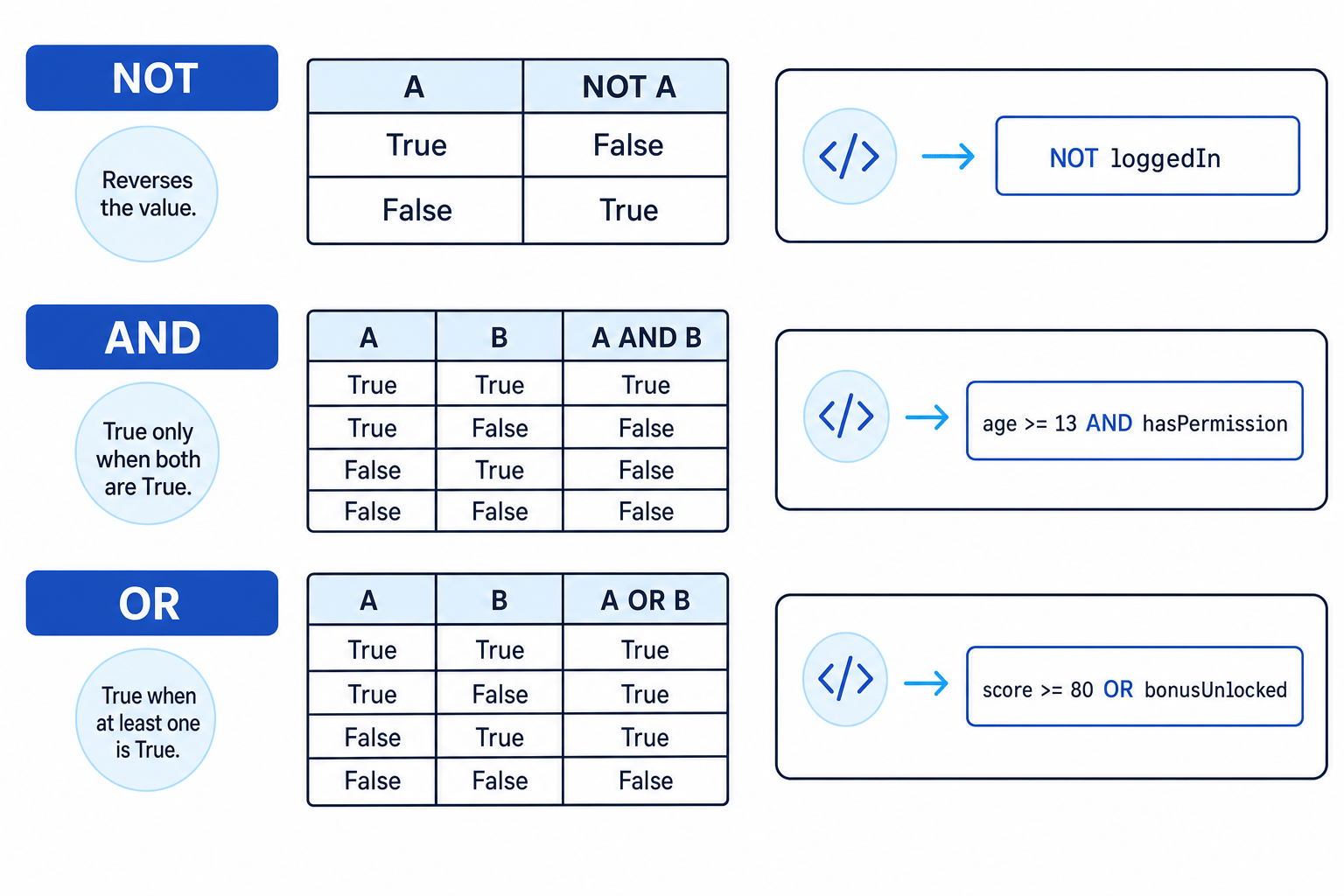
The diagram below summarises the truth tables for NOT, AND and OR. A truth table lists every possible input combination and the result produced by the operator.
NOT: reversing a Boolean value
NOT reverses a Boolean value:
NOT Truebecomes False.NOT Falsebecomes True.
Key Idea
NOT
Use NOT when you want the opposite of a condition.
For example:
IF NOT loggedIn THEN
    OUTPUT "Please log in"
ENDIF
This means the message is output only when loggedIn is False.
Example
Using NOT in a condition
Suppose loggedIn ← False. Decide whether this code outputs the message.
- Start with the value of the Boolean variable:
loggedInis False. - Apply NOT:
NOT loggedInbecomes True. - The IF condition is True, so the program runs the statement inside the IF and outputs
"Please log in".
Common Mistake
Putting NOT in the wrong place
NOT score >= 50 can be confusing. Write NOT (score >= 50) to make it clear that the comparison is done first, then reversed.
AND: both conditions must be True
AND is used when two conditions must both be True.
For example, a user might only be allowed access if they are old enough and have permission:
IF age >= 13 AND hasPermission THEN
    OUTPUT "Access allowed"
ELSE
    OUTPUT "Access denied"
ENDIF
Key Idea
AND
A AND B is True only when A is True and B is True.
Example
Checking two requirements with AND
Suppose age ← 12 and hasPermission ← True. Evaluate age >= 13 AND hasPermission.
- Evaluate the comparison
age >= 13: because12 >= 13is False, the first part is False. - Use the stored Boolean value for the second part:
hasPermissionis True. - Apply AND:
False AND Trueis False, so access is denied.
OR: at least one condition must be True
OR is used when one condition, the other condition, or both conditions can be True.
For example, a player might continue if they still have lives or they have an extra chance:
IF lives > 0 OR extraChance THEN
    OUTPUT "Keep playing"
ELSE
    OUTPUT "Game over"
ENDIF
Key Idea
OR
A OR B is True when at least one of A or B is True.
Example
Accepting either condition with OR
Suppose lives ← 0 and extraChance ← True. Evaluate lives > 0 OR extraChance.
- Evaluate the comparison
lives > 0: because0 > 0is False, the first part is False. - Use the stored Boolean value for the second part:
extraChanceis True. - Apply OR:
False OR Trueis True, so the program outputs"Keep playing".
Common Mistake
Treating OR as exclusive
In programming, OR is usually inclusive: if both conditions are True, the result is still True. So True OR True is True.
Using Boolean operations in selection
A selection structure chooses which path a program takes. The most common example is an IF statement.
Definition
Selection
Selection is when a program chooses between different routes depending on whether a condition is True or False.
Example:
IF username = "admin" AND passwordCorrect THEN
    OUTPUT "Welcome"
ELSE
    OUTPUT "Access denied"
ENDIF
Here, the program only outputs "Welcome" if both parts of the condition are True.
You can use Boolean operators to build more precise decisions:
- Use AND when all requirements must be met.
- Use OR when any one acceptable option is enough.
- Use NOT when you want the opposite of a condition.
Using Boolean operations in iteration
An iteration structure repeats code. A loop uses a condition to decide whether to keep repeating or when to stop.
Definition
Iteration
Iteration means repetition: running a section of code more than once, usually controlled by a condition.
A WHILE loop repeats while its condition is True:
WHILE NOT found AND index < numberOfItems
    index ← index + 1
ENDWHILE
This loop continues only while the item has not been found and there are still items left to check.
Example
Deciding whether a WHILE loop runs
Suppose found ← False, index ← 4 and numberOfItems ← 10. Evaluate NOT found AND index < numberOfItems.
- Apply NOT to
found: sincefoundis False,NOT foundis True. - Evaluate the comparison
index < numberOfItems: because4 < 10is True. - Apply AND:
True AND Trueis True, so the WHILE loop runs again.
A REPEAT...UNTIL loop is slightly different: it repeats until the condition becomes True.
REPEAT
    INPUT password
UNTIL password = correctPassword
The condition still produces a Boolean value, but the loop stops when that value is True.
Combining operators safely
When conditions get longer, use brackets to make the order clear.
A bracketed condition is a condition inside brackets that should be evaluated as a group first, such as (age >= 13 AND age <= 16).
Tip
Use brackets for clarity
Even if a programming language has its own operator order, brackets make your intention clear and reduce mistakes in exam answers.
For example:
IF (age >= 13 AND age <= 16) OR teacherOverride THEN
    OUTPUT "Allowed"
ENDIF
This means the user is allowed if they are aged 13 to 16 inclusive, or if a teacher override is active.
Example
Evaluating a combined condition
Suppose age ← 12 and teacherOverride ← True. Evaluate (age >= 13 AND age <= 16) OR teacherOverride.
- Evaluate the first bracketed comparison:
age >= 13is False because 12 is less than 13. - Evaluate the second bracketed comparison:
age <= 16is True because 12 is less than 16. - Apply AND inside the brackets:
False AND Trueis False. - Apply OR with the final part:
False OR Trueis True, so the output statement runs.
Choosing AND or OR for range checks
A range check tests whether a value is inside or outside an allowed range.
For example, a percentage mark is valid if it is from 0 to 100 inclusive:
mark >= 0 AND mark <= 100
Both parts must be True, so this uses AND.
But if you are checking for an invalid mark, the logic changes:
mark < 0 OR mark > 100
A mark is invalid if it is too low or too high.
Example
Choosing the correct operator for a range check
A program should keep asking for mark while it is invalid. Decide the condition for the loop.
- Identify what makes the mark invalid: it is invalid if it is less than 0 or greater than 100.
- Convert each invalid case into a comparison:
mark < 0andmark > 100. - Combine the invalid cases with OR:
mark < 0 OR mark > 100. - Test a value such as
mark ← 120:120 < 0is False, but120 > 100is True, so the OR condition is True and the loop should ask again.
Common Mistake
Using AND for impossible invalid ranges
mark < 0 AND mark > 100 can never be True for one value, because a number cannot be below 0 and above 100 at the same time.
A reliable tracing method
When you see a Boolean expression in an exam, do not try to “just see it” all at once. Break it down.
- Evaluate each comparison first, such as
score >= 50. - Replace each comparison with True or False.
- Apply any NOT operators.
- Evaluate bracketed groups.
- Combine the remaining values using AND or OR.
- Use the final True/False value to decide what the IF statement or loop does.
Exam technique
In the exam
- For combined conditions, write True or False above each smaller comparison before applying AND or OR.
- Use brackets in your own pseudocode when conditions contain more than one Boolean operator.
- Remember that AND means all required conditions must be True, while OR means at least one condition must be True.
- For validation questions, carefully decide whether the condition describes valid data or invalid data.
Self review
Check yourself
- What is the result of
NOT (score >= 50)whenscore ← 42? - Which operator should you use when two requirements must both be met?
- Why is
mark < 0 OR mark > 100used to detect an invalid percentage mark?

Recap questions
Test yourself with 5 quick questions on this guide. Answer them all correctly to complete it.
Programming
Guide 5 of 11
You've reached the end
Test yourself on this topic, or move on to the next guide.
How was this guide?