Revision notes for AQA GCSE Computer Science Relational databases. Open the guide for explanations and worked examples. Written against the AQA GCSE Computer Science (8525) specification, so the content matches what's examinable rather than general Computer Science background.
Relational databases
What you'll learn
- What a database is and why it is useful.
- How a relational database stores data in linked tables.
- The meanings of table, record, field, data type, primary key and foreign key.
- How good relational database design reduces data redundancy and data inconsistency.
Why do we need databases?
In computer science, we often need to store lots of data so it can be searched, updated, sorted and shared. A school might store students, teachers, rooms, subjects and exam results. A shop might store products, customers and orders.
A simple text file or spreadsheet can work for small tasks, but as the amount of data grows, it becomes harder to keep it organised and accurate. This is where databases are useful.
Definition
Database
A database is an organised collection of data that can be stored, searched, updated and managed efficiently.
A database is not just “a big list”. The key idea is that the data is structured, so the computer knows what each piece of data means.
Tables, records and fields
Most GCSE database examples use data arranged in tables. A table looks a bit like a spreadsheet: it has rows and columns.
Definition
Table, record and field
- A table stores data about one type of thing, such as students, books or orders.
- A record is one row in a table. It stores all the data about one item or person.
- A field is one column in a table. It stores one category of data, such as surname or date of birth.
For example, a STUDENT table might look like this:
| StudentID | Forename | Surname | YearGroup |
|---|---|---|---|
| 1 | Emma | Johnson | 10 |
| 2 | Liam | Smith | 11 |
| 3 | Olivia | Brown | 9 |
In this table:
- The whole grid is a table.
- Emma Johnson’s row is a record.
Surnameis a field.
Key Idea
Rows and columns
A record is a row. A field is a column.
Data types
Every field should have a suitable data type. This tells the database what kind of data is allowed in that field.
Definition
Data type
A data type is the kind of data a field can store, such as text, integer, Boolean or date.
Common database data types include:
| Data type | Meaning | Example |
|---|---|---|
| Text/string | Letters, digits and symbols treated as text | AB12 3CD |
| Integer | Whole number | 10 |
| Boolean | One of two values, usually true/false or yes/no | true |
| Date | A calendar date | 2026-03-15 |
Choosing the right data type matters. For example, a phone number should usually be stored as text, not an integer, because you do not calculate with it and it might start with 0.
Example
Choosing suitable data types
A school wants to store these fields: YearGroup, ParentPhoneNumber, and HasMedicalPlan.
YearGroupshould be an integer because it stores a whole number such as 7, 8, 9, 10 or 11.ParentPhoneNumbershould be text/string because phone numbers are identifiers, not values used in calculations. Storing it as a number could lose a leading 0.HasMedicalPlanshould be Boolean because there are only two possible values: yes/no or true/false.
Common Mistake
Numbers are not always numeric data
Do not assume that anything made of digits should be stored as an integer. If you will not do arithmetic with it, it may be better stored as text.
Relational databases
A relational database stores data in multiple related tables, rather than one huge table.
Definition
Relational database
A relational database is a database that stores data in tables which can be linked together using key fields.
Here is the big picture: one table stores students, another table stores loans, and a key field links the two tables together.
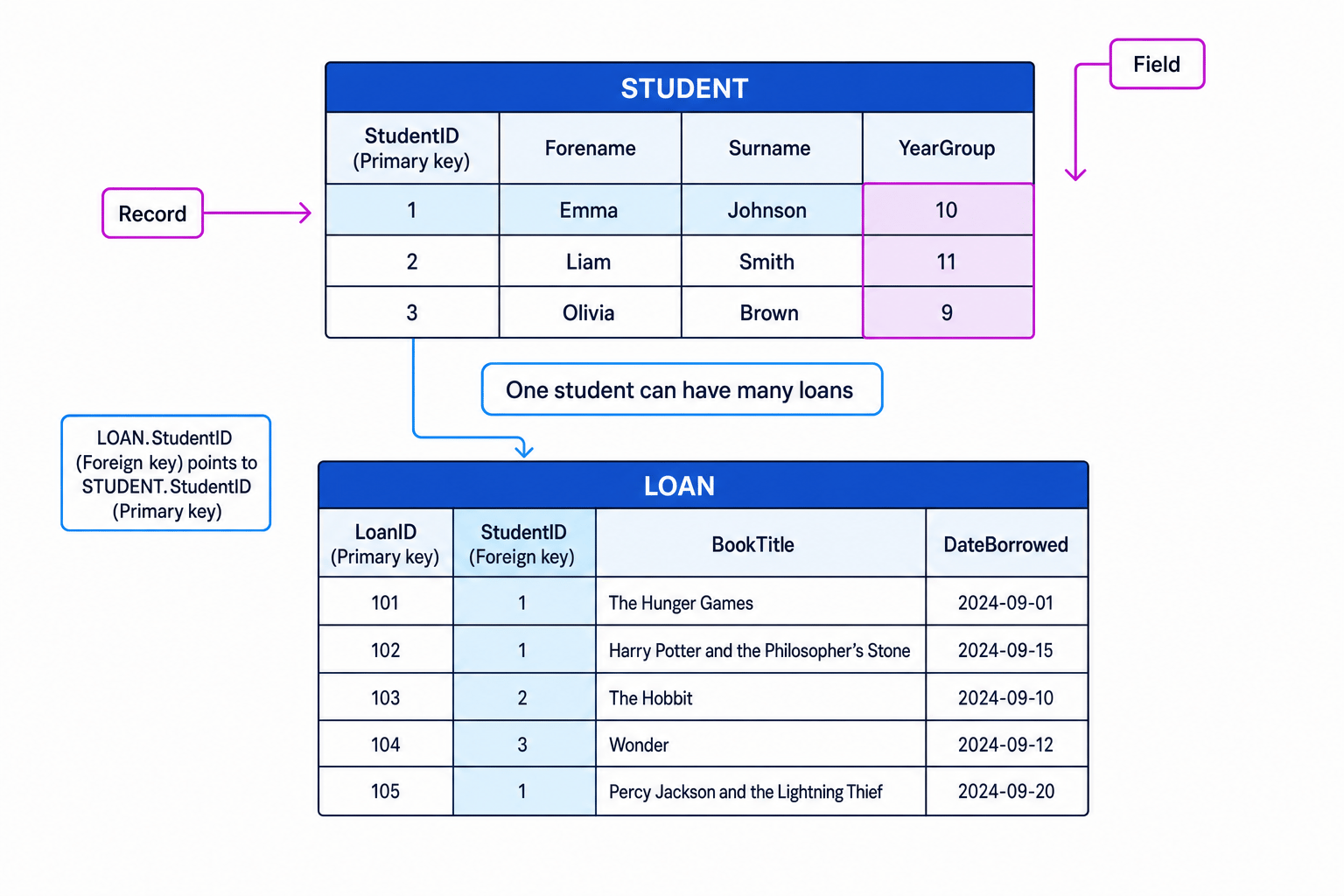
This is useful because different tables can store data about different things. For example:
- A
STUDENTtable stores data about students. - A
LOANtable stores data about book loans. - A loan can be linked to the student who borrowed the book.
Primary keys
To link records properly, each record in a table needs a reliable way to be identified.
Definition
Primary key
A primary key is a field that uniquely identifies each record in a table.
A primary key must be:
- unique — no two records have the same value;
- present — it should not be blank;
- stable — it should not keep changing.
In the STUDENT table, StudentID is a good primary key because each student can be given a different ID number.
Names are usually poor primary keys because two people can have the same name.
Example
Choosing a primary key
A school has this student data: Forename, Surname, DateOfBirth, StudentID.
Forenameis not suitable because many students may share the same first name.Surnameis not suitable because many students may share the same surname.DateOfBirthis not suitable because several students could be born on the same day.StudentIDis suitable because the school can make sure every student has a different ID.
Tip
Primary key sanity check
Ask: “Could two records ever have the same value in this field?” If yes, it is not a safe primary key.
Foreign keys
A table can include a field that refers to the primary key in another table. This is called a foreign key.
Definition
Foreign key
A foreign key is a field in one table that refers to the primary key in another table.
For example, in a library database:
STUDENT.StudentIDis the primary key in theSTUDENTtable.LOAN.StudentIDis a foreign key in theLOANtable.- The value in
LOAN.StudentIDtells you which student made that loan.
This creates a relationship between the tables.
Example
Linking a loan to a student
A LOAN record has LoanID = 105 and StudentID = 1. The STUDENT table contains a record where StudentID = 1 and the student is Emma Johnson.
- Look at the foreign key value in the
LOANrecord:StudentIDis 1. - Match that value to the primary key in the
STUDENTtable: the record withStudentID1 is Emma Johnson. - Therefore, loan 105 belongs to Emma Johnson.
Common Mistake
Mixing up primary and foreign keys
A primary key identifies a record in its own table. A foreign key points to a primary key in another table.
Relationships between tables
Relational databases are powerful because one record in a table can be linked to many records in another table.
For example, one student can have many book loans:
- Emma Johnson appears once in the
STUDENTtable. - Emma’s
StudentIDcan appear many times in theLOANtable. - Each loan record still has its own
LoanID.
This avoids storing Emma’s full details again and again for every book she borrows.
Data redundancy
Definition
Data redundancy
Data redundancy means storing the same data more than once when it is not needed.
Suppose every loan record stored the student’s full name and year group:
| LoanID | StudentName | YearGroup | BookTitle |
|---|---|---|---|
| 101 | Emma Johnson | 10 | The Hunger Games |
| 102 | Emma Johnson | 10 | The Hobbit |
| 103 | Emma Johnson | 10 | Wonder |
Emma’s name and year group are repeated. That is redundant data.
A better design is to store Emma’s details once in STUDENT, then store only her StudentID in LOAN.
Key Idea
Store data once where possible
A well-designed relational database reduces unnecessary repetition by storing each fact in the most suitable table and linking tables with keys.
Data inconsistency
Definition
Data inconsistency
Data inconsistency happens when different copies of the same data do not match.
Redundancy can lead to inconsistency. If Emma moves from Year 10 to Year 11, but one loan record is updated and another is not, the database now gives conflicting information.
Example
Reducing inconsistency with linked tables
A database stores Emma’s year group in three separate loan records. Emma moves from Year 10 to Year 11.
- In the repeated-data design, three separate records need updating. If one is missed, the database contains both Year 10 and Year 11 for Emma.
- In the relational design, Emma’s year group is stored once in the
STUDENTtable. - Updating Emma’s single student record changes the value used whenever her loans are linked back to her student details.
Common Mistake
Relational does not automatically mean perfect
A relational database can still be badly designed. It only reduces redundancy and inconsistency if data is split sensibly into tables and linked using correct keys.
The core GCSE model
For this topic, keep the structure simple:
- A database stores organised data.
- A relational database stores data in linked tables.
- A table contains records and fields.
- A primary key uniquely identifies records in a table.
- A foreign key links to a primary key in another table.
- Good design reduces data redundancy and data inconsistency.
Exam technique
In the exam
- Use the exact GCSE terms: table, record, field, data type, primary key and foreign key.
- If asked about redundancy or inconsistency, explain the problem and then link it to repeated data being stored in more than one place.
- When identifying keys, check uniqueness: a primary key must uniquely identify a record; a foreign key must point to a primary key in another table.
Self review
Check yourself
- What is the difference between a record and a field?
- Why is
StudentIDusually a better primary key thanSurname? - How can storing student details in a separate table reduce data inconsistency?

Recap questions
Test yourself with 5 quick questions on this guide. Answer them all correctly to complete it.
Relational databases and structured query language (SQL)
Guide 1 of 2
You've reached the end
Test yourself on this topic, or move on to the next guide.
How was this guide?