Revision notes for AQA GCSE Computer Science Programming concepts. Open the guide for explanations and worked examples. Written against the AQA GCSE Computer Science (8525) specification, so the content matches what's examinable rather than general Computer Science background.
Programming concepts
What you'll learn
- How variables, constants and assignment let programs store and change data.
- How programs combine statements using sequence, selection and iteration.
- How to choose between count-controlled and condition-controlled loops.
- How subroutines, nesting and meaningful names make programs easier to understand.
The big idea: programs are built from statements
An algorithm is a precise set of steps for solving a problem. A program is an algorithm written in a programming language so that a computer can run it.
A statement is a single instruction in a program, such as assigning a value, making a choice, or repeating a block of instructions.
Definition
Control flow
Control flow means the order in which the statements in a program are executed.
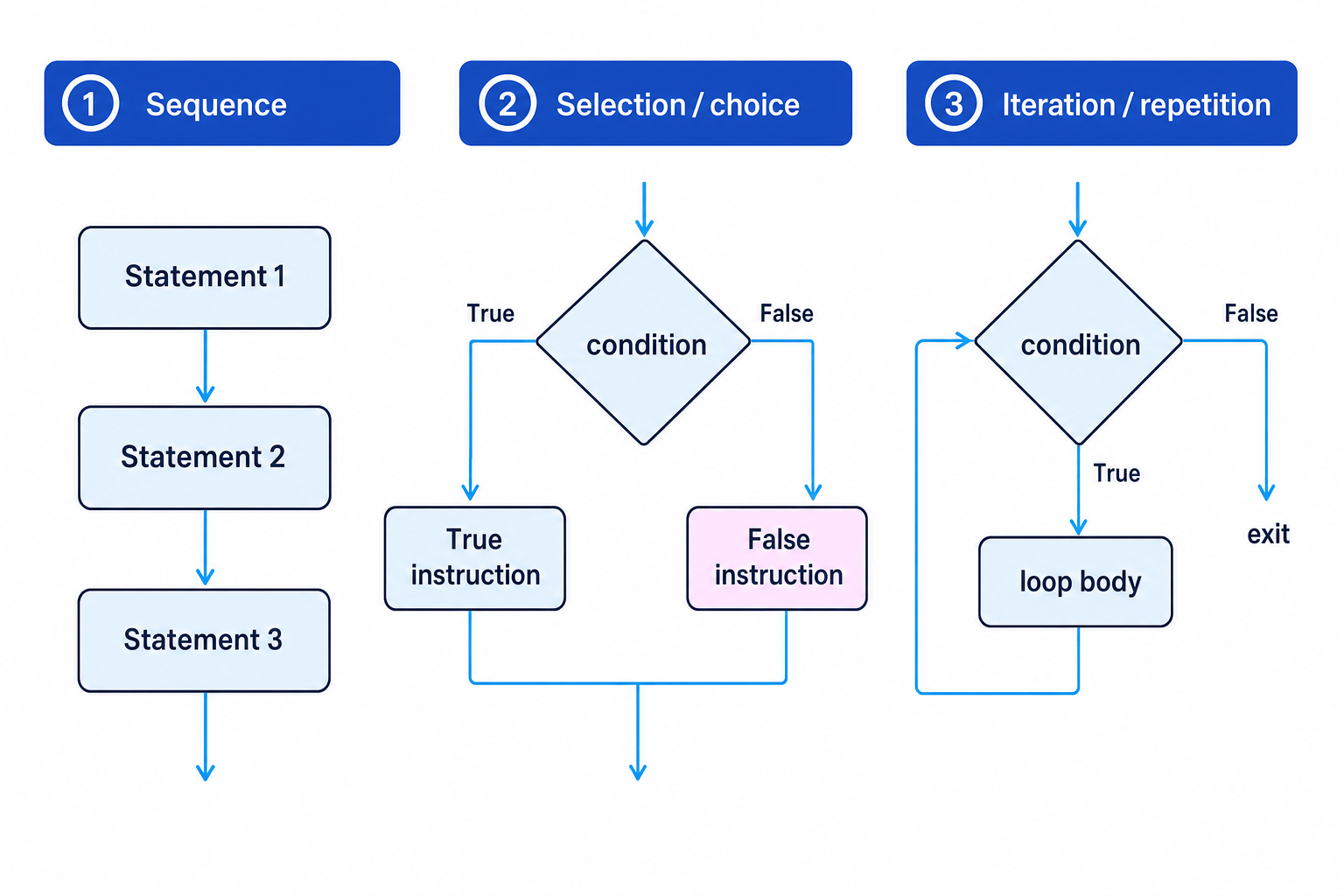
Most GCSE programming is built from three combining principles: sequence, selection and iteration.
Key Idea
Three ways to control a program
A program normally runs statements in sequence, but selection chooses between paths and iteration repeats instructions.
Variables, constants and assignment
An identifier is a name you give to something in a program, such as a variable, constant or subroutine.
A variable is a named storage location whose value can change while the program runs. A variable declaration introduces a variable, usually giving its name and data type.
A data type describes the kind of value stored, such as INTEGER, REAL, STRING, CHARACTER or BOOLEAN.
DECLARE score : INTEGER
DECLARE playerName : STRING
DECLARE gameWon : BOOLEAN
An assignment stores a value in a variable. In AQA pseudo-code, the assignment arrow ← means “is set to”.
score ← 0
playerName ← "Sam"
gameWon ← FALSE
A constant is a named value that does not change while the program runs. A constant declaration creates that fixed value.
CONSTANT MAX_ATTEMPTS ← 3
CONSTANT PASS_MARK ← 50
Named constants are useful because they make code easier to read and safer to change. If the maximum attempts changes from 3 to 5, you change the constant once instead of hunting through the whole program.
Common Mistake
Declaration is not assignment
A declaration creates or introduces a name. An assignment gives a variable a value or changes its value. A constant can be declared and given a value, but should not be changed later.
Example
Tracing assignment in sequence
Program fragment:
DECLARE score : INTEGER
DECLARE lives : INTEGER
score ← 10
score ← score + 5
lives ← 3
score ← score * lives
- The first assignment stores 10 in
score. score ← score + 5uses the current value ofscore, so 10 becomes 15.lives ← 3stores 3, thenscore ← score * livesstores 15 multiplied by 3, so the final value ofscoreis 45.
Sequence: running instructions in order
Sequence means statements run one after another, from top to bottom, unless another structure changes the flow.
name ← USERINPUT
score ← 0
OUTPUT name
OUTPUT score
Sequence is the simplest structure, but it matters a lot when tracing code. If two assignment statements affect the same variable, the later one uses the value left by the earlier one.
Selection: making choices
Selection means choosing which block of code to run based on a condition.
A condition is a Boolean expression: it evaluates to either TRUE or FALSE.
IF score >= PASS_MARK THEN
  OUTPUT "Pass"
ELSE
  OUTPUT "Try again"
ENDIF
If the condition is TRUE, the program runs the statements after THEN. Otherwise, it runs the ELSE block if one is included.
Example
Following an IF statement
Suppose score is 72 and PASS_MARK is 50.
IF score >= PASS_MARK THEN
  result ← "Pass"
ELSE
  result ← "Fail"
ENDIF
- Compare
scorewithPASS_MARK: 72 is greater than or equal to 50. - The condition
score >= PASS_MARKis thereforeTRUE, so theTHENbranch runs. resultis assigned"Pass"and theELSEbranch is skipped.
Iteration: repeating instructions
Iteration means repeating a block of code. It is also called repetition or a loop.
There are two main types you need for GCSE.
Definite iteration: count-controlled loops
Definite iteration is used when the number of repetitions is known before the loop starts. A count-controlled loop normally uses FOR.
FOR i ← 1 TO 5
  OUTPUT i
ENDFOR
Here, the loop repeats 5 times. The variable i is the loop counter.
Example
Tracing a count-controlled loop
Program fragment:
total ← 0
FOR i ← 1 TO 5
  total ← total + i
ENDFOR
- The
FORloop runs withitaking the values 1, 2, 3, 4 and 5. - Each time, the current value of
iis added tototal: after adding 1, 2, 3, 4 and 5, the running totals are 1, 3, 6, 10 and 15. - After the loop finishes,
totalstores 15.
Indefinite iteration: condition-controlled loops
Indefinite iteration is used when the number of repetitions is not known in advance. A condition-controlled loop keeps going until a condition changes.
A condition can be checked at the start of the loop:
WHILE NotSolved
  OUTPUT "Try again"
ENDWHILE
A start-tested loop may run zero times, because the condition is checked before the loop body.
A condition can also be checked at the end of the loop:
REPEAT
  password ← USERINPUT
UNTIL password = correctPassword
An end-tested loop always runs at least once, because the loop body happens before the condition is checked.
Common Mistake
UNTIL means stop when true
In REPEAT ... UNTIL Solved, the loop repeats while Solved is false and stops when Solved becomes true. Do not read it as “repeat while solved”.
Example
Choosing a condition-controlled loop
A program must ask the user for a mark until they enter a value from 0 to 100. It must ask at least once.
-
The number of attempts is not known in advance, so this should be indefinite iteration rather than a
FORloop. -
The program cannot check whether the mark is valid until after the user has entered it, so an end-tested loop is suitable.
-
The loop should stop when the mark is valid:
REPEAT mark ← USERINPUT UNTIL mark >= 0 AND mark <= 100
Nesting: putting structures inside structures
A structure is nested when it is placed inside another structure.
Nested selection means an IF statement inside another IF statement.
IF gameWon THEN
  IF score > highScore THEN
    highScore ← score
  ENDIF
ENDIF
Nested iteration means a loop inside another loop.
FOR row ← 1 TO 2
  FOR column ← 1 TO 3
    OUTPUT "*"
  ENDFOR
ENDFOR
The inner loop completes all its repetitions each time the outer loop runs once.
Example
Tracing nested iteration
Program fragment:
count ← 0
FOR row ← 1 TO 2
  FOR column ← 1 TO 3
    count ← count + 1
  ENDFOR
ENDFOR
- The outer loop runs twice: once for
row ← 1and once forrow ← 2. - For each outer loop repetition, the inner loop runs three times:
column ← 1,column ← 2andcolumn ← 3. - The assignment
count ← count + 1runs six times in total, socountfinishes as 6.
Tip
Use indentation to see nesting
Indent the statements inside IF, FOR, WHILE and REPEAT blocks. It helps you match each ENDIF, ENDFOR or ENDWHILE to the correct structure.
Subroutines: reusable named blocks
A subroutine is a named block of code that can be called from elsewhere in a program.
A procedure is a subroutine that performs a task but does not return a value.
SUBROUTINE DisplayMenu()
  OUTPUT "1. Play"
  OUTPUT "2. Quit"
ENDSUBROUTINE
A function is a subroutine that returns a value. A return value is the value sent back to the part of the program that called the function.
SUBROUTINE AddVAT(price)
  RETURN price * 1.2
ENDSUBROUTINE

totalPrice ← AddVAT(10)
Subroutines help with decomposition, which means breaking a problem into smaller, manageable parts. They also reduce repeated code and make programs easier to test.
Example
Choosing a procedure or function
A game needs one subroutine to display the main menu and another to calculate a player’s final score.
- Displaying a menu is an action. It does not need to send a value back, so it should be a procedure such as
DisplayMenu(). - Calculating a final score produces a value that the program needs to use later, so it should be a function such as
CalculateFinalScore(). - The procedure can be called on its own, but the function call should be used in an assignment or expression, for example
finalScore ← CalculateFinalScore().
Meaningful identifier names
A meaningful identifier name describes what the item is for.
Good names:
highScoreMAX_ATTEMPTSCalculateAveragepasswordCorrect
Poor names:
xthingdata1procA
Meaningful names make code easier to read, debug and maintain. They also reduce mistakes because you are less likely to confuse currentScore with highScore than a with b.
Tip
Name by purpose
Choose names that explain the role of the item, not just its data type. playerAge is more useful than integer1.
Exam technique
In the exam
- When tracing code, update variable values in order and remember that assignment replaces the old value.
- For loops, decide whether the number of repetitions is known: use
FORfor count-controlled loops andWHILEorREPEAT ... UNTILfor condition-controlled loops. - For nested structures, work from the inside out carefully and match each ending keyword with its opening keyword.
Self review
Check yourself
- What is the difference between a variable, a constant and an assignment?
- When would a
REPEAT ... UNTILloop be better than aWHILEloop? - Why is
CalculateTotalCosta better identifier name thansub1?

Recap questions
Test yourself with 5 quick questions on this guide. Answer them all correctly to complete it.
You've reached the end
Test yourself on this topic, or move on to the next guide.
How was this guide?