Revision notes for AQA GCSE Computer Science Arithmetic operations in a programming language. Open the guide for explanations and worked examples. Written against the AQA GCSE Computer Science (8525) specification, so the content matches what's examinable rather than general Computer Science background.
Arithmetic operations in a programming language
What you'll learn
- How arithmetic expressions are written in AQA-style pseudo-code.
- The difference between addition, subtraction, multiplication and real division.
- How integer division works using
DIVandMOD. - How to choose the correct operator in programming questions.
Arithmetic in programs
Programs often need to calculate: totals, averages, scores, positions, costs, file sizes, counts and more. In programming, a calculation is usually written as an expression, then stored in a variable or used in a decision.
Definition
Expression, operator and operand
An arithmetic expression is a calculation that produces a numeric value. An operator is the symbol or word that tells the computer what calculation to perform, such as + or DIV. An operand is a value or variable that an operator works on.
For example, in total ← price + delivery, the operator is +, and the operands are price and delivery.
The arrow ← means assignment: the value on the right is calculated first, then stored in the variable on the left.
Example
Evaluating an expression with variables
Suppose:
price ← 12delivery ← 3total ← price + delivery
- Substitute the variable values into the expression:
price + deliverybecomes12 + 3. - Perform the arithmetic operation:
12 + 3gives 15. - Assign the result to the variable:
totalnow stores 15.
The basic arithmetic operators
You need to recognise and use these operators in programming:
| Operation | AQA pseudo-code operator | Meaning |
|---|---|---|
| Addition | + | Add values together |
| Subtraction | - | Take one value away from another |
| Multiplication | * | Multiply values |
| Real division | / | Divide and allow a decimal result |
| Integer division | DIV | Divide and keep only the integer quotient |
| Remainder | MOD | Find the remainder after integer division |
Key Idea
Use programming symbols
In programming, multiplication is written as *, not the letter x. Division is usually written as /, DIV or MOD, depending on the kind of answer you need.
Addition, subtraction and multiplication
Addition combines values.
Subtraction finds the difference or reduces a value.
Multiplication is repeated addition or scaling.
These are often used to update variables. A common pattern is assigning a variable a new value based on its old value.
Example
Updating a score
A game starts with score ← 40, then runs these statements:
score ← score + 10score ← score - 3score ← score * 2
- Start with the current value of
score, which is 40. Afterscore ← score + 10, the new value is 50. - Use the updated value for the next line. After
score ← score - 3, the new value is 47. - Use 47 in the final line. After
score ← score * 2, the final value ofscoreis 94.
Common Mistake
Forgetting that variables update
In score ← score + 1, the variable is not being “set equal to itself”. The right-hand side is calculated first, then the result replaces the old value of score.
Real division using /
Real division means division that can produce a decimal answer. In AQA pseudo-code, / represents real division.
Definition
Real number
A real number is a number that may include a decimal part, such as 4.5 or 12.75. In GCSE programming questions, real division is used when the exact divided value is needed.
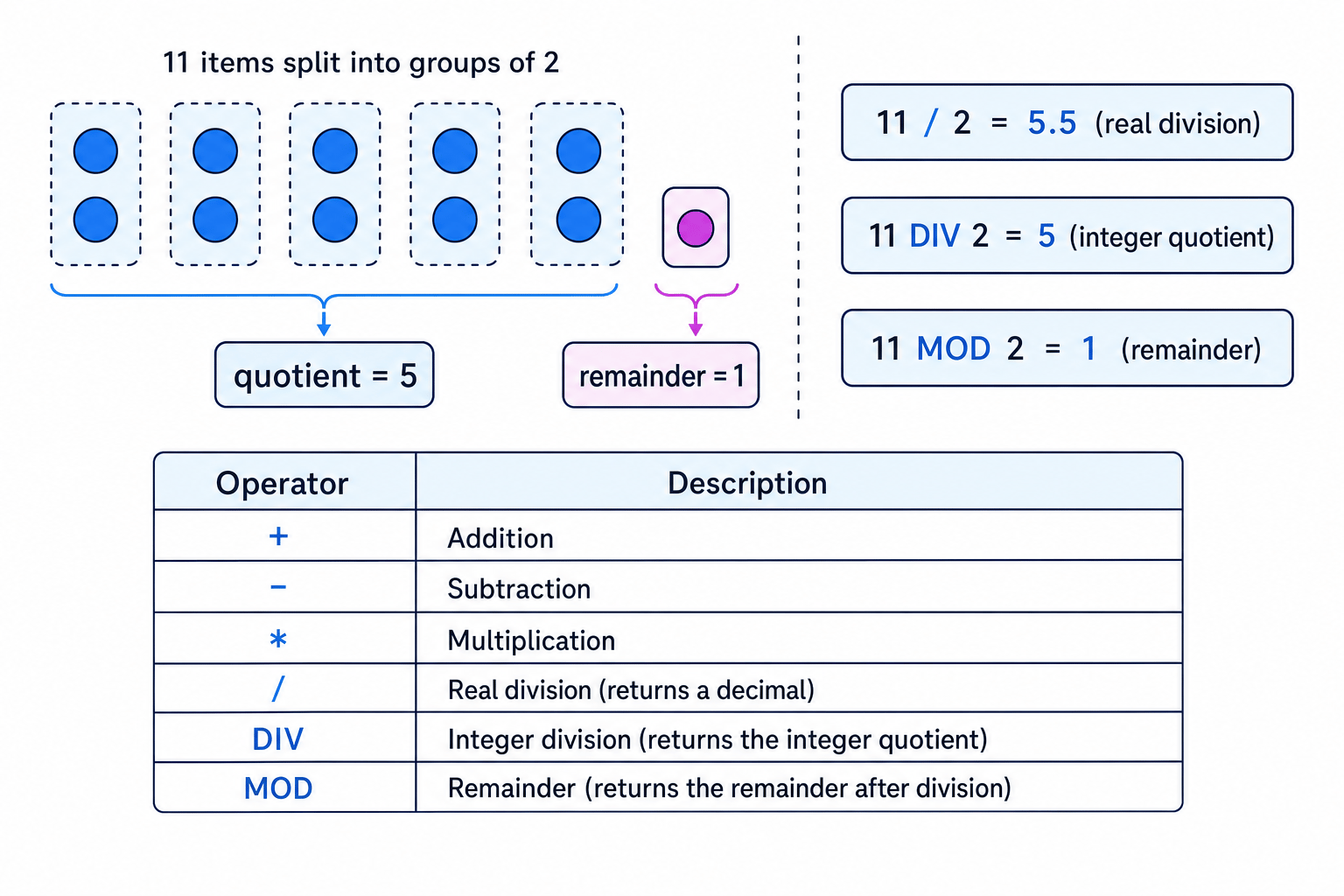
For example, 11 / 2 gives 5.5 because the result is not forced to be a whole number.
Real division is useful for averages because averages are not always integers.
Example
Calculating an average
A student’s three marks are 14, 17 and 16. The pseudo-code is average ← (14 + 17 + 16) / 3.
- Add the three marks to find the total:
14 + 17 + 16gives 47. - Divide the total by the number of marks using real division:
47 / 3gives 15.666... - Store the decimal result in
average; usingDIVhere would incorrectly lose the decimal part.
The diagram below shows the key difference between real division, integer division and the remainder operation.
Integer division using DIV
An integer is a whole number, such as 0, 7 or 42. Integer division gives the whole-number quotient when one integer is divided by another.
Definition
Quotient
The quotient is the number of complete times one number fits into another during division. In AQA pseudo-code, DIV returns this integer quotient.
For example, 11 DIV 2 gives 5 because 2 fits into 11 five complete times.
This is not rounding. It does not become 6 just because 5.5 is closer to 6. DIV keeps the whole-number quotient.
Common Mistake
DIV is not rounding
7 DIV 2 gives 3, not 4. Integer division keeps the number of complete groups and ignores the leftover part.
Remainders using MOD
Sometimes the leftover amount matters. The MOD operator gives the remainder after integer division.
Definition
Remainder and MOD
The remainder is what is left over after making as many complete groups as possible. In AQA pseudo-code, MOD returns this remainder.
For positive integer division, the relationship is:
dividend=divisor×quotient+remainder\text{dividend} = \text{divisor} \times \text{quotient} + \text{remainder}dividend=divisor×quotient+remainderThe remainder is always smaller than the divisor:
0≤remainder<divisor0 \le \text{remainder} < \text{divisor}0≤remainder<divisorExample
Finding full boxes and leftovers
There are 29 pencils. Each box holds 6 pencils. Work out 29 DIV 6 and 29 MOD 6.
- Find the number of complete groups of 6 in 29. Since
6 * 4is 24 and6 * 5is 30, only 4 full boxes can be made. - The integer quotient is therefore 4, so
29 DIV 6gives 4. - Subtract the pencils used in full boxes:
29 - 24gives 5. - The remainder is 5, so
29 MOD 6gives 5.
Key Idea
DIV and MOD work together
DIV tells you how many complete groups there are. MOD tells you how many are left over.
Modular arithmetic in programming
Modular arithmetic means working with remainders. At GCSE, you mainly need to use it through MOD.
A very common use is checking divisibility. If number MOD divisor gives 0, then number divides exactly by divisor.
For example:
10 MOD 2gives 0, so 10 is even.11 MOD 2gives 1, so 11 is odd.24 MOD 6gives 0, so 24 is divisible by 6.
Example
Checking whether a number is even
A program tests the condition age MOD 2 = 0. Suppose age ← 15.
- Divide 15 by 2 and find the number of complete groups. 2 fits into 15 seven complete times, using 14.
- Find the remainder:
15 - 14gives 1, so15 MOD 2gives 1. - Compare the result with 0. Since 1 is not 0, the condition
age MOD 2 = 0is false, so 15 is not even.
Tip
Quick MOD check
For MOD, focus on the leftover amount after making complete groups. If there is no leftover, the MOD result is 0.
Choosing the correct division operator
The hardest part is often choosing between /, DIV and MOD.
Use / when you want the exact divided value, possibly with a decimal:
mean ← total / count
Use DIV when you want the number of complete groups:
boxes ← pencils DIV pencilsPerBox
Use MOD when you want the leftover amount:
leftOver ← pencils MOD pencilsPerBox
Example
Choosing the correct operator
A cinema row has 8 seats. There are 35 people. Work out how many full rows are needed before the final incomplete row, and how many people are in that incomplete row.
- Full rows are complete groups of 8, so use
DIV:35 DIV 8gives 4 because 4 full rows seat 32 people. - The incomplete row is the leftover people, so use
MOD:35 MOD 8gives 3 because35 - 32is 3. - The useful results are therefore 4 full rows and 3 people left for the next row.
Common Mistake
Division by zero
A program cannot divide by zero. Expressions such as 10 / 0, 10 DIV 0 and 10 MOD 0 are invalid.
Brackets and order of operations
Programming languages follow an order of operations. Multiplication and division operations are normally evaluated before addition and subtraction. Brackets make the intended order clear.
Definition
Operator precedence
Operator precedence is the set of rules that decides which operators are evaluated first in an expression.
For GCSE pseudo-code, do not rely on the examiner guessing what you meant. If the order matters, use brackets.
Example
Using brackets to control a calculation
Compare result ← 8 + 4 / 2 with result ← (8 + 4) / 2.
- In
8 + 4 / 2, the division happens first, so4 / 2gives 2. - Then the addition happens:
8 + 2gives 10. - In
(8 + 4) / 2, the brackets happen first, so8 + 4gives 12. - Then divide:
12 / 2gives 6. The brackets changed the result.
Exam technique
In the exam
- Identify what the question wants: exact decimal answer, complete groups, or leftover amount.
- Use
/for real division,DIVfor the integer quotient, andMODfor the remainder. - For
DIVandMOD, check your answer by multiplying the quotient by the divisor and adding the remainder.
Self review
Check yourself
- What is the difference between
17 / 5,17 DIV 5and17 MOD 5? - Why would
average ← total DIV countusually be a poor choice for calculating a mean? - In
items ← items + 4, which side of the assignment is calculated first?

Recap questions
Test yourself with 5 quick questions on this guide. Answer them all correctly to complete it.
You've reached the end
Test yourself on this topic, or move on to the next guide.
How was this guide?