Revision notes for AQA GCSE Computer Science Converting between number bases. Open the guide for explanations and worked examples. Written against the AQA GCSE Computer Science (8525) specification, so the content matches what's examinable rather than general Computer Science background.
Converting between number bases
What you'll learn
- How whole numbers from 0 to 255 can be represented in binary and hexadecimal.
- How to convert between binary and decimal.
- How to convert between binary and hexadecimal using nibbles.
- How to convert between decimal and hexadecimal without guessing.
The big idea: place value
A whole number is a number with no fractional or decimal part, such as 0, 37 or 255.
A digit is one symbol in a number. For example, decimal uses the digits 0 to 9. Hexadecimal also uses letters A to F as digits.
Definition
Number base
A number base tells you how many different digits a number system uses. In positional notation, the value of a digit depends on where it appears in the number.
You already know decimal, which is base 10. Moving one place left makes a digit worth 10 times as much: 1s, 10s, 100s, and so on.
In this topic, you also need:
- binary: base 2, using only 0 and 1
- hexadecimal: base 16, using 0 to 9 and A to F
Key Idea
Places get bigger to the left
In any base, each place is worth the base multiplied by the place to its right. Binary places double. Hexadecimal places multiply by 16.
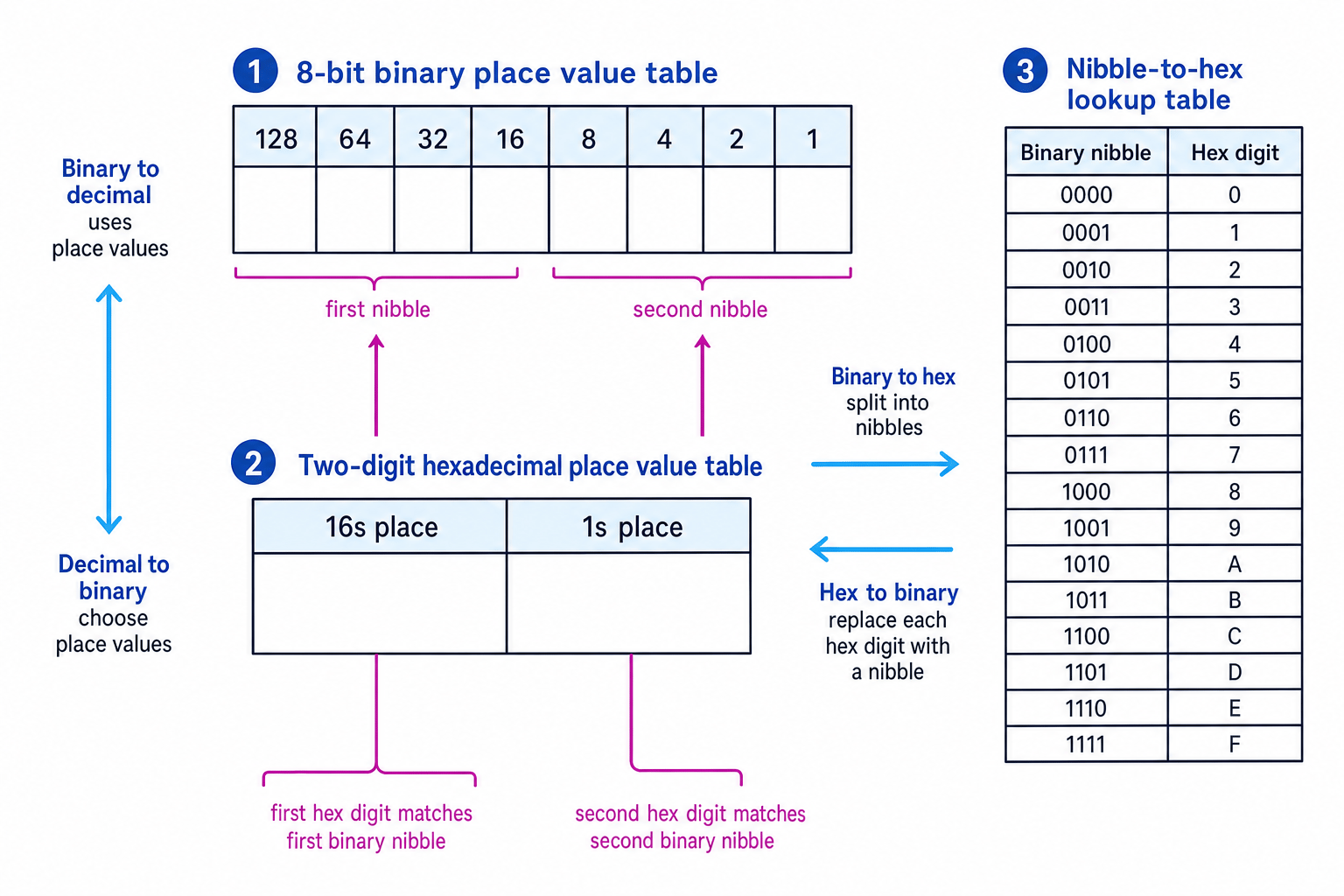
The diagram below gives the main reference patterns you will use: 8-bit binary place values, two-digit hexadecimal place values, and the nibble-to-hex lookup table.
Binary: base 2
Definition
Binary and bit
Binary is a base 2 number system. A bit is a single binary digit, either 0 or 1. Eight bits make one byte.
For this GCSE topic, binary numbers are treated as whole numbers from 0 to 255. The largest 8-bit value is:
- binary: 1111 1111
- decimal: 255
- hexadecimal: FF
The 8 binary place values are:
| 128 | 64 | 32 | 16 | 8 | 4 | 2 | 1 |
|---|
A 1 means “include this place value”. A 0 means “do not include this place value”.
Converting binary to decimal
To convert binary to decimal, add the place values where the bit is 1.
Example
Converting binary to decimal
Convert binary 1011 0110 to decimal.
- Match the bits to the 8-bit place values: 1 is under 128, 0 under 64, 1 under 32, 1 under 16, 0 under 8, 1 under 4, 1 under 2, and 0 under 1.
- Keep only the place values with a 1: 128, 32, 16, 4 and 2.
- Add those place values: 128+32+16+4+2=182128 + 32 + 16 + 4 + 2 = 182128+32+16+4+2=182, so binary 1011 0110 is decimal 182.
Common Mistake
Reading the bits backwards
The rightmost bit is the 1s place. The leftmost bit in an 8-bit number is the 128s place.
Converting decimal to binary
To convert decimal to binary, work from left to right through the binary place values. At each place, ask: “Can this place value fit into what is left?”
- If yes, write 1 and subtract that place value.
- If no, write 0 and move on.
Example
Converting decimal to binary
Convert decimal 106 to 8-bit binary.
- Start with the largest place value. 128 is too large, so write 0. 64 fits into 106, so write 1 and leave 42 remaining.
- 32 fits into 42, so write 1 and leave 10 remaining. 16 is too large, so write 0. 8 fits into 10, so write 1 and leave 2 remaining. 4 is too large, so write 0.
- 2 fits into 2, so write 1 and leave 0 remaining. The 1s place is not needed, so write 0. The bits are 0110 1010.
Tip
Use leading zeroes
Leading zeroes do not change the value, but they help keep the number as 8 bits. For example, binary 1010 and 0000 1010 both represent decimal 10.
Hexadecimal: base 16
Definition
Hexadecimal
Hexadecimal, often shortened to hex, is a base 16 number system. It uses the digits 0 to 9, then the letters A, B, C, D, E and F for the values 10 to 15.
For GCSE Computer Science, write hexadecimal values like FF, 3A or C7. If there is any chance of confusion, include the base name: “hexadecimal FF”.
| Hex digit | A | B | C | D | E | F |
|---|---|---|---|---|---|---|
| Decimal value | 10 | 11 | 12 | 13 | 14 | 15 |
A two-digit hexadecimal number has:
- a 16s place
- a 1s place
So hexadecimal FF is the maximum value in this topic because F means 15:
15×16+15=25515 \times 16 + 15 = 25515×16+15=255Common Mistake
Hex 10 is not decimal 10
Hexadecimal 10 means one 16 and zero 1s, so it is decimal 16.
Converting hexadecimal to decimal
To convert hexadecimal to decimal, multiply the first hex digit by 16, then add the second hex digit.
Example
Converting hexadecimal to decimal
Convert hexadecimal 3A to decimal.
- Convert any letter digits first: A has decimal value 10.
- Use the hexadecimal place values: the 3 is in the 16s place, so 3×16=483 \times 16 = 483×16=48. The A is in the 1s place, so it contributes 10.
- Add the parts: 48+10=5848 + 10 = 5848+10=58, so hexadecimal 3A is decimal 58.
Converting decimal to hexadecimal
To convert decimal to hexadecimal, split the number into 16s and 1s.
DIV means whole-number division: how many complete times one number fits into another. MOD means the remainder after whole-number division.
For numbers from 0 to 255:
- the first hex digit is found using DIV 16
- the second hex digit is found using MOD 16
Example
Converting decimal to hexadecimal
Convert decimal 199 to hexadecimal.
- Find how many complete 16s fit into 199: 199 DIV 16 gives 12, with remainder 7.
- Convert the 16s digit into hex: decimal 12 is hex C. The remainder 7 stays as hex 7.
- Write the 16s digit followed by the 1s digit: decimal 199 is hexadecimal C7.
Binary and hexadecimal using nibbles
Definition
Nibble
A nibble is 4 bits. One nibble can represent values from 0 to 15, so one nibble matches exactly one hexadecimal digit.
This is why hexadecimal is useful: it is a shorter way of writing binary.
For example:
- binary 1111 is hexadecimal F
- binary 0000 is hexadecimal 0
- binary 1010 is hexadecimal A
To convert binary to hexadecimal, split the 8 bits into two nibbles.
To convert hexadecimal to binary, replace each hex digit with its 4-bit nibble.
Example
Converting between binary and hexadecimal
Convert binary 1101 0101 to hexadecimal, then convert hexadecimal 4E to binary.
- Split binary 1101 0101 into two nibbles: 1101 and 0101.
- Look up each nibble: 1101 is D, and 0101 is 5. So binary 1101 0101 is hexadecimal D5.
- For hexadecimal 4E, replace each digit with 4 bits: 4 becomes 0100, and E becomes 1110. So hexadecimal 4E is binary 0100 1110.
Common Mistake
Adding zeroes on the wrong side
If you need to pad a binary number to make a full nibble, add leading zeroes on the left. Adding zeroes on the right changes the value.
Choosing the best conversion route
Different conversions have different “fastest” methods.
| Start | Finish | Best method |
|---|---|---|
| Binary | Decimal | Add the binary place values with 1s |
| Decimal | Binary | Choose place values from 128 down to 1 |
| Binary | Hexadecimal | Split into nibbles and use the lookup table |
| Hexadecimal | Binary | Replace each hex digit with a nibble |
| Hexadecimal | Decimal | Use 16s and 1s |
| Decimal | Hexadecimal | Use DIV 16 and MOD 16 |
Tip
Sanity check your answer
For this topic, your answer should stay within decimal 0 to 255, binary 0000 0000 to 1111 1111, and hexadecimal 00 to FF.
Exam technique
In the exam
- Check the starting base and the target base before doing any working.
- For binary and hexadecimal conversions, use nibbles instead of converting through decimal unless the question asks for decimal.
- Keep binary answers as 8 bits where appropriate, grouping them into nibbles like 0110 1010.
- Remember that A to F stand for decimal values 10 to 15, not letters with their own place values.
Self review
Check yourself
- Convert decimal 173 to 8-bit binary.
- Convert binary 0101 1110 to both decimal and hexadecimal.
- Explain why hexadecimal FF is the largest value needed for this topic.

Recap questions
Test yourself with 5 quick questions on this guide. Answer them all correctly to complete it.
Fundamentals of data representation
Guide 2 of 8
You've reached the end
Test yourself on this topic, or move on to the next guide.
How was this guide?