Revision notes for AQA GCSE Computer Science Methods to detect and prevent cyber security threats. Open each subtopic for explanations, worked examples, and summaries of Methods to detect and prevent cyber security threats. Written against the AQA GCSE Computer Science (8525) specification, so the content matches what's examinable rather than general Computer Science background.
Methods to detect and prevent cyber security threats
What you'll learn
- How systems check that a user is really who they claim to be.
- How passwords, biometrics, CAPTCHA and email confirmations protect accounts.
- Why automatic software updates reduce the risk from known vulnerabilities.
- How to choose the best security measure for a given situation.
The big idea: reduce the risk
A cyber security threat is anything that could harm a computer system, steal data, disrupt services or gain access without permission.
A security measure is a method used to reduce the chance of that threat succeeding. Some measures mainly prevent attacks, some help detect suspicious behaviour, and many do a bit of both.
Definition
Authentication and authorisation
Authentication means checking a user’s identity, usually before they can log in. Authorisation means checking what an authenticated user is allowed to access or do.
For example, entering the correct password authenticates you. Being allowed to open only your own school files is authorisation.
Security is strongest when there is more than one layer. If one measure fails, another may still stop the attacker.
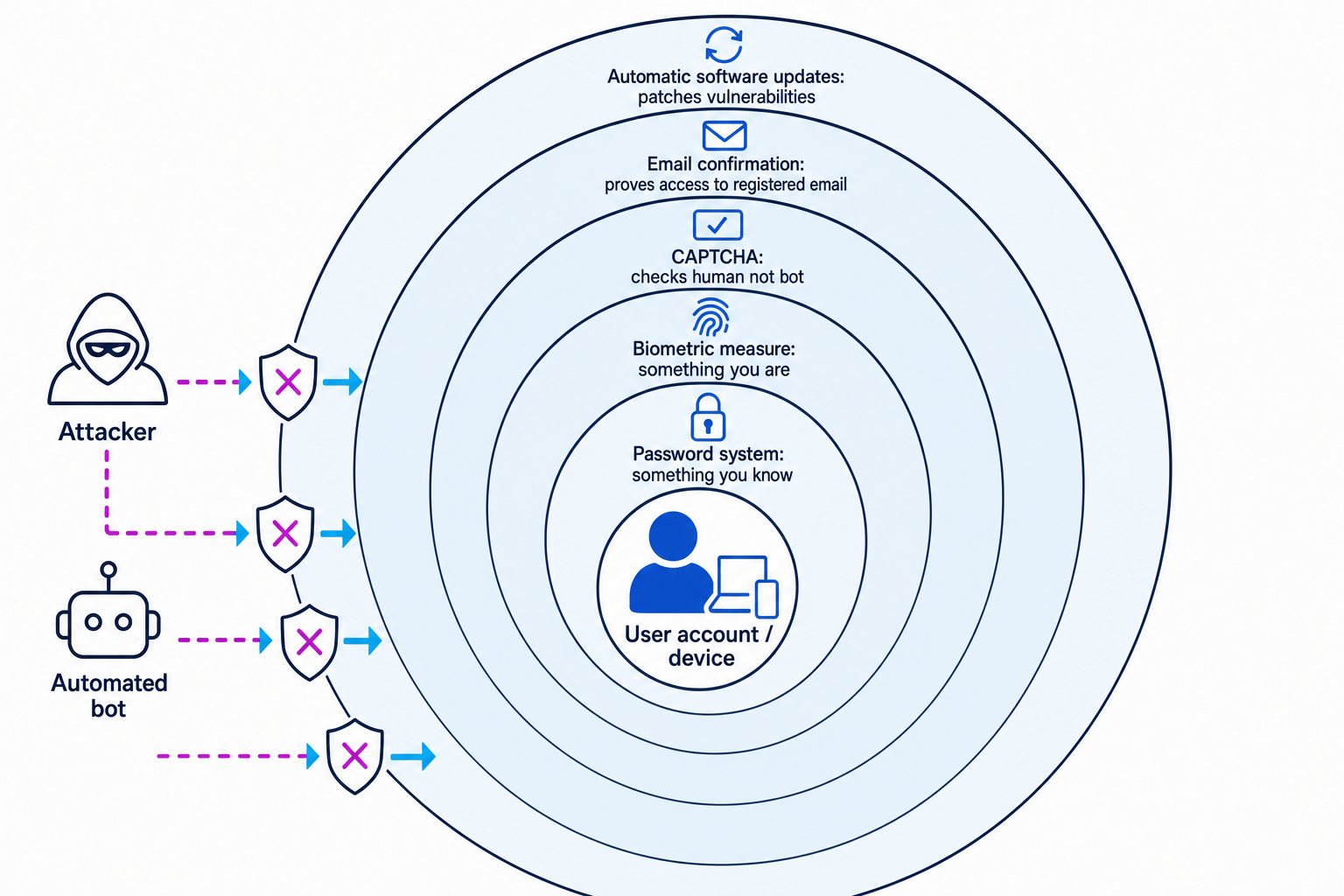
Key Idea
Layered defence
In the exam, do not just name a security measure. Explain what threat it reduces and how it reduces the risk.
Password systems
A password is a secret sequence of characters that a user enters to prove their identity. A password system is the whole set of rules and checks around using passwords.
A good password system may:
- require a minimum length
- require a mix of letters, numbers and symbols
- stop users choosing common passwords
- hide the password while it is typed
- limit the number of failed login attempts
- force a password reset if suspicious activity is detected
A brute-force attack is when an attacker tries lots of possible passwords. A dictionary attack is when they try common words, names or leaked passwords.
Password systems help prevent unauthorised access. They can also help detect attacks if there are many failed login attempts in a short time.
Example
Comparing password choices
-
Compare
summer2026withRiver!Lamp92. The first looks like a common word plus a year, so it is more predictable. -
Check variety.
River!Lamp92uses upper-case and lower-case letters, a symbol and digits, which makes guessing harder. -
Choose
River!Lamp92as the stronger password because it is less likely to appear in a dictionary attack and has more character variety.
Common Mistake
Password strength is not just symbols
Adding one symbol to a common word, such as Password!, does not make it strong. Attackers often try common patterns like this.
Biometric measures
A biometric measure uses a physical or behavioural feature of a person to help identify them. Common examples are fingerprint scanning, face recognition and voice recognition.
Biometrics are especially common on mobile devices because phones often have built-in cameras and fingerprint sensors.
When a biometric system is first set up, it records a template, which is a stored digital pattern of the user’s biometric feature. Later, the system compares a new scan with the stored template.
Biometrics are useful because they are quick and hard to guess. They are often described as “something you are”, while a password is “something you know”.
However, biometrics are not perfect:
- a scan might fail if your finger is wet or your face is partly covered
- a biometric feature cannot easily be changed if compromised
- a device usually still needs a backup PIN or password
Example
Protecting a lost phone
-
Identify the threat: someone finds a lost phone and tries to unlock it.
-
Apply the biometric measure: fingerprint or face recognition checks whether the person matches the stored template.
-
Add a backup control: after several failed biometric attempts, the phone can require the password or PIN instead, reducing the chance of repeated guessing.
Tip
Use the factor words
Passwords are something you know. Biometrics are something you are. Using different types of evidence can make authentication stronger.
CAPTCHA
CAPTCHA stands for “Completely Automated Public Turing test to tell Computers and Humans Apart”. You do not usually need the full phrase in an answer, but you should understand what it does.
A bot is a software program that performs automated tasks. Some bots are used to create fake accounts, send spam or try many passwords.
A CAPTCHA is a challenge designed to be easy for a human but difficult for a bot. For example, it might ask the user to select images containing traffic lights or type characters from a distorted image.
CAPTCHA helps detect whether the user is likely to be human. It is useful on sign-up forms, comment forms and login pages after suspicious failed attempts.
Example
Placing CAPTCHA on a website
-
Identify the likely attack: bots are creating hundreds of fake accounts on a website.
-
Choose where CAPTCHA helps most: place it on the account creation form, because that is where the automated abuse is happening.
-
Explain the effect: the bot must now pass a human-style challenge before creating each account, so automated mass sign-ups become much harder.
Common Mistake
CAPTCHA does not prove identity
CAPTCHA checks whether the user is likely to be human. It does not prove that the human is the correct account owner.
Email confirmations
An email confirmation is when a system sends a link or code to an email address and asks the user to click the link or enter the code.
This is used to confirm that the user has access to the registered email account. It is common when:
- creating a new account
- resetting a password
- logging in from a new device
- changing important account details
Email confirmations help prevent attackers from using an account unless they can also access the linked email inbox.
Example
Checking a password reset
-
Identify the risk: an attacker knows a username and requests a password reset.
-
Apply the email confirmation: the reset link is sent to the registered email address, not shown directly on the website.
-
Decide the outcome: if the attacker cannot access that inbox, they cannot complete the reset, so the account is better protected.
Common Mistake
Email access is not absolute proof
Email confirmation proves access to an email account, not a person’s real-world identity. If the email account is compromised, this protection is weakened.
Automatic software updates
A software update is a new version of software that may add features, fix bugs or improve security. A patch is an update that fixes a specific problem.
A vulnerability is a weakness in software that an attacker could exploit. For example, an old web browser might have a flaw that lets a malicious website run unwanted code.
Automatic software updates download and install updates without the user having to remember to do it manually. This is important because many attacks target known vulnerabilities in out-of-date software.
Automatic updates help by:
- fixing known security weaknesses
- reducing the time a device stays vulnerable
- protecting users who might ignore manual update messages
Example
Stopping an attack using a patch
-
Identify the weakness: a version of an app has a known vulnerability that attackers can exploit.
-
Apply the automatic update: the device installs a patched version of the app.
-
Explain the prevention: the vulnerable code has been fixed, so the attacker’s old method no longer works on the updated device.
Choosing the right measure
Different measures protect against different problems.
| Situation | Helpful measure | Why it helps |
|---|---|---|
| Someone tries to guess a login | Strong password rules and limited attempts | Makes guessing harder and can detect repeated failures |
| A bot submits fake forms | CAPTCHA | Checks whether the user is likely to be human |
| A user signs up with an email address | Email confirmation | Checks they can access that email inbox |
| A phone is stolen | Biometric unlock plus password or PIN | Stops most people unlocking the device |
| Software has a known security flaw | Automatic updates | Installs a patch to remove the weakness |
Exam technique
In the exam
-
Name the method clearly, then link it to the threat: for example, “CAPTCHA helps stop automated bots creating accounts.”
-
Explain the mechanism, not just the benefit: say what the system checks, blocks or updates.
-
Mention a limitation when asked to evaluate: no method is perfect, so layered security is usually stronger.
Self review
Check yourself
- Why is a biometric measure useful on a mobile phone?
- What is the difference between CAPTCHA and email confirmation?
- How do automatic software updates reduce the risk from vulnerabilities?

Recap questions
Test yourself with 5 quick questions on this guide. Answer them all correctly to complete it.
Cyber security
Guide 2 of 2
You've reached the end
Test yourself on this topic, or move on to the next guide.
How was this guide?