Revision notes for AQA GCSE Computer Science Hardware and software. Open the guide for explanations and worked examples. Written against the AQA GCSE Computer Science (8525) specification, so the content matches what's examinable rather than general Computer Science background.
Hardware and software
What you'll learn
- What hardware means in a computer system.
- What software means, and how it differs from hardware.
- How hardware and software work together when you use a computer.
- How to avoid common wording traps in exam questions.
The starting point: a computer system
A computer system is not just a screen, keyboard or box of electronics. It is the combination of physical parts and programs working together to input, process, store and output data.
Data means values a computer can store or process, such as text, numbers, images, sound or video.
- Input means data or commands going into the computer, such as pressing a key or clicking a mouse.
- Processing means carrying out instructions to manipulate data.
- Output means the results produced, such as text on a screen or sound from speakers.
Definition
Computer system
A computer system is a working combination of hardware and software used to input, process, store and output data.
The important idea is that hardware and software are not rivals. They depend on each other.
Hardware
Definition
Hardware
Hardware means the physical components of a computer system — the parts you can touch, connect, replace or repair.
A component is one part of a larger system. In computing, hardware components include:
- a CPU or central processing unit — the hardware that carries out program instructions
- RAM or random access memory — temporary main memory used while programs are running
- storage — hardware such as an SSD or hard disk that keeps programs and files when power is off
- a motherboard
- a keyboard
- a mouse or touchpad
- a monitor or screen
- a printer
- speakers
- network hardware
Some hardware is inside the computer case, such as the CPU and RAM. Other hardware is connected from outside.
Definition
Peripheral
A peripheral is a hardware device connected to a computer system, usually for input, output or storage. Examples include a keyboard, mouse, monitor, printer and external drive.
Key Idea
Hardware is physical
If it is a physical device or part of a device, it is hardware. You can point to it as an object, even if you should not take it apart!
Software
Definition
Software
Software means the programs and instructions that tell the hardware what to do.
A program is a sequence of instructions that a computer can run. An instruction is a command that tells the computer to perform a small operation, such as storing a value, comparing data or displaying something.
Examples of software include:
- an operating system, such as Windows, macOS, iOS, Android or Linux
- a web browser
- a word processor
- a game
- an email app
- antivirus software
- a calculator app
You cannot touch “a program” in the same way you can touch a keyboard. However, software still has to be stored somewhere, usually on storage hardware such as an SSD.
Common Mistake
Stored on hardware does not mean it is hardware
A game saved on an SSD is still software. The SSD is the hardware. The game is the program stored on it.
Classifying hardware and software
A good test is to ask: is this a physical device, or is it a program/instructions?
Example
Classifying items in a computer system
A student is asked to classify four items: touchscreen, web browser, operating system, and SSD.
- The touchscreen is a physical input/output device that you can touch and replace, so it is hardware.
- The SSD is a physical storage device inside or connected to the computer, so it is hardware.
- The web browser is a program used to view websites, so it is software.
- The operating system is a program or collection of programs that manages the computer, so it is software.
Tip
Quick classification test
Use the question: “Could I physically pick up or replace this part?” If yes, it is probably hardware. If it is an app, program or set of instructions, it is software.
The relationship between hardware and software
Hardware and software must work together.
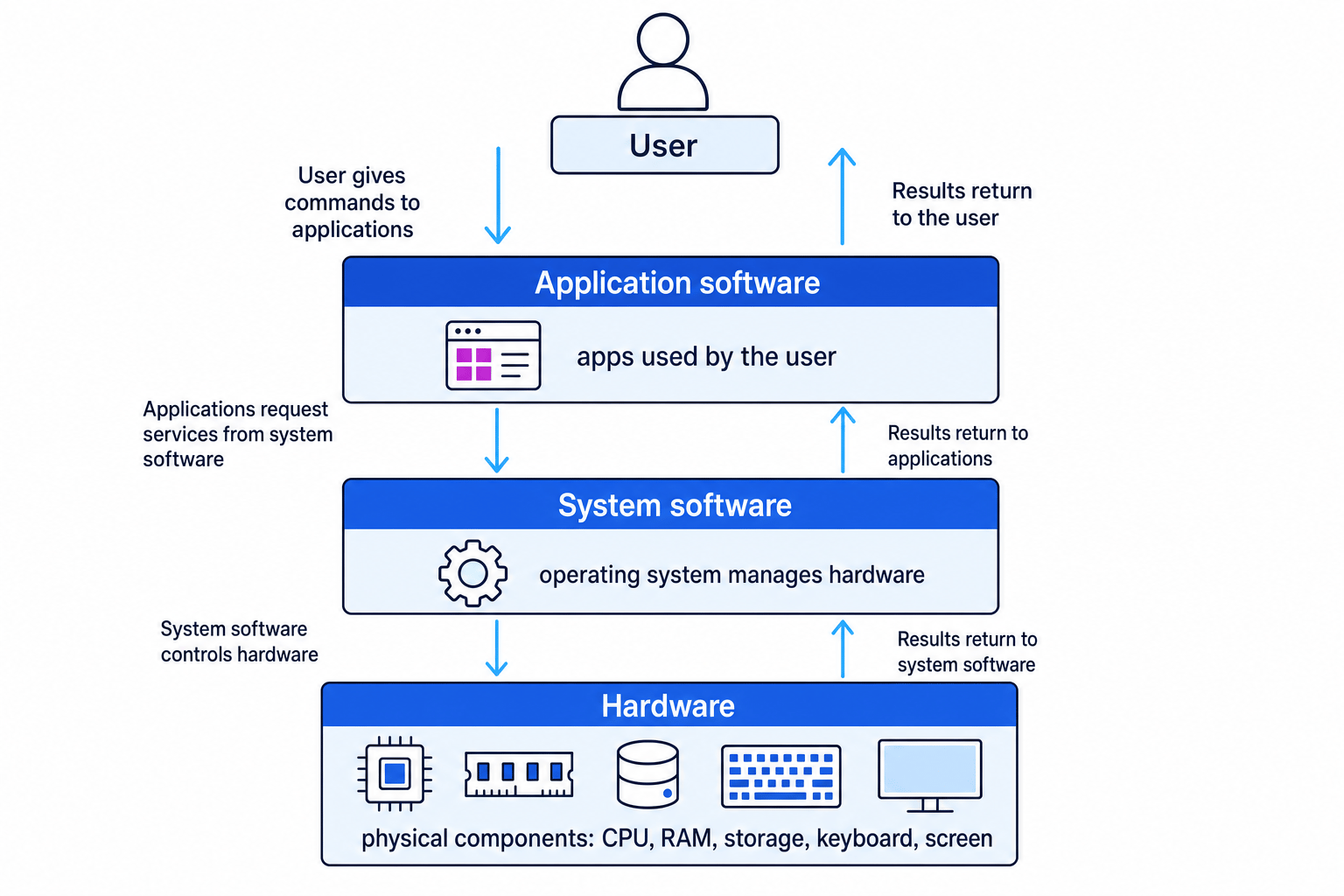
Hardware provides the physical resources: the processor, memory, storage, input devices and output devices. Software provides the instructions that make those resources do useful work.
Without software, hardware has no meaningful instructions to follow. Without hardware, software has nowhere to run.
Key Idea
They depend on each other
Software tells hardware what to do. Hardware carries out the instructions from software.
Useful software layers
You do not need deep detail for this section, but it helps to know two common categories.
Application software means programs designed to help the user do tasks, such as writing a document, browsing the web or editing a photo.
System software means software that manages the computer system itself. The most important example is the operating system, which helps manage hardware and allows applications to run.
The diagram below shows how the user, application software, system software and hardware fit together.
What happens when you use a program?
When you click, type, save, print or play a game, hardware and software interact constantly.
For example, imagine you open a word processor and type a sentence.
- The keyboard is hardware that detects the keys you press.
- The operating system is software that receives input from the keyboard.
- The word processor is software that decides what letters should appear in the document.
- The CPU is hardware that carries out the program instructions.
- RAM is hardware that temporarily stores the program and document while you work.
- The screen is hardware that displays the output.
Example
Explaining a print command
A user clicks Print in a word processor.
- The word processor is application software, so it creates a request to print the current document.
- The operating system is system software, so it helps manage communication between the word processor and the printer.
- The CPU, RAM and printer are hardware, so they carry out the processing, temporary storage and physical output.
- The final printed page is produced because the software supplied instructions and the hardware carried them out.
Common exam wording
Questions may ask you to define, identify, describe or explain.
Define
If asked to define hardware, use the word physical.
A strong definition is:
Hardware is the physical components of a computer system.
If asked to define software, use the words programs or instructions.
A strong definition is:
Software is the programs and instructions that run on a computer system and tell the hardware what to do.
Identify
If asked to identify examples, classify carefully.
- CPU: hardware
- RAM: hardware
- monitor: hardware
- operating system: software
- web browser: software
- game: software
Explain
If asked to explain the relationship, do not just list examples. Make the dependency clear.
You might write:
Software provides instructions for the hardware to execute. Hardware provides the physical components needed to run the software. A computer system needs both to work usefully.
Common Mistake
Only giving examples
If a question asks for the relationship between hardware and software, do not only write “keyboard is hardware and browser is software”. That identifies examples, but it does not explain how they work together.
Mini-summary
Hardware and software are the two essential parts of a computer system.
Hardware is physical. Software is programs and instructions. The software tells the hardware what to do, and the hardware carries out those instructions.
Exam technique
In the exam
- For hardware, include the word physical in your definition.
- For software, include programs or instructions in your definition.
- For relationship questions, say both sides: software gives instructions and hardware executes/carries them out.
Self review
Check yourself
- Can you define hardware and software in one clear sentence each?
- Can you classify these as hardware or software: CPU, RAM, operating system, keyboard, web browser?
- Can you explain why a computer needs both hardware and software to be useful?

Recap questions
Test yourself with 5 quick questions on this guide. Answer them all correctly to complete it.
Computer systems
Guide 1 of 5
You've reached the end
Test yourself on this topic, or move on to the next guide.
How was this guide?