Revision notes for AQA GCSE Computer Science Efficiency of algorithms. Open the guide for explanations and worked examples. Written against the AQA GCSE Computer Science (8525) specification, so the content matches what's examinable rather than general Computer Science background.
Efficiency of algorithms
What you'll learn
- Why the same problem can often be solved by more than one algorithm.
- How to compare algorithms using time efficiency.
- How to explain “more efficient” using comparisons, checks, loops and input size.
- Why conditions such as “the list is sorted” can change which algorithm is best.
The starting point: algorithms
An algorithm is a precise set of steps for solving a problem. In GCSE Computer Science, algorithms might be written in English, shown as a flowchart, or written in pseudocode.
Definition
Algorithm
An algorithm is a step-by-step method for solving a problem or completing a task.
A problem might be:
- finding a value in a list
- sorting names into alphabetical order
- calculating a total price
- checking whether a password meets certain rules
There is often more than one algorithm that gives the correct answer. The important question in this topic is not just “Does it work?” but also “How quickly does it work?”
Key Idea
Correct is not always efficient
Two algorithms can both produce the correct result, but one may do much less work to get there.
One problem, different algorithms
Imagine you need to find the number 91 in a list.
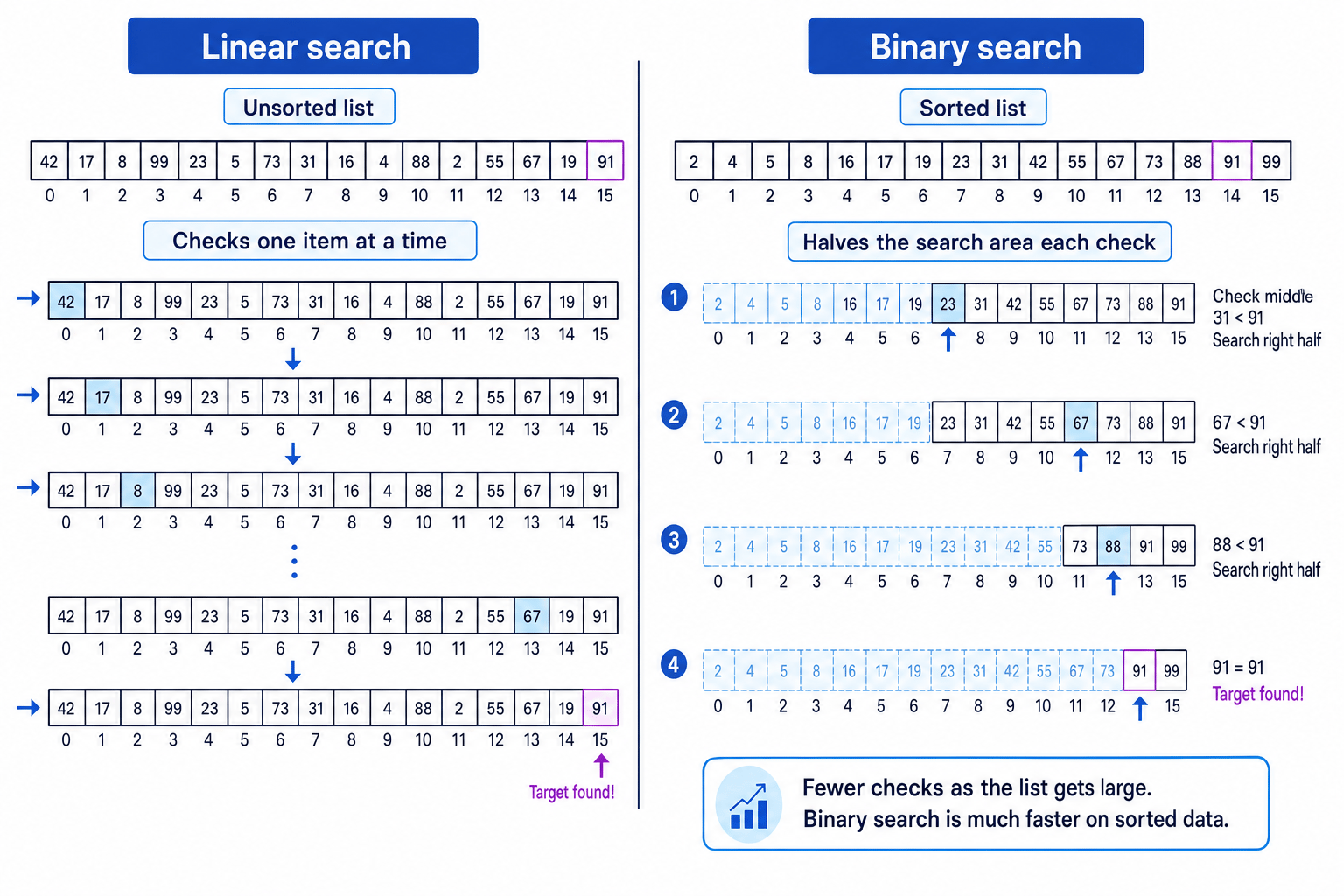
One possible algorithm is linear search: check each item from the start until the target is found.
Another possible algorithm is binary search: if the list is sorted, check the middle item, then repeatedly discard the half where the target cannot be.
Definition
Linear search
A linear search checks items one by one from the start of a list until the target is found or the list ends.
Definition
Binary search
A binary search searches a sorted list by repeatedly checking the middle value and discarding half of the remaining search area.
The diagram below shows how two different algorithms can solve the same search problem in different ways.
Example
Comparing two search methods
A sorted list contains these values:
2, 4, 5, 8, 16, 17, 19, 23, 31, 42, 55, 67, 73, 88, 91, 99
The target value is 91.
-
A linear search starts at the first item and checks each value in order: 2, 4, 5, 8, and so on. It reaches 91 near the end of the list, so it does many checks.
-
A binary search starts near the middle. It checks a middle value, then decides whether 91 must be to the left or right. Because the list is sorted, it can safely ignore half of the list each time.
-
Both algorithms can find 91, but binary search uses fewer checks in this case, so it is more time efficient for this sorted list.
What “efficiency” means
In general, efficiency means how well something uses resources. For algorithms, resources could include time or memory.
For this GCSE topic, focus on time efficiency: how long an algorithm takes to complete.
Definition
Time efficiency
Time efficiency describes how quickly an algorithm solves a problem, usually by considering how many steps, comparisons, or loop iterations it needs.
You usually do not need to measure real seconds. Real time can depend on the computer, programming language, or hardware. Instead, it is often clearer to compare the amount of work the algorithm does.
For example, when comparing search algorithms, a useful thing to count is the number of comparisons.
Definition
Comparison
A comparison is a check between values, such as testing whether a list item is equal to the target value.
Example
Counting comparisons in a linear search
A linear search is used to find 19 in this list:
14, 3, 27, 8, 19
-
Compare the first item with the target: 14 is not 19, so the search continues.
-
Compare the next items in order: 3 is not 19, 27 is not 19, and 8 is not 19.
-
Compare the fifth item: 19 is equal to the target, so the algorithm stops after 5 comparisons.
Tip
Use work done, not just seconds
In exam explanations, phrases like “uses fewer comparisons”, “needs fewer loop iterations”, or “checks fewer items” are usually stronger than just saying “it is faster”.
Input size matters
The input size is the amount of data given to an algorithm. For a search algorithm, this could be the number of items in the list. For a sorting algorithm, it could be the number of values to sort.
Definition
Input size
The input size is how much data an algorithm has to process, such as the number of records, values, characters, or list items.
An algorithm that seems fine on 10 items may become slow on 10,000 items. When you compare efficiency, ask what happens as the input gets larger.
For example, a linear search may need to check every item in the worst case. If the list doubles in size, the possible number of checks roughly doubles too.
Binary search behaves differently because it halves the search area each time, but only when the list is sorted.
Example
Estimating maximum checks
A sorted list contains 64 values. You need to compare linear search and binary search for finding one target value.
-
In the worst case for linear search, the target is at the end of the list or not present. The algorithm may have to check all 64 values.
-
Binary search keeps halving the search area: 64 values, then about 32, then 16, then 8, then 4, then 2, then 1.
-
This means binary search needs far fewer checks than linear search for this sorted list, so binary search is more time efficient in this situation.
Comparing algorithms fairly
When you compare two algorithms, make sure they are solving the same problem.
A fair comparison should consider:
- the same input data or the same input size
- the same expected output
- the number of meaningful operations, such as comparisons or loop iterations
- any conditions the algorithm depends on, such as the data being sorted
For GCSE, you do not need formal mathematical notation for efficiency. You need clear reasoning in words.
Key Idea
How to explain efficiency
An algorithm is more time efficient if it solves the same problem while doing less work, such as fewer checks, fewer passes, or fewer loop iterations.
Common Mistake
Comparing code length instead of efficiency
A shorter program is not automatically more efficient. Efficiency is about the work done when the algorithm runs, not how many lines of code are written.
Conditions can change the best choice
Some algorithms only work properly under certain conditions.
Binary search is a very good example. It is efficient because it can discard half of the list after each comparison, but that only works if the list is sorted.
Common Mistake
Binary search needs sorted data
If the list is not sorted, binary search may discard the half that actually contains the target. In that case, the algorithm may give the wrong result.
Also, if you only need to search an unsorted list once, sorting the whole list first just to use binary search may not be worth it. Sorting takes time too.
This is why you should avoid saying one algorithm is “always better”. A better answer explains the situation.
For example:
- “Binary search is more efficient for large sorted lists because it checks the middle and discards half the remaining values each time.”
- “Linear search can be used on an unsorted list, but may need to check every item.”
- “If the target is the first item, linear search finds it immediately.”
Efficiency with sorting algorithms
The same idea applies to sorting.
A sorting algorithm puts data into a particular order, such as ascending numerical order or alphabetical order.
Different sorting algorithms can produce the same final sorted list, but they may take different amounts of time. Some sorting methods make lots of repeated comparisons and swaps. Others reduce the amount of repeated work.
At GCSE, you may be asked to compare algorithms in a practical way, not using formal notation. Focus on what the algorithm actually does.
For example, if one algorithm repeatedly passes through a list and swaps adjacent values, while another reaches the sorted result using fewer comparisons or passes, the second algorithm is more time efficient for that input.
Common Mistake
Saying only ‘it is quicker’
“Quicker” is too vague on its own. Add why: for example, “because it checks fewer values” or “because it halves the search area each time”.
Useful comparison sentence starters
When writing about algorithm efficiency, try sentences like:
- “Algorithm A is more time efficient because it performs fewer comparisons.”
- “Algorithm B may take longer as the input size increases because it checks each item one at a time.”
- “This algorithm is only suitable if the data is already sorted.”
- “Both algorithms produce the same result, but one uses fewer steps.”
Exam technique
In the exam
-
First check that both algorithms solve the same problem and produce the same required output.
-
Compare time efficiency using evidence: number of comparisons, loop iterations, passes, or items checked.
-
Mention important conditions, such as whether the data must be sorted, and avoid vague answers like “it is just faster”.
Self review
Check yourself
- What does it mean for two algorithms to solve the same problem?
- Why is binary search usually more time efficient than linear search on a large sorted list?
- What could you count to compare the time efficiency of two algorithms?

Recap questions
Test yourself with 5 quick questions on this guide. Answer them all correctly to complete it.
You've reached the end
Test yourself on this topic, or move on to the next guide.
How was this guide?