Revision notes for AQA GCSE Computer Science Searching algorithms. Open the guide for explanations and worked examples. Written against the AQA GCSE Computer Science (8525) specification, so the content matches what's examinable rather than general Computer Science background.
Searching algorithms
What you'll learn
- How a linear search checks items one at a time.
- How a binary search repeatedly halves a sorted list.
- Why binary search is usually faster, but only works in certain conditions.
- How to compare the advantages and disadvantages of both algorithms.
Before searching: lists, indexes and targets
A searching algorithm is a set of steps used to find whether a particular item is present in a collection of data.
In GCSE questions, the data is often shown as a list or array. An array is a data structure that stores multiple values under one name. Each value is an element. Each element has a position called an index.
Many programming examples use index 0 for the first item:
| Index | 0 | 1 | 2 | 3 | 4 |
|---|---|---|---|---|---|
| Value | 14 | 6 | 22 | 9 | 31 |
The item you are looking for is often called the target value or search item.
Definition
Searching algorithm
A searching algorithm is a step-by-step method for finding a target value in a list, or deciding that the target value is not present.
Tip
Follow the indexing in the question
Some exam questions label positions starting at 0, while others may describe the “first item”, “second item”, and so on. Use the indexes or positions given in the question rather than assuming.
Linear search
A linear search checks each element in order, starting at the beginning of the list.
It compares the current element with the target value:
- If they match, the search stops because the item has been found.
- If they do not match, the algorithm moves to the next element.
- If the end of the list is reached without a match, the target is not in the list.
Key Idea
Linear search in one sentence
Linear search works by checking every item one by one until it finds the target or reaches the end of the list.
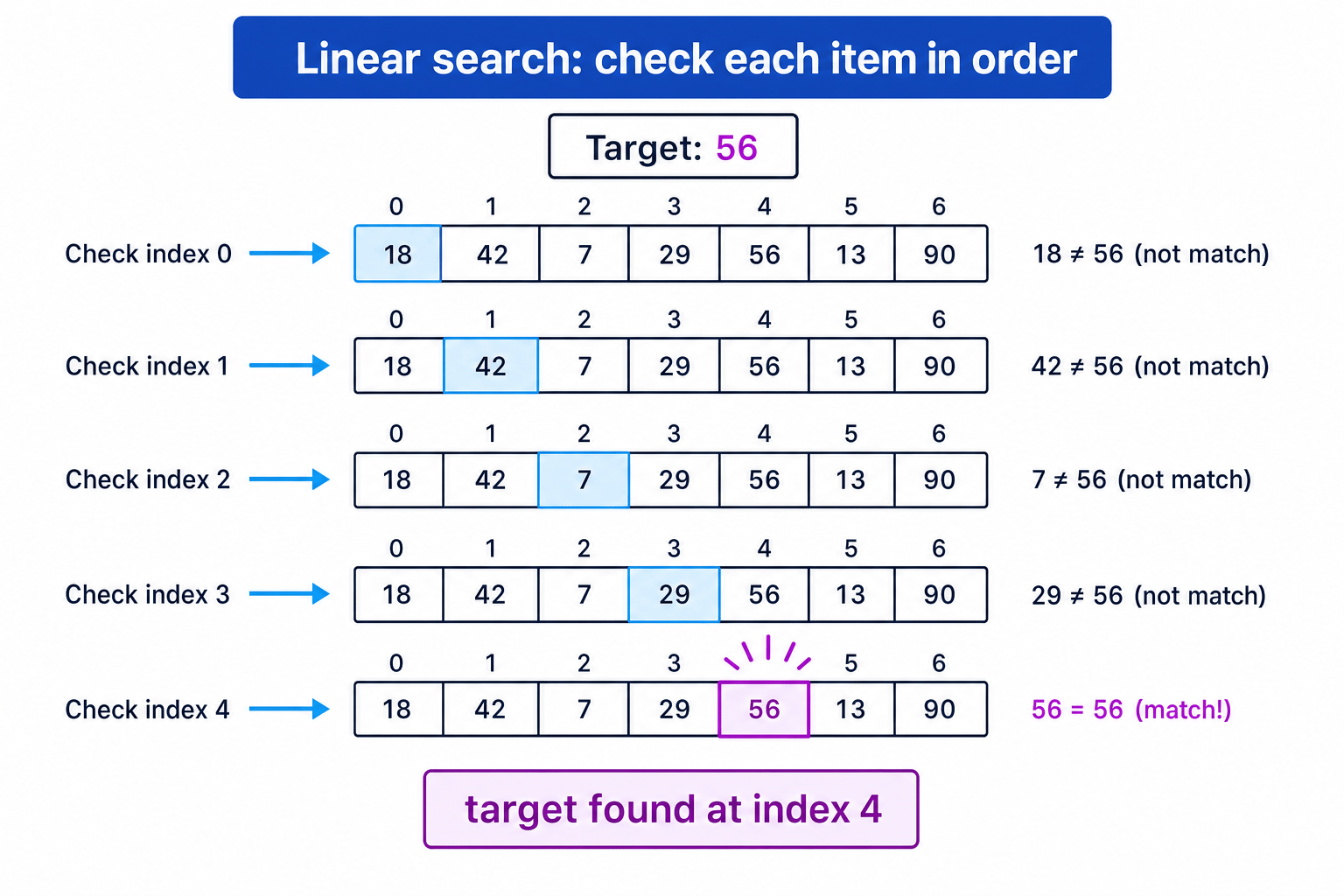
The diagram shows a linear search for 56. Notice that it does not jump around — it checks the list from left to right.
Linear search pseudo-code
Here is one clear version of linear search in AQA-style pseudo-code:
found ← False
index ← 0

WHILE found = False AND index < LENGTH(values)
    IF values[index] = target THEN
        found ← True
    ELSE
        index ← index + 1
    ENDIF
ENDWHILE

IF found = True THEN
    OUTPUT index
ELSE
    OUTPUT "Not found"
ENDIF
The variable found is a Boolean variable, meaning it can only store True or False.
Example
Tracing a linear search
Search for 28 in this list:
| Index | 0 | 1 | 2 | 3 | 4 | 5 |
|---|---|---|---|---|---|---|
| Value | 15 | 4 | 28 | 9 | 28 | 11 |
- Compare the first item with the target: index 0 stores 15, and 15 is not 28, so move on.
- Compare the next item: index 1 stores 4, and 4 is not 28, so move on again.
- Compare index 2: it stores 28, which matches the target, so the search stops and returns index 2.
What if the item appears more than once?
A basic linear search usually stops as soon as it finds the first match. In the example above, 28 also appears at index 4, but the algorithm returns index 2 because that is the first match found.
Common Mistake
Duplicate values
If a list contains duplicates, a simple search may find a matching value, not necessarily every matching value. To find all matches, the algorithm would need to keep searching after the first match.
Strengths and weaknesses of linear search
Linear search is simple and flexible. It works even if the list is not sorted.
However, it can be slow for long lists because it may have to check many items. If the target is the last item, or not present at all, linear search checks every element.
Binary search
A binary search is a more efficient search method, but it has one very important requirement: the list must already be sorted.
A list is sorted when its values are in a clear order, such as smallest to largest or alphabetical order.
Binary search works by repeatedly checking the middle item of the current search area.
The basic idea is:
- Look at the middle item.
- If it is the target, stop.
- If the target is smaller than the middle item, ignore the right half.
- If the target is larger than the middle item, ignore the left half.
- Repeat with the remaining half.
Common Mistake
Using binary search on an unsorted list
Binary search only works correctly on a sorted list. If the data is not sorted, discarding half the list might throw away the target value by mistake.
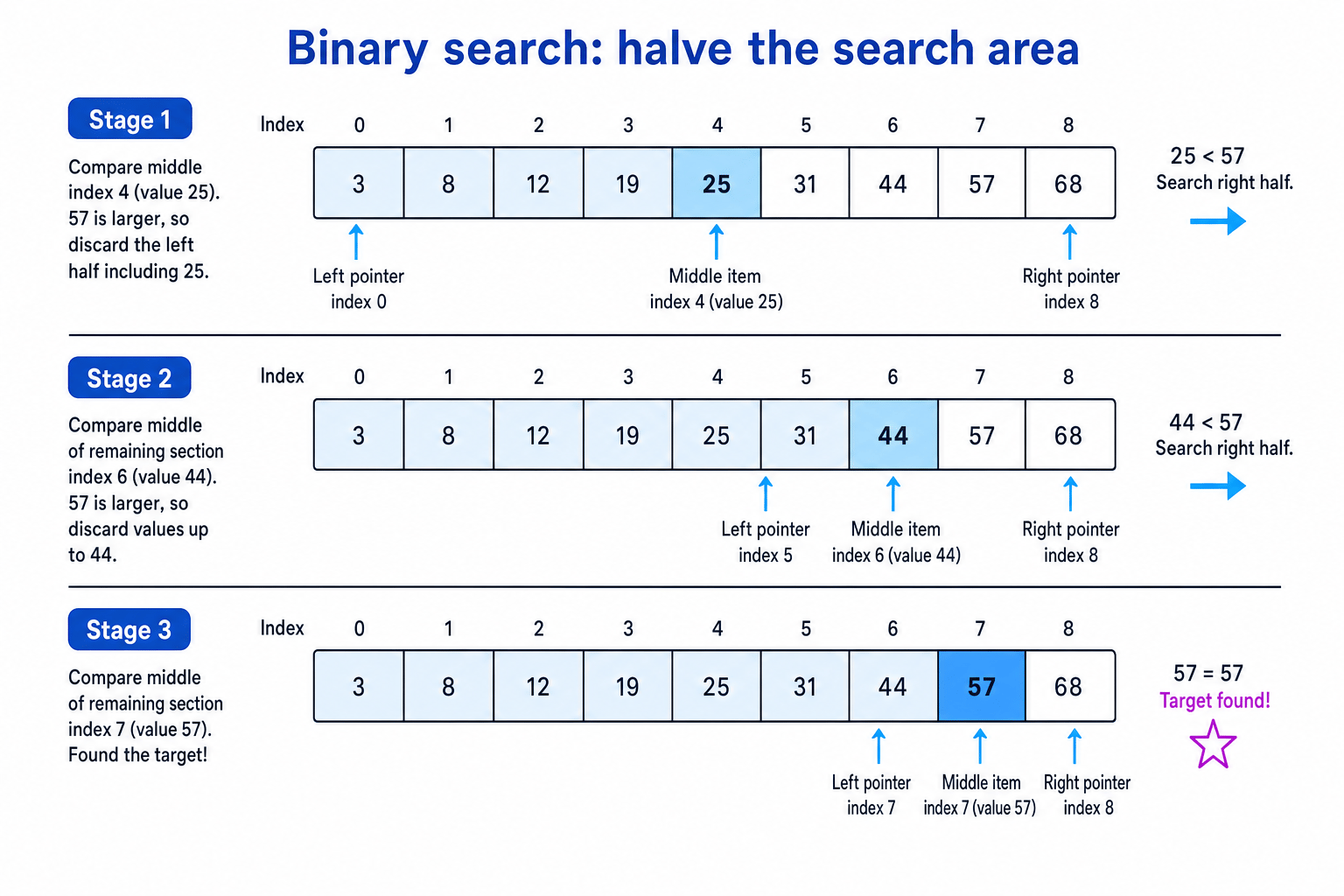
The diagram shows binary search finding 57 in a sorted list. Each comparison removes a large part of the remaining search area.
Binary search pseudo-code
Binary search often uses three index variables:
-
left— the first index still being searched -
right— the last index still being searched -
middle— the index halfway betweenleftandrightfound ← False left ← 0 right ← LENGTH(values) - 1
WHILE found = False AND left <= right middle ← (left + right) DIV 2
  IF values[middle] = target THEN
      found ← True
  ELSEIF values[middle] < target THEN
      left ← middle + 1
  ELSE
      right ← middle - 1
  ENDIF
ENDWHILE
IF found = True THEN OUTPUT middle ELSE OUTPUT "Not found" ENDIF
DIV means integer division. It gives the whole-number result and ignores any remainder. For example, 7 DIV 2 gives 3.
Example
Tracing a binary search
Search for 57 in this sorted list:
| Index | 0 | 1 | 2 | 3 | 4 | 5 | 6 | 7 | 8 |
|---|---|---|---|---|---|---|---|---|---|
| Value | 3 | 8 | 12 | 19 | 25 | 31 | 44 | 57 | 68 |
- Start with
left ← 0andright ← 8. Calculatemiddle ← (0 + 8) DIV 2, somiddle ← 4. The value at index 4 is 25. - Compare 25 with the target 57. Since 57 is larger, ignore index 4 and everything to its left. Set
left ← 5. - Now
left ← 5andright ← 8. Calculatemiddle ← (5 + 8) DIV 2, somiddle ← 6. The value at index 6 is 44. - Compare 44 with 57. Since 57 is larger, ignore index 6 and everything to its left. Set
left ← 7. - Now
left ← 7andright ← 8. Calculatemiddle ← (7 + 8) DIV 2, somiddle ← 7. The value at index 7 is 57, which matches the target, so the search stops and returns index 7.
What if the target is not in the list?
Binary search stops when the remaining search area becomes empty. In the pseudo-code, this happens when left > right.
For example, if left becomes 6 and right is 5, there are no indexes left to check. The algorithm can safely output "Not found".
Comparing linear and binary search
Both algorithms are used to find data, but they are suitable in different situations.
| Feature | Linear search | Binary search |
|---|---|---|
| Does the list need to be sorted? | No | Yes |
| How does it search? | Checks items one by one | Checks the middle and halves the search area |
| Works on unsorted data? | Yes | No |
| Simple to understand and program? | Very simple | Slightly more complex |
| Good for small lists? | Yes | Yes |
| Good for large sorted lists? | Less suitable | More suitable |
Key Idea
Choosing between them
Use linear search when the data is unsorted or the list is small. Use binary search when the data is sorted and you want to reduce the number of comparisons.
Example
Choosing a search algorithm
A program needs to search a list of 500 student surnames. The surnames are stored in alphabetical order. Decide which search algorithm is more suitable.
- Check whether the data is sorted. The surnames are in alphabetical order, so binary search is allowed.
- Consider the size of the list. There are 500 surnames, so checking one by one could take many comparisons.
- Choose binary search because it can repeatedly halve the sorted list, making it more suitable than linear search here.
Common Mistake
Saying binary search is always best
Binary search is not automatically the best choice. If the list is unsorted, binary search cannot be used unless the data is sorted first.
Describing the algorithms in words
In an exam, you may be asked to “explain how” an algorithm works. That means you should describe the mechanics, not just name the algorithm.
For linear search, include ideas like:
- starts at the first item
- compares each item with the target
- moves through the list in order
- stops when found or when the end is reached
For binary search, include ideas like:
- the list must be sorted
- compares the target with the middle item
- discards the half where the target cannot be
- repeats until found or until no items remain
Exam technique
In the exam
- For a trace question, keep track of the current index or the
left,rightandmiddlevalues after each comparison. - For binary search, always state that the list must be sorted before the algorithm can work correctly.
- When comparing algorithms, give both a benefit and a limitation, such as “linear works on unsorted data but may check every item”.
Self review
Check yourself
- Why can binary search discard half of the list after each comparison?
- What happens in a linear search if the target value is not present?
- Which search algorithm would you choose for a short unsorted list, and why?

Recap questions
Test yourself with 5 quick questions on this guide. Answer them all correctly to complete it.
You've reached the end
Test yourself on this topic, or move on to the next guide.
How was this guide?