Revision notes for AQA GCSE Computer Science Data types. Open the guide for explanations and worked examples. Written against the AQA GCSE Computer Science (8525) specification, so the content matches what's examinable rather than general Computer Science background.
Data types
What you'll learn
- What a data type is and why programs need them.
- How to choose between integer, real, Boolean, character and string.
- How the type of a value affects what you can do with it.
- Common traps, such as treating phone numbers as integers.
Starting point: values and variables
A program works with values. A value is one piece of data, such as 17, TRUE, "AQA" or 'B'.
A variable is a named storage location in a program. For example, a variable called score might store the value 42. The value in a variable can change while the program runs.
Before a program can sensibly store or process a value, it needs to know what kind of value it is.
Definition
Data type
A data type is a category of data that tells the program what kind of value is being stored and what operations are suitable for that value.
For example, 12 as a number can be added to another number. "12" as text might be joined to other text instead. That is why the type matters.
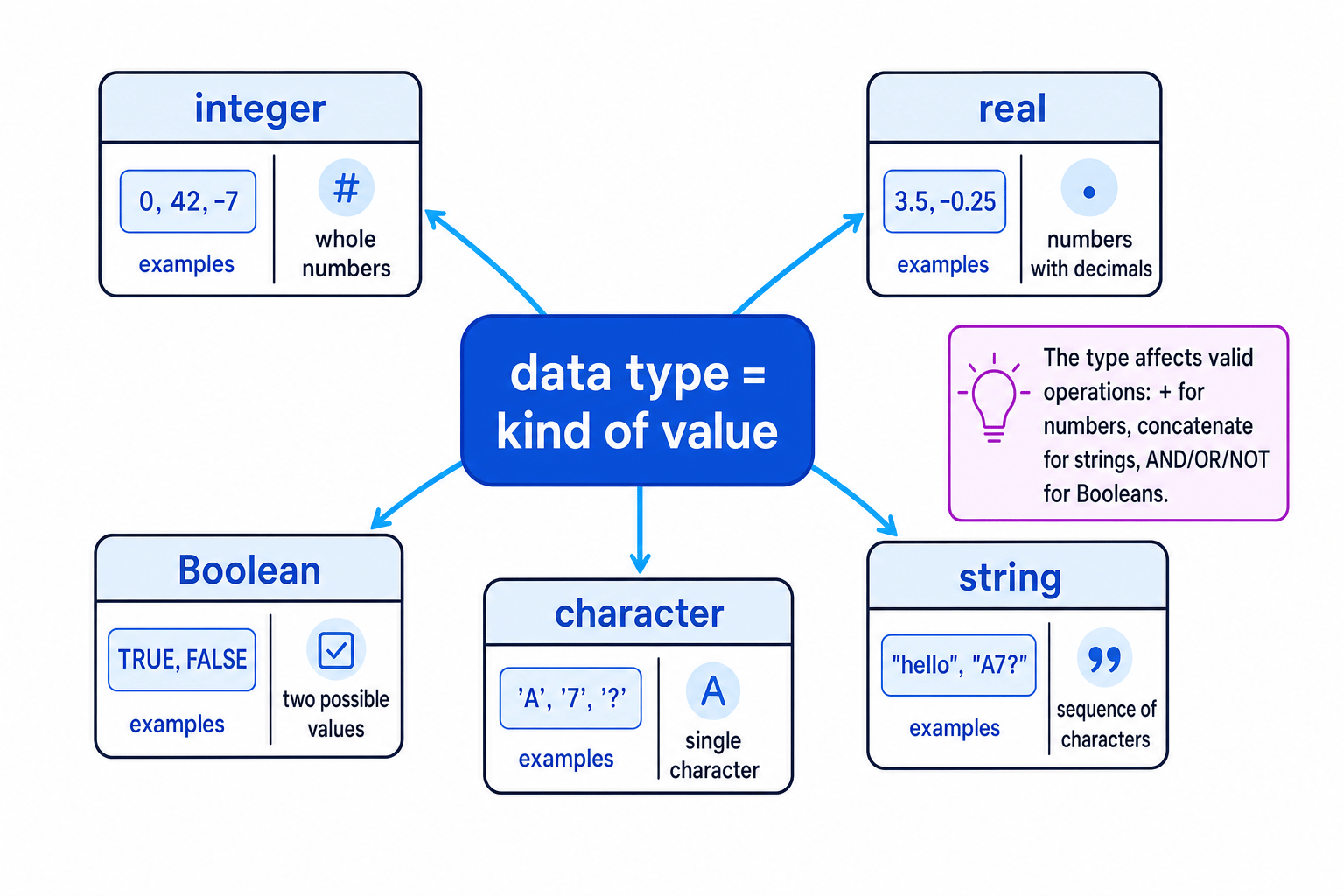
Here is the basic map of the five data types you need for AQA GCSE Computer Science.
Key Idea
Type affects meaning
Do not choose a data type just by how the data looks. Choose it by what the program needs to do with the data.
The five data types
In exams, use these general names: integer, real, Boolean, character and string. Some programming languages use different names. For example, a real number is often called a float.
| Data type | Meaning | Example values | Good for |
|---|---|---|---|
| Integer | A whole number with no decimal part | 0, 15, -3 | Counts, scores, number of attempts |
| Real | A number that can have a decimal part | 3.5, -0.25, 10.0 | Measurements, averages, prices |
| Boolean | One of two truth values | TRUE, FALSE | Conditions, flags, yes/no data |
| Character | One single character | 'A', '7', '?' | Menu choices, single grades, initials |
| String | A sequence of characters | "Sam", "A7?", "Hello" | Names, addresses, postcodes, messages |
Integer
An integer is a whole number. It has no decimal point.
Use an integer when the value represents a count or whole-number quantity, such as:
- number of lives in a game
- number of students in a class
- exam mark out of 80
- number of items in a basket
Integers can be used in arithmetic, such as adding scores or multiplying a quantity by a price.
Common Mistake
Whole-looking text
A value made of digits is not automatically an integer. A phone number like "07700 900123" should normally be a string, because you do not add, subtract or multiply phone numbers, and the leading zero must be kept.
Real
A real number can contain a fractional or decimal part. In many programming languages, this type is called a float.
Use a real number when the value may need a decimal point, such as:
- height in metres, for example
1.62 - temperature, for example
21.5 - an average mark, for example
34.5
Example
Choosing between integer and real after division
A student has four test scores: 28, 35, 40 and 35. What data type is best for storing the average?
- Add the integer scores:
28 + 35 + 40 + 35gives a total of138. - Divide the total by the number of tests: average=138÷4=34.5\text{average} = 138 \div 4 = 34.5average=138÷4=34.5.
- The result has a decimal part, so the average should be stored as a real. The individual test scores can still be stored as integers.
Boolean
A Boolean value has only two possible values: TRUE or FALSE.
Booleans are often used for conditions. A condition is a test that evaluates to either TRUE or FALSE, such as score >= 50.
Examples of Boolean variables:
isLoggedInhasPaidgameOverpasswordCorrect
Boolean values are also used with logical operations such as AND, OR and NOT.
Example
Evaluating a Boolean condition
A program stores:
score ← 72attendance ← 95eligible ← score >= 50 AND attendance >= 90
Work out the value of eligible.
- Test the first comparison:
score >= 50isTRUEbecause72is at least50. - Test the second comparison:
attendance >= 90isTRUEbecause95is at least90. - Apply
AND:TRUE AND TRUEgivesTRUE, soeligiblestores the Boolean valueTRUE.
Common Mistake
Boolean is not text
TRUE is a Boolean value. "TRUE" is a string containing the letters T, R, U and E. They may look similar, but they are different types.
Character
A character is one single character. It could be:
- a letter, such as
'A' - a digit character, such as
'7' - a punctuation symbol, such as
'?' - a space character
A character is useful when the program only needs one symbol, such as a menu choice.
For example:
choice ← 'A'grade ← '7'initial ← 'M'
The character '7' is not the same as the integer 7. The first is a symbol; the second is a number.
String
A string is a sequence of characters stored together in order. “Sequence” just means the characters come one after another.
Strings can contain:
- letters
- digits
- spaces
- punctuation
- a mixture of all of these
Examples:
"Amira""AQA 8525""SW1A 1AA""007"
Strings are used for text data, such as names, usernames, addresses, postcodes and messages.
Definition
Concatenation
Concatenation means joining strings together end to end. For example, joining "Hello " and "Sam" gives "Hello Sam".
Common Mistake
Character versus string
A character stores one single character, such as 'A'. A string can store many characters, such as "AQA". Some languages also allow a one-character string like "A", but in the exam you should still understand the difference between the two data types.
Choosing the right data type
When choosing a data type, ask what the data represents and how the program will use it.
Tip
Quick decision order
If it is only TRUE or FALSE, use Boolean. If it is text or an identifier, use string. If it is exactly one symbol, use character. If it is a number used in calculations, use integer for whole numbers and real for decimals.
Example
Choosing data types for stored data
A school trip program stores a pupil’s age, height, payment status, first initial and full name. Choose suitable data types.
- The pupil’s age is a whole-number count of years, such as
15, so use an integer. - The pupil’s height may include a decimal value, such as
1.58, so use a real. - Payment status has two possible states, paid or not paid, so use a Boolean.
- The first initial is one symbol, such as
'J', so use a character. - The full name contains several characters, and may include spaces, so use a string.
Why using the wrong type causes problems
The wrong data type can lead to errors or incorrect processing.
For example:
- Storing an average as an integer could lose the decimal part.
- Storing a phone number as an integer could remove a leading zero.
- Trying to do arithmetic with a string may fail or produce an unexpected result.
- Storing a yes/no value as a string makes it harder to use directly in conditions.
A type mismatch happens when a program tries to use a value in a way that does not fit its data type. For GCSE, focus on recognising the suitable type rather than memorising language-specific error messages.
Exam technique
In the exam
- Choose the type based on the value’s purpose, not just its appearance.
- Use integer for whole-number calculations and real when decimals or averages are possible.
- Use the exam’s general names: integer, real, Boolean, character and string.
Self review
Check yourself
- What data type would you choose for a pupil’s surname, exam mark, average mark and homework-submitted status?
- Why is
"007"usually better stored as a string than as an integer? - What is the difference between the character
'A'and the string"AQA"?

Recap questions
Test yourself with 5 quick questions on this guide. Answer them all correctly to complete it.
You've reached the end
Test yourself on this topic, or move on to the next guide.
How was this guide?