Revision notes for AQA GCSE Computer Science Character encoding. Open the guide for explanations and worked examples. Written against the AQA GCSE Computer Science (8525) specification, so the content matches what's examinable rather than general Computer Science background.
Character encoding
What you'll learn
- Why text must be represented using binary.
- What a character set, character code and encoding table are.
- How 7-bit ASCII stores common characters and how its codes run in sequence.
- Why Unicode is needed for many languages and symbols.
Starting point: all data becomes binary
Computers store and process data using binary, which means only two digits: 0 and 1. A bit is one binary digit. A byte is 8 bits.
Text is made from characters. A character is one symbol in text, such as A, 7, ?, a space, or a new-line instruction. To store text, a computer needs a way to turn each character into a number, then into binary.
Character sets, character codes and encoding tables
Definition
Character set, character code and encoding
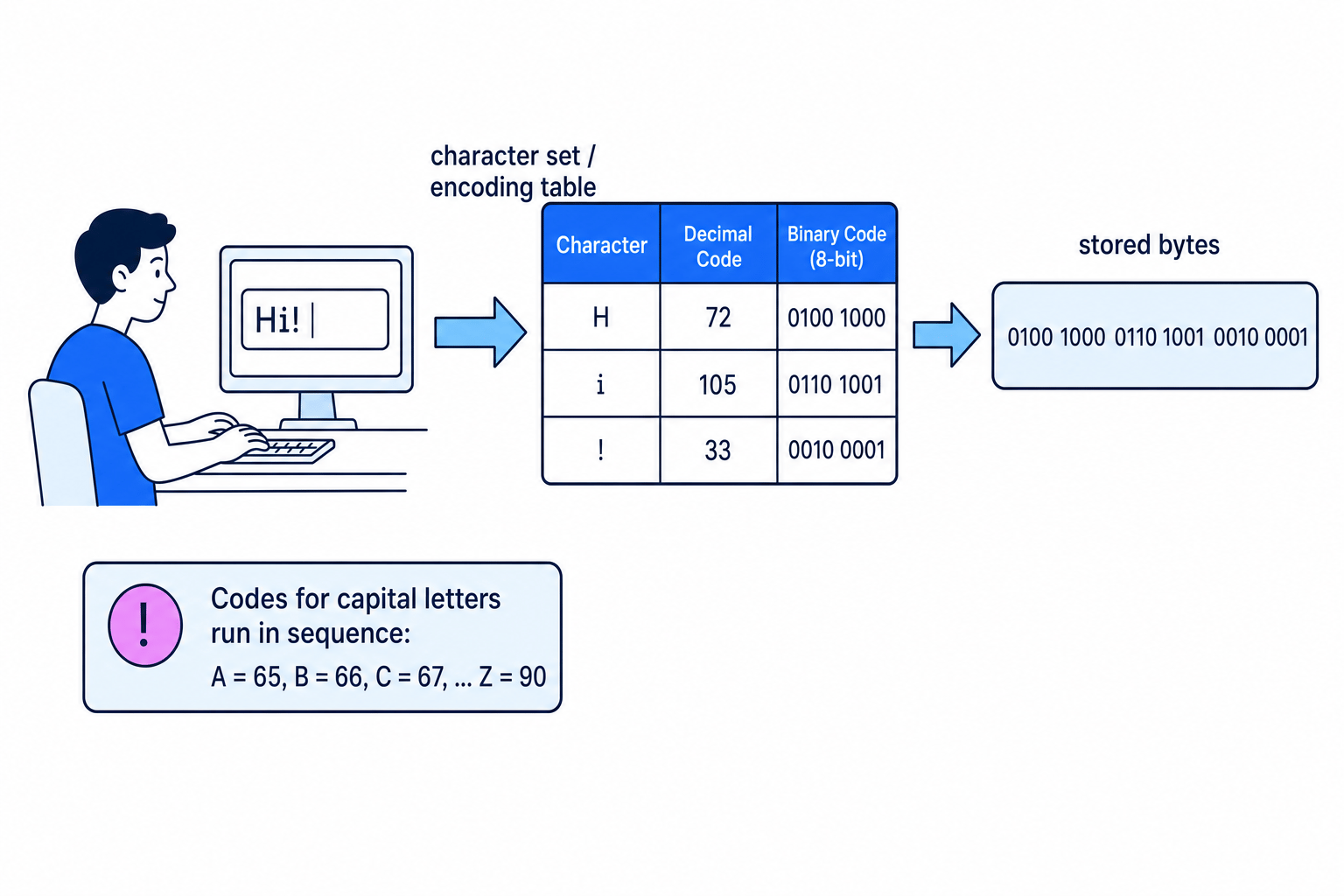
A character set is the collection of characters a computer can represent. Each character is given a character code, which is a number. Character encoding is the method for representing characters as codes, so they can be stored using binary.
An encoding table lists which code goes with each character. For example, a table might say that A has code 65.
The flow is: you type characters, the computer looks them up in an encoding table, and then stores the resulting codes in binary. The diagram shows the binary written as 8-bit bytes.
Key Idea
Text is stored as numbers
A computer does not store the “shape” of a letter. It stores a character code, then uses the correct character set to turn that code back into the character when needed.
Encoding and decoding
Encoding means converting a character into its code.
Decoding means converting a code back into its character.
So, if A is stored as 65, then:
- encoding:
A→ 65 - decoding: 65 →
A
Character codes often run in sequence
Character codes are commonly grouped in an encoding table. Within a group, the codes often run in sequence, meaning each next character has the next number.
For example, in ASCII:
| Character group | Runs from | Useful starting code |
|---|---|---|
| Digit characters | 0 to 9 | 0 = 48 |
| Capital letters | A to Z | A = 65 |
| Lower-case letters | a to z | a = 97 |
This means you can often calculate a code without being given every single row of the table.
Example
Using sequential character codes
Suppose A has code 65 and capital letters run in sequence. Find the code for G.
- Work out how far
Gis fromA:Ahas offset 0,Bhas offset 1, soGhas offset 6. - Add that offset to the code for
A: 65 + 6 = 71. - Therefore,
Ghas character code 71. If you were decoding 71, you could subtract 65 to get offset 6 and identifyGagain.
Common Mistake
Capital and lower-case letters are different
A and a do not have the same character code. In ASCII, A is 65 but a is 97, so always check the case of the character.
7-bit ASCII
Definition
7-bit ASCII
ASCII stands for American Standard Code for Information Interchange. 7-bit ASCII is a character encoding method that uses 7 bits to represent each character code.
With 7 bits there are 27=1282^7 = 12827=128 possible bit patterns. So 7-bit ASCII has 128 codes, running from 0 to 127.
ASCII includes:
- capital English letters, such as
AtoZ - lower-case English letters, such as
atoz - digit characters, such as
0to9 - punctuation, such as
!,?and. - some control characters, which are non-printing instructions such as moving to a new line
Example
Counting the possible ASCII codes
- A 7-bit code has 7 bit positions, and each bit position can be either 0 or 1.
- This gives 27=1282^7 = 12827=128 different patterns.
- Because the codes start at 0, the 128 codes run from 0 to 127, not from 1 to 128.
ASCII written as binary
Although ASCII is a 7-bit code, you may see ASCII values written as 8-bit bytes by adding an extra 0 at the front.
For example:
| Character | Decimal ASCII code | As an 8-bit byte |
|---|---|---|
A | 65 | 0100 0001 |
B | 66 | 0100 0010 |
C | 67 | 0100 0011 |
The leading 0 just pads the value to make a full byte.
Common Mistake
A digit character is not the same as a number
The character 5 in a text message is not the same as the numeric value 5 used in arithmetic. In ASCII, the digit character 5 has character code 53.
Using a given encoding table
In the exam, you may be given an encoding table and asked to convert:
- characters to character codes
- character codes to characters
Use the table exactly. If the table only gives the start of a sequence, use the fact that the codes run in order.
Example
Decoding character codes
Suppose a question tells you that capital A is 65 and lower-case a is 97, and that both groups run in sequence. Decode the codes 66, 97, 103.
- Code 66 is in the capital-letter group: 66 - 65 = 1, so it is one place after
A, which isB. - Code 97 is exactly the first lower-case code, so it represents
a. - Code 103 is in the lower-case group: 103 - 97 = 6, so it is six places after
a, which isg. The decoded text isBag.
Unicode
Definition
Unicode
Unicode is a character set and encoding standard designed to represent a far greater range of characters than ASCII, including different alphabets and special symbols.
ASCII is useful for basic English text, but 128 codes is not enough for all the characters people use around the world.
Unicode was created so computers can represent:
- different alphabets and writing systems, such as Greek, Arabic, Chinese and Cyrillic
- accented letters, such as
é - currency symbols, such as
€ - mathematical and technical symbols
- many other special symbols
Advantages of Unicode over ASCII
Unicode has several important advantages:
| Feature | 7-bit ASCII | Unicode |
|---|---|---|
| Range | 128 codes | Far greater range |
| Languages | Mainly basic English characters | Many alphabets and writing systems |
| Symbols | Limited punctuation and symbols | Many special symbols |
| Compatibility | Original simple standard | Uses the same codes as ASCII up to 127 |
Compatibility means that systems can work together more easily. Unicode keeps the ASCII codes from 0 to 127 the same. For example, A is code 65 in both ASCII and Unicode.
Example
Choosing ASCII or Unicode
A company needs to store the message Café costs €5.
- Check which characters are basic ASCII characters:
C,a,f, the space,c,o,s,t,sand5can be represented in ASCII. - Identify characters outside basic 7-bit ASCII:
éand€are not part of the standard 128 ASCII codes. - Choose Unicode, because it can represent a far greater range of characters, while still using the same codes as ASCII for codes 0 to 127.
Tip
Stay within GCSE depth
For GCSE 8525, you do not need to learn different Unicode versions such as UTF-8 or UTF-16, or calculate how many bytes each Unicode character uses. Focus on purpose, range and ASCII compatibility.
Exam technique
In the exam
- If you are given an encoding table, use that table rather than guessing from memory.
- When using a sequence, remember the first character has offset 0: if
Ais 65, thenCis 67, not 68. - For ASCII versus Unicode questions, explain that Unicode represents many more characters and uses the same codes as ASCII up to 127.
Self review
Check yourself
- If
Ahas code 65 and capital letters run in sequence, what code doesFhave? - Why is 7-bit ASCII not enough for all languages and special symbols?
- What is the benefit of Unicode using the same codes as ASCII up to 127?
Fundamentals of data representation
Guide 5 of 8
You've reached the end
Test yourself on this topic, or move on to the next guide.
How was this guide?