Revision notes for AQA GCSE Computer Science Data structures. Open the guide for explanations and worked examples. Written against the AQA GCSE Computer Science (8525) specification, so the content matches what's examinable rather than general Computer Science background.
Data structures
What you'll learn
- What a data structure is and why programs need them.
- How to use one-dimensional arrays and two-dimensional arrays.
- How to use records to group related data with different data types.
- How to choose a sensible structure when designing a simple program.
Starting point: data in programs
A program often needs to store more than one value. For example, a quiz program might store scores, a game might store a grid of tiles, and a garage system might store details about cars.
Before data structures, you already know about variables.
Definition
Variable
A variable is a named memory location used to store a value while a program is running.
A single variable is useful for one value:
score ← 18
But real programs often need groups of related values. That is where data structures come in.
Definition
Data structure
A data structure is a particular way of organising data so that a program can store it, access it, and update it sensibly.
For GCSE, the key data structures in this section are arrays and records.
Key Idea
Why data structures matter
A data structure lets you keep related data together instead of creating lots of separate variables with awkward names like score1, score2, score3, and so on.
One-dimensional arrays
An array stores several values under one identifier. Each value in the array is called an element.
Definition
Array
An array is an ordered collection of elements, usually of the same data type, accessed using an index.
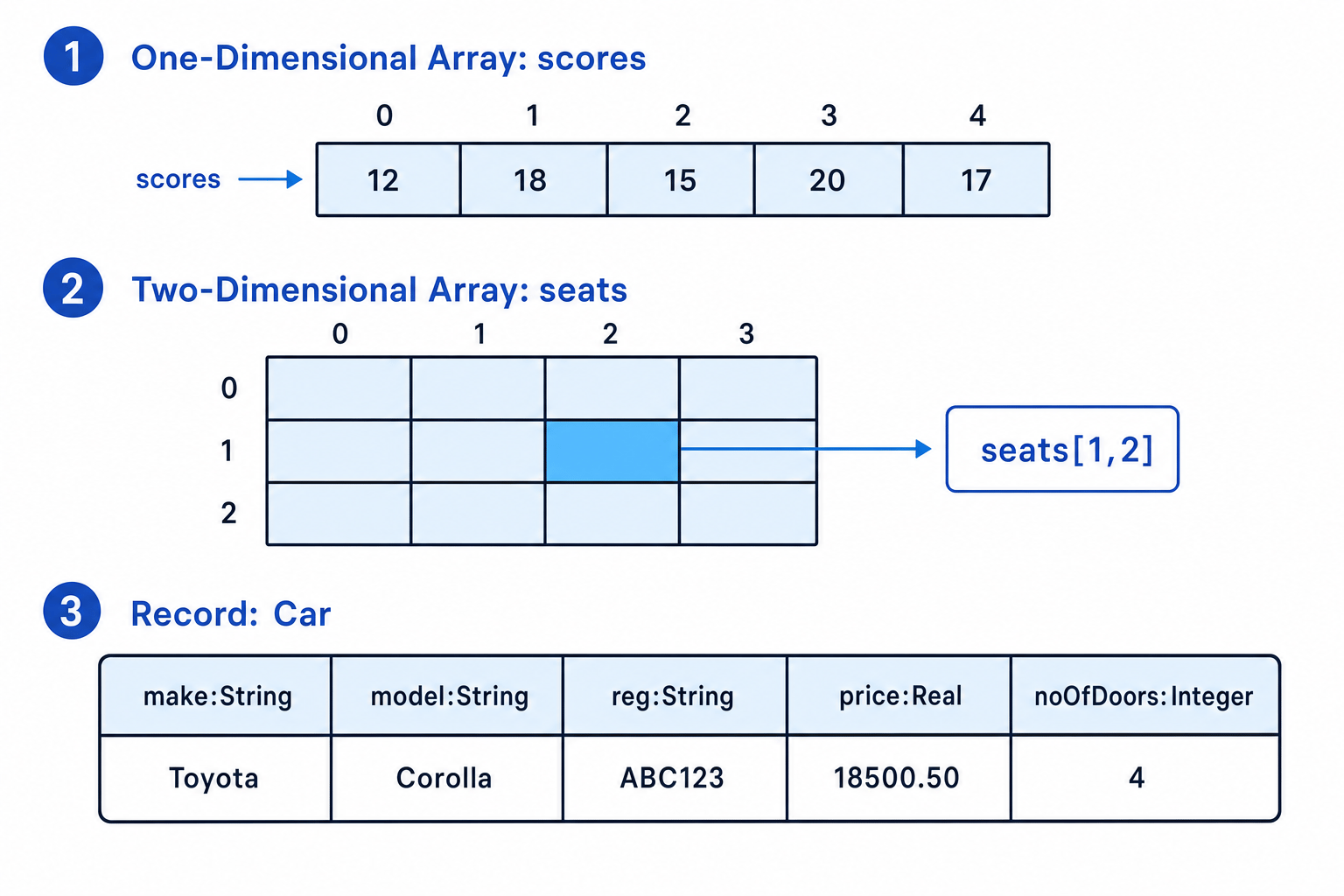
A one-dimensional array is like a single row of values:
scores ← [12, 18, 15, 20, 17]
Each element has an index.
Definition
Index
An index is the position number used to access an element in an array.
In AQA pseudocode, array indexing starts at 0. So for this array:
scores[0] is 12
scores[1] is 18
scores[2] is 15
scores[3] is 20
scores[4] is 17
There are 5 elements, but the last valid index is 4.
Common Mistake
Forgetting zero-based indexing
If an array has 5 elements, the indexes are 0 to 4, not 1 to 5. Trying to access scores[5] would be outside the array.
Accessing and updating array elements
To access an element means to read its value. To update an element means to change its value.
scores[2] ← 16
This changes the third element from 15 to 16.
Example
Finding a total from a one-dimensional array
Suppose this array stores five test scores:
scores ← [12, 18, 15, 20, 17]
Find the total score.
-
Start with a running total of 0, because no scores have been added yet.
-
Visit each valid index from 0 to 4 and add the element at that index to the running total:
total ← total + scores[index] -
Substitute the array values in order: 12, then 18, then 15, then 20, then 17. The running total becomes 82.
-
The final total is therefore 82.
In pseudocode, this could be written as:
total ← 0

FOR index ← 0 TO 4
    total ← total + scores[index]
ENDFOR
Tip
Looping through an array
A loop variable such as index is often used to move through an array one element at a time.
Two-dimensional arrays
A two-dimensional array stores data in rows and columns. You can think of it like a table or grid.
Definition
Two-dimensional array
A two-dimensional array is an array with rows and columns, where each element is accessed using two indexes.
For example, a cinema booking system could use a 2D array to store seats:
seats[1, 2]
This means row index 1, column index 2.
The order matters: the first index gives the row, and the second index gives the column.
Using a 2D array in a program
Imagine "E" means an empty seat and "B" means a booked seat.
seats ← [["E", "E", "E", "E"],
         ["E", "E", "E", "E"],
         ["E", "E", "E", "E"]]
To book the seat at row 1, column 2:
IF seats[1, 2] = "E" THEN
    seats[1, 2] ← "B"
ENDIF
Example
Updating a seat in a two-dimensional array
A cinema system stores seats in a 3 by 4 array. "E" means empty and "B" means booked. A customer asks for the seat at row 1, column 2.
-
Use the row index first and the column index second, so the required element is
seats[1, 2]. -
Check whether that element currently stores
"E". If it does, the seat is available. -
Change only that one element to
"B":seats[1, 2] ← "B" -
Leave all other elements unchanged, because the customer has booked one specific seat.
Nested loops with 2D arrays
A nested loop is a loop inside another loop. It is useful for processing every cell in a 2D array.
For example, to count how many seats are booked in a 3 by 4 seating grid:
booked ← 0

FOR row ← 0 TO 2
    FOR column ← 0 TO 3
        IF seats[row, column] = "B" THEN
            booked ← booked + 1
        ENDIF
    ENDFOR
ENDFOR
The outer loop moves through the rows. For each row, the inner loop moves through the columns.
Key Idea
Rows then columns
For 2D arrays, be consistent: use array[row, column]. Mixing up rows and columns is a common cause of incorrect answers.
Records
Arrays are good when you have lots of similar values, such as many scores or many seats. But sometimes one “thing” has several different pieces of information.
For example, a car might have:
- a make
- a model
- a registration number
- a price
- a number of doors
These values are related, but they are not all the same data type. A record is useful here.
Definition
Record
A record is a data structure that groups related fields together, where the fields may have different data types.
Definition
Field
A field is one named item of data inside a record.
A record definition for a car could be:
RECORD Car
    make : String
    model : String
    reg : String
    price : Real
    noOfDoors : Integer
ENDRECORD
This defines the structure of a car record. Each actual car would then have values for those fields.
For example:
myCar.make ← "Toyota"
myCar.model ← "Corolla"
myCar.reg ← "AB12 CDE"
myCar.price ← 18500.50
myCar.noOfDoors ← 4
Choosing suitable fields and data types
When designing a record, think about what information belongs together and what data type each field should use.
Common GCSE data types include:
Stringfor text, such as a name or registration numberIntegerfor whole numbers, such as number of doorsRealfor decimal numbers, such as a priceBooleanfor true/false values
Example
Designing a record for a library book
A library program needs to store each book’s title, author, ISBN, year published, and whether it is currently on loan.
-
Group the data around one real-world item: one book. That suggests using a record called
Book. -
Choose field names that describe each item clearly:
title,author,isbn,yearPublished, andonLoan. -
Choose suitable data types.
title,author, andisbnshould beString;yearPublishedshould beInteger;onLoanshould beBoolean. -
Write the record definition:
RECORD Book
    title : String
    author : String
    isbn : String
    yearPublished : Integer
    onLoan : Boolean
ENDRECORD
Common Mistake
Using a number for every numeric-looking field
An ISBN or registration number may contain digits, but it is not usually used for calculations. Store it as a String, not an Integer.
Arrays vs records
Arrays and records solve different problems.
An array is best when you have a collection of similar items:
scores ← [12, 18, 15, 20, 17]
A record is best when one item has several named properties:
RECORD Student
    name : String
    formGroup : String
    targetGrade : Integer
ENDRECORD
Sometimes you can combine ideas. For example, a garage might store many cars using an array of car records. Each element in the array is one Car record.
cars[0].make
cars[0].price
cars[1].make
cars[1].price
You do not need advanced data structures for this topic. Focus on recognising when an array or record is appropriate, and using clear indexes or field names.
Tip
Choosing a structure
Ask yourself: “Am I storing many similar values?” If yes, use an array. “Am I storing several facts about one thing?” If yes, use a record.
Designing simple solutions
When a question asks you to design a solution, it may not say “use an array” or “use a record” directly. You need to spot the shape of the data.
For example:
- Daily temperatures for a week → one-dimensional array
- A game board with rows and columns → two-dimensional array
- Details about one customer → record
- Details about many customers → array of records
Use meaningful identifiers. Names like scores, row, column, studentRecord, and booked make your design easier to understand than names like x, y, and data.
Exam technique
In the exam
-
Check whether the data is a list, a grid, or a set of fields about one item before choosing the structure.
-
Remember that AQA pseudocode arrays start at index 0, so an array of 10 elements uses indexes 0 to 9.
-
For records, give each field a clear name and a sensible data type; do not use an array just because there is more than one value.
Self review
Check yourself
- What is the difference between an element and an index in an array?
- When would a two-dimensional array be more suitable than a one-dimensional array?
- Why might a car be stored as a record rather than as a simple array?

Recap questions
Test yourself with 5 quick questions on this guide. Answer them all correctly to complete it.
Programming
Guide 6 of 11
You've reached the end
Test yourself on this topic, or move on to the next guide.
How was this guide?