Bar gate stock graphs: the saw-tooth line you need to picture
Definition
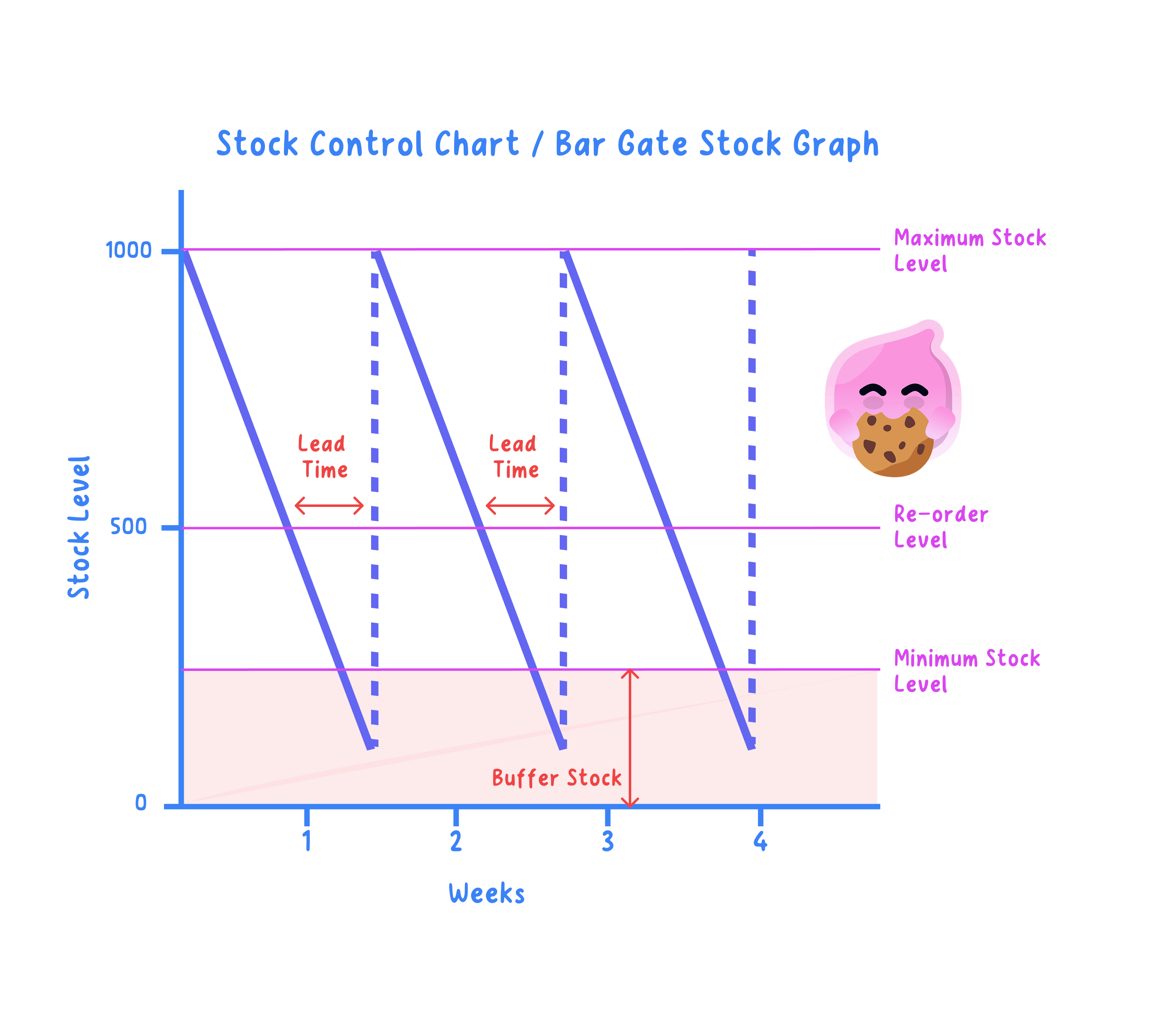
Bar gate stock graph: a chart showing how the level of stock a business holds falls as it is used and rises again as deliveries arrive.
Stock-out: running out of an item completely, so nothing can be sold or made until the next delivery lands.
- The horizontal axis is time, usually in days or weeks, read from left to right.
- The vertical axis is the level of stock held in units, so a point high up the graph means a full store room and a point near the bottom means nearly empty shelves.
- The line falls steadily as stock is sold to customers or used in production, and the steeper that slope, the faster the business is getting through its stock.
- When a delivery arrives the line jumps vertically upwards, because the whole order lands at once rather than trickling in over several days.
- Repeating that steady fall and sudden jump gives the graph its saw-tooth shape, and each tooth is one complete order cycle.
The five labels on the graph
- Five horizontal lines and measurements are marked on the graph, and an interpretation question expects you to name each one correctly.
- Maximum stock level: the most the business is willing or able to hold, set by the storage space it has and the cash it can afford to tie up.
- Re-order level: the stock level at which a new order is placed, which is never zero because the delivery takes time to arrive.
- Minimum stock level, or buffer stock: the reserve held to cover unexpectedly high demand or a delivery that turns up late.
- Lead time: the gap between placing the order and the delivery arriving, read along the graph as a horizontal distance.
- Re-order quantity: how much is ordered each time, which is the size of the vertical jump back up the graph.
- The steeper the usage line or the longer the lead time, the higher the re-order level must be set, because more stock is used up before the delivery lands.
Note
A business can instead run with almost no buffer stock and order only as it needs, which is just in time, covered in the next guide.
Following one full cycle: a worked example
A shop holds a maximum stock level of 1,000 units and sells 200 units a week, with a buffer stock of 200 units, a lead time of 1 week and a re-order level of 400 units.
| Point in the cycle | Stock (units) | What the graph shows |
|---|---|---|
| Start of week 1 | 1,000 | Maximum stock level |
| End of week 3 | 400 | Re-order level, order placed |
| End of week 4 | 200 | Buffer stock, delivery arrives |
| Immediately after delivery | 1,000 | Vertical jump back to maximum |
- The order goes in at 400 units and another 200 units sell during the one-week lead time, so 400−200=200400 - 200 = 200400−200=200 units are still on the shelf when the delivery arrives.
- The delivery of 800 units lands on top of that buffer, so 200+800=1,000200 + 800 = 1{,}000200+800=1,000 units restores the maximum stock level.
- Those 800 units are the re-order quantity and the height of the vertical jump, and because the shop is back where it started the whole tooth repeats every four weeks.
Interpreting the graph: what it tells the business
- A buffer the line never touches means the business is holding more stock than it needs, so cash sits on the shelf as boxes instead of paying suppliers or wages.
- A line that reaches zero is a stock-out, so sales are lost that day and a customer who finds the shelf empty buys from a rival and may not come back.
- A longer lead time forces the re-order level higher, and a business like Greggs, selling cheap hot food in high volume, has such a steep usage line that it must reorder while plenty is still in the shop.
- Ordering more each time means fewer deliveries and lower delivery costs, but taller teeth on the graph mean more cash tied up in stock and more storage space needed.
Exam technique
- Read every value straight off the axes before you write anything, because a misread level makes the rest of the answer wrong.
- Find the lead time by measuring the horizontal gap between the re-order level being reached and the line jumping upwards.
- Use the exact terms maximum stock level, re-order level, buffer stock, lead time and re-order quantity rather than vague words like low point.
- When the question says interpret or explain, never leave a figure bare: say what it means for the shop, such as lost sales or cash tied up.
Self review
- What does each axis of a bar gate stock graph measure?
- Why is the re-order level set above zero?
- A shop reorders at 400 units, sells 200 units a week and waits 1 week for delivery, so how much stock is left when the delivery arrives?
- What does the size of the vertical jump tell you?
- Give one drawback of ordering a larger quantity less often.