Revision notes for OCR AS Level Computer Science Describe the solution. Open the guide for explanations and worked examples. Written against the OCR AS Level Computer Science specification, so the content matches what's examinable rather than general Computer Science background.
Describe the solution
What you'll learn
- How to explain and justify the structure of a proposed software solution.
- How to describe the solution using algorithms that fit together as a complete design.
- How to include sensible usability features for the intended users.
- How to identify key variables, data structures, classes and validation before coding.
The purpose of “describe the solution”
In the Programming Project, you are not just expected to build a program. You need to show that you can design it carefully before development starts.
This section is about explaining what your solution will be like, how its parts will work, and why your choices are suitable for the problem.
Definition
Solution design
A solution design is a clear plan for a program before it is implemented. It describes the structure, algorithms, interface features, data choices and validation needed to meet the requirements.
A strong design is not a vague list of features. It should connect back to the problem you analysed earlier. If your analysis says the user needs to search, sort, save data, log in, or generate reports, your design should show exactly how those needs will be met.
Key Idea
Design is about decisions
For each important design choice, explain what you will do and why it is appropriate for the problem, the users and the success criteria.
Starting point: requirements and success criteria
Before describing the solution, you need two things from the earlier analysis stage:
- Requirements: what the system must do.
- Success criteria: measurable statements used to judge whether the solution works.
For example, a requirement might be “the system must allow a teacher to record student quiz scores”. A success criterion might be “the system stores each quiz score with the student name, date and topic, and allows the teacher to view scores by student”.
Your design should be traceable. That means someone should be able to look at a requirement and find the matching part of your design.
A simple traceability approach
A useful sentence pattern is:
To meet requirement X, the solution will use Y, because Z.
For example:
To meet the requirement to view scores by student, the solution will include a search algorithm that filters stored quiz records by student ID, because names may not be unique and IDs give a reliable lookup value.
Tip
Use the because test
If a design sentence does not include a clear “because”, it is probably description only. Add justification by linking the choice to the user, data, requirements, maintainability, reliability or efficiency.
Explaining and justifying the structure
Definition
Structure
The structure of a solution is the way the system is broken into parts, such as screens, menus, modules, subroutines, classes, files and databases.
A good structure makes the solution easier to build, test, maintain and explain. In A-Level terms, you are showing decomposition.
Definition
Decomposition
Decomposition means breaking a complex problem into smaller, more manageable sub-problems.
For a procedural solution, you might structure the program as menus and subroutines, such as:
displayMenu()addScore()searchScores()calculateAverage()saveScores()
For an object-oriented solution, you might structure the program using classes, such as:
StudentQuizScoreScoreManagerUserInterface
Neither approach is automatically better. The better choice is the one you can justify for your problem.
What to include when describing structure
You should explain:
- the main sections or modules of the program
- how users move between screens or menus
- how data moves through the system
- which parts handle input, processing, output and storage
- how the parts work together as one complete solution
Example
Justifying a modular structure
A student is designing a quiz-score tracking system for a teacher.
-
The requirement “enter new scores quickly during a lesson” suggests a separate
addScore()subroutine, because the teacher needs one focused input process rather than navigating through unrelated features. -
The requirement “view progress over time” suggests a
calculateAverage()orgenerateReport()subroutine, because the program must process stored scores rather than only store raw data. -
The requirement “keep data between sessions” suggests a
saveScores()andloadScores()structure, because data held only in variables would be lost when the program closes. -
These parts form a complete structure because input, processing, output and storage are all covered by separate, testable components.
Common Mistake
Listing modules without purpose
A weak design says “I will have an add module, search module and save module.” A stronger design explains what each module does, what data it uses, and why separating it improves the solution.
Describing the parts using algorithms
Definition
Algorithm
An algorithm is a finite sequence of ordered steps used to solve a problem or carry out a task.
In this section, you should not just say “the program will search the data”. You should describe the algorithm that performs the search. This can be done using OCR-style pseudocode, flowcharts, structured English, or diagrams, but pseudocode is often the clearest.
An algorithm description should make clear:
- the inputs it receives
- the processing it performs
- the outputs it produces
- any selection, iteration or validation used
- how it links to other algorithms or modules
OCR-style pseudocode example
Here is a small design-level algorithm for adding a quiz score. It is not full production code, but it is precise enough to show the intended logic.
procedure addScore(byRef scores[], byVal studentID, byVal topic, byVal score)
    if studentID.length == 0 then
        print("Student ID required")
    elseif score < 0 OR score > 100 then
        print("Score must be between 0 and 100")
    else
        scores.append(studentID + "," + topic + "," + score)
        print("Score added")
    endif
endprocedure
This shows validation, storage and feedback. In a real design, you would also explain where scores[] comes from and how it is saved.
Example
Showing how algorithms form a complete solution
A design includes loadScores(), addScore(), searchScores() and saveScores().
-
loadScores()is needed at program start because stored records must be available before the user searches or updates them. -
addScore()takes the student ID, topic and score, then validates the score before appending a new record, so it covers the requirement to enter new marks safely. -
searchScores()filters the stored records by student ID, so it covers the requirement to view an individual student’s progress. -
saveScores()writes the updated data back to the file before the program closes, so changes made byaddScore()are not lost. -
Together, these algorithms form a complete solution because the data can be loaded, changed, searched and saved.
Common Mistake
Using vague algorithm descriptions
Avoid descriptions like “the program checks the data and saves it”. Say what is checked, what rule is used, what happens if the data is invalid, and where valid data is stored.
Describing usability features
Definition
Usability
Usability is how easy, efficient and pleasant the system is for its intended users to use correctly.
Usability is not decoration. It affects whether the solution actually solves the user’s problem.
For OCR H446, useful usability features might include:
- clear menus or navigation
- consistent button names and screen layout
- meaningful error messages
- input prompts that show the expected format
- confirmation messages after saving, deleting or submitting
- prevention of invalid actions where possible
- accessibility features, such as readable text and keyboard-friendly navigation
- help text or instructions for unfamiliar tasks
The key is to justify features for the actual user. A system for a teacher entering marks during a busy lesson needs speed and clarity. A system for younger pupils may need simpler wording and more guidance.
Example
Choosing usability features for a booking system
A sports club booking system will be used by reception staff.
-
A main menu with options such as “Add booking”, “Search booking” and “Cancel booking” is suitable because staff need fast access to frequent tasks while speaking to customers.
-
Date input should show the required format, such as
DD/MM/YYYY, because unclear date entry could lead to bookings being stored on the wrong day. -
The system should ask for confirmation before cancelling a booking because cancellation is a destructive action and may be difficult to reverse.
-
Clear feedback such as “Booking saved for Court 2 at 18:00” is useful because it confirms the exact result of the action.
Tip
Tie usability to the user
Do not just say “the interface will be user-friendly”. Explain which feature helps which user complete which task.
Identifying variables and data structures
Definition
Variable
A variable is a named memory location used to store a value that may change while a program runs.
A design should identify important variables, especially those linked to input, processing and output. You do not need to list every temporary counter, but you should identify the key data items.
Examples might include:
studentIDstudentNametopicscoresearchIDaverageScore
You should also choose suitable data types. For example, a score out of 100 might be an integer, while a student name would be a string.
Definition
Data structure
A data structure is an organised way of storing related data so it can be accessed and processed efficiently.
Common choices include:
- a 1D array for a simple list of values
- a 2D array for rows and columns of related values
- a file for persistent storage
- a class with attributes for object-oriented designs
For larger or more complex projects, classes are often clearer than parallel arrays, because each object can keep related data together.
Definition
Class
A class is a template for creating objects. It defines the attributes an object stores and the methods it can perform.
For example, a Student class might store studentID, name and yearGroup. A QuizScore class might store studentID, topic, score and date.
Justifying data choices
Good justifications refer to the operations the program must perform.
For example:
- Use
studentIDrather thanstudentNameas the key field because two students may have the same name. - Use an array of score records because the program needs to iterate through multiple scores when searching and calculating averages.
- Use a class for
Bookingbecause each booking has several related attributes, such as date, time, court and customer name.
Identifying validation
Definition
Validation
Validation checks whether input data is reasonable, allowed and in the expected form before it is accepted.
Validation does not prove the data is true. It only reduces the chance of invalid data entering the system.
Useful validation checks include:
- presence check: data has been entered
- range check: number is within allowed limits
- type check: data is the expected type
- length check: data has an allowed number of characters
- format check: data matches a required pattern
- lookup check: data exists in an allowed list
Example
Designing data and validation for bookings
A sports club system stores court bookings.
-
bookingDateshould be stored as a string or date value using a fixed format such asDD/MM/YYYY, because bookings must be searched and displayed by date. -
courtNumbershould be an integer, because the club has numbered courts and the value will be compared against an allowed range. -
customerNameshould be a string with a presence check, because the booking needs an identifiable customer and a blank name would make the record unusable. -
startTimeshould be validated using a lookup check against allowed booking slots, because the club may only allow bookings on the hour. -
A
Bookingclass is suitable becausebookingDate,courtNumber,startTimeandcustomerNamedescribe one real-world booking and should be stored together.
Common Mistake
Confusing validation and verification
Validation checks whether data is sensible, such as a score being between 0 and 100. Verification checks whether data has been copied accurately, such as entering an email address twice.
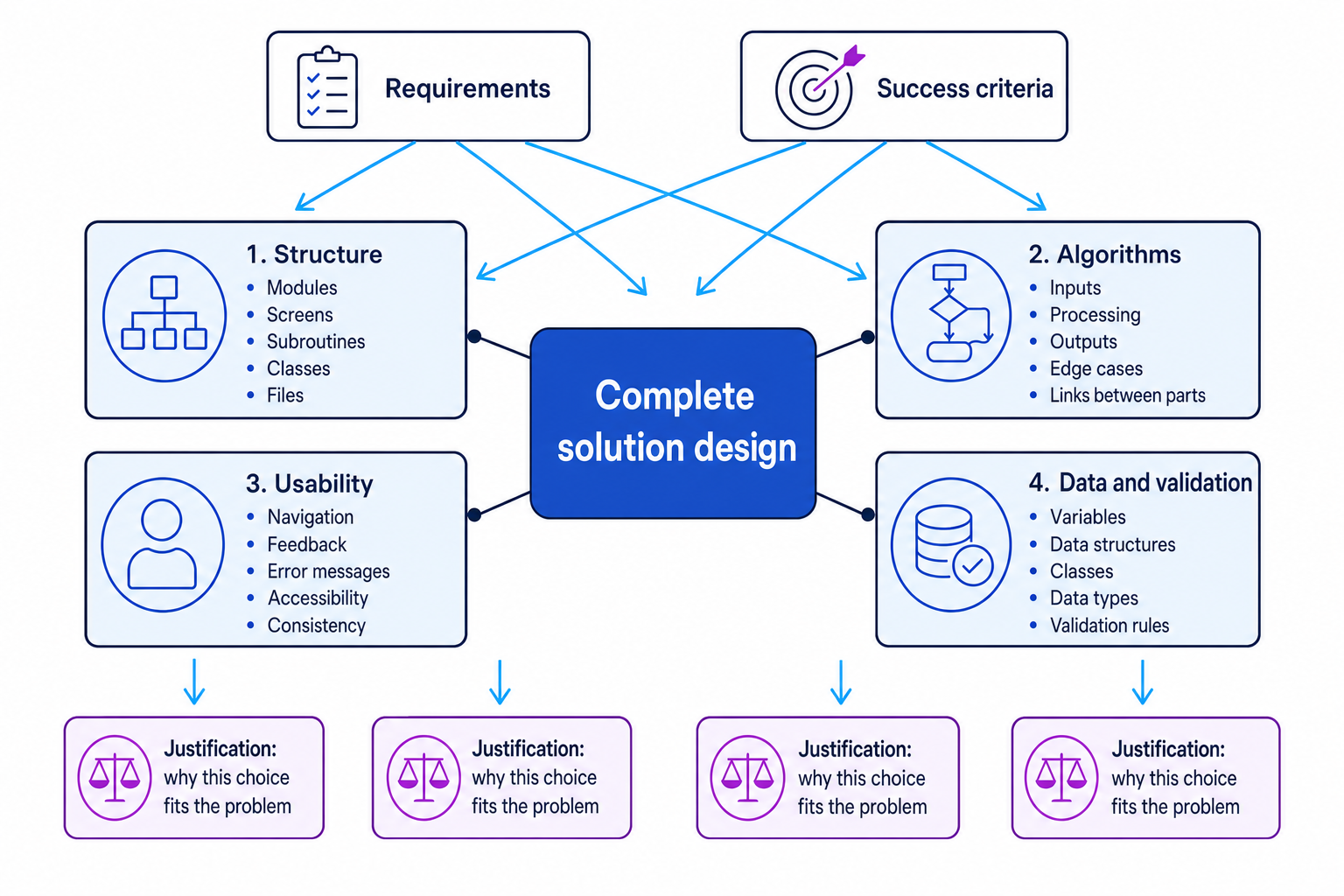
Pulling it all together
A strong “describe the solution” section usually includes:
- an overview of the whole system
- a breakdown into modules, screens, subroutines or classes
- algorithms for the main processes
- an explanation of how the algorithms connect
- usability features linked to the target users
- key variables, data structures and classes
- validation rules for important inputs
- justifications linked to requirements and success criteria
Key Idea
Completeness matters
Your design should make it believable that the whole problem can be solved. Cover input, processing, output, storage, validation and user interaction, not just the most interesting algorithm.
Exam technique
In the exam
-
Link every major design choice to a requirement or success criterion, using clear justification rather than just description.
-
When writing algorithms, include the data entering the algorithm, the processing steps, validation decisions, and the output or data update.
-
For variables, data structures and classes, explain why each choice fits the data and how validation will prevent unsuitable input.
Self review
Check yourself
-
Can you explain the difference between describing a module and justifying why that module is needed?
-
Can you outline one algorithm from your own project idea, including its inputs, processing, validation and output?
-
Can you name three important data items in a solution and state a suitable validation rule for each?

Keep learning
Make a free account to read the full revision notes and worked examples.