Revision notes for OCR AS Level Computer Science Decompose the problem. Open the guide for explanations and worked examples. Written against the OCR AS Level Computer Science specification, so the content matches what's examinable rather than general Computer Science background.
Decompose the problem
What you'll learn
- What problem decomposition means in OCR H446 project design.
- How to break a large problem into smaller, computable subproblems.
- How to decide sensible module boundaries using inputs, processing and outputs.
- How to justify your decomposition decisions for the design marks.
Why decomposition matters
In the Programming project, you are not rewarded just for having an idea. You need to show that you can design a solution before you build it.
A real project brief is usually messy: users want features, data must be stored, errors must be handled, and the program needs a clear flow. Decomposition is the design technique that stops this becoming one huge, unmanageable program.
Definition
Decomposition
Decomposition means breaking a large problem into smaller subproblems that are easier to understand, design, implement, test and maintain.
For OCR H446 section 3.2.1, the key skill is to break down the problem into smaller parts suitable for computational solutions and to justify the decisions you make.
That last phrase matters: you should not just draw a diagram. You need to explain why your chosen parts make sense.
Start with the whole problem
Before splitting anything up, you need to understand what the system is meant to do.
Definition
Requirement
A requirement is something the solution must do or a constraint it must satisfy. For example, “the system must allow a teacher to add quiz questions” is a functional requirement.
A good starting point is to identify:
- inputs — data entering the system, such as usernames, answers or file contents
- processing — actions the program performs, such as validation, searching or calculating a score
- outputs — results produced by the system, such as feedback, reports or saved files
- data storage — data that must be kept, such as accounts, scores or questions
- users — who interacts with the system and what each user needs
Definition
Computational solution
A computational solution is a solution that can be expressed as algorithms and data structures that a computer can execute. It should involve clear data, clear rules and clear processing steps.
Not every human description is immediately computational. “Make revision more engaging” is a project aim, but it is too vague to code directly. “Select ten random questions from a topic and display the user’s percentage score” is computational.
Example
Turning a vague aim into computable parts
Suppose the brief says: “Create a system to help students revise computer science.”
-
Identify the vague goal: “help students revise” is useful context, but it does not yet say what the program will actually do.
-
Convert it into concrete features: the system could store questions, let a student take a quiz, mark answers and show progress by topic.
-
Separate the features by data and processing: storing questions needs file/database handling, taking a quiz needs question selection and answer input, marking needs comparison rules, and progress needs calculations.
-
Check each part is computable: “show progress by topic” becomes computable if you define stored topic scores and calculate percentages from correct answers and total attempts.
Top-down decomposition
A common approach is top-down decomposition.
Definition
Top-down decomposition
Top-down decomposition starts with the whole system, splits it into major sub-systems, then repeatedly splits those into smaller tasks until each task is small enough to design and code.
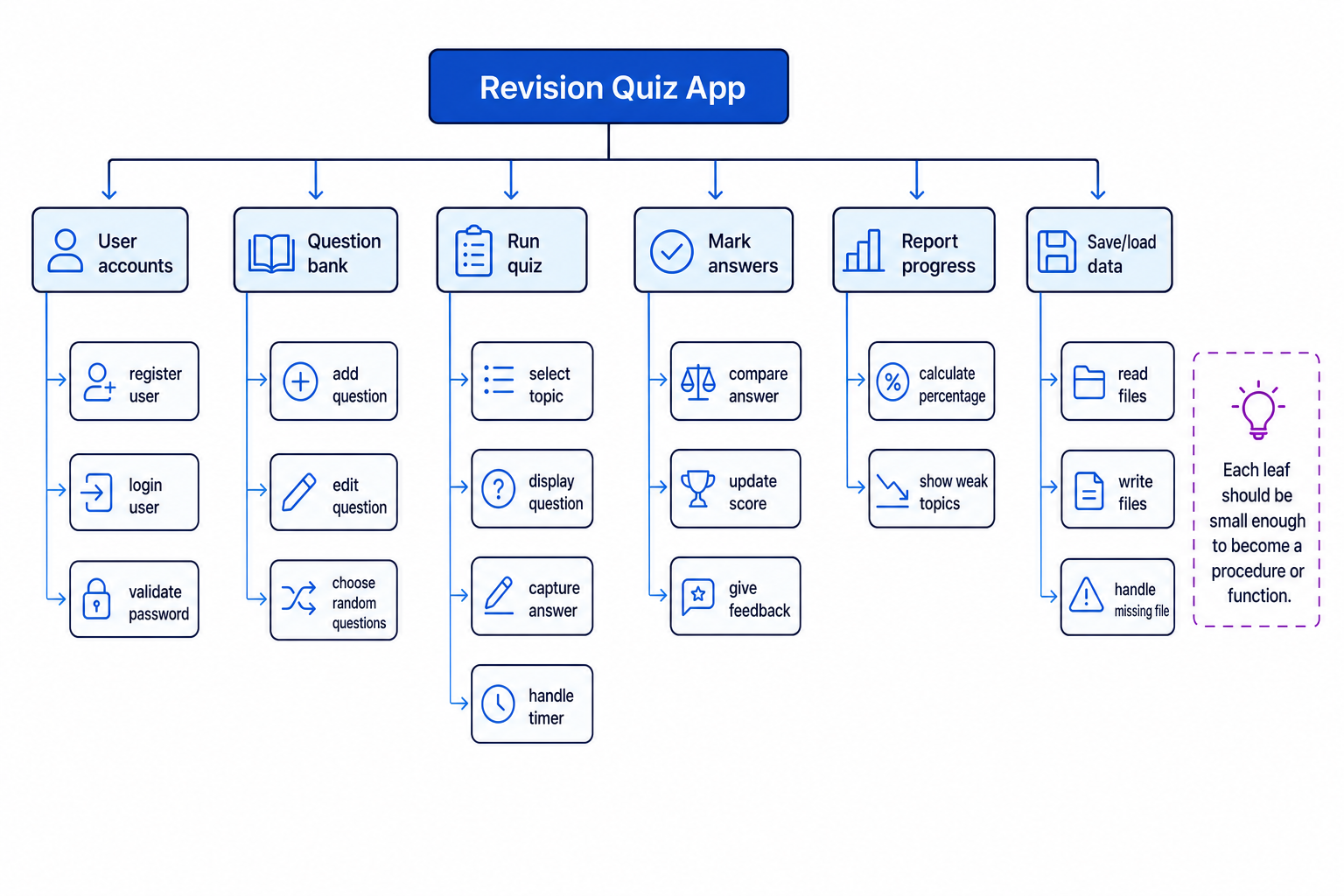
This is often shown as a decomposition tree or structure chart. The top node is the whole system. The lower nodes are smaller parts. A leaf is a lowest-level item in the tree.
The diagram below shows how a revision quiz app can be decomposed into smaller responsibilities.
Key Idea
The main idea
A good decomposition does not just make the project look organised. It creates parts that can become procedures, functions, classes, files, forms, algorithms or testable units.
Choosing sensible parts
A subproblem should normally have a clear responsibility. If one part is trying to do too many different things, split it further.
For example, “quiz system” is too broad. It might include:
- selecting questions
- displaying a question
- capturing an answer
- marking an answer
- updating the score
- saving the result
Each of these has a clearer purpose.
Definition
Module
A module is a self-contained part of a program with a specific responsibility. In OCR pseudocode, this might be represented using a procedure or function.
A procedure carries out a task. A function carries out a task and returns a value. For example, marking an answer is a good candidate for a function because it can return whether the answer was correct.
Example
Decomposing a quiz feature
Suppose one feature is: “The user takes a ten-question quiz and receives a score.”
-
Separate the user interaction from the scoring logic: displaying questions and capturing answers are different from deciding whether an answer is correct.
-
Identify repeated behaviour: the system must ask a question ten times, so the “ask one question” task should be reusable inside a loop.
-
Identify data passed between parts: the marking part needs the user’s answer and the correct answer, then returns a result such as correct or incorrect.
-
Create possible module names:
selectQuestions,askQuestion,markAnswer,updateScoreanddisplayFinalScore. -
Check the order of control:
selectQuestionshappens before the quiz loop;markAnswerandupdateScorehappen inside the loop;displayFinalScorehappens after the loop.
Keep each part suitable for a computer
A decomposed part is useful only if it can be designed as an algorithm.
Definition
Algorithm
An algorithm is a finite sequence of precise steps used to solve a problem.
A good subproblem usually has:
- a clear input
- a clear output or effect
- a precise rule or process
- a sensible stopping point
- a way to test whether it works
For example, “choose random questions” is suitable if you specify the source of questions, the topic filter and how many questions are needed. “Make good questions appear” is not precise enough.
Common Mistake
Decomposing into screens only
A common mistake is to decompose the system only into user interface screens, such as “login screen”, “quiz screen” and “results screen”. Screens are useful, but your design also needs processing parts such as validation, searching, sorting, calculation and file handling.
Interfaces between parts
When one part of the program uses another part, they need an interface.
Definition
Interface
An interface is the agreed way one part of a system communicates with another part. For a procedure or function, this usually means its name, parameters and return value.
In OCR pseudocode, values can be passed as parameters. byVal means a copy of the value is passed in. byRef means the original value can be changed by the procedure.
For example, this design decision is clear:
function markAnswer(byVal userAnswer, byVal correctAnswer)returnsTrueif the answer is correct, otherwise returnsFalse.
That is better than hiding the marking logic inside a huge runQuiz procedure because the function can be tested separately.
Example
Designing a clean function interface
Suppose you need to mark a quiz answer.
-
Decide what data the function genuinely needs: it needs the user’s answer and the correct answer, but it does not need the whole user account or the full question bank.
-
Decide what the function should return: a Boolean result such as
TrueorFalseis enough if the caller will update the score. -
Keep the function focused: it should compare answers, not display the next question, save the file or calculate the final percentage.
-
Justify the decision: this makes the marking logic reusable and easy to test with several pairs of sample answers.
Cohesion and coupling
Two useful design ideas are cohesion and coupling.
Definition
Cohesion and coupling
Cohesion means how closely related the responsibilities inside one module are. Coupling means how dependent one module is on another module.
Aim for:
- high cohesion — each module has one clear purpose
- low coupling — modules depend on each other as little as possible
For example, calculatePercentage has high cohesion if it only calculates a percentage from marks and total marks. It has poor cohesion if it also prints a report, edits user details and writes to a file.
Tip
Sanity check
If you struggle to name a module without using “and”, it may be doing too much. validateLoginAndSaveScoreAndPrintReport should probably be split.
Justifying decomposition decisions
OCR expects you to justify decisions made during the design. A justification explains why your decomposition is appropriate.
Weak justification:
- “I split it into login, quiz and results because those are the parts.”
Stronger justification:
- “I separated login validation from the quiz logic because authentication is used before several features. This reduces duplicated code and allows login validation to be tested independently.”
Useful reasons include:
| Decision reason | What it shows |
|---|---|
| Reuse | The same module can be used in more than one place. |
| Testing | A small module can be tested independently. |
| Maintainability | Changes are easier because responsibilities are separated. |
| Data security | Sensitive data, such as passwords, is handled in a controlled part of the system. |
| Complexity reduction | A large problem is easier to understand when split into smaller algorithms. |
| Clear data flow | Inputs, outputs and stored data are easier to track. |
Example
Justifying a file-handling module
Suppose your system stores quiz results in a file.
-
Identify the issue: several parts of the program may need to load or save results, so file handling could become duplicated.
-
Choose a separate module: create
loadResultsandsaveResultsrather than writing file code inside the quiz, report and account sections. -
Explain the benefit: if the file format changes later, only the file-handling module needs changing.
-
Link to testing: the save/load module can be tested using normal files, missing files and empty files without running a full quiz.
What to include in your design evidence
For the project design section, your decomposition can be shown using several forms of evidence. You do not need every possible diagram, but your choices should make the design clear.
Useful evidence includes:
- a decomposition tree or structure chart
- descriptions of each module’s responsibility
- inputs and outputs for each module
- pseudocode for important algorithms
- data structure designs, such as arrays, records or classes
- file/database design where data must be stored
- user interface designs linked to the processing behind them
- test planning linked to the decomposed parts
Common Mistake
Do not stop at a pretty diagram
A decomposition diagram is useful, but it is not enough by itself. You need enough explanation for someone else to understand how the parts will become a working computational solution.
Checking your decomposition
Before finalising your design, ask yourself:
- Can each part be implemented using sequence, selection, iteration, data structures or file/database operations?
- Does each part have a clear responsibility?
- Can you describe the inputs and outputs of each part?
- Are repeated tasks separated so they can be reused?
- Could each part be tested on its own?
- Have you explained why you split the problem this way?
If the answer to several of these is “no”, your decomposition probably needs more work.
Exam technique
In the exam
-
Start from the user requirements, then group related requirements into major subproblems.
-
For each subproblem, make clear what data it receives, what processing it performs and what output or effect it produces.
-
Justify your choices using design reasons such as reuse, testing, maintainability, low coupling and high cohesion.
Self review
Check yourself
- What is the difference between decomposing a system into screens and decomposing it into computational modules?
- Why is
markAnswerlikely to be a better separate function than hiding the marking logic inside one large quiz procedure? - How could you justify separating file handling from the rest of a program?

Keep learning
Make a free account to read the full revision notes and worked examples.