

What you'll learn
- How CISC and RISC processors differ, and where each is commonly used.
- Why GPUs are excellent at some non-graphics tasks as well as graphics.
- How multicore processors and parallel systems can speed up work — and why speed-up is not automatic.
Starting point: what is a processor?
A processor, often called a CPU for Central Processing Unit, is the part of a computer system that executes program instructions. It repeatedly fetches instructions from memory, decodes what they mean, and executes them.
An instruction is a low-level command the processor can carry out, such as loading a value from memory, adding two values, or jumping to another part of a program.
Instruction set
An instruction set is the complete collection of machine-code instructions that a particular processor design can understand and execute.
A register is a very small, very fast storage location inside the processor. A clock cycle is one tick of the processor’s clock; processors use clock cycles to coordinate the stages of instruction execution.
The topic of “types of processor” is mainly about how processors are designed to execute instructions and how they share work.
CISC and RISC processors
Two important processor design approaches are CISC and RISC.
CISC and RISC
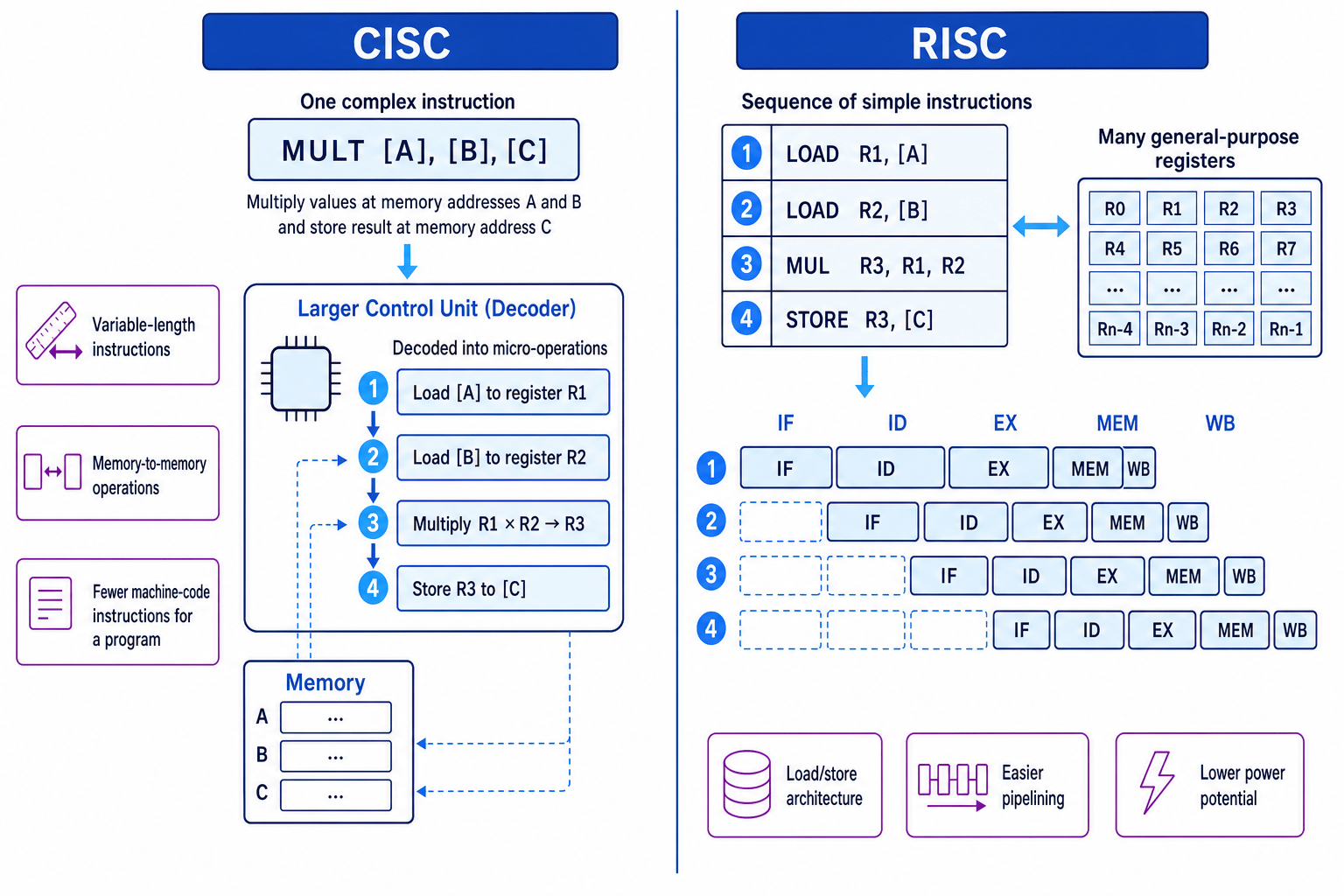
CISC stands for Complex Instruction Set Computer. RISC stands for Reduced Instruction Set Computer. They describe different approaches to the size and complexity of the processor’s instruction set.
CISC tries to provide powerful instructions that can do quite a lot in one machine-code instruction. RISC uses fewer, simpler instructions, so a complex task is built from several simple instructions.
Some complex instructions are decoded into micro-operations, which are smaller internal steps carried out inside the processor.
Here is the big-picture contrast between CISC and RISC instruction design.
CISC processors
A CISC processor has a large instruction set, often with complex instructions. One instruction might load values from memory, carry out an arithmetic operation, and store the result.
Typical CISC features include:
- Large instruction set with many specialised instructions.
- Variable-length instructions, so different instructions may take different amounts of memory.
- Instructions may take several clock cycles to complete.
- More complex control hardware, because the processor must decode more complicated instructions.
- Programs may need fewer machine-code instructions, which can reduce program size.
CISC processors are commonly associated with desktop and laptop processors that need strong compatibility with existing software. For example, many PC processors use CISC-style instruction sets because of backwards compatibility, meaning newer processors can still run older software.
RISC processors
A RISC processor has a smaller instruction set made up of simpler instructions. A complex operation is normally split into several basic steps.
Typical RISC features include:
- Smaller instruction set with simpler instructions.
- Often fixed-length instructions, making them easier to fetch and decode.
- Many instructions are designed to complete in one clock cycle in the simplified A-Level comparison.
- More use of general-purpose registers.
- A load/store architecture, where data must usually be loaded from memory into registers before the ALU processes it, then stored back afterwards.
- Easier pipelining, where different stages of several instructions overlap.
RISC processors are commonly used in smartphones, tablets, embedded systems, and low-power devices. ARM-based processors are a well-known example of RISC-style design.
Comparing CISC and RISC
| Feature | CISC | RISC |
|---|---|---|
| Instruction set | Large and complex | Smaller and simpler |
| Instruction length | Often variable | Often fixed |
| Work per instruction | Can do more in one instruction | Usually does one simple operation |
| Clock cycles | Some instructions take several cycles | Many instructions designed to take one cycle |
| Memory access | Some instructions can work directly with memory | Usually load/store only |
| Control unit | More complex | Simpler |
| Pipelining | Harder to optimise | Easier to optimise |
| Code size | Often smaller | Can be larger |
| Common uses | PCs, laptops, compatibility-focused systems | Mobile, embedded, low-power systems |
CISC vs RISC
CISC focuses on doing more work per instruction; RISC focuses on making each instruction simple, regular, and easy to pipeline.
Choosing a processor style
A manufacturer is designing a battery-powered smart thermostat. It runs a small control program, reads sensors, controls heating, and must use very little power.
- The main constraint is power consumption, because the device is battery-powered and does not need to run large desktop applications.
- A RISC-style processor is a good fit because simple instructions and simpler control hardware can reduce power use and heat output.
- The possible disadvantage is that the program may need more machine-code instructions, but the thermostat’s software is small, so this is unlikely to matter much.
- A CISC-style processor would be more attractive if the device needed compatibility with existing PC software, which it does not.
RISC is not automatically faster
Do not write “RISC is faster than CISC” as a blanket statement. RISC often makes pipelining easier, but real performance depends on clock speed, cache, compiler quality, workload, and the exact processor design.
GPUs
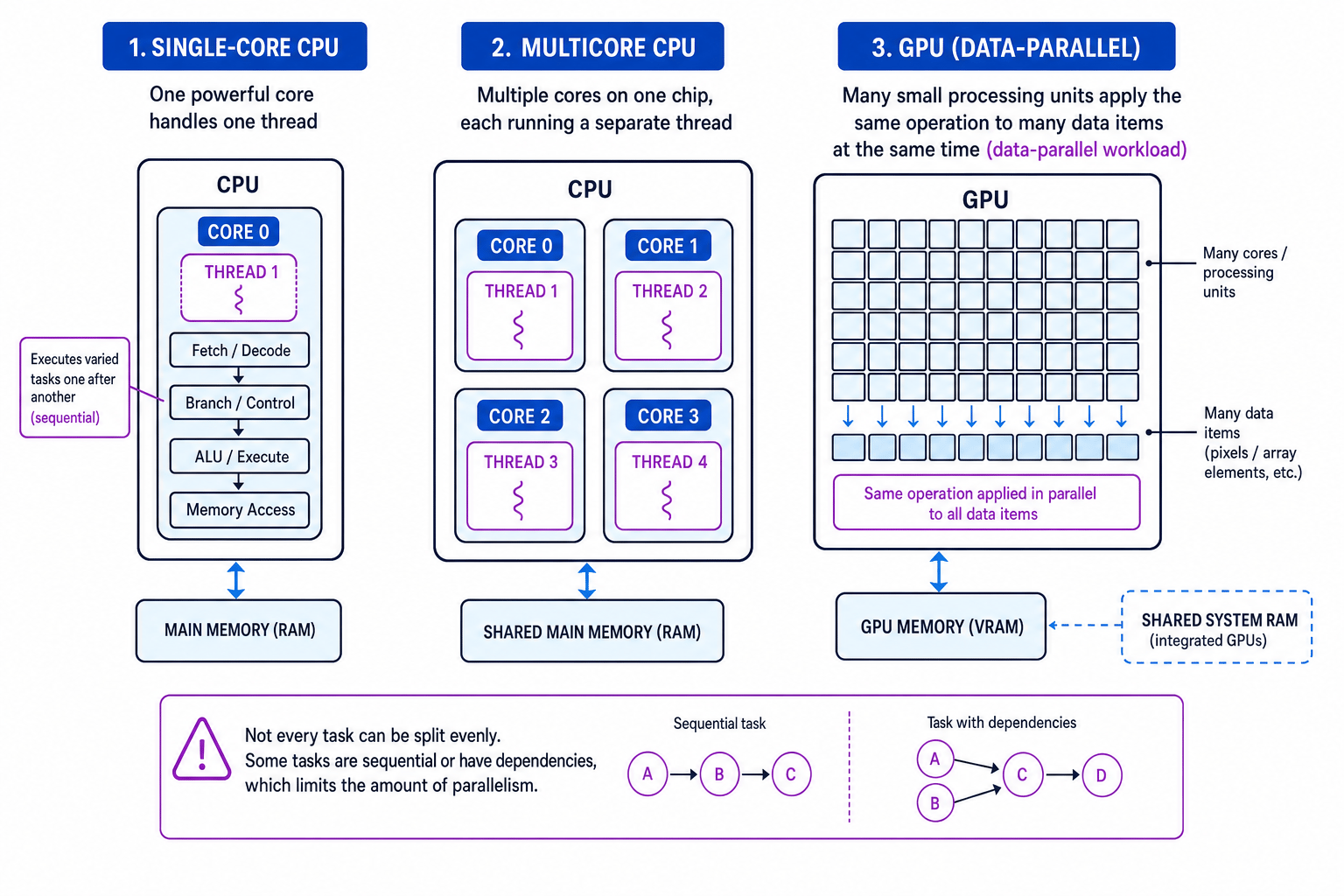
A GPU, or Graphics Processing Unit, is a processor designed to perform many similar calculations at the same time.
Originally, GPUs were designed for graphics: drawing pixels, applying textures, calculating lighting, and rendering 3D scenes. The key idea is that graphics work often involves doing the same kind of calculation to millions of pixels or vertices.
Data parallelism
Data parallelism means applying the same operation to many separate pieces of data at the same time, such as processing many pixels in an image.
A CPU usually has a small number of powerful cores optimised for varied, general-purpose tasks. A GPU has many simpler processing units optimised for high-throughput parallel work.
This diagram compares a single-core CPU, a multicore CPU, and a GPU.
Graphics uses of GPUs
GPUs are used for:
- Rendering 2D and 3D graphics.
- Applying lighting, shadows, and textures in games.
- Processing video and animation.
- Driving high-resolution displays.
- Accelerating user interfaces and visual effects.
Non-graphics uses of GPUs
Using a GPU for non-graphics computation is often called GPGPU, meaning General-Purpose computing on Graphics Processing Units.
GPUs are useful for non-graphics tasks when the task can be split into lots of independent calculations. Examples include:
- Machine learning and neural network training.
- Scientific simulations, such as weather, physics, or molecular modelling.
- Image and video processing, such as filters or object detection.
- Cryptocurrency mining and hash calculations.
- Financial modelling and large-scale numerical analysis.
- Password cracking or security testing where many hashes are checked in parallel.
When GPUs shine
A GPU is best when the same calculation must be repeated across a huge amount of independent data.
Deciding whether a GPU is suitable
A program needs to blur a 4-megapixel image by applying the same filter calculation to each pixel.
- Each pixel can be processed using the same calculation, so the task has strong data parallelism.
- Most pixel calculations are independent, so thousands of GPU processing units can work on different pixels at the same time.
- A GPU is suitable here because the workload is large and repetitive.
- If the task were instead a small decision-making program with many branches and dependencies, a CPU would usually be more suitable.
GPUs have overheads
A GPU is not always better. Moving data between CPU memory and GPU memory can take time, and tasks with lots of branching or dependencies may not use GPU hardware efficiently.
Multicore processors
A core is an independent processing unit inside a CPU. It can fetch, decode, and execute instructions.
A multicore processor is a single CPU chip containing two or more cores. For example, a quad-core CPU has four cores.
A thread is a sequence of instructions that can be scheduled to run independently. A program may have one thread or many threads. The operating system can run different threads on different cores.
Benefits of multicore processors
Multicore processors can improve performance by allowing multiple threads to run at the same time. This helps with:
- Multitasking, such as running a browser, music player, and antivirus software.
- Programs designed with multiple threads, such as video editing or 3D rendering.
- Server workloads, where many users’ requests can be handled at once.
- Responsiveness, because background tasks can run on separate cores.
They can also be more energy-efficient than trying to make one core run at a much higher clock speed, which would create more heat.
Limits of multicore processors
More cores do not automatically mean proportionally faster execution.
Some parts of a program may be sequential, meaning they must happen in a fixed order. There may also be dependencies, where one calculation needs the result of another before it can begin.
Parallel programs can also suffer from:
- Overhead from splitting work into threads and combining results.
- Synchronisation delays when threads must wait for each other.
- Shared-memory problems, such as two threads trying to update the same data.
- Memory bandwidth limits if many cores need data from memory at once.
Parallel systems
A parallel system uses multiple processors, cores, or computers to work on a problem at the same time.
A multicore CPU is one form of parallel system, but parallel processing can also involve GPUs, multiple CPUs, or clusters of networked computers.
There are two useful forms to recognise:
- Task parallelism: different tasks run at the same time, such as one core handling user input while another saves a file.
- Data parallelism: the same task is applied to different chunks of data, such as a GPU processing many pixels.
Estimating multicore speed-up
A task takes 800 ms on one core. Of this, 200 ms must be done sequentially, but 600 ms can be split evenly across four cores. Ignore overheads.
- Separate the work into the sequential part and the parallel part: 200 ms must stay sequential, while 600 ms can be divided across the four cores.
- Calculate the ideal time for the parallel part: 600 ms÷4=150 ms600\text{ ms} \div 4 = 150\text{ ms}600 ms÷4=150 ms.
- Add the sequential part back on: Tnew=200 ms+150 ms=350 msT_{\text{new}} = 200\text{ ms} + 150\text{ ms} = 350\text{ ms}Tnew=200 ms+150 ms=350 ms.
- Compare old and new times: 800÷350≈2.3800 \div 350 \approx 2.3800÷350≈2.3, so the speed-up is about 2.3 times, not 4 times.
More cores does not mean equal speed-up
If a program cannot be split into independent threads, extra cores may sit idle. Always mention software design, dependencies, and overheads when explaining multicore performance.
Spotting the right processor type
If the question says “same calculation on lots of independent data”, think GPU. If it says “several threads or tasks at once”, think multicore or parallel processing. If it asks about instruction design, compare CISC and RISC.
Summary
CISC, RISC, GPUs, multicore processors, and parallel systems are all responses to the same broad challenge: how to get useful work done efficiently.
CISC and RISC are mainly about instruction set design. GPUs are about massive data-parallel throughput. Multicore and parallel systems are about sharing work across processing units.
In the exam
- For CISC vs RISC, compare instruction complexity, instruction length, clock cycles, memory access, pipelining, and typical uses.
- For GPU questions, state that GPUs contain many simpler processing units and are suited to data-parallel tasks; include a non-graphics example if asked.
- For multicore and parallel systems, explain that speed-up depends on whether the program can be split into independent threads, and mention overheads or dependencies.
Check yourself
- Why might a RISC processor be suitable for a smartphone or embedded device?
- Give one graphics use and one non-graphics use of a GPU.
- Why might doubling the number of cores fail to halve the execution time?