

What you'll learn
- How to write and call functions and procedures in OCR pseudocode.
- How byVal and byRef parameter passing affect variables.
- How to declare and use 0-based arrays, including 2D arrays.
- How to read from files, write to files, and add useful comments.
Before you start: tiny OCR pseudocode reminders
OCR pseudocode uses = for assignment, meaning “store this value in this variable”. For example, x = 10 stores 10 in x.
A main program is the top-level sequence of instructions that runs first. It can call named blocks of code called subroutines.
print() outputs a value, for example:
print("Hello World")
Subroutines
Subroutine
A subroutine is a named block of code that can be called from elsewhere in a program. It helps break a problem into smaller, reusable parts.
Subroutines support decomposition, which means splitting a large problem into smaller problems. They also make programs easier to test, maintain and reuse.
There are two main OCR pseudocode subroutines you need here: functions and procedures.
Functions: subroutines that return a value
Function
A function is a subroutine that sends a value back to the part of the program that called it. The value sent back is called the return value.
OCR pseudocode uses function, return and endfunction:
function triple(number)
    return number*3
endfunction
Called from the main program:
y = triple(7)
The function call triple(7) produces a value, so it can be used on the right-hand side of an assignment.
Tracing a function call
For this code:
function triple(number)
    return number*3
endfunction

y = triple(7)
- The argument
7is passed into the parameternumber, so inside the functionnumberhas the value 7. - The expression
number*3becomes7*3, so the function returns 21. - The call
triple(7)is replaced by the returned value 21, soy = triple(7)stores 21 iny.
Procedures: subroutines that do not return a value
Procedure
A procedure is a subroutine that performs one or more instructions but does not return a value to the caller.
OCR pseudocode uses procedure and endprocedure:
procedure greeting(name)
    print("hello"+name)
endprocedure
Called from the main program:
greeting("Hamish")
Here, name receives "Hamish" and the procedure prints a greeting. The + joins the two strings together.
Function or procedure?
- Use a function when the subroutine must calculate or produce a value.
- Use a procedure when the subroutine performs an action, such as printing, updating a file, or changing a value passed by reference.
Parameters and arguments
A parameter is the named variable in the subroutine heading, such as number in function triple(number).
An argument is the actual value supplied when the subroutine is called, such as 7 in triple(7).
So in:
y = triple(7)
number is the parameter, and 7 is the argument.
Passing by value and passing by reference
By default in OCR pseudocode, values passed to subroutines are assumed to be passed by value unless the question states otherwise.
byVal and byRef
byVal means the subroutine receives a copy of the value. byRef means the subroutine receives a reference to the original variable, so changes inside the subroutine affect the caller’s variable.
If the distinction matters, OCR pseudocode will use byVal and byRef in the subroutine heading:
procedure foobar(x:byVal, y:byRef)
    ...
endprocedure
In this example, x is passed by value and y is passed by reference.
The diagram shows why this matters: changing a by-value parameter changes only the copy, while changing a by-reference parameter changes the original variable.
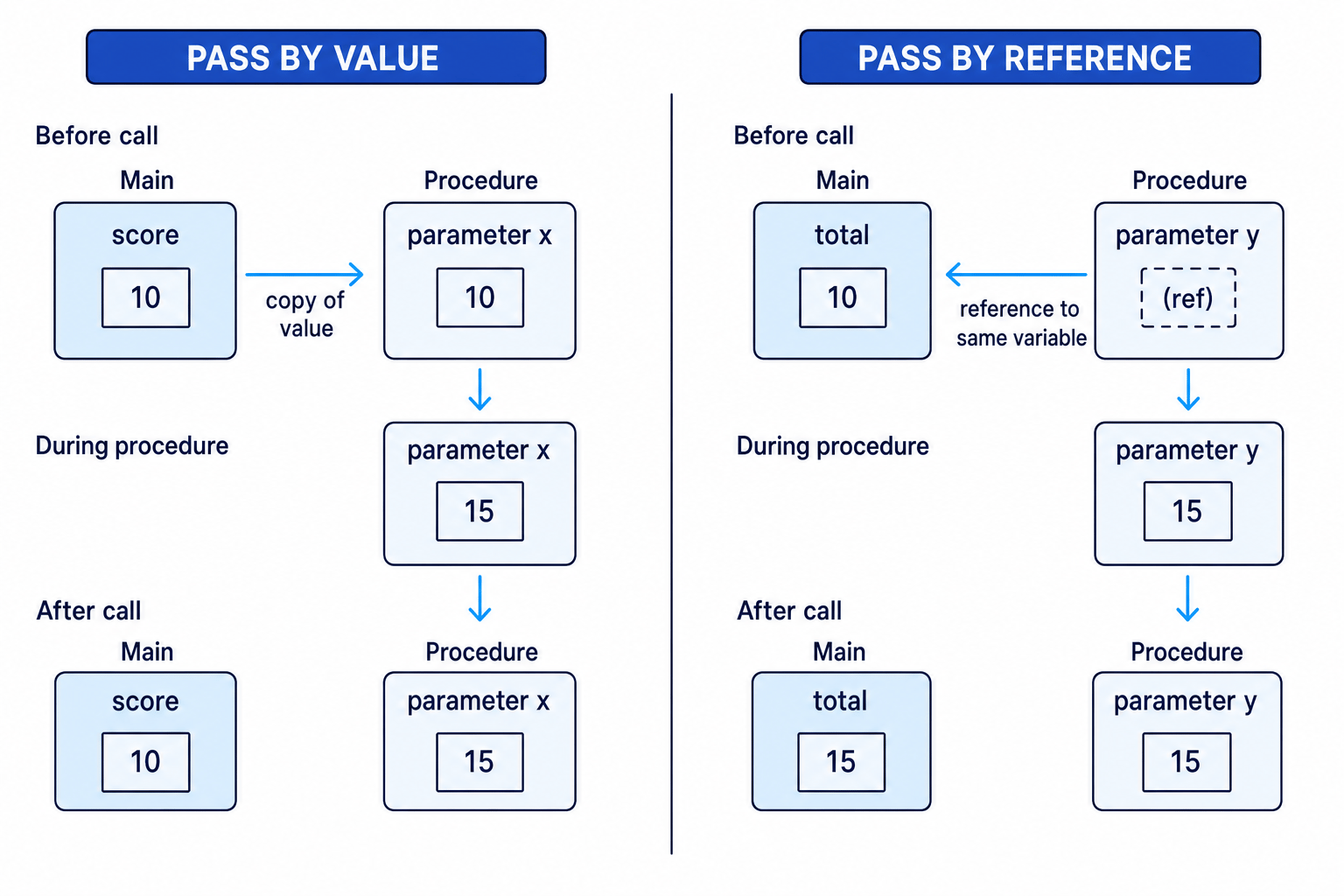
Tracing by value and by reference
For this code:
procedure update(a:byVal, b:byRef)
    a = a + 10
    b = b + 10
endprocedure

x = 5
y = 5
update(x, y)
print(x)
print(y)
- When
update(x, y)is called,areceives a copy ofx, soastarts as 5.brefers to the original variabley. a = a + 10changes the local copyato 15, butxis still 5.b = b + 10changes the original variableybecausebis passed by reference, soybecomes 15.- After the procedure ends,
ais discarded. The program prints 5, then 15.
Assuming parameters always change the original variable
Unless byRef is shown, assume parameters are passed by value. Changing the parameter inside the subroutine will not change the original variable in the main program.
Arrays
Array
An array is a data structure that stores multiple values under one name, with each value accessed using an index.
OCR arrays are 0-based, meaning the first element is at index 0, not index 1. The keyword array is used to declare one.
The diagram shows a 1D array and a 2D array using OCR-style indexing.
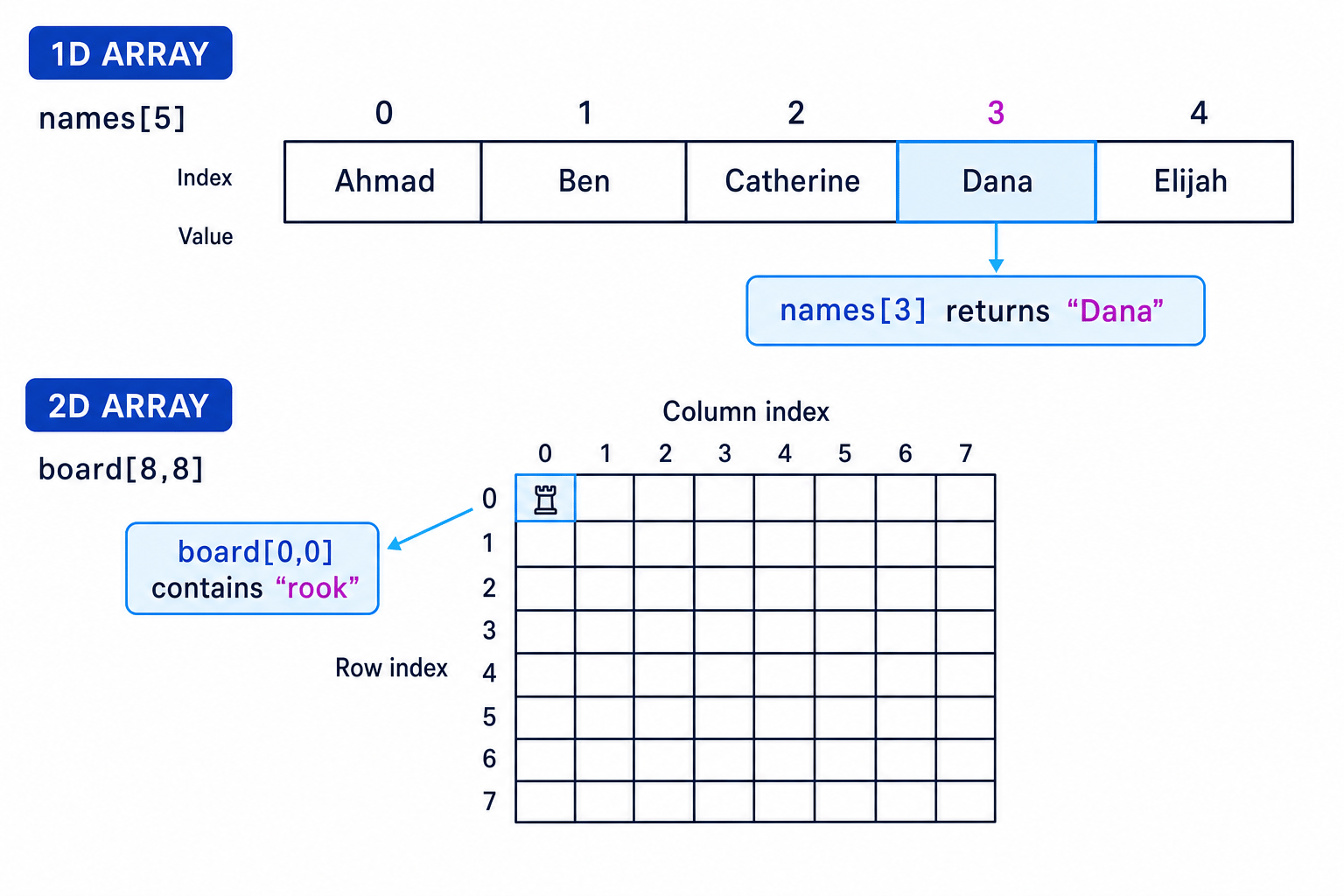
1D arrays
A 1D array is a single row of values.
array names[5]
names[0] = "Ahmad"
names[1] = "Ben"
names[2] = "Catherine"
names[3] = "Dana"
names[4] = "Elijah"

print(names[3])
This prints:
Dana
The declaration array names[5] creates five elements, with valid indexes 0, 1, 2, 3 and 4.
Off-by-one array access
In array names[5], names[5] is not valid. The array has five elements, but because indexing starts at 0, the final valid index is 4.
Processing an array with a loop
A traversal means visiting each element in a data structure, usually to search, count, total or compare values.
array scores[4]
scores[0] = 12
scores[1] = 19
scores[2] = 15
scores[3] = 20

highest = scores[0]

for i = 1 to 3
    if scores[i] > highest
        highest = scores[i]
    endif
next

print(highest)
Finding the largest value in an array
highest = scores[0]sets the starting best value to 12, so the algorithm begins with a real value from the array.- When
i = 1,scores[1]is 19, which is greater than 12, sohighestbecomes 19. Wheni = 2,scores[2]is 15, which is not greater than 19, sohigheststays 19. - When
i = 3,scores[3]is 20, which is greater than 19, sohighestbecomes 20. - The loop ends after index 3, and
print(highest)outputs 20.
2D arrays
A 2D array stores values using two indexes, often thought of as row and column.
array board[8,8]
board[0,0] = "rook"
This creates an 8 by 8 grid. Valid row indexes are 0 to 7, and valid column indexes are 0 to 7. The element board[0,0] is the first row and first column.
A 2D array is useful for grids, maps, game boards, timetables and tables of values.
Reading 2D indexes
In these notes, treat board[row,column] as row first, column second. If a question defines a different convention, follow the question carefully.
Reading from files
A file stores data outside the program, usually on secondary storage. In OCR pseudocode, you first open the file, then read or write lines, then close the file.
To open a file for reading, use openRead.
To read one line, use readLine.
myFile = openRead("sample.txt")
x = myFile.readLine()
myFile.close()
This makes x store the first line of sample.txt.
Reading until the end of a file
endOfFile() checks whether the file has reached the end. It returns a Boolean value: true or false.
The OCR pattern for reading every line is:
myFile = openRead("sample.txt")

while NOT myFile.endOfFile()
    print(myFile.readLine())
endwhile

myFile.close()
NOT myFile.endOfFile() means “keep looping while we have not reached the end of the file”.
Counting lines in a file
Suppose sample.txt contains three lines. This program counts them:
count = 0
myFile = openRead("sample.txt")

while NOT myFile.endOfFile()
    line = myFile.readLine()
    count = count + 1
endwhile

myFile.close()
print(count)
- Before the first read, the file has unread data, so
NOT myFile.endOfFile()is true. The first line is read intoline, andcountbecomes 1. - The loop repeats for the second and third lines. Each successful
readLine()reads exactly one line, socountbecomes 2 and then 3. - After the third line has been read, the next condition check finds the end of the file. The loop stops, the file is closed, and the program prints 3.
Writing to files
To open a file for writing, use openWrite.
To write a line, use writeLine.
myFile = openWrite("sample.txt")
myFile.writeLine("Hello World")
myFile.close()
This makes "Hello World" the contents of sample.txt.
openWrite overwrites
openWrite overwrites any previous contents of the file. OCR’s guide here does not give an append mode, so do not invent one unless the question explicitly defines it.
Open, process, close
A safe file-handling pattern is: open the file once, read or write the required lines, then close it once at the end.
Comments
Comment
A comment is text in the program that is ignored when the program runs. It is written for humans reading the code.
OCR pseudocode uses // for comments:
print("Hello World") //This is a comment
A comment can explain the purpose of a section, clarify an assumption, or make a tricky line easier to understand.
Good comments explain why something is being done, not just what the code already says.
total = total + price // add current item to the running total
Comments do not change the output, the variables, or the flow of the program.
Using comments instead of code
A comment does not execute. If the algorithm needs to read a file, update a variable, or call a subroutine, you must write pseudocode instructions as well as any comments.
In the exam
- For subroutines, identify whether it is a function or a procedure. Replace a function call with its returned value when tracing.
- For parameters, assume byVal unless
byRefis shown. Track by-reference changes back to the original variable. - For arrays and files, be exact: arrays are 0-based, file reading usually uses
while NOT file.endOfFile(), andopenWriteoverwrites existing contents.
Check yourself
- In
array grid[3,4], what are the valid row and column indexes? - What is the difference between a parameter and an argument?
- Why does changing a
byRefparameter affect the original variable, but changing abyValparameter usually does not?