
What you'll learn
- How the main software development methodologies work: waterfall, agile, extreme programming, spiral, and RAD.
- The strengths, weaknesses, and best-use cases for each methodology.
- How to write clear algorithms using OCR-style pseudocode.
- How to follow an algorithm using a dry run and trace table.
Why software needs a development process
Software is rarely built by “just coding”. Real systems need planning, testing, user feedback, documentation, and maintenance. A development methodology gives a team a structured way to organise that work.
Software development lifecycle
A software development lifecycle (SDLC) is the set of stages used to develop, test, release, and maintain a software system.
Common stages include:
- Requirements analysis — finding out what the system must do.
- Design — planning data structures, algorithms, interfaces, and architecture.
- Implementation — writing the code.
- Testing — checking the software works and finding defects.
- Deployment — releasing the system for users.
- Maintenance — fixing bugs, improving features, and adapting to change.
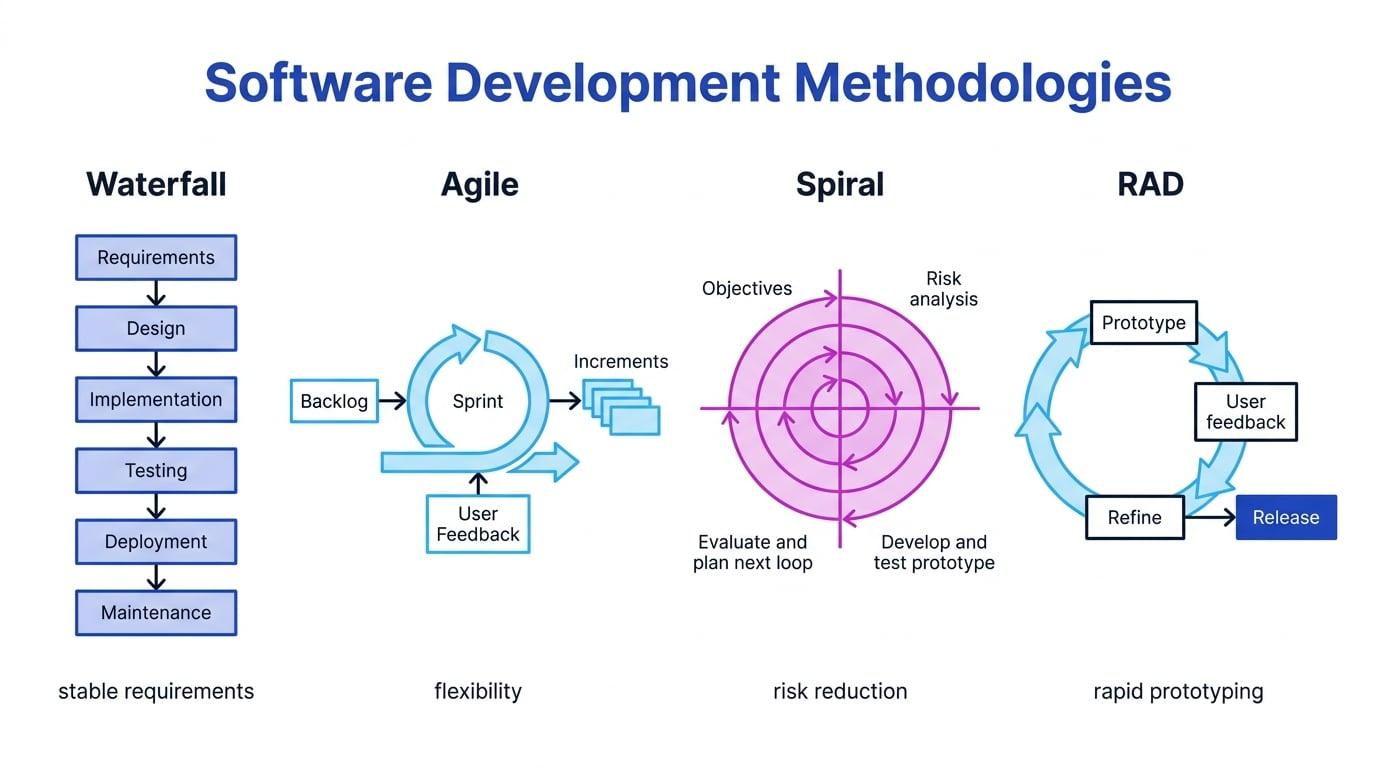
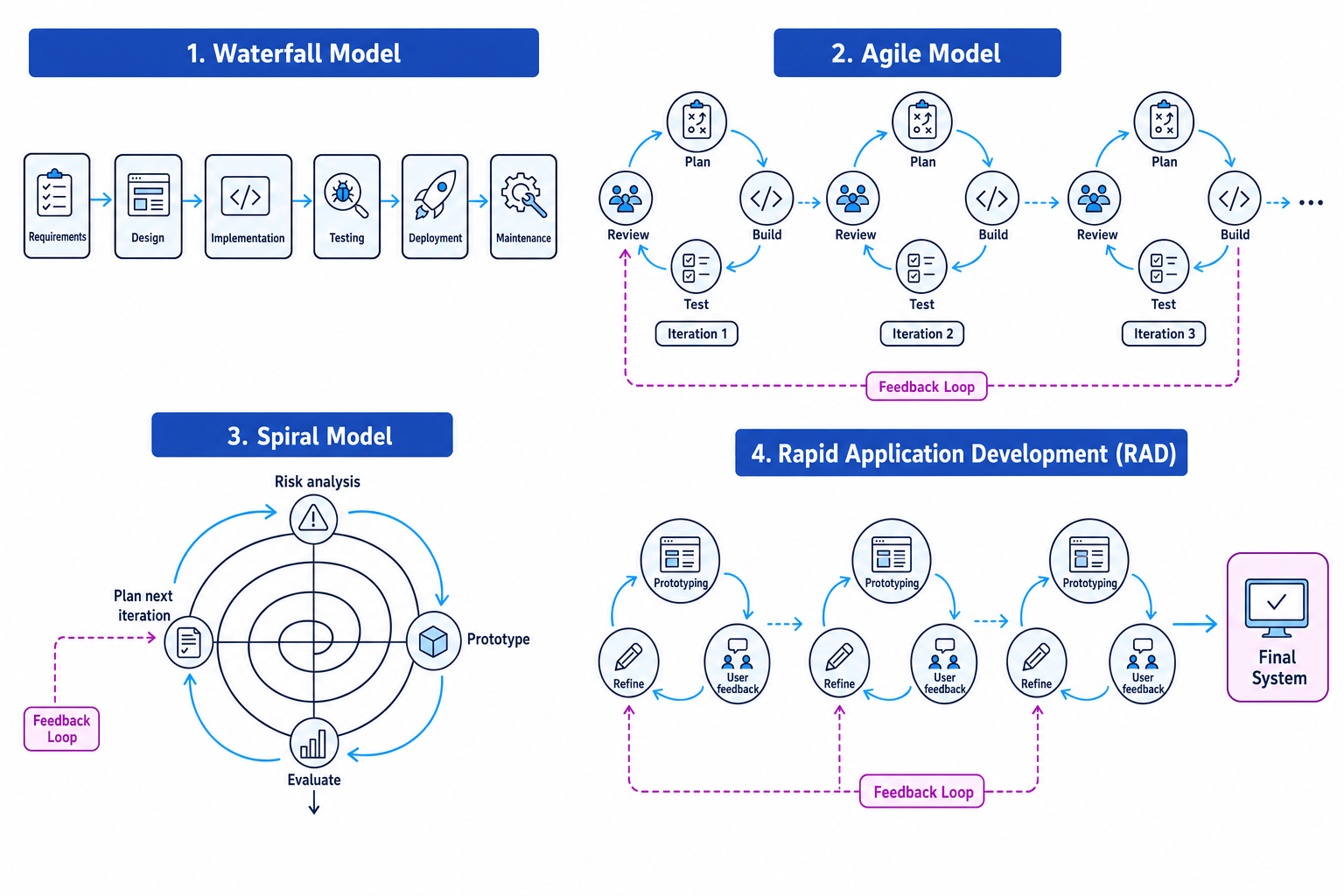
Different methodologies arrange these stages differently. Some move through them once in order; others repeat them many times.
The big idea
A development methodology is not “the coding language”. It is the overall approach for managing how software is planned, built, tested, changed, and delivered.
The waterfall lifecycle
The waterfall lifecycle is a linear methodology where each stage is completed before the next one begins.
Typical waterfall order:
- Requirements
- Design
- Implementation
- Testing
- Deployment
- Maintenance
It is called “waterfall” because progress flows downwards through the stages, with limited movement back up.
Merits of waterfall
Waterfall works well when the requirements are stable and well understood. It produces clear documentation, which helps with contracts, safety checks, handover, and maintenance.
It is also easier to manage because each stage has defined outputs. For example, the design stage may produce diagrams and specifications before programming begins.
Drawbacks of waterfall
The main drawback is that users often do not see working software until late in the project. If requirements were misunderstood, the mistake may be discovered after a lot of work has already been done.
It also handles change poorly. A new requirement during testing may force the team to revisit design and implementation.
When waterfall might be used
Waterfall may be suitable for:
- Projects with fixed, clearly agreed requirements.
- Systems needing strong documentation.
- Contract-based work where each stage must be signed off.
- Safety-critical or regulated systems, although these may also use risk-focused models.
Waterfall is not always bad
Do not write “waterfall is outdated” as a blanket statement. It can be appropriate when requirements are stable and documentation is very important.
Agile methodologies
Agile is a family of iterative methodologies where software is developed in small cycles, with frequent feedback from users.
Iteration and increment
An iteration is one short development cycle. An increment is a working addition to the software produced by an iteration.
Instead of trying to specify everything at the start, an agile team builds a small useful version, reviews it, then improves it.
Agile often uses:
- User stories — short descriptions of what a user needs, such as “As a customer, I want to reset my password.”
- Sprints — short fixed time periods, often one to four weeks, in which a team builds selected features.
- Backlog — a prioritised list of features, fixes, and tasks.
Merits of agile
Agile handles changing requirements well. Users can give feedback early, so the product is more likely to match real needs.
It also allows early delivery of useful software. A system can begin with core features and grow over time.
Drawbacks of agile
Agile needs regular user involvement. If users are unavailable, feedback becomes weak.
It can also be harder to predict final cost, timescale, and scope because requirements may evolve. Documentation may be lighter unless the team deliberately maintains it.
When agile might be used
Agile is useful for:
- Apps and websites where user expectations may change.
- Start-ups testing ideas quickly.
- Projects where regular feedback is available.
- Systems where partial releases are valuable.
Extreme programming
Extreme programming (XP) is an agile methodology focused strongly on code quality, fast feedback, and adapting to change.
XP often includes:
- Pair programming — two programmers work together at one computer; one writes code while the other reviews and thinks ahead.
- Test-driven development (TDD) — tests are written before the code that passes them.
- Continuous integration — code is merged and tested frequently.
- Refactoring — improving code structure without changing what it does.
- Small releases — frequent delivery of working versions.
- Customer involvement — the customer or user representative gives regular feedback.
Merits of XP
XP can produce high-quality code because testing and review are built into the process. Pair programming can catch errors early, and TDD helps ensure the code meets requirements.
Drawbacks of XP
Pair programming can feel costly because two developers are assigned to one task. XP also needs discipline: if tests are skipped or feedback is unavailable, its benefits are reduced.
When XP might be used
XP suits small to medium software teams where requirements change often and code quality is important.
XP in one sentence
XP is agile with the software engineering practices turned up: frequent tests, frequent releases, frequent feedback, and frequent code improvement.
The spiral model
The spiral model is an iterative methodology that focuses on identifying and reducing risk.
Risk
A risk is something that could cause the project to fail, become unsafe, go over budget, miss deadlines, or deliver poor-quality software.
Each loop of the spiral usually includes:
- Setting objectives.
- Identifying and analysing risks.
- Developing and testing a prototype or version.
- Evaluating the result and planning the next loop.
Merits of the spiral model
The spiral model is strong for large, complex, high-risk systems. Risks are considered early rather than ignored until testing.
For example, a team might build a prototype to test whether a chosen database can handle expected transaction volumes before committing to the full design.
Drawbacks of the spiral model
It can be expensive and complex to manage. It also requires people who can assess technical, financial, security, and safety risks accurately.
When the spiral model might be used
The spiral model may be suitable for:
- Defence systems.
- Medical software.
- Large financial systems.
- Projects where failure would be very costly.
- Systems using unfamiliar technology.
Rapid application development
Rapid application development (RAD) is a methodology focused on quickly building prototypes, getting user feedback, and refining the system.
Prototype
A prototype is an early working model of a system or part of a system, used to explore requirements, design, or usability.
RAD often uses reusable components, visual design tools, and close user involvement. The aim is speed and practical feedback.
Merits of RAD
RAD is good when users are unsure what they want until they see it. It can produce usable systems quickly, especially for user interfaces and business applications.
Drawbacks of RAD
The speed can lead to weak design if the team does not control quality. RAD is less suitable for systems where security, performance, reliability, or safety must be carefully engineered from the start.
When RAD might be used
RAD may suit:
- Database-driven business systems.
- Internal tools.
- User interface-heavy applications.
- Projects with tight deadlines and available users.
Comparing methodologies
| Methodology | Main strength | Main weakness | Good use case |
|---|---|---|---|
| Waterfall | Clear stages and documentation | Poor at handling late changes | Stable requirements, formal sign-off |
| Agile | Flexible and feedback-driven | Scope and cost can be less predictable | Changing requirements, regular releases |
| Extreme programming | High code quality and fast feedback | Needs discipline and close collaboration | Small teams with changing requirements |
| Spiral | Strong risk management | Expensive and complex | Large, high-risk systems |
| RAD | Very fast prototypes and user feedback | Can produce weak architecture if rushed | Business tools and UI-heavy systems |
Choosing a development methodology
A local council needs a new online booking system for leisure centres. Staff are unsure what screens they need, the deadline is tight, and the system is not safety-critical.
-
The uncertain screen design suggests users need to see and comment on prototypes before the requirements become clear.
-
The tight deadline makes a long waterfall process less suitable, because users may not see working software until late in the project.
-
The system is not safety-critical, so the heavy risk analysis of the spiral model is probably unnecessary.
-
RAD is a strong choice because quick prototypes can be shown to staff, feedback can be gathered, and the system can be refined rapidly.
Writing algorithms
An algorithm is a finite sequence of precise instructions for solving a problem.
In OCR H446, you may be asked to write or follow algorithms using pseudocode. Pseudocode is a language-like way of describing an algorithm without needing the exact syntax of a real programming language.
A good algorithm should be:
- Clear — each instruction has one meaning.
- Finite — it eventually stops.
- Correct — it solves the required problem.
- Complete — it handles the important cases, including edge cases.
- Maintainable — variable names and structure are understandable.
Basic building blocks
Most algorithms use three control structures.
Sequence
Sequence means instructions run in order.
Example:
total = 0
total = total + mark
Selection
Selection means the algorithm chooses between paths, usually using if, elseif, else, and endif.
Example:
if mark >= 40 then
    output "Pass"
else
    output "Fail"
endif
Iteration
Iteration means repetition. In OCR pseudocode, common loops include for…next, while…endwhile, and do…until.
Example:
for i = 0 to 4
    output scores[i]
next i
Confusing assignment and comparison
In OCR pseudocode, = assigns a value, while == compares two values. So total = 0 changes total, but choice == "Y" tests whether choice is equal to "Y".
Following algorithms
To follow an algorithm, you perform a dry run: you track the values of variables step by step without actually running the program.
A trace table records how variable values change as the algorithm executes.
Tracing an algorithm
Given readings[5] contains 6, -2, 4, 0, 8, follow this algorithm.
total = 0
count = 0

for i = 0 to 4
    if readings[i] > 0 then
        total = total + readings[i]
        count = count + 1
    endif
next i

if count > 0 then
    average = total DIV count
else
    average = 0
endif

output average
-
The loop uses
i = 0toi = 4, so it checks all five array positions:readings[0],readings[1],readings[2],readings[3], andreadings[4]. -
Only positive readings update
totalandcount.i readings[i] Condition total after iteration count after iteration 0 6 true 6 1 1 -2 false 6 1 2 4 true 10 2 3 0 false 10 2 4 8 true 18 3 -
After the loop,
countis greater than 0, so the algorithm uses the first branch:average = total DIV count. -
Substituting the final values gives
average = 18 DIV 3, soaveragebecomes 6 and the algorithm outputs6.
Dry running
When following an algorithm, do not guess the purpose first and jump to the end. Track variables carefully, especially inside loops and if statements.
Writing better algorithms
When you write an algorithm in an exam or NEA design, first decide:
- What are the inputs?
- What processing is needed?
- What are the outputs?
- Are there repeated steps?
- Are there decisions or edge cases?
For example, if you are asked to validate an age, you should consider whether values such as -1, 0, 17, 18, and very large numbers should be accepted or rejected.
A simple validation algorithm might be:
valid = false

while valid == false
    input age

    if age >= 0 and age <= 120 then
        valid = true
    else
        output "Age must be between 0 and 120"
    endif
endwhile

output "Accepted"
This algorithm repeats until the user enters a value in the accepted range.
Check loop boundaries
For loops over arrays, check the first and last index carefully. An array declared as names[5] has indexes 0, 1, 2, 3, 4, not 1 to 5.
In the exam
-
For methodology questions, match the project context to the method: stable requirements suggest waterfall; changing requirements suggest agile or XP; high risk suggests spiral; fast prototypes suggest RAD.
-
For algorithm questions, use OCR pseudocode keywords accurately, especially
if…endif,for…next,while…endwhile,MOD,DIV,==, and!=. -
For trace tables, update variables only when the executed branch or loop body actually runs; do not update values just because a line appears nearby.
Check yourself
- Why might waterfall be a poor choice for a mobile app whose features are likely to change after user feedback?
- What makes the spiral model especially suitable for high-risk projects?
- In a trace table, how would you decide whether the body of an
ifstatement should be executed?