Revision notes for AQA A Level Computer Science Lists in functional programming. Open the guide for explanations and worked examples. Written against the AQA A Level Computer Science specification, so the content matches what's examinable rather than general Computer Science background.
Lists in functional programming
What you'll learn
- How a list can be represented as a head joined to a tail.
- How to use the basic list operations: head, tail, empty test, length, empty list, prepend and append.
- Why the tail is always a list, even when it contains one item or no items.
- How to write simple functional-style list operations using recursion and immutable lists.
4.12.3.1 List processing
The prerequisite idea: functional data is usually not changed in place
In functional programming, programs are built mainly from functions: reusable rules that take inputs and return outputs.
A key habit in the functional paradigm is to avoid changing existing data directly. Instead, a function usually returns a new value.
For lists, this means operations such as “prepend an item” or “append an item” are normally thought of as constructing a new list, not editing the old one.
Definition
List
A list is an ordered collection of elements. In functional programming, lists are often processed by splitting them into their first element and the remaining list.
For example, [4, 3, 5] is a list of three elements. The order matters: [4, 3, 5] is different from [5, 3, 4].
Head and tail
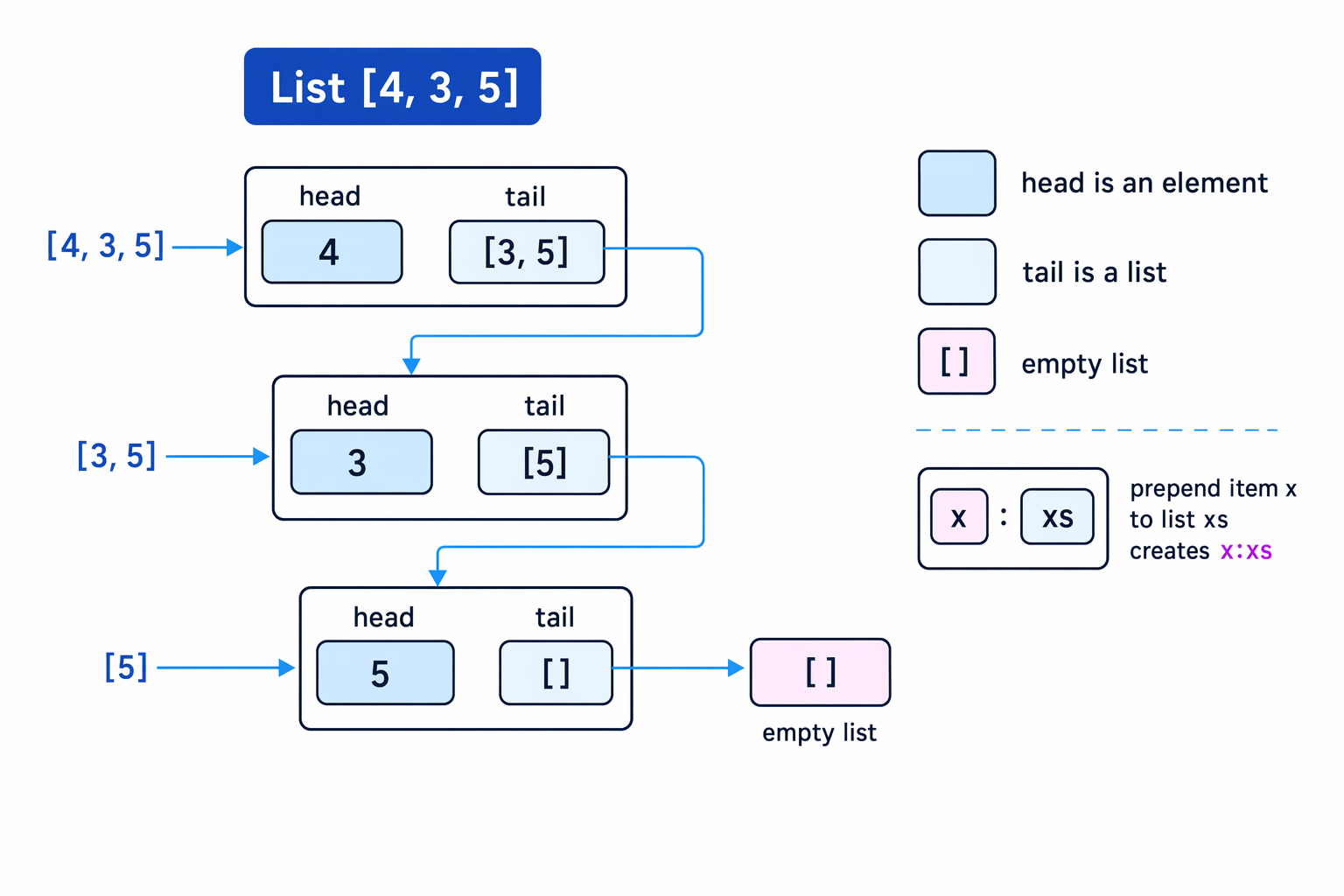
A functional list is often represented as a concatenation of:
- the head: the first element of the list
- the tail: the rest of the list, which is itself a list
Definition
Head and tail
For a non-empty list, the head is the first element, and the tail is the list containing every element except the head.
In Haskell-style notation, the list [4, 3, 5] can be written as:
4:[3, 5]
Here:
4is the head[3, 5]is the tail
Key Idea
Tail is a list
The head is an element, but the tail is always a list. For [4, 3, 5], the tail is [3, 5], not 3.
Example
Splitting a list into head and tail
For the list [8, 2, 6, 1], find the first three head-tail decompositions.
-
Split the original list into its first element and the rest: the head is
8, and the tail is[2, 6, 1], so the list can be written as8:[2, 6, 1]. -
Now split the tail
[2, 6, 1]: the head is2, and the tail is[6, 1], so it can be written as2:[6, 1]. -
Split the next tail
[6, 1]: the head is6, and the tail is[1], so it can be written as6:[1].
The empty list
A list can contain no elements. This is called the empty list.
Definition
Empty list
The empty list is written as []. It contains no elements and has length 0.
The empty list is important because repeated tail operations eventually reach it:
[4, 3, 5]- tail is
[3, 5] - tail is
[5] - tail is
[]
Common Mistake
Taking the head of an empty list
The empty list has no first element, so head([]) is not valid. Always test whether a list is empty before taking its head if there is any chance it may be [].
Core list operations
AQA expects you to describe and apply these list operations.
Return the head of a list
This operation returns the first element of a non-empty list.
Examples:
head([4, 3, 5])returns4head(["red", "blue"])returns"red"
It is not valid for [].
Return the tail of a list
This operation returns the list after removing the first element.
Examples:
tail([4, 3, 5])returns[3, 5]tail([5])returns[]
Notice that tail([5]) is the empty list, not an error.
Test for the empty list
This operation checks whether a list contains no elements.
Examples:
isEmpty([])returnstrueisEmpty([9])returnsfalse
This is often used as the base case in recursive list processing.
Definition
Base case
A base case is the stopping condition in a recursive definition. For list processing, the base case is often when the list is empty.
Return the length of a list
The length of a list is the number of elements it contains.
In functional programming, length is naturally described recursively:
- the length of
[]is 0 - the length of a non-empty list is 1 plus the length of its tail
In pseudocode:
FUNCTION length(xs)
IF isEmpty(xs) THEN
RETURN 0
ELSE
RETURN 1 + length(tail(xs))
ENDIF
ENDFUNCTION
Example
Tracing recursive length
Trace length([7, 4, 9]).
-
The list
[7, 4, 9]is not empty, so apply the recursive rule:length([7, 4, 9])becomes1 + length([4, 9]). -
The list
[4, 9]is not empty, so apply the same rule again:length([4, 9])becomes1 + length([9]). -
The list
[9]is not empty, so reduce once more:length([9])becomes1 + length([]). -
The list
[]is empty, so the base case giveslength([]) = 0. -
Substitute back through the pending additions:
1 + 1 + 1 + 0 = 3, so the length is 3.
Construct an empty list
This operation creates [].
For example, you might start with an empty list and build a result by adding items:
- start with
[] - prepend
5to get[5] - prepend
3to get[3, 5] - prepend
4to get[4, 3, 5]
Prepend an item to a list
To prepend means to add an item to the front of a list.
Definition
Prepend
To prepend an item is to construct a new list where that item becomes the head and the original list becomes the tail.
In Haskell-style notation, : is commonly used for this operation.
Example:
4:[3, 5] gives [4, 3, 5]
So if xs = [3, 5], then 4:xs gives [4, 3, 5].
Tip
Prepend as head-tail construction
Prepending is exactly the same idea as making a new head:tail pair: the new item becomes the head, and the old list becomes the tail.
Append an item to a list
To append means to add an item to the end of a list.
Definition
Append
To append an item is to construct a new list containing all the original elements in the same order, followed by the new item at the end.
Examples:
- append
5to[4, 3]gives[4, 3, 5] - append
"z"to["x", "y"]gives["x", "y", "z"]
In functional list processing, append can be defined recursively:
FUNCTION appendItem(xs, item)
IF isEmpty(xs) THEN
RETURN prepend(item, [])
ELSE
RETURN prepend(head(xs), appendItem(tail(xs), item))
ENDIF
ENDFUNCTION
This keeps all original elements in order, then places the new item at the end.
Example
Applying prepend and append
Starting with [2, 6], work out the result of first prepending 9, then appending 4.
-
Prepending
9makes9the new head and keeps[2, 6]as the tail, giving[9, 2, 6]. -
Appending
4places4after all existing elements, so[9, 2, 6]becomes[9, 2, 6, 4]. -
Compare the positions carefully:
9is at the front because it was prepended, and4is at the end because it was appended.
Common Mistake
Confusing prepend and append
Prepend adds to the front. Append adds to the end. prepend(4, [3, 5]) gives [4, 3, 5], but append(4, [3, 5]) gives [3, 5, 4].
Writing functional-style list operations
The exam is language-agnostic, so clear pseudocode is usually safest. Functional-style list programs normally use:
- an empty-list test
headtail- recursion
- construction of a new list using prepend or append
Here is a function that sums a list of numbers.
FUNCTION sumList(xs)
IF isEmpty(xs) THEN
RETURN 0
ELSE
RETURN head(xs) + sumList(tail(xs))
ENDIF
ENDFUNCTION
The structure is very similar to length, but instead of adding 1 for each element, it adds the value of the head.
Example
Tracing a list sum
Trace sumList([3, 10, 2]).
-
The list is non-empty, so split it into head
3and tail[10, 2]; the result is3 + sumList([10, 2]). -
Split
[10, 2]into head10and tail[2]; the result becomes3 + 10 + sumList([2]). -
Split
[2]into head2and tail[]; the result becomes3 + 10 + 2 + sumList([]). -
The empty list reaches the base case, so
sumList([])returns 0. -
Substitute back:
3 + 10 + 2 + 0 = 15, so the sum is 15.
A Python 3 version using functional style
Python lists are not exactly the same as Haskell-style functional lists, but Python can still support a functional style if you avoid mutating the original list.
def head(xs): return xs[0]
def tail(xs): return xs[1:]
def is_empty(xs): return xs == []
def prepend(item, xs): return [item] + xs
def append_item(xs, item): return xs + [item]
def length(xs): return 0 if is_empty(xs) else 1 + length(tail(xs))
The important idea is not the Python syntax. The important idea is that each operation returns a value based on the list.
Common Mistake
Python slicing is not the examinable focus
In Python, xs[1:] creates a slice. AQA’s focus here is the functional list idea: head, tail, empty list, prepend, append and recursive processing, not Python’s internal list implementation.
Big picture
Functional list processing is powerful because many algorithms follow the same pattern:
- if the list is empty, return a simple base result
- otherwise, process the head and recursively process the tail
- combine those results into the final answer
Key Idea
The standard recursive list pattern
Most simple functional list algorithms ask: “Is the list empty?” If yes, stop. If no, use the head, then solve the same problem for the tail.
Exam technique
In the exam
-
When asked for the head and tail, remember that the head is one element but the tail is a list, even if it has only one element or is empty.
-
Before using
headortail, consider whether the list could be[]; if so, mention or apply an empty-list test. -
For recursive list functions, write the empty-list base case first, then write the non-empty case using
head(xs)andtail(xs).
Self review
Check yourself
- What are the head and tail of
[12, 7, 4]? - What is the result of prepending
6to[1, 2, 3], and how is this different from appending6? - How would a recursive
lengthfunction know when to stop?
You've reached the end
Test yourself on this topic, or move on to the next guide.
How was this guide?