Revision notes for AQA A Level Computer Science Aspects of software development. Open the guide for explanations and worked examples. Written against the AQA A Level Computer Science specification, so the content matches what's examinable rather than general Computer Science background.
Aspects of software development
What you'll learn
- How analysis turns a real-world problem into requirements and a data model.
- How design plans data structures, algorithms, modules and the user interface before coding.
- How implementation, testing and evaluation help you build a solution that works for real users.
- Why prototyping and agile approaches make software development iterative rather than one-way.
The big picture
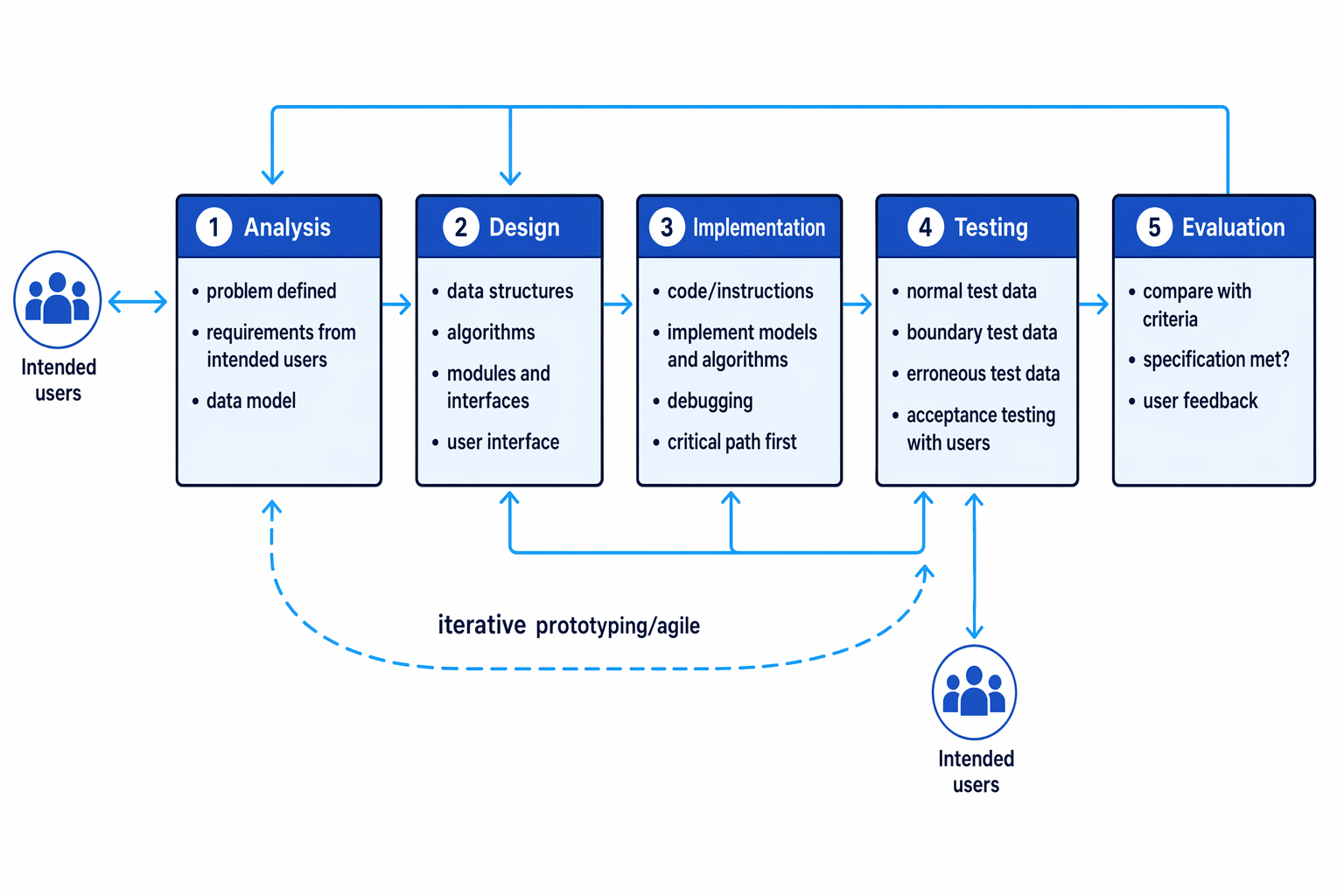
Software development is a systematic process: you do not just “start coding”. You first understand the problem, plan a solution, implement it, test it and evaluate whether it actually meets the user’s needs.
Definition
Software development process
A software development process is an organised sequence of activities used to create a computer system, from understanding the problem through to evaluating the finished solution.
Although the stages are often shown in order, real projects usually loop backwards. Testing may reveal a design flaw. User feedback may change a requirement. A prototype may show that the interface is confusing.
Key Idea
Not just coding
For AQA 4.13.1, remember that software development includes analysis, design, implementation, testing and evaluation. Coding is only one part of the process.
4.13.1.1 Analysis
Defining the problem
Before a problem can be solved, it must be clearly defined. A problem definition explains what needs to be achieved and what issue the system is meant to solve.
A vague statement such as “make booking easier” is not enough. You need to know who is booking, what they are booking, what information is needed, what rules apply, and what counts as success.
Establishing requirements
Definition
Requirement
A requirement is something the system must do, or a constraint it must satisfy, for the solution to be acceptable.
Requirements must be established by interacting with the intended users of the system. These are the people who will use the system, not just the programmer or the organisation paying for it.
Requirements are often split into:
- Functional requirements: what the system must do, such as “allow a student to place a lunch order”.
- Non-functional requirements: qualities or constraints, such as “the system should be easy to use on a tablet” or “orders must be stored securely”.
Interaction with users might involve interviews, observation, questionnaires, or asking users to comment on a prototype.
Creating a data model
Definition
Data model
A data model is an abstract representation of the data the system needs to store or process, including important entities, attributes and relationships.
An entity is a thing about which data is stored, such as a student, order or product. An attribute is a property of an entity, such as name, price or order date.
This is where abstraction matters.
Definition
Abstraction
Abstraction means representing only the relevant features of something and ignoring unnecessary detail.
For example, a canteen ordering system probably needs a student’s ID and year group, but not their favourite colour. The data model should represent the parts of the external world that are relevant to the program.
Prototyping and agile clarification
A prototype is a quick, incomplete version of a system used to explore ideas and gather feedback. An agile approach develops software in small increments, with frequent user feedback and revision.
During analysis, prototypes can help users realise what they actually need. Users often find it easier to comment on a visible mock-up than on a written list of requirements.
Example
Modelling a canteen pre-order system
- Start from the vague problem “lunchtime queues are too long” and turn it into a clearer aim: students should be able to pre-order food before lunch so staff can prepare orders earlier.
- Interact with intended users: students say they need a quick ordering screen; canteen staff say they need a daily list of orders grouped by collection time.
- Apply abstraction by choosing relevant entities: Student, MenuItem and Order are needed; the colour of the canteen walls is irrelevant.
- Draft a simple data model, such as
Student(<strong>StudentID</strong>, Name, YearGroup),MenuItem(<strong>ItemID</strong>, Name, Price, Available)andOrder(<strong>OrderID</strong>, StudentID, ItemID, CollectionDate, Status). - Use a prototype ordering screen to check whether students understand the process and whether staff receive the information they need.
Common Mistake
Skipping the users
Do not describe analysis as something the programmer does alone. AQA specifically expects requirements to be established through interaction with the intended users.
4.13.1.2 Design
Designing before constructing
Once the problem is understood, the solution should be designed and specified before construction begins.
Definition
Specification
A specification is a precise description of what the system should do and the constraints it must meet. It provides a basis for testing and evaluation.
Design includes planning:
- Data structures for the data model, such as records, arrays, lists or files.
- Algorithms, which are step-by-step methods for solving tasks.
- A modular structure, splitting the solution into manageable parts.
- The human user interface, meaning the screens, forms, menus, prompts and messages through which users interact with the system.
Modular structure and interfaces
Definition
Module and interface
A module is a self-contained part of a program with a clear responsibility. A module’s interface documents how other parts of the system use it, including its inputs, outputs and purpose.
Good modular design makes a program easier to test, debug, understand and maintain. Each module should do a clear job, and other modules should not need to know its internal details.
For example, an OrderValidation module might expose an operation that checks whether an order is valid. Other parts of the program need to know what data to pass in and what result comes back, but not every internal validation step.
Example
Designing modules for a booking system
- Use the requirements to identify core tasks: check available slots, create a booking, cancel a booking and produce a daily schedule.
- Choose data structures that fit the data model: bookings could be stored as records containing booking ID, user ID, date, time and status.
- Split the system into modules with clear responsibilities, such as
AvailabilityChecker,BookingManagerandScheduleReporter. - Specify interfaces, for example
checkAvailability(date, time)returns whether a slot is free, whilecreateBooking(userID, date, time)returns a booking confirmation or an error. - Design the user interface flow so the user selects a date before choosing a time, because available times depend on the chosen date.
Iterative design
Design can be iterative. If a prototype shows that users misunderstand a screen, the interface design should change. If testing reveals that a chosen data structure makes searching too slow, the design may need revising.
Tip
Data model versus data structure
The data model says what real-world data matters. The data structure says how that data will be represented in the program.
4.13.1.3 Implementation
Turning designs into code
Definition
Implementation
Implementation is the stage where the designed models and algorithms are turned into data structures and code that a computer can execute.
At this stage, you write program instructions, create the chosen data structures, and connect modules together. You also debug the program, which means finding and fixing errors in the implementation.
Implementation should not be treated as guesswork. You should be able to explain how your program works and argue that it is correct and efficient using logical reasoning, test data and user feedback.
Solving the critical path first
In an iterative or agile approach, the final solution may be reached through repeated cycles of building, testing and improving.
Definition
Critical path
In this context, the critical path is the core set of dependent features that must work before the rest of the system can be meaningfully used or tested.
For a shopping system, browsing products, adding items to a basket and placing an order are more critical than adding a decorative theme selector. The critical path gives you a usable prototype sooner.
Example
Prioritising a usable prototype
- List the requested features for a canteen system: view menu, place order, pay online, print kitchen list, customise colours and produce monthly sales charts.
- Identify dependencies: staff cannot prepare food unless orders are stored, and orders cannot be placed unless menu items can be selected.
- Choose the critical path: view menu, place order, store order and produce a daily kitchen list.
- Leave less essential features, such as colour customisation and monthly charts, until the core workflow has been implemented and tested.
Common Mistake
Coding too early
Starting implementation before analysis and design often produces software that runs but does not solve the right problem.
4.13.1.4 Testing
Testing for errors
Definition
Testing
Testing is the process of running the implemented system with selected data to find errors and gather evidence that it meets its specification.
AQA expects you to know these types of test data:
- Normal data: valid, typical data that should be accepted.
- Boundary data: data at, or close to, the limits of what is valid.
- Erroneous data: invalid data that should be rejected or handled safely.
Testing should use expected outcomes. It is not enough to say “try some numbers”; you need to know what should happen.
Example
Selecting test data for a range check
Suppose a program accepts an integer quantity q only if 1≤q≤201 \le q \le 201≤q≤20.
- Identify the valid range: the smallest accepted value is 1 and the largest accepted value is 20.
- Choose normal data from inside the range, such as 10, expecting the system to accept it.
- Choose boundary data at and just outside the limits: 1 and 20 should be accepted, while 0 and 21 should be rejected.
- Choose erroneous data that is not a valid integer input, such as
tenor a blank entry, expecting a suitable error message rather than a crash.
Common Mistake
Only testing the happy path
Normal data alone is not enough. Boundary and erroneous data are needed because many errors occur at limits or when users enter unexpected input.
Acceptance testing
Acceptance testing is testing carried out with the intended users to check whether the solution meets the specification and works for their real needs.
For AQA, you only need to provide evidence of user feedback; you do not need to describe every detailed test carried out by the end user. Useful evidence might include comments from the user, an annotated prototype, a feedback form or a short summary of requested improvements.
Key Idea
Testing cannot prove perfection
Testing can show that errors exist and provide evidence that requirements are met, but it cannot prove that a non-trivial system contains no errors at all.
4.13.1.5 Evaluation
Criteria for evaluating a computer system
Definition
Evaluation
Evaluation is judging the finished system against criteria to decide how successful it is and what could be improved.
Useful criteria include:
| Criterion | What you judge |
|---|---|
| Fitness for purpose | Does the system solve the original problem and meet the requirements? |
| Correctness | Does it produce the expected outputs for valid cases? |
| Usability | Can intended users use it effectively and confidently? |
| Robustness | Does it handle invalid or unexpected input without failing? |
| Performance and efficiency | Are response times, storage use and processing time acceptable? |
| Maintainability | Is the system modular, readable, documented and easy to change? |
| Security | Does it protect data and restrict access where needed? |
| Compatibility or portability | Does it work on the required devices, operating systems or environments? |
Example
Evaluating against criteria
- Compare the system with the specification: if the requirement says users must be able to edit an order, but the system only allows new orders, fitness for purpose is only partly met.
- Use evidence rather than opinion: test results may show correct calculations, while user feedback may show that staff find the daily report easy to use.
- Link weaknesses to improvements: if the report takes 12 seconds to load and staff need it during a busy lunch period, improving performance should be a priority.
Tip
Make evaluation evidence-based
Strong evaluation uses evidence from requirements, tests and user feedback. Avoid unsupported comments such as “the system is good” without saying why.
Exam technique
In the exam
- Link each stage to its output: analysis gives requirements and a data model; design gives planned structures, algorithms, modules and interface; implementation gives code; testing gives evidence; evaluation gives a judgement.
- If users are mentioned, include them in analysis, prototyping/agile feedback and acceptance testing.
- For test data questions, state the input, the type of test data and the expected outcome.
- For evaluation questions, use named criteria and apply them to the scenario rather than writing generic praise.
Self review
Check yourself
- What information would you collect from intended users during analysis?
- For a valid input range of 5 to 50 inclusive, what normal, boundary and erroneous data could you choose?
- Choose one evaluation criterion and describe what evidence would support it.
You've reached the end
Test yourself on this topic, or move on to the next guide.
How was this guide?