Revision notes for AQA A Level Computer Science External hardware devices. Open the guide for explanations and worked examples. Written against the AQA A Level Computer Science specification, so the content matches what's examinable rather than general Computer Science background.
External hardware devices
What you'll learn
- How barcode readers, digital cameras, laser printers and RFID systems work.
- Why computer systems need secondary storage.
- How hard disks, optical disks and SSDs store data.
- How to compare devices and justify the most suitable one for a scenario.
Prerequisites: peripherals and suitability
In this topic, you are looking at hardware that sits outside the processor and main memory. Some devices get data into the system, some produce output, and some provide long-term storage.
Definition
External hardware device
An external hardware device, often called a peripheral, is a physical device connected to a computer system to provide input, output or storage rather than carrying out the processor’s internal fetch-decode-execute work.
A key exam skill is not just naming a device, but explaining why it is suitable. Suitability depends on characteristics such as speed, capacity, reliability, cost, portability, durability and the environment where the device will be used.
Key Idea
Suitability is evidence-based
A strong answer links the device’s principle of operation to the situation. For example, RFID is suitable for scanning items inside packaging because it uses radio waves and does not require line-of-sight.
4.7.4.1 Input and output devices
Input and output devices
An input device captures data from the real world and sends it to a computer system. An output device presents data from the system in a useful form for people or another system.
The devices you need to know for this subsection are:
- barcode reader
- digital camera
- laser printer
- RFID system
Barcode reader
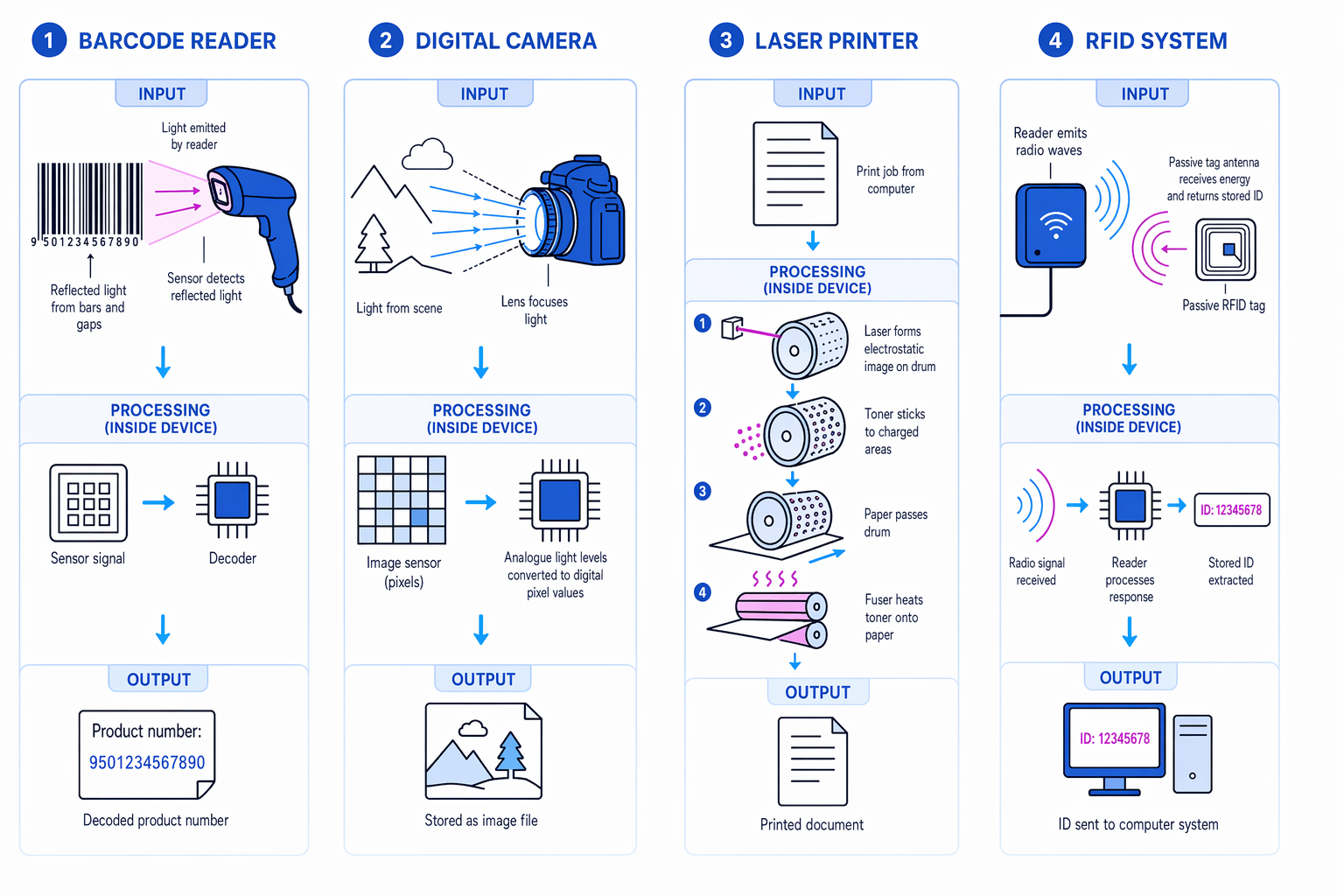
A barcode is a printed pattern of dark bars and light gaps that represents a code, usually an item identifier. A barcode reader is an input device that uses light to read that pattern.
The reader shines light onto the barcode. Dark bars reflect less light and light gaps reflect more light. A sensor detects the pattern of reflected light and converts it into an electrical signal. A decoder then turns this signal into the digits or characters represented by the barcode.
Barcode readers are common in shops, libraries and warehouses. They are cheap, quick and accurate when the printed code is clean and visible. They are less suitable if the label is damaged, dirty, hidden, curved or needs to be read from a distance.
Common Mistake
Barcode does not usually store the price
A barcode normally stores an identifier, such as a product number. The computer system uses that identifier to look up details such as description, price and stock level in a database.
Digital camera
A digital camera is an input device that captures light and stores it as digital image data. A camera may be a separate device, a phone camera, a webcam or part of another system such as a security system.
A lens focuses light onto an image sensor. The sensor is divided into tiny picture elements called pixels. Each pixel detects light intensity and colour information. These analogue light measurements are converted into digital values, then processed and stored as an image or video file.
Digital cameras are suitable when visual information is needed: security monitoring, video calls, medical imaging, traffic systems and recording events. They can capture lots of detail, but image quality depends on lighting, focus, motion blur, lens quality and sensor resolution. They are not always suitable for exact data entry unless extra software, such as optical character recognition, is used.
Laser printer
A laser printer is an output device that produces high-quality printed pages, usually on paper. It is especially suitable for offices and schools where many pages of clear text or diagrams are needed.
The page is first rasterised, meaning converted into a grid of dots. Inside the printer, a photosensitive drum is given an electrostatic charge. A laser changes the charge pattern on the drum to match where toner is needed. Toner is fine powdered ink. Toner sticks to the charged pattern, is transferred onto paper, and is fixed permanently using heated rollers called a fuser.
Laser printers are fast, quiet and have a low cost per page for large volumes. They are usually more expensive to buy than basic inkjet printers and are less suitable for occasional low-volume home photo printing.
RFID
RFID stands for Radio-Frequency Identification. An RFID system normally has a reader and a tag. The tag contains a small chip and an antenna, and it stores an identifier.
The reader emits radio waves. A passive RFID tag uses energy from the reader’s signal to power itself briefly and send back its stored ID. Some RFID tags are active, meaning they have their own battery. The reader sends the received ID to the computer system, often to look up or update a record.
RFID is useful for access cards, contactless payments, library books, warehouse stock tracking, passports and animal microchips. Unlike barcodes, RFID does not require direct line-of-sight and can sometimes be read through packaging. It can also allow faster batch scanning. However, tags cost more than printed barcodes, and radio signals may be affected by distance, metal, liquids or interference.
Example
Choosing an identification device
A warehouse wants to identify sealed boxes moving quickly along a conveyor belt.
- Compare the need for line-of-sight. A barcode reader needs the printed code to be visible and aligned, while RFID can read a tag using radio waves even if the tag is inside or partly hidden by packaging.
- Compare speed and handling. A barcode reader usually scans one visible code at a time, while RFID can be more suitable for fast-moving items because exact visual alignment is less important.
- Compare cost against benefit. RFID tags are more expensive than printed barcodes, but the speed and reduced handling may justify the cost for reusable warehouse boxes. RFID is the better choice here.
4.7.4.2 Secondary storage devices
Why secondary storage is needed
Main memory, such as RAM, is fast working memory used by the processor while programs are running. RAM is volatile, meaning its contents are lost when power is switched off.
Definition
Secondary storage
Secondary storage is non-volatile storage used to keep programs, files and data when the computer is switched off.
Computer systems need secondary storage because users need to keep operating systems, applications, documents, media files, databases and backups permanently. Secondary storage also usually provides much larger capacity than RAM at a lower cost per unit of data.
Key comparison terms
Capacity means how much data can be stored. Access speed means how quickly data can be found, read or written. Latency is the delay before data starts being transferred. Transfer rate is how much data can be moved per second once transfer has started.
Hard disk drive
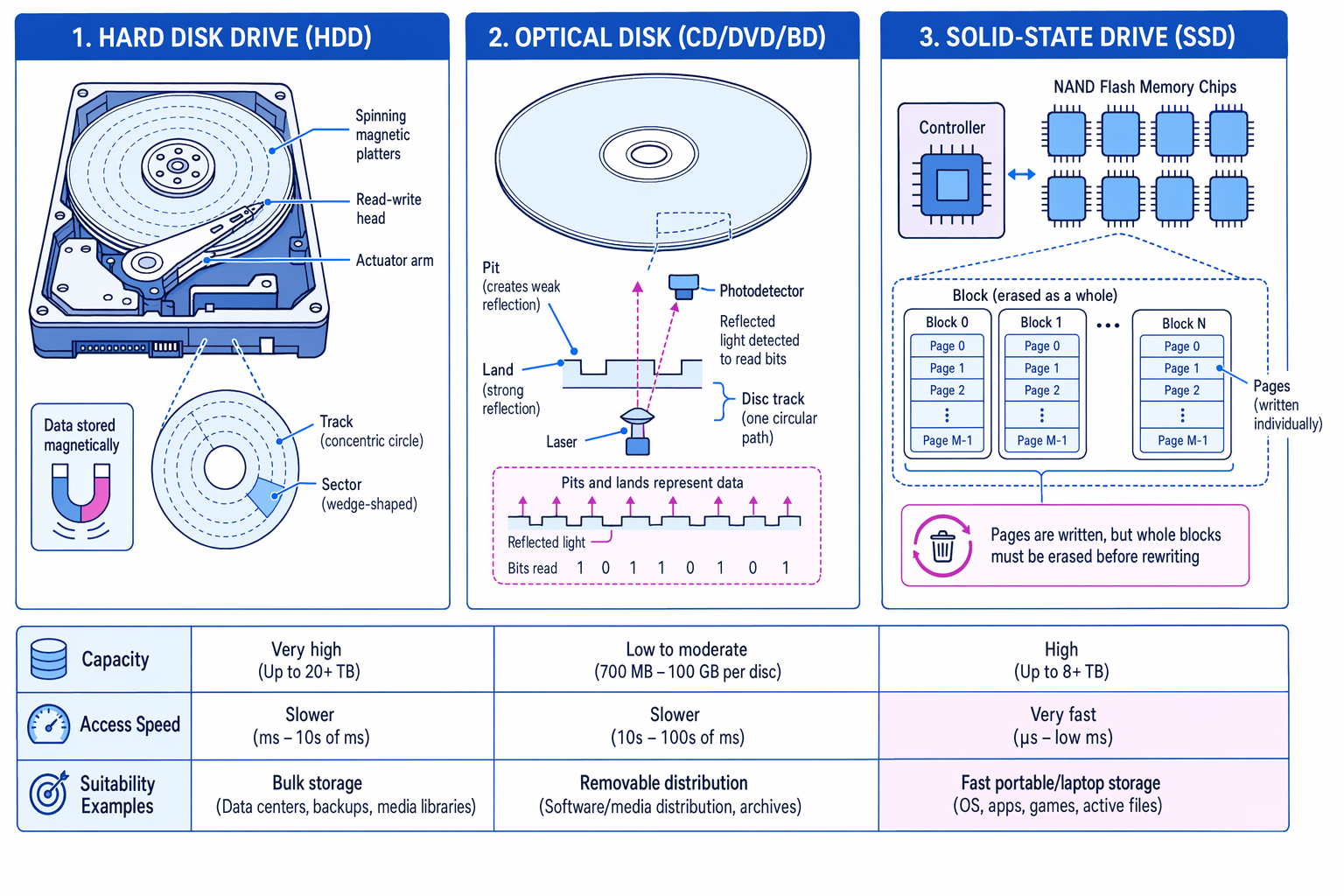
A hard disk drive, or HDD, stores data magnetically on spinning platters. The surface is arranged into circular tracks, divided into sectors. A moving read-write head positions itself over the correct part of the platter to read or change the magnetic pattern.
HDDs offer very high capacity for relatively low cost. They are suitable for bulk storage, backups, desktop PCs, servers and media libraries. Their main weakness is that they contain moving parts, so random access is slower than on an SSD, and they are more vulnerable to shock, vibration and mechanical failure.
Optical disk
An optical disk stores data on a removable disc such as a CD, DVD or Blu-ray disc. A laser reads tiny physical or optical changes on the disc surface. Pits and lands reflect light differently, and the drive detects these changes as data.
Optical disks are portable and cheap to distribute. Some are read-only, while others can be written once or rewritten. They are suitable for media distribution, software distribution, archives and systems where removable physical media is useful. They are generally slower and lower capacity than HDDs and SSDs, and discs can be scratched or lost.
Solid-state disk
A solid-state disk, or SSD, stores data using NAND flash memory and has no moving parts. NAND flash memory is non-volatile electronic memory based on floating gate transistors. A floating gate transistor can trap and store electrical charge; the stored charge represents data.
An SSD also contains a controller, which manages how data is stored. Flash memory is organised into pages and blocks. A page can be written, but it cannot simply be overwritten in place. Before rewriting, data must be erased, and flash technology requires a whole block of many pages to be erased at once. The controller manages this by writing new versions of data elsewhere, marking old pages as invalid, erasing blocks when needed and spreading writes across the drive.
SSDs have much lower latency and faster transfer speeds than magnetic disk drives because there is no spinning platter or moving read-write head. They are suitable for operating systems, applications, laptops, tablets, games and portable devices where speed, shock resistance, silence and low power use matter. They are often more expensive than HDDs for the same capacity, although capacities continue to increase.
Common Mistake
Capacity is not the same as speed
A device with larger capacity is not automatically faster. A high-capacity HDD may store more data than an SSD, but the SSD will usually access data more quickly.
Comparing storage media
| Medium | Capacity | Access speed | Main strengths | Less suitable for |
|---|---|---|---|---|
| HDD | Very high | Moderate; slower random access | Cheap bulk storage | Devices needing shock resistance or very fast access |
| Optical disk | Low to moderate | Slow | Removable distribution and archiving | Running modern operating systems or active applications |
| SSD | High | Very fast | Fast access, low latency, no moving parts | Cheapest possible bulk storage |
Exact capacities change over time, so exam answers should focus on relative characteristics unless a question gives specific figures.
Example
Selecting storage for a laptop
A student laptop needs storage for the operating system, applications and school files.
- Identify the important requirements. The laptop should boot quickly, open applications quickly, use little power and survive being carried around.
- Compare the storage options. An HDD gives high capacity cheaply, but has moving parts and higher latency. An optical disk is removable but too slow and low capacity for active system storage. An SSD has low latency, fast transfer speeds and no moving parts.
- Make a justified judgement. An SSD is the most suitable primary secondary storage for the laptop. If very large cheap storage is also needed, an external HDD could be added for backups or media files.
Tip
How to write comparison answers
Use comparative language: “faster than”, “higher capacity than”, “more durable than”, “requires line-of-sight whereas”. This shows you are judging suitability, not just listing facts.
Exam technique
In the exam
- For “principles of operation”, describe the process: what is detected, how it is converted, and what data is sent to the computer.
- For “suitability”, link at least two characteristics to the scenario, such as speed, capacity, cost, durability or need for line-of-sight.
- For storage comparisons, avoid vague claims like “better”. State whether you mean faster access, higher capacity, lower cost, portability or reliability.
Self review
Check yourself
- Why is RFID often more suitable than a barcode for tracking sealed boxes?
- What happens inside a laser printer between receiving the page image and producing the printed page?
- Why can an SSD be faster than an HDD even if both have similar capacity?
You've reached the end
Test yourself on this topic, or move on to the next guide.
How was this guide?