Revision notes for CIE IGCSE Maths Using a Calculator. Open the guide for explanations and worked examples. Written against the CIE IGCSE Maths (0580) specification, so the content matches what's examinable rather than general Maths background.
Using a Calculator
What you'll learn
- How to use your calculator for squares, square roots, fractions and brackets.
- How to enter longer calculations without losing the correct order.
- How to write down all the figures on your calculator display.
- How to round calculator answers to decimal places or significant figures.
Why calculator questions need care
A calculator is powerful, but it only follows what you type. Most mistakes in calculator questions come from missing brackets, typing a fraction in the wrong place, or rounding too soon.
Definition
Expression
An expression is a calculation made from numbers and calculation signs, such as 1.32+1.421.3^2 + 1.4^21.32+1.42. When you use a calculator, you are finding its value.
Definition
All the figures on the display
This means copy every digit your calculator shows for the answer, not a rounded version. If your calculator shows more or fewer digits than someone else’s, write the digits shown on your own display.
Tip
Use decimal mode when needed
Some calculators show an exact fraction or surd first. If the question wants the calculator display, use the decimal toggle key, often labelled S⇔D, F⇔D or ≈, to show a decimal.
Squares and square roots
A square means multiplying a number by itself. For example, 1.2521.25^21.252 means 1.25×1.251.25 \times 1.251.25×1.25.
A square root does the reverse. For example, 1.69\sqrt{1.69}1.69 asks: “What positive number squares to make 1.69?”
Key Idea
Opposite operations
Squaring and square rooting undo each other: if 1.32=1.691.3^2 = 1.691.32=1.69, then 1.69=1.3\sqrt{1.69} = 1.31.69=1.3.
Example
Finding a square root and a square
Find 2.89\sqrt{2.89}2.89 and 1.1521.15^21.152.
-
For 2.89\sqrt{2.89}2.89, press the square root key, then type 2.89, then press equals.
-
The display gives 1.7, because 1.72=2.891.7^2 = 2.891.72=2.89.
-
For 1.1521.15^21.152, type 1.15, then use the square key, then press equals.
-
The display gives 1.3225, so 1.152=1.32251.15^2 = 1.32251.152=1.3225.
Following BIDMAS on a calculator
Definition
BIDMAS
BIDMAS is the usual order of operations: Brackets, Indices, Division/Multiplication, then Addition/Subtraction. Indices means powers, such as 2.822.8^22.82 or 1.931.9^31.93.
Most scientific calculators follow BIDMAS automatically, but you must enter the brackets correctly. Brackets tell the calculator which part of the calculation belongs together.
Example
Using brackets and powers
Work out (4.25−0.36)2−8.104(4.25 - 0.36)^2 - 8.104(4.25−0.36)2−8.104. Write down all the figures on the display.
-
Type the bracketed part first: (4.25−0.36)(4.25 - 0.36)(4.25−0.36).
-
Square the whole bracket, not just the 0.36. The bracket gives 3.89, so the square is 3.892=15.13213.89^2 = 15.13213.892=15.1321.
-
Subtract 8.104 from that result.
-
The calculator display shows 7.0281.
-
Write the answer as 7.0281.
Common Mistake
Squaring only the last number
In (4.25−0.36)2(4.25 - 0.36)^2(4.25−0.36)2, the square applies to the whole bracket. Without brackets, the calculator may treat the calculation as 4.25−0.3624.25 - 0.36^24.25−0.362, which is different.
Fractions and long calculations
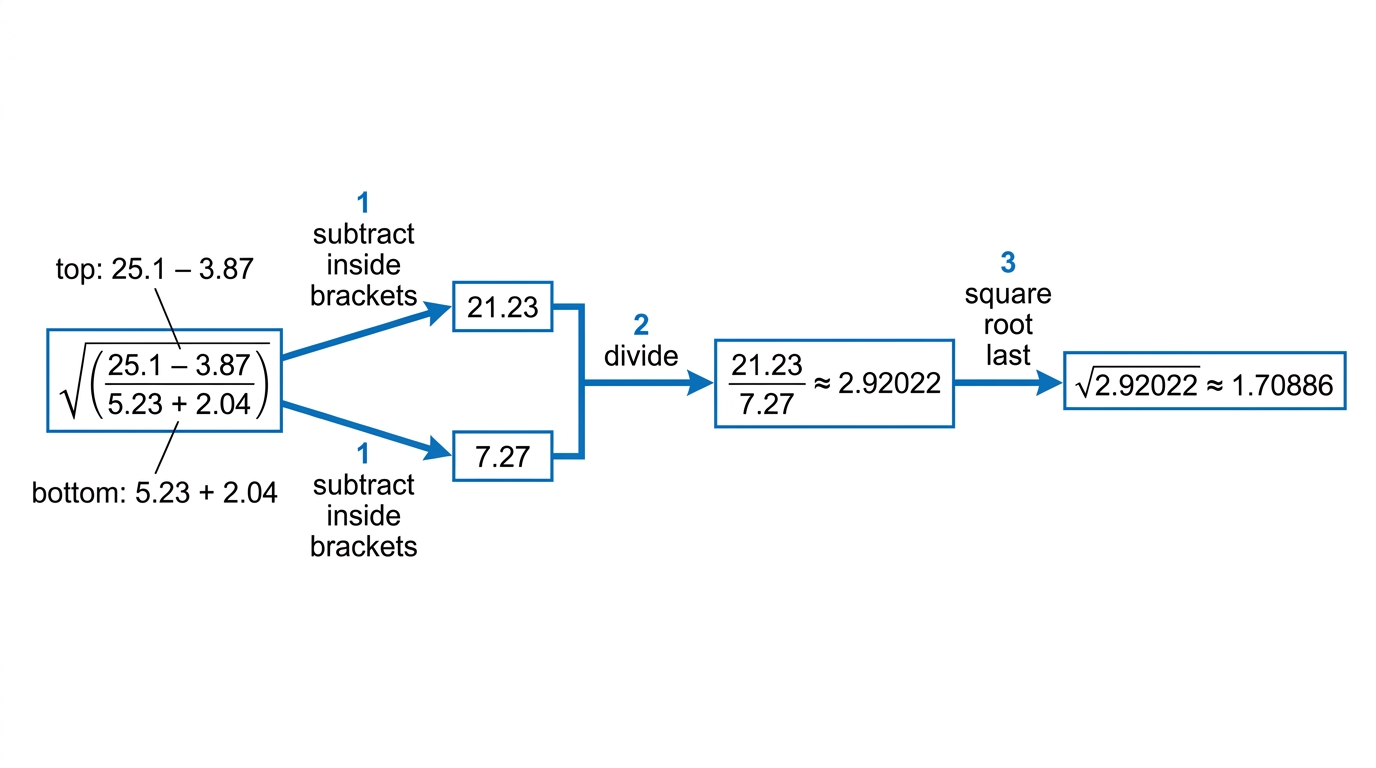
A fraction has a numerator on the top and a denominator on the bottom. On a calculator with a fraction template, put the whole top calculation in the numerator and the whole bottom calculation in the denominator.
Definition
Numerator and denominator
In a fraction, the numerator is the top part and the denominator is the bottom part. For example, in 2.75+1.621.24\frac{2.75 + 1.6^2}{1.24}1.242.75+1.62, the numerator is 2.75+1.622.75 + 1.6^22.75+1.62 and the denominator is 1.24.
For nested calculations, do the inside parts first: brackets first, then powers or roots, then division.
Example
Using a fraction bar
Work out 2.75+1.621.24\frac{2.75 + 1.6^2}{1.24}1.242.75+1.62. Write down all the figures on the calculator display.
-
Use the fraction key if your calculator has one.
-
Put 2.75+1.622.75 + 1.6^22.75+1.62 on the top line.
-
Put 1.24 on the bottom line.
-
Press equals. The top is 2.75+2.56=5.312.75 + 2.56 = 5.312.75+2.56=5.31.
-
The calculator then works out 5.31÷1.245.31 \div 1.245.31÷1.24.
-
A typical display shows 4.282258065. Copy the full display shown on your calculator.
Example
A square root over a fraction
Work out 21.8−4.286.10+1.20\sqrt{\frac{21.8 - 4.28}{6.10 + 1.20}}6.10+1.2021.8−4.28. Write down all the figures on the display.
-
Use the square root key first, then put the whole fraction inside the square root.
-
The numerator is 21.8−4.28=17.5221.8 - 4.28 = 17.5221.8−4.28=17.52.
-
The denominator is 6.10+1.20=7.306.10 + 1.20 = 7.306.10+1.20=7.30.
-
The fraction inside the square root is 17.52÷7.30=2.417.52 \div 7.30 = 2.417.52÷7.30=2.4.
-
The calculator finds 2.4\sqrt{2.4}2.4.
-
A typical display shows 1.549193338. Write the digits shown on your display.
Common Mistake
Missing denominator brackets
If you type a fraction using a division sign instead of a fraction template, put brackets around the whole denominator. For example, type (21.8−4.28)÷(6.10+1.20)\sqrt{(21.8 - 4.28) \div (6.10 + 1.20)}(21.8−4.28)÷(6.10+1.20), not just the first number after the division sign.
Rounding calculator answers
Sometimes a question asks for all the figures first, then asks you to round.
Definition
Decimal places
Decimal places count digits after the decimal point. For 2 decimal places, keep two digits after the decimal point, then look at the next digit to decide whether to round up.
Definition
Significant figures
Significant figures count from the first non-zero digit. For example, in 0.792099, the first significant digit is 7, not 0.
Example
Rounding to 2 decimal places
Use your calculator to work out 11.56−5.312.62\frac{\sqrt{11.56 - 5.31}}{2.6^2}2.6211.56−5.31, then give your answer to 2 decimal places.
-
Enter the calculation as one fraction: the numerator is 11.56−5.31\sqrt{11.56 - 5.31}11.56−5.31 and the denominator is 2.622.6^22.62.
-
The value inside the square root is 11.56−5.31=6.2511.56 - 5.31 = 6.2511.56−5.31=6.25, so the numerator is 2.5.
-
The denominator is 2.62=6.762.6^2 = 6.762.62=6.76.
-
The calculator display is about 0.3698224852.
-
To round to 2 decimal places, keep 0.36 and look at the third decimal digit, which is 9.
-
Since 9 is 5 or more, round up. The answer to 2 decimal places is 0.37.
Example
Rounding to significant figures
Use your calculator to work out 12.34+8.415.2×3.7\frac{12.34 + \sqrt{8.41}}{5.2 \times 3.7}5.2×3.712.34+8.41, then give your answer to 2 significant figures.
-
Enter the whole calculation using a fraction template if possible.
-
The square root part is 8.41=2.9\sqrt{8.41} = 2.98.41=2.9.
-
The numerator is 12.34+2.9=15.2412.34 + 2.9 = 15.2412.34+2.9=15.24.
-
The denominator is 5.2×3.7=19.245.2 \times 3.7 = 19.245.2×3.7=19.24.
-
The display is about 0.7920997921.
-
For 2 significant figures, keep the 7 and the 9. The next digit is 2, so the 9 does not round up.
-
The answer to 2 significant figures is 0.79.
Common Mistake
Rounding too early
Do not round partway through a calculation. Keep the full calculator value until the very end, then round only when the question asks you to.
Trigonometry keys: sin, cos and tan
Some calculator questions use the trigonometric functions sin, cos and tan. These are buttons on your calculator connected to angles.
Definition
Degree mode
Degree mode means your calculator is measuring angles in degrees, shown using the symbol °. For IGCSE angle questions, your calculator should usually show DEG on the screen.
Common Mistake
Check DEG before trig
If your calculator is in radians instead of degrees, trigonometry answers will be wrong even if you type everything perfectly.
Example
Using sin and cos
Use your calculator to work out sin30∘+cos60∘cos45∘−sin30∘\frac{\sin 30^\circ + \cos 60^\circ}{\cos 45^\circ - \sin 30^\circ}cos45∘−sin30∘sin30∘+cos60∘, then give the answer to 2 decimal places.
-
Check that your calculator is in degree mode.
-
Enter the expression using a fraction template.
-
The numerator is sin30∘+cos60∘=0.5+0.5=1\sin 30^\circ + \cos 60^\circ = 0.5 + 0.5 = 1sin30∘+cos60∘=0.5+0.5=1.
-
The denominator is cos45∘−sin30∘\cos 45^\circ - \sin 30^\circcos45∘−sin30∘, which is about 0.2071067812.
-
A typical display shows 4.828427125.
-
To 2 decimal places, the answer is 4.83.
Example
Using tan inside a square root
Use your calculator to work out tan60∘+1tan60∘−1\sqrt{\frac{\tan 60^\circ + 1}{\tan 60^\circ - 1}}tan60∘−1tan60∘+1, then give the answer to 3 significant figures.
-
Check that DEG is showing on your calculator.
-
Put the whole fraction inside the square root.
-
Type tan60∘+1\tan 60^\circ + 1tan60∘+1 on the top of the fraction.
-
Type tan60∘−1\tan 60^\circ - 1tan60∘−1 on the bottom of the fraction.
-
Press equals. A typical display shows 1.931851653.
-
For 3 significant figures, keep 1, 9 and 3. The next digit is 1, so the answer is 1.93.
Exam technique
In the exam
-
Enter the whole expression in one go where possible, using brackets and the fraction template to keep the structure clear.
-
If the question asks for all the figures, copy the calculator display before doing any rounding.
-
For trigonometry, check DEG first, then check that every numerator, denominator, bracket, power and square root is in the right place.
Self review
Check yourself
-
Can you explain why (3.4−0.8)2(3.4 - 0.8)^2(3.4−0.8)2 is not the same as 3.4−0.823.4 - 0.8^23.4−0.82?
-
If your display shows 0.046718293, can you tell which digit is the first significant figure?
-
Before using sin, cos or tan, where do you check that your calculator is in degree mode?

Recap questions
Test yourself with 5 quick questions on this guide. Answer them all correctly to complete it.
You've reached the end
Test yourself on this topic, or move on to the next guide.
How was this guide?