Function Machines
x

Revision notes for Edexcel GCSE Maths Function Machines. Open the guide for explanations and worked examples. Written against the Edexcel GCSE Maths (1MA1) specification, so the content matches what's examinable rather than general Maths background.

Function Machines

What you'll learn

  • How to read input and output diagrams.
  • How to calculate an output from an input.
  • How to work backwards to find the starting number.
  • How to use real-life rules, like temperatures and taxi fares, as function machines.

1. What is a function machine?

A function machine is a way of showing a rule. You put a number in, follow the instructions in the boxes, and get a number out.

Definition

Function machine words

  • A function machine is a set of instructions that changes a starting number into an answer.

  • The input is the number you put in.

  • The output is the number that comes out.

  • An operation is a maths action, such as add, subtract, multiply or divide.

Key Idea

Follow the arrows

Always do the boxes in the order shown. A different order can give a different answer.

Example

Finding an output

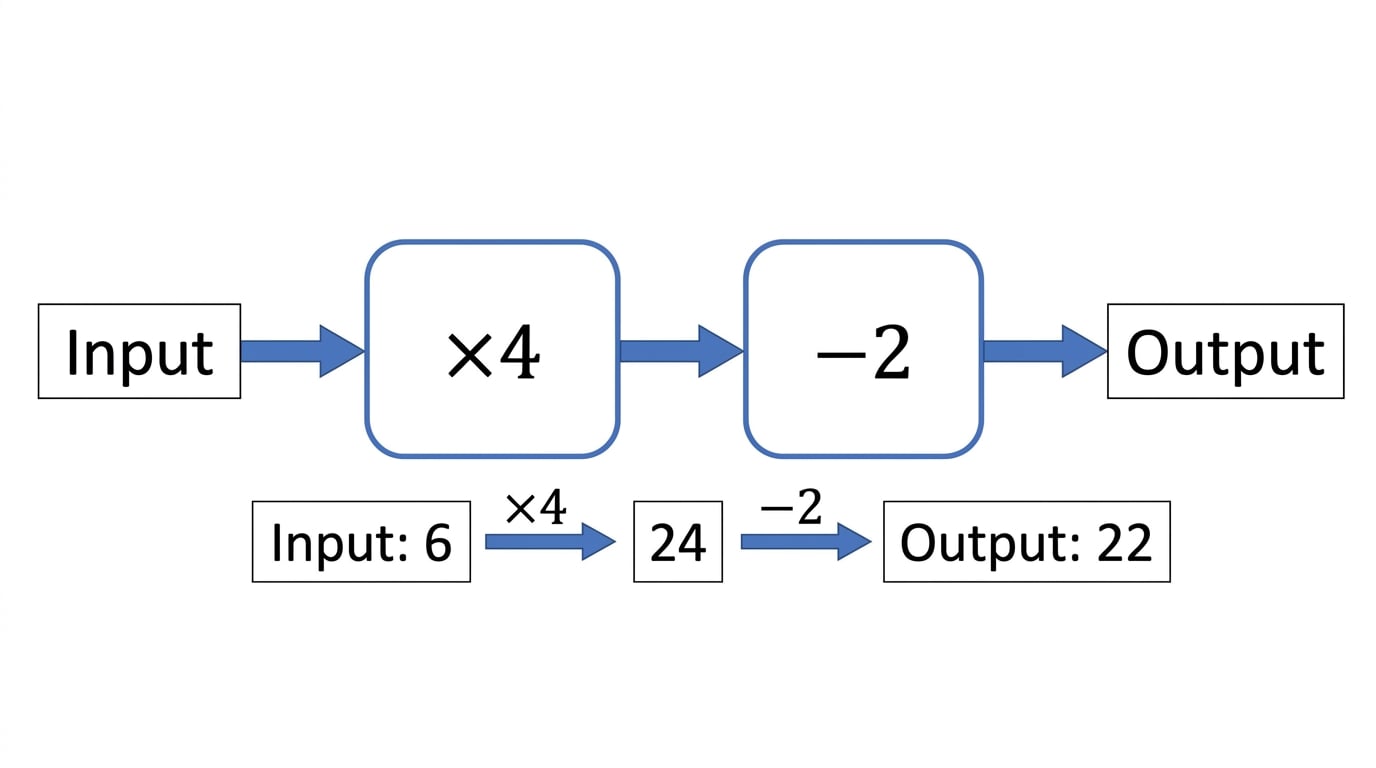
A machine says: input → multiply by 4 → subtract 2 → output. Find the output when the input is 6.

Function machine showing 6 going through ×4 then −2 to give an output.

  1. Start with the input: 6.

  2. The first box says multiply by 4:

    6×4=246 \times 4 = 246×4=24
  3. The second box says subtract 2:

    24−2=2224 - 2 = 2224−2=22
  4. The output is 22.

2. Filling in a missing box

Sometimes one box in the machine is missing. Use the boxes you do know first, then compare with the final output.

Example

Finding the missing operation

A machine says: input → add 10 → missing box → output. When the input is 5, the output is 4. Find the missing box.

Function machine with a missing operation after adding 10, from input 5 to output 4.

  1. Start with the input: 5.

  2. Use the first box, add 10:

    5+10=155 + 10 = 155+10=15
  3. Now ask: what changes 15 into 4?

  4. Since 15 subtract 11 gives 4, the missing box is subtract 11.

Common Mistake

Skipping the known box

Do not compare the input straight to the output until you have used the boxes already shown.

3. Working backwards to find the input

If you know the output but not the input, you need to go backwards through the machine.

Definition

Inverse operation

An inverse operation undoes another operation. Add and subtract undo each other; multiply and divide undo each other.

Key Idea

Reverse the order

When working backwards, undo the last box first, then undo the first box.

Example

Finding an input

A machine says: input → multiply by 6 → add 4 → output. The output is 46. Find the input.

The machine is worked backwards from output 46 by undoing the last operation first.

  1. The forwards machine is multiply by 6, then add 4.

  2. Start at the output, 46, and move backwards.

  3. Undo add 4 by subtracting 4:

    46−4=4246 - 4 = 4246−4=42
  4. Undo multiply by 6 by dividing by 6:

    42÷6=742 \div 6 = 742÷6=7
  5. The input was 7.

Tip

Backwards checklist

Write the operations in reverse order before you calculate. This helps you avoid undoing the boxes in the wrong order.

4. Machines with division

If a machine divides when going forwards, it multiplies when going backwards.

Example

Division in a function machine

A machine says: input → divide by 5 → add 3 → output.

Find the output when the input is 40. Then find the input when the output is 12.

Division machine shown both forwards for input 40 and backwards for output 12.

  1. For input 40, first divide by 5:

    40÷5=840 \div 5 = 840÷5=8
  2. Then add 3:

    8+3=118 + 3 = 118+3=11
  3. So the output is 11.

  4. For output 12, start backwards by undoing add 3:

    12−3=912 - 3 = 912−3=9
  5. Undo divide by 5 by multiplying by 5:

    9×5=459 \times 5 = 459×5=45
  6. So the input is 45.

Common Mistake

Undoing division

If the forwards box says divide by 5, the backwards step is multiply by 5, not divide again.

5. Negative inputs

A negative number is less than zero. It is written with a minus sign, such as -3.

Be careful with signs when the input is negative.

Example

Using a negative input

A machine says: input → multiply by 4 → add 7 → output. Find the output when the input is -2.

Negative input −2 passes through the same operations in order: multiply by 4, then add 7.

  1. Start with the input: -2.

  2. Multiply by 4:

    −2×4=−8-2 \times 4 = -8−2×4=−8
  3. Add 7:

    −8+7=−1-8 + 7 = -1−8+7=−1
  4. The output is -1.

Tip

Sign check

Adding a positive number to a negative number moves you towards zero. For example, -8 add 7 gives -1.

6. When the input and output are the same

You might be asked to show that there is an input where the output has the same value. You only need to find one value that works, then check it.

Example

Showing one value works

A machine says: input → multiply by 4 → subtract 9 → output. Show that there is an input where the output is the same as the input.

A same-input-and-output machine can be checked by trying one value and seeing it return to itself.

  1. Try input 3.

  2. First multiply by 4:

    3×4=123 \times 4 = 123×4=12
  3. Then subtract 9:

    12−9=312 - 9 = 312−9=3
  4. The output is 3, which is the same as the input, so input 3 works.

7. Real-life rules are function machines

A worded rule can be treated like a function machine. Read the rule carefully and turn it into boxes.

For example, Celsius and Fahrenheit are two temperature scales. A rule might say: multiply the Celsius temperature by 1.8, then add 32.

Example

Temperature rule

A temperature rule is: Celsius → multiply by 1.8 → add 32 → Fahrenheit.

Find the Fahrenheit temperature for 10°C. Then find the Celsius temperature for 77°F.

The Celsius-to-Fahrenheit rule is a function machine, and converting back uses inverse operations in reverse order.

  1. For 10°C, multiply by 1.8:

    10×1.8=1810 \times 1.8 = 1810×1.8=18
  2. Add 32:

    18+32=5018 + 32 = 5018+32=50
  3. So 10°C is 50°F.

  4. For 77°F, work backwards. Undo add 32:

    77−32=4577 - 32 = 4577−32=45
  5. Undo multiply by 1.8:

    45÷1.8=2545 \div 1.8 = 2545÷1.8=25
  6. So 77°F is 25°C.

A taxi fare rule is also a function machine. A fixed charge is the starting amount you pay before distance is added. Per mile means for each mile travelled.

Example

Taxi fare rule

A taxi costs £3 plus £2 per mile.

Find the cost of a 7-mile journey. Then find the distance if the fare is £19.

The taxi fare rule multiplies the miles by £2 and then adds the fixed £3 charge.

  1. For 7 miles, the mileage cost is 7 × £2 = £14.

  2. Add the fixed charge: £14 + £3 = £17.

  3. So the 7-mile journey costs £17.

  4. For a fare of £19, work backwards by subtracting the fixed charge: £19 - £3 = £16.

  5. £16 pays for the miles. At £2 per mile, 16 ÷ 2 = 8.

  6. So the journey was 8 miles.

Exam technique

In the exam

  1. For outputs, start at the input and follow the arrows from left to right.

  2. For inputs, start at the output and use inverse operations in the reverse order.

  3. For worded rules, write the rule as boxes before calculating.

Self review

Check yourself

  • If a machine says “multiply by 5, then subtract 7”, what happens first?

  • What operation undoes “add 12”?

  • A taxi fare is “£4 plus £3 per mile” — what are the two boxes in the machine?

Recap questions

Test yourself with 5 quick questions on this guide. Answer them all correctly to complete it.

You've reached the end

Test yourself on this topic, or move on to the next guide.

Practice questionsTake a quick quiz on this topicFlashcardsSelf-test with active recall
Solving One Step EquationsUp next

How was this guide?

Function Machines Revision Guide

  1. GCSE
  2. /Maths
  3. /Function Machines